People love to share posts of their Home Assistant dashboards, and I've always been impressed by the 3D recreations of people's homes that people use to monitor and control their smart home devices.It's always seemed like too much effort to set up, but one Home Assistant user has created a home dashboard that's so cool that I'm sorely tempted to make one myself.A smart home dashboard that looks like a Pokémon game The pixel-art floor plan of the user's real home I've seen a ton of posts of people who have created 3D floor plans of their homes and set them up as interactive Home Assistant dashboards.
You can use apps such as Sweet Home 3D or Blender to place your walls, windows, doors, and furniture and then render the scene.You can create multiple renders so that you have versions where the lights are off and the lights are shining, and switch between these renders depending on the state of your lights.While these 3D floor plans look impressive, the 2D floor plan, created by u/anonym9173 based on a detailed how-to guide from u/katschung, is arguably even cooler.
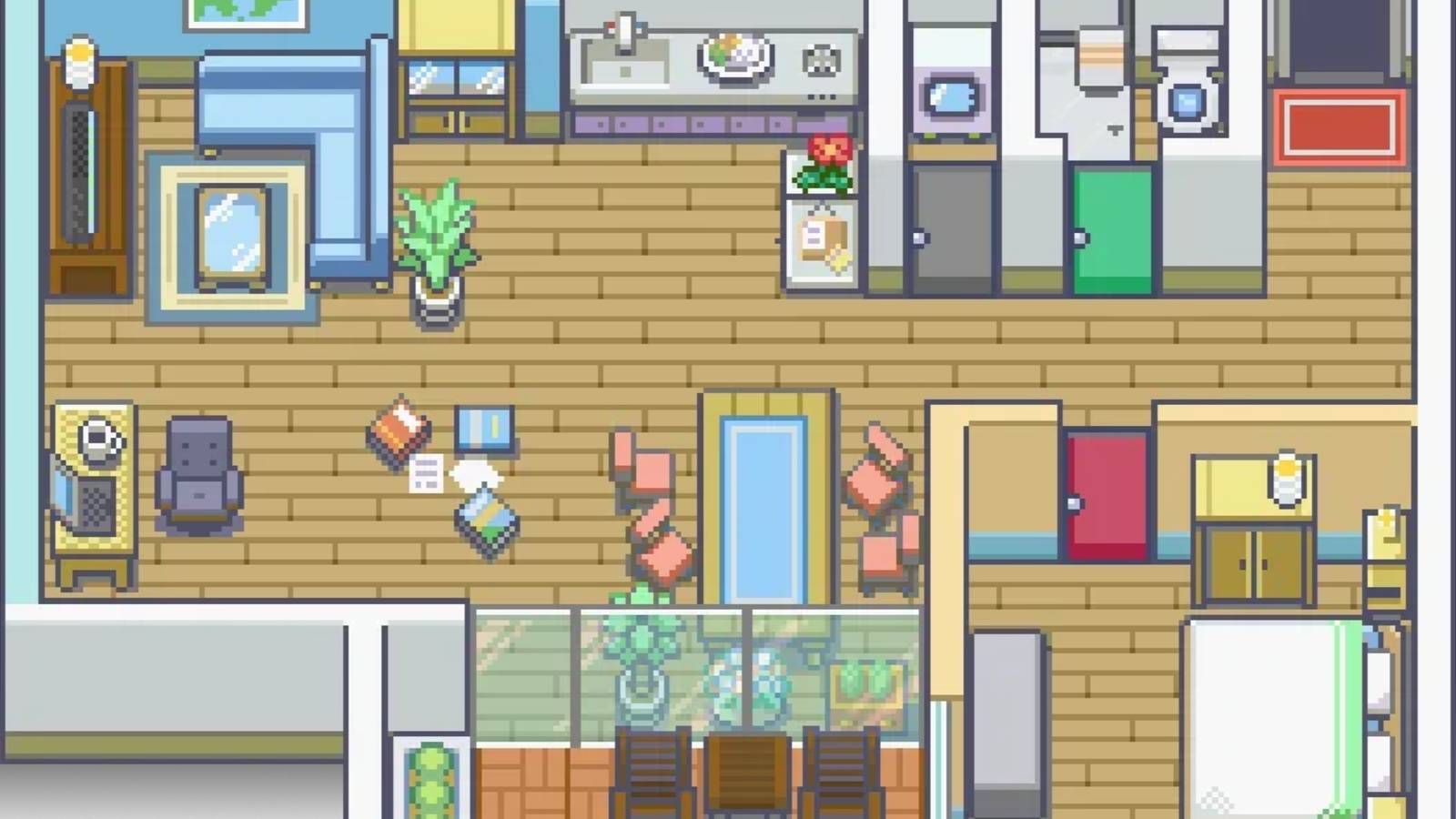
It's a top-down pixel-art recreation of the user's real home, complete with all the rooms, doors, furniture, and lights.It's created in the style of the classic top-down Pokémon games, and it just looks awesome.According to the creator, making the floor plan took some serious time and effort.
It was built in GIMP using RPG tile sets and custom tiles for things that weren't easily available, such as a TV bench and even a coat rack.I did a quick experiment, and it does seem like using AI image generation might help to speed up the process.The floor plan reacts to real-time changes The lights on the floor plan match the real-world lighting Close The best thing about this awesome Pokémon dashboard is that it doesn't just look great.
It's a genuine smart home status monitor that reflects the current state of smart home devices.In the video included in the Reddit post, the user shows themselves walking into their hallway and then their living room.The lights in these rooms turn on automatically using presence sensors.
As the lights turn on in each room, the live dashboard changes almost instantly to reflect these changes.The glow of the lights in each room appears on the dashboard, making it easy to see at a glance which lights are on and which are off.It's not just the lights, either.
When the user turns on the TV by pointing at it and snapping their fingers, the pixel-art TV goes from a black screen to a bright image of a pixel-art person to indicate that the TV is currently on.Even two computers in the same room can have their screens light up independently, using presence sensors set up with zones for each desk.This means that only the computer currently being used will light up and will go dark again when the user leaves.
Related 5 Home Assistant integrations that make my smart home feel like it came from the future The future is now, old man.Posts 3 By Adam Davidson The Pokémon dashboard has a dark mode At sunset, the floor plan changes automatically In the posted video, there are two views of the dashboard displayed.The top view is the daytime floor plan, and the bottom one is the nighttime floor plan.
The daytime view appears bright and well-lit, while the nighttime view is in darker shadow, except in those areas where lights are turned on.According to the creator, the dashboard automatically switches from daytime to nighttime view based on sunset and sunrise.It's a great idea, as it's far easier to see which lights are on and off using the nighttime view, and the reality is that most lights are probably turned off during daylight hours.
It means that at night, a quick glance at the dashboard will instantly show if any lights or other devices in the house are still on.This is ideal if you're trying to make sure that everything is off before you go to bed.It's not just a map; it's also a remote Tapping devices on the map controls them in the real world The dashboard doesn't just show if any lights have been left on.
It can also be used to turn those lights off.The entire dashboard is interactive and can be controlled via touch.Tapping lights or other devices on the dashboard will turn them on or off.
The clickable buttons have the opacity turned down to zero, so the button icons don't ruin the beautiful Pokémon look.Long-pressing on lights will bring up additional options.Even the TVs are controllable from the floor plan.
Clicking on the TV icon brings up a pop-up virtual TV remote using Browser Mod and the Universal Remote Card that can be used to control the TV remotely.I don't need this dashboard, but I really want it I'm not a big fan of using dashboards to control my smart home, but this project has me sorely tempted.I really like the idea of building a Zelda version of my own home, although I'm worried that it might cause me to start smashing all our vases.
Read More