There are hundreds of productivity apps out there, and I think that's part of the problem.A productivity app is just a system—a means to an end, not the end itself.If any of these apps actually delivered, we wouldn't need hundreds of them.
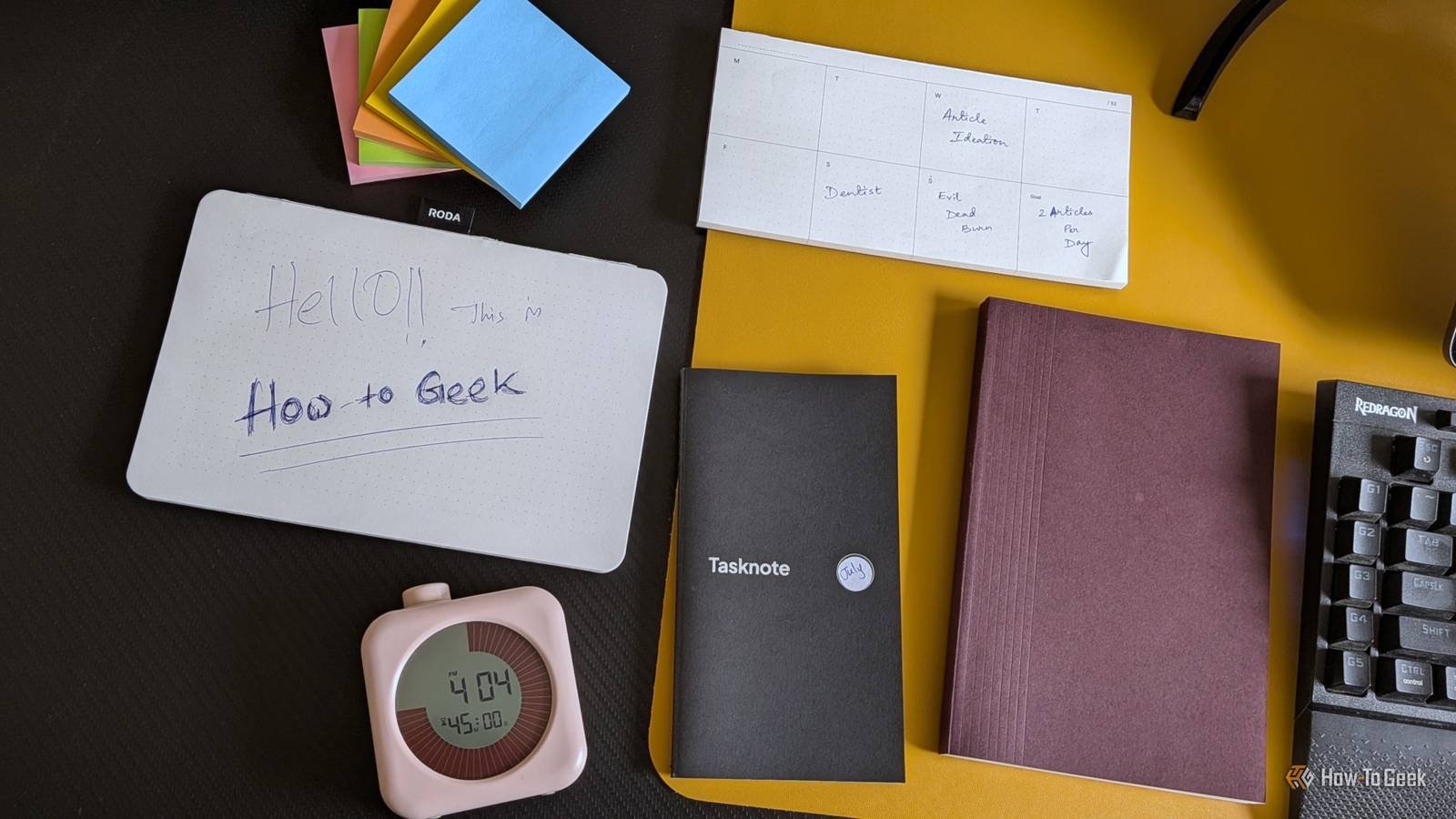
The sheer number suggests something fundamental is missing, which is why people keep hopping between them, hoping the next one will finally be the answer.I was one of those people, and I'm happy to say I've finally figured it out—and it has nothing to do with apps or any digital product at all.This is my low-tech productivity system It's essentially a glorified collection of paper and a timer Close It starts with a simple notepad.
Nothing fancy—just tear-off pages with a dot grid pattern.I treat it like scratch paper while I'm working.Sometimes an idea pops into my head mid-task, and I don't want to lose it, but I also don't want to open another app and get distracted.
Having the notepad lets me quickly jot it down and get back to work.It sits right beside my mouse, making capturing ideas completely frictionless.I lift my right hand, grab the pen, write down the idea, and get back to work.
At the end of the day, I go back through the notepad.Everything there falls into three categories: tasks I need to do, useful ideas worth saving, and redundant thoughts I have no use for.For the notes worth saving, I use a separate notebook.
It's basically a bullet journal where ideas and anything I want to reference later get written down properly.For tasks, I use a small notebook called a Tasknote (the brand name).It has pre-formatted pages: the left side has space for the date, day, and a list of tasks, while the right side is where I build my schedule, time-box my work, and jot down notes for the day.
I fill it out the night before.That way, when the day actually starts, I'm not guessing what I need to do—I just open the notebook, and it tells me everything.Close That said, while the Tasknote is excellent for planning and storing tasks, it doesn't give me an always-visible view of what I need to work on.
I don't want to open a notebook every time I need to check my next task—I need something that's constantly in my line of sight.So for the tasks that need to stay visible, I use sticky notes.I write down the day's tasks and stick them to the bottom of my monitor.
That way, I always have them in view, and when something's done, I peel the note off, crumple it up, and toss it away.It provides satisfying tactile feedback that makes completing tasks feel more rewarding.The Tasknote also gives me a running record of the tasks I'm working on, how many I'm able to complete, and whether I stick to my time-boxed work sessions.
It's useful data that helps me plan better and keeps my tendency to be overly optimistic in check.Next is a timer—which is more of a clock with a built-in visual timer that I use for Pomodoro sessions.I simply twist the knob on top to set a timer, and a colored disk shows exactly how much time is left.
As time passes, the disk gradually shrinks, so I can see how much time remains without having to read a single number.The last piece I added was a week pad.The system works perfectly well without it, but I wanted a quick weekly overview.
If I need to check my availability before replying to an email or committing to something during a call, I can simply glance at the pad and immediately see what my week looks like.And that’s the entire system.Related Digital minimalism is overrated—how more devices made me more productive Minimalism only created an efficient setup.
Maximalism is what actually made me efficient.Posts By Dibakar Ghosh What about search and archival? What about the areas where “digital” is objectively better Close Obviously, doing all of this on paper raises questions about searching and archiving.But people organized ideas this way long before computers and smartphones existed.
Leonardo da Vinci and Isaac Newton relied on handwritten notebooks throughout their lives.So I wouldn't call this approach inherently inferior just because it isn't digital.For archival, every idea lives in my bullet journal, and every task lives in my Tasknote.
The more ephemeral things—phone numbers, addresses, rough sketches, and other quick notes I jot down on the week pad, sticky notes, or notepad—I treat as genuinely disposable.I don't try to save all of them because most of them simply aren't worth keeping.As for searching through what I do keep, I write the month and year on the cover of each Tasknote and bullet journal, so I have a clear visual index of the period each one covers.
It's obviously not as fast as digital search, but it's more than good enough to find what I'm looking for.That said, I'll admit digital tools are objectively better for search and archival.Paper degrades over time, and digital notes are almost instantly searchable with the right tools.
So I've also started to digitize this system.You can simply photograph the notes, run them through OCR (Optical Character Recognition), and end up with a searchable archive.The simplest method would be to photograph all your notes and tasks, upload them to Claude or ChatGPT, have the handwritten text converted into Markdown, and save it in Obsidian or Google Drive.
However, since I'm already into self-hosting and own a NAS, I use Paperless-ngx, which is built for exactly this kind of workflow.How paper solved the problem I had with my smartphone No battery, no distraction, and always visible For most of my life, I was a digital-first person.My partner was the one who loved paper and stationery, while I was the one arguing that digital was objectively better and that it was the future.
But once I started doing genuinely demanding work, I began noticing the flaws in my own approach—especially compared to how she worked, which just felt more elegant and streamlined.The biggest issue with running your entire productivity system from your phone is friction.Say you want to jot down an idea.
You pick up your phone, unlock it, open the notes app while a dozen other apps compete for your attention, type the idea on a virtual keyboard, lock the phone again, and finally get back to work.With pen and paper, the process is much simpler.You pick up the pen, write the idea down, and continue working.
It's even more effective when what you're capturing isn't text but a quick sketch, diagram, or rough layout.The other advantage is having a constant view of everything.I want a dashboard I can glance at while I'm working without having to pick up my phone every few minutes.
I want to see everything at once, which is one of the reasons I use an ultrawide monitor—I simply work better when more information is visible at the same time.The problem with trying to recreate that experience on a phone is its limited screen space.Furthermore, if you want your tasks to remain constantly visible, you have to keep the display on for extended periods of time, which drains the battery and can contribute to long-term screen wear.
Related These Smartphone Habits Are Killing Your Battery Life Do you know what's draining your juice? Posts By Joe Fedewa It isn't necessarily about replacement—it's about integration So that's the story of how I went from being completely digital-first to embracing analog—and actually enjoying it.That said, I wouldn't say one approach is objectively better than the other or that everyone should switch to paper.Paper has real advantages.
It makes capturing ideas faster, and there's no battery anxiety or concern about screen wear over time.On the other hand, if you care about long-term storage and being able to search through everything instantly, digital clearly has the advantage.As such, rather than treating it as an either-or choice, I think the best approach is to combine the two.
Using pen and paper to capture tasks and ideas in the moment, then digitize anything worth keeping afterward.
Read More