While Linux’s app ecosystem isn’t as rich as that of Windows, especially when it comes to commercial and professional software, the open-source community has filled a lot of that gap with a bunch of well-made apps.Add How-To Geek on Google Add as Preferred Source Follow on Google Discover Contrary to popular belief, many of those apps aren’t limited to Linux; you can find them on Windows, too.Better still, a good chunk of them are free and open-source alternatives that beat Windows’ built-in apps at their own game.
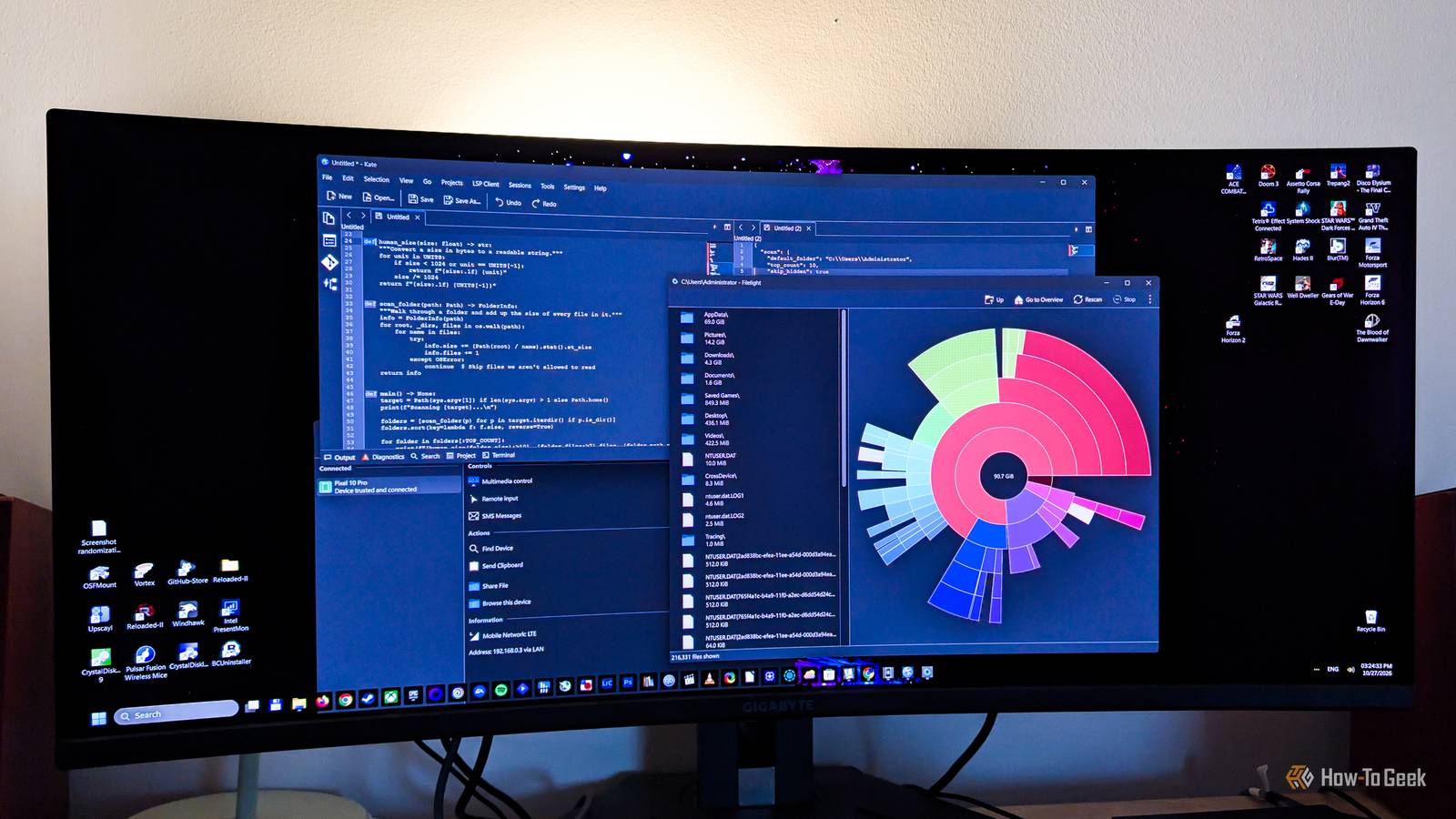
Filelight A disk usage tool that's better than anything Microsoft offers Close Filelight is super simple, but at the same time, it’s so much better than Windows’ disk usage tools.I like it because it shows your storage drives in the form of nested rings.The circle in the center represents the folder you’re currently looking at (for instance, C:\, C:\Users, or any other folder you click), with the rings around it representing its subfolders and files.
The bigger the portion of a ring a folder takes up, the larger it is, giving you a clear and very effective visual representation of folder size.This way, you can find out which folders take up the most space on your drives with just a quick glance.It’s effortless, and nothing built into Windows comes close.
For example, by taking a look at my user folder (C:\Users\Administrator), I immediately noticed that the AppData folder takes up almost 70GB of space.More than 20GB of that was Spotify’s cache, which I promptly deleted.While I could’ve done this with third-party Windows apps such as WizTree or WinDirStat, Filelight is simpler, looks more modern, and its ring-style visualization is much easier to read than the treemaps those two apps use.
On top of that, you can download Filelight directly from the Microsoft Store.Okular Okular is a fantastic Linux PDF viewer, and it's available on Windows, too Close Now, Okular is a document viewer that supports a wide range of file formats, but the reason I included it here is that it’s an excellent PDF viewer packed with features.I find it much better than the free Adobe Acrobat Reader, as well as the built-in PDF readers that come with major browsers such as Chrome, Firefox, and Edge.
With it, you can view, annotate, and add text or notes to PDF documents, select and copy text, tables, and custom areas, and more.You can even use Okular to digitally sign PDFs, but setting up the certificate this requires is a bit elaborate, at least on Windows.The app can also open a bunch of other formats, including EPUB and MOBI ebooks, CBR and CBZ files used for comic books and manga, many image formats, Markdown files, and even fax formats.
That gives you a powerful, free, ad-free, and open-source document viewer that’s also one of the best PDF viewers on Windows.KDE Connect If you want to connect your phone to your Windows PC, KDE Connect is a better option than Phone Link Close I won’t say that Microsoft’s Phone Link is bad, quite the contrary.When it works, it’s a great way to link your phone and Windows PC, allowing you to browse and copy your phone’s files to the PC, including photos, check out text messages and notifications, and even make phone calls and use your phone’s camera as a webcam.
But the catch is that Phone Link isn’t very stable.In my experience, the connection drops at random, I often can’t re-establish it after I manually disconnect the phone, and some features simply refuse to work.The recommended fixes often help, but only temporarily.
Judging by the many complaints online, I’m not the only one dealing with these issues.On the other hand, KDE Connect has been a much more stable experience.I also like that it doesn’t immediately ask for a bunch of permissions when I first open it on my phone; I can decide whether to give it access to my files, phone calls and messages, and other stuff, while Link to Windows asks for everything the first time you launch it.
Sure, KDE Connect lacks some Phone Link features, such as making phone calls or using the phone as a webcam, but it comes with other handy tools Phone Link doesn’t have.I can, for instance, ring my phone to find it, use the phone as a mouse and keyboard for the PC, control media on my PC from the phone and vice versa, and more.Overall, I find it better than Phone Link, and while it primarily targets Linux, it’s also available on Windows and macOS.
Just note that the app offers fewer features if you’re using an iPhone instead of an Android phone.Flameshot A powerful screenshot tool that gives Snipping Tool a run for its money Close Snipping Tool is a decent built-in screenshot tool, but Flameshot, one of the best Linux screenshot apps out there, offers more ways to mark up your screenshots while also being easy to use and faster in general.For instance, Flameshot lets you annotate and edit a screenshot right inside the capture overlay, so you don’t have to open a separate editing window.
Snipping Tool’s redaction feature is also limited, since it only works on text it detects, such as email addresses and phone numbers, while Flameshot lets you pixelate or blur any part of a screenshot you want.Flameshot doesn’t offer some advanced features found in Snipping Tool, such as OCR and screen recording, but it’s better at the core workflow of capturing and editing screenshots.There are also third-party screenshot tools such as ShareX that offer so much more than Flameshot, but they can be a chore to learn and are better suited for advanced users.
That’s why I’d recommend Flameshot over both Snipping Tool and ShareX if all you want is a no-frills app for capturing and annotating screenshots that’s fast, easy to use, and doesn’t overwhelm you with features.Kate You can use arguably the best Linux code editor on your Windows machine Close Many Linux users swear by Kate, KDE’s code editor, calling it the best option for coding on Linux.But Kate isn’t tied to Linux, since KDE also maintains a Windows version that you can grab from the Microsoft Store.
Compared to the built-in Notepad, Kate comes with a number of extra features, such as Git and terminal integration, code folding, syntax highlighting, and split view.As you’re probably aware, Microsoft has been adding AI features to Notepad, which understandably doesn't sit right with many Windows users.Kate, on the other hand, doesn’t come with any built-in AI and stays focused on performance and a robust feature set.
You also don’t need to sign in to use the full breadth of Kate’s features, and the app is free and open source.While it easily trumps Notepad, Kate is more or less on par with Notepad++.Kate comes with a much larger number of features out of the box, but Notepad++ supports a bunch of plugins that add the missing ones.
That said, if you want a capable code editor that’s ready to go without messing around with plugins, Kate is generally the better choice.Related I replaced cloud apps with these 8 open-source Linux programs that keep everything local Less uploading, fewer subscriptions, and a lot more control over my files! Posts 14 By Umair Khurshid Plenty of other Linux-first apps are on Windows, too The apps I’ve shown here are just a small sample of notable Linux apps that have Windows versions.For instance, if you’re looking for a powerful free video editor that’s not as complex as DaVinci Resolve but offers more than Clipchamp, be sure to check out Kdenlive.
People looking for a simple music player to replace Windows 11’s Media Player should take a look at Elisa.If you’re looking for a more powerful, free, and open-source alternative to the built-in Windows Photos app, give digiKam a chance.Lastly, Kasts allows you to listen to podcasts right from your Windows desktop, without opening a browser.
If you liked the apps above, these are well worth your time, too.
Read More