Subscription software keeps getting more expensive, and most of us end up paying for a massive suite of features we rarely touch.The good news is that for almost every major paid desktop app, there is usually an open-source counterpart that costs nothing and runs on Windows, macOS, and Linux.While some of these—like ArtCraft’s PhotoCraft—deliberately clone the layout of the original to make the transition easy, others approach the same jobs with their own unique interfaces and quirks.
Here are some of my favorite alternatives available today.Photoshop: PhotoCraft You get something that feels very familiar If you're tired of Adobe's subscription-based model, but don't want to spend a few weeks relearning a brand-new set of tools in GIMP, you should try PhotoCraft.PhotoCraft is part of a suite of Rust-based tools that also includes FilmCraft (a Premiere alternative) and LightCraft (a Lightroom alternative).
PhotoCraft mirrors Photoshop's capabilities and interface, so Photoshop users can switch easily.Currently, it handles layers, masks, PSD files, and many drawing tools that you'd expect in a program aiming to replace Photoshop.However, it is still in the early phases of development.
It tends to be a bit memory heavy, and it is still missing more than a dozen key tools that Photoshop already has.For the time being, it isn't something I'd recommend as a professional tool—you're still better off with GIMP for that.ArtCraft is growing rather quickly, though.
Since I first encountered it two weeks ago, most of the apps have received significant updates.It is only a matter of time before it is a serious contender for a hobbyist or even enthusiast, and it could eventually replace professional workflows.Illustrator: Inkscape Vector illustration for free If you're creating logos, web graphics, or anything that really benefits from vector-based graphics, Inkscape is a great open-source choice.
It has of the features that Illustrator does, with a few important caveats.Inkscape will sometimes handle Illustrator's AI files inconsistently, which can lead to a frustrating amount of duplicated work and bug hunting.I'd recommend exporting your Illustrator projects as SVGs, which Inkscape fully supports, instead.
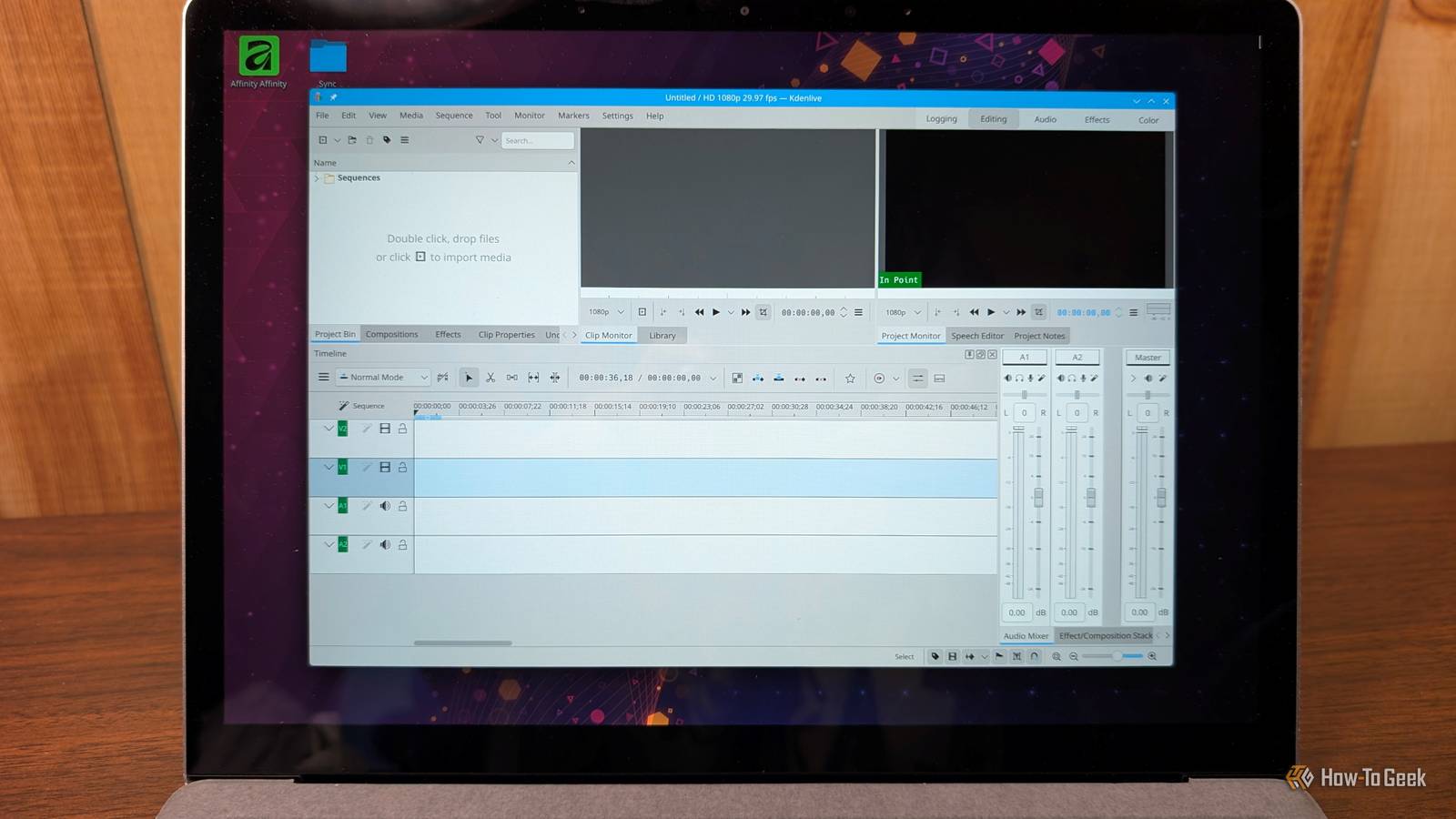
Premiere Pro: Kdenlive Kdenlive is a full multitrack video editor Close If you need to edit videos, and you can't justify springing for a full Adobe Premiere subscription, Kdenlive should be the first program you try.In many ways, Kdenlive's interface and workflow are fairly similar to Premiere.It has a non-linear timeline, effects, transitions, and even some AI features powered by on-device AI rather than a cloud model.
I do the overwhelming majority of my video editing on Kdenlive and I haven't run into a noteworthy bug in several years.Related 3 Graphics Design Apps for Windows to Try This Weekend (Oct.31 - Nov.
2) You don't need to pay for a Photoshop subscription.Posts 1 By Nick Lewis While ArtCraft has a video tool, Kdenlive is more mature and has an experienced team behind it.If you don't mind a Premiere replacement that works quite differently, and you care about open-source, check out DaVinci Resolve—it is excellent.
Microsoft Office: LibreOffice LibreOffice covers documents, spreadsheets, and presentations Close There are multiple office suites out there, but LibreOffice has seen steady development for more than 15 years.As software suites go, it is quite mature.It has apps that can handle documents, spreadsheets, presentations, writing math equations, and more.
Even though it is very different looking from Microsoft Office, it is very close to feature parity for everyday documents, spreadsheets, and slides.That doesn't mean there won't be compatibility hiccups though.Sometimes elements in a DOCX or PPTX will move around a bit.
You may also encounter some snags with spreadsheets, since LibreOffice doesn't have full equivalents to some of Excel's more sophisticated features, like Power Query or Power Pivot.Maya and 3ds Max: Blender Blender is a professional 3D suite that rivals paid tools Blender is a viable replacement for a number of programs.It handles the entire 3D production pipeline in one application.
You can create a model, sculpt it, then do your rigging, animation, and rendering without leaving the application.It even includes a basic video editor.Maya and 3ds Max run more than $2,000 per year, while Blender is completely free.
If you need a 3D modeling program and don't want to pay thousands, you can't do better.Blender isn't just for hobbyists either.The movie Flow, which won an Oscar for Best Animated Feature in 2025, was created using Blender.
Blender's major financial backers include NVIDIA, AMD, and Adobe, among others.Free software can cover most of what paid apps do As open source projects have become more mature, I rarely find myself reaching for paid software anymore.Most of the time, the free project does the job well enough for my purposes.
The major trade-off is the convenience.Open-source apps often come with a slightly harder learning curve, and your workflow from paid apps don't necessarily map one-to-one.Still, considering the cost, privacy improvements, and control that open-source apps offer, it is a trade I'm happy to make.
Read More