The just-released Lenovo Yoga Pro 9i (Gen 11) Aura Edition creator laptop is an incredible piece of modern tech.From the gorgeous tandem OLED display to enough power to be a portable gaming rig, there's really not much to dislike about this premium Windows laptop.Lenovo Yoga Pro 9i Aura Edition 11th Generation 8 Operating System Windows 11 CPU Intel Core Ultra 9 386H GPU NVIDIA RTX 5050, 5060, or 5070 RAM 32GB or 64GB Lenovo Yoga Pro 9i 16 Aura Edition 11th Generation is a premiun laptop that is perfect fora wide range of uses.
The base model sports an RTX 5050 and 32GB of RAM, which delivers plenty of power for whatever task you throw at it, including office work, photo and video editing, 3D modeling, or even gaming.The OLED screen is vibrant and bright, boasts a base resolution of 2880x1800, though an upgrade is available to 3200x1200 with a tandem OLED panel that reaches 1,000 nits brightness.Pros & Cons Gorgeous tandem OLED display Handles gaming fantastically for not being a gaming laptop Included Yoga Pen Gen 2 is genuinely useful for creatives Ample I/O including USB-C/Thunderbolt 4/USB4, USB-A, HDMI 2.1, and SD Large trackpad Key switches are a bit squishy $2669 at Lenovo $3000 at bhphotovideo Expand Collapse Related How We Test and Review Products at How-To Geek We go hands-on with every product to ensure it's worth your time and money.
Posts By Justin Duino Price and availability The Lenovo Yoga Pro 9i Aura Edition is available to purchase in multiple versions with pricing starting at $2,669.The version I reviewed comes in with a price tag of $2,944.It is available to purchase directly from Lenovo as well as from B&H Photo.
Specifications Brand Lenovo Operating System Windows 11 CPU Intel Core Ultra 9 386H GPU NVIDIA RTX 5050, 5060, or 5070 RAM 32GB or 64GB Storage Up to 2TB Battery 4 Cell Rechargeable Li-ion 92.5Wh Display (Size, Resolution) 16-inch, up to 3200x1200 Camera 5MP RGB+IR with Dual Microphone Speakers 6 stereo speakers, 2W x 4 (dual side woofers), 2W x 2 (tweeters), Dolby Atmos Network Wi-Fi 7 Card Reader SD, UHS-II Display type OLED Expand Collapse This laptop can game even without the flashy RGB Not all gaming laptops need to look like a gaming laptop The Yoga Pro 9i Aura Edition is not billed as a gaming laptop.Lenovo is touting this as a creator's laptop, which it definitely is.The RTX 5060, Core Ultra 9, and 32GB of RAM are all perfect for creative tasks like video or photo editing.
However, the Yoga Pro 9i Aura Edition also handles gaming quite well.I tested several titles on it, as well as ran a few synthetic benchmarks.To start with, my favorite game is Minecraft.
Well, modded Minecraft.I typically play Minecraft with about 200 mods, including the Create Mod which is a pretty mod in and of itself.The Pro 9i handled Minecraft like a breeze.
It was pushing hundreds of FPS without shaders on, and the experience was extremely smooth.Moving onto more traditional gaming titles, we have No Man's Sky, another favorite of mine.The game auto set itself to high settings and the native 3200x1200 resolution.
When in Sentinel battles, I was seeing frame rates averaging 120 to 130 FPS easily.The overall experience was equally as smooth as Minecraft and I would have zero problems playing No Man's Sky on this laptop when traveling.Then we have Apex Legends, which played equally as smooth.
As a fast-paced FPS shooter, Apex definitely requires a responsive system to play, and the Yoga Pro 9i Aura Edition delivers that.On average, I saw around 100 FPS with a mix of settings that the system auto set on first launch of the game.The majority of the settings were high, very high, or ultra, however.
So, the game looked gorgeous on the tandem OLED display.Forza Horizon 5's built-in benchmarking tool set the system to the extreme preset on first launch, and it achieved 79 FPS average for the famed racing game.This is a very respectable score at a 3.2K resolution.
For Cinebench, it saw a GPU score of 42,452, which is more powerful than Apple's M2 processor by five times, and only about 30% less powerful than the M4 Max.On the multicore performance side of Cinebench, it achieved a score of 4,923.That score puts it about 40% slower than the M4 Max, and 50% slower than the desktop-class Core Ultra 9 285K.
However, it's still faster than most processors out there, and actually puts it ahead of Apple's famed M5 chip.For the single core performance, I was also fairly impressed with a score of 502, it was solidly ahead of the Core Ultra 9 288V and Core Ultra 7 255H, and only slightly behind the M3 Ultra.As far as single core performance goes, this laptop delivers really solid numbers and an experience to back it up.
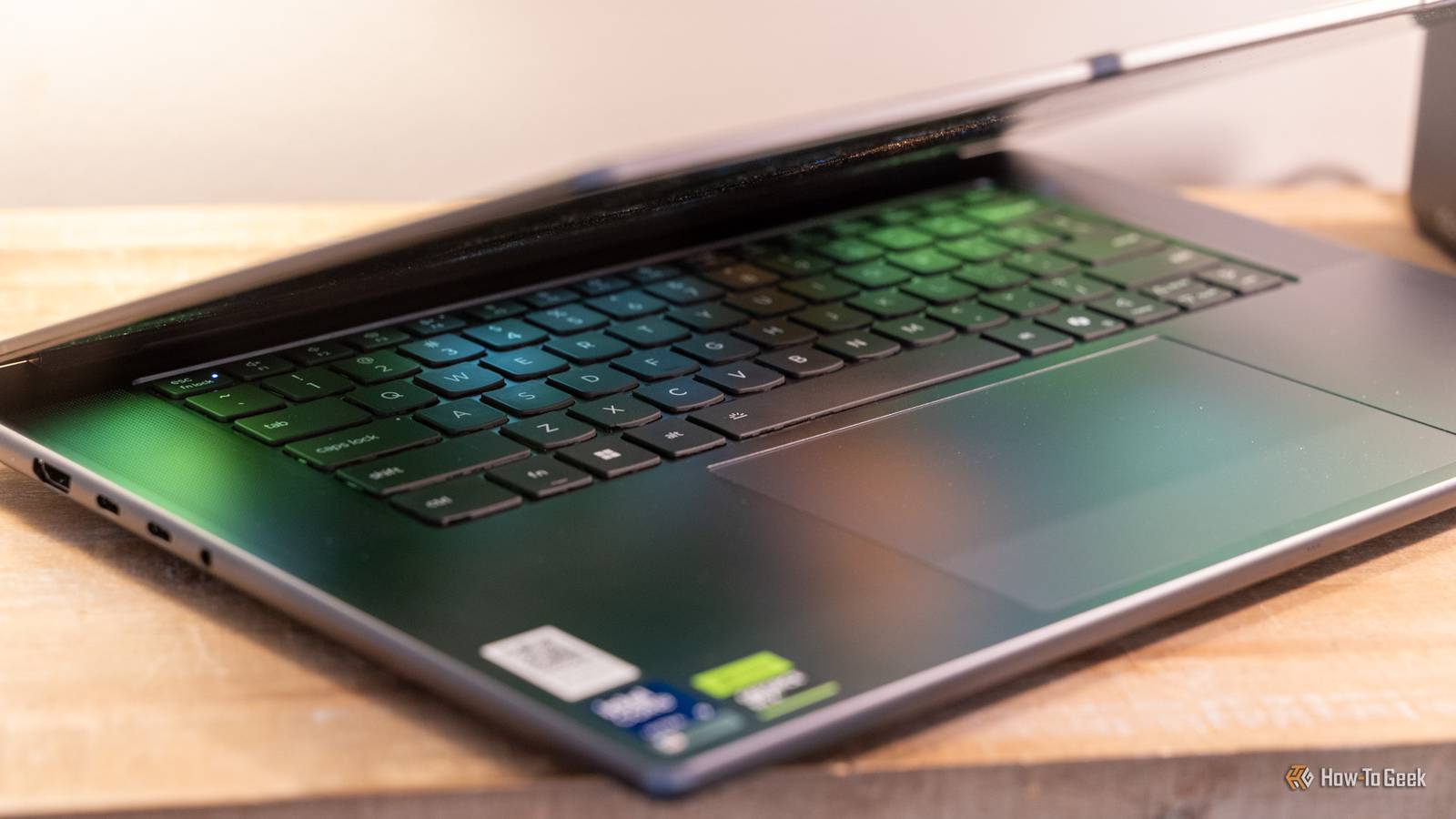
The typing experience is solid with a massive trackpad Just don't expect an easy way to turn the trackpad off if you use an external mouse The main way that you interact with any laptop is the keyboard and trackpad, and Lenovo almost nailed both here.The trackpad is genuinely massive, encroaching on MacBook Pro size, and I love that.There's plenty of room to drag the mouse around with the trackpad and it's very responsive.
I was able to click all over the trackpad easily, just like with Apple.What I mean by this is there didn't seem to be an apex point where the trackpad moved from.I could easily click in the top middle, top left, and top right, which are normally problem areas for the trackpad on Windows laptops.
I was also quite surprised with the Yoga Pen Gen 2, which is included with the laptop.I'm guessing one of the reasons that the trackpad is so large is because, when used with the pen, the trackpad is a 1:1 of the display itself.In other words, if you tap in the upper right corner with the pen, it taps the upper right corner of the screen.
Put the pen in the middle and scroll, then it puts the mouse in the middle and scrolls.Essentially, the Yoga Pen Gen 2 turns the trackpad into a form of a Wacom tablet for drawing and sketching, and that's a really nice feature, especially since it's included with the purchase.The keyboard left a little to be desired.
It offered a solid typing experience, don't get me wrong, but the keys felt a tad squishy for my liking.They worked, the key travel was fine, and the layout is traditional in every sense—something we don't see all that often anymore.But, the switches themselves felt squishy when I would type.
It just isn't a very "crisp" keyboard, which is what I definitely prefer.One thing that's a bit annoying is there's no button to disable the trackpad on the function row.This is fairly typical of laptops to have a button to turn the trackpad on and off, as if you're using an external mouse, you likely don't want the trackpad to interfere with the mouse as you're typing.
I was blown away by how gorgeous this OLED display is I need more OLED in my life I was genuinely impressed with the 16-inch 3.2K tandem OLED display.With HDR 1000 True Black and 100% coverage of Adobe RGB, DCI-P3, and sRGB, this laptop is absolutely perfect for creatives.The colors look extremely accurate and the 1,000 nit brightness means you can easily work on HDR projects properly.
It also allows you to use this laptop even in direct sunlight without worrying.It is a glossy display, which means there will be glare, but overall, I was very impressed with the quality and color vibrancy of the screen here.In addition to the screen, the speakers were quite impressive.
I actually think I enjoy these speakers more than my MacBook Pro's, which is really saying something.The speakers offered an immersive experience when gaming or watching media, which I was very happy to see.I was also impressed with just how loud the speakers got.
This laptop really checks all the boxes in the media department, with the webcam also offering a solid view and the microphones equally working well for taking video calls on the laptop.Fantastic battery life when not pushing the system to its limits You could easily go almost a full workday with light tasks like web use and remote desktop before the battery dies Normally, a big laptop with a bright screen and a powerful processor chews through battery—somehow Lenovo made the Pro 9i not do that.The other night, I was using the Pro 9i on the couch unplugged from the wall.
I was doing remote desktop work, web browsing, watching some videos, and answering some emails.The screen was fairly high in brightness, and I was even using a Bluetooth mouse.After around two or three hours of that type of usage, the battery had only dropped to 80%.
I was genuinely impressed with that performance.Now, when gaming or doing heavy workloads, it definitely chewed through the battery much faster than when doing light work.However, I do love that the Yoga Pro 9i is capable of sipping battery power when doing light tasks.
This definitely would give me the confidence to use the Yoga Pro 9i from an airport or when flying without worrying that it would die on me.Lenovo didn't skimp on the I/O Thunderbolt 4, USB4, and even HDMI 2.1 are all in tow here I was pleasantly surprised with the I/O that Lenovo packed into this laptop.In a world where we're increasingly seeing companies go with USB-C only on computers, Lenovo bucked the trend with the Yoga Pro 9i.
On the left-hand side, you'll find a dedicated power connector for the 170W power supply that it ships with, two USB-C ports that are both Thunderbolt 4 and USB4 40Gb/s capable with Power Delivery 3.0 and DisplayPort 1.2, as well as a HDMI 2.1 output that supports up to 10K30Hz.There's also a headphone/microphone combo jack on the left, with two USB-A ports on the right as well as an SD card reader.With I/O like this, you can really use almost any accessory you need when away from home.
The USB-A ports let you use legacy devices without adapters and the Thunderbolt 4 ports with Power Delivery 3.0 allow up to 100W of USB-C PD charging.However, I really like that there's a native HDMI 2.1 port on the side that allows me to hook up displays without the need of bringing a dongle with me everywhere I go.Add to that the built-in SD card slot that lets me offload footage from my camera to the laptop without an adapter, speeding up my on-the-go workflow, and you definitely have a winning combo of I/O here.
The only thing I would have liked to see was a compact Ethernet port, but it's understandable for that to not be on here even though I'd love to see it.Should you buy the Lenovo Yoga Pro 9i Aura Edition? I really like the Lenovo Yoga Pro 9i (Gen 11) Aura Edition creator laptop.It offers incredible portable power, a gorgeous display, and ample I/O.
With its starting price around $2,700, it's a pretty expensive laptop, but I definitely think it delivers more than what you'd ask for from a laptop in that price range.Lenovo Yoga Pro 9i Aura Edition 11th Generation 8 Operating System Windows 11 CPU Intel Core Ultra 9 386H GPU NVIDIA RTX 5050, 5060, or 5070 RAM 32GB or 64GB Lenovo Yoga Pro 9i 16 Aura Edition 11th Generation is a premiun laptop that is perfect fora wide range of uses. The base model sports an RTX 5050 and 32GB of RAM, which delivers plenty of power for whatever task you throw at it, including office work, photo and video editing, 3D modeling, or even gaming.
The OLED screen is vibrant and bright, boasts a base resolution of 2880x1800, though an upgrade is available to 3200x1200 with a tandem OLED panel that reaches 1,000 nits brightness.$2669 at Lenovo $3000 at bhphotovideo Expand Collapse
Read More