My homelabbing journey started off like many of you, with just one server.I finally moved to using multiple servers about a year ago and I can say that my homelab has never been more stable than it is now, and I couldn’t be more happy with the setup.My original homelab had just one server And it handled When I first got started in homelabbing, I was doing it on as much of a budget as I could.
I started by reusing hardware I had around the house, and then I picked up an old enterprise-grade server for about $400 on eBay and that was my humble beginnings.The enterprise-grade server was actually pretty beefy for what it was.I put dual 6-core 12-thread Xeon processors in it, and picked up some second-hand DDR3 ECC RAM to upgrade it to 64GB when I picked it up several years ago.
I then cobbled together all the drives I had accumulated over the years and picking up a few more just for the NAS.Quiz 8 Questions · Test Your KnowledgeHome Networking & Wi-FiThink you know your routers from your repeaters — put your home networking know-how to the ultimate test.Wi-FiRoutersSecurityHardwareProtocolsBegin 01 / 8Wi-FiWhat does the '5 GHz' band in Wi-Fi offer compared to the '2.4 GHz' band?ALonger range but slower speedsBFaster speeds but shorter rangeCBetter wall penetration and faster speedsDLower interference but identical speedsThat's right! The 5 GHz band delivers faster data rates but loses signal strength more quickly over distance and through walls.It's ideal for devices close to the router that need maximum throughput, like streaming 4K video.Not quite — the 5 GHz band actually offers faster speeds at the cost of range.
The 2.4 GHz band travels farther and penetrates obstacles better, which is why smart home devices and older gadgets often prefer it.Continue 02 / 8ProtocolsWhich Wi-Fi standard, introduced in 2021, is also known as Wi-Fi 6E and extends into a new frequency band?A802.11acB802.11axC802.11beD802.11nCorrect! 802.11ax is the technical name for Wi-Fi 6 and Wi-Fi 6E.The 'E' variant extends the standard into the 6 GHz band, offering a massive swath of new, less-congested spectrum for faster and more reliable connections.The answer is 802.11ax — that's Wi-Fi 6 and Wi-Fi 6E.Wi-Fi 6E adds support for the 6 GHz band, giving it far less congestion than the crowded 2.4 GHz and 5 GHz bands.
802.11be is actually the upcoming Wi-Fi 7 standard.Continue 03 / 8RoutersWhat is the default IP address most commonly used to access a home router's admin interface?A192.168.0.1 or 192.168.1.1B10.0.0.1 or 172.16.0.1C255.255.255.0 or 255.0.0.0D127.0.0.1 or localhostSpot on! The vast majority of consumer routers use either 192.168.0.1 or 192.168.1.1 as the default gateway address.Typing either into your browser's address bar will bring up the router's login page — just make sure you've changed the default password!The correct answer is 192.168.0.1 or 192.168.1.1.These are the most common default gateway addresses for home routers.
The 255.x.x.x addresses are subnet masks, and 127.0.0.1 is your own machine's loopback address, not a router.Continue 04 / 8SecurityWhich Wi-Fi security protocol is considered most secure for home networks as of 2024?AWEP (Wired Equivalent Privacy)BWPA (Wi-Fi Protected Access)CWPA2 with TKIPDWPA3 (Wi-Fi Protected Access 3)Excellent! WPA3 is the latest and most robust Wi-Fi security protocol, introduced in 2018.It uses Simultaneous Authentication of Equals (SAE) to replace the older Pre-Shared Key handshake, making it far more resistant to brute-force attacks.The answer is WPA3.WEP is completely broken and should never be used, WPA is outdated, and WPA2 with TKIP has known vulnerabilities.
WPA3 offers the strongest protection, and if your router supports it, you should enable it right away.Continue 05 / 8HardwareWhat is the primary difference between a mesh Wi-Fi system and a traditional Wi-Fi range extender?AMesh systems only work with fiber internet connectionsBRange extenders create a seamless single network while mesh systems create separate SSIDsCMesh nodes communicate with each other to form one seamless network, while extenders create a separate networkDMesh systems are always wired, while extenders are always wirelessExactly right! Mesh systems use multiple nodes that talk to each other intelligently, handing off your device seamlessly as you move around your home under one SSID.Traditional range extenders typically broadcast a separate network and can cut bandwidth in half as they relay the signal.The correct answer is that mesh nodes form one intelligent, seamless network.Range extenders are actually the ones that often create separate SSIDs (like 'MyNetwork_EXT') and can significantly reduce speeds.
Mesh systems are far superior for large homes with many devices.Continue 06 / 8ProtocolsWhat does DHCP stand for, and what is its main function on a home network?ADynamic Host Configuration Protocol — it automatically assigns IP addresses to devicesBDirect Hardware Control Protocol — it manages router firmware updatesCDistributed Hosting and Caching Protocol — it speeds up web browsingDDynamic Hypertext Communication Protocol — it secures data transmissionsPerfect! DHCP (Dynamic Host Configuration Protocol) is the unsung hero of home networking.Every time a device joins your network, your router's DHCP server automatically hands it a unique IP address, subnet mask, and gateway info so it can communicate without manual configuration.DHCP stands for Dynamic Host Configuration Protocol, and its job is to automatically assign IP addresses to devices on your network.Without it, you'd have to manually configure a unique IP address on every single phone, laptop, and smart device — a tedious nightmare!Continue 07 / 8RoutersWhat is 'QoS' (Quality of Service) used for in a home router?AEncrypting all traffic leaving the routerBPrioritizing certain types of network traffic over othersCAutomatically switching between 2.4 GHz and 5 GHz bandsDBlocking malicious websites using a DNS filterThat's correct! QoS lets you tell your router which traffic gets priority.
For example, you can prioritize video calls or gaming over a family member's file download, ensuring your Zoom meeting doesn't freeze just because someone is downloading a large update.QoS — Quality of Service — is actually about traffic prioritization.By tagging certain data types (like VoIP calls or gaming packets) as high priority, your router ensures latency-sensitive applications get bandwidth first, even when the network is congested.Continue 08 / 8HardwareWhat does the 'WAN' port on a home router connect to?AOther computers in your home network via EthernetBA wireless access point for extending Wi-Fi coverageCYour modem or ISP-provided gateway to the internetDA network-attached storage (NAS) deviceCorrect! WAN stands for Wide Area Network, and the WAN port is where your router connects to the outside world — typically to your cable modem, DSL modem, or ISP gateway.The LAN ports on the other side connect to devices inside your home network.The WAN (Wide Area Network) port connects your router to your ISP's modem or gateway — essentially your entry point to the internet.
The LAN (Local Area Network) ports are for connecting devices inside your home.Mixing them up can cause your network to not function at all!See My Score Challenge CompleteYour Score/ 8Thanks for playing!Try Again Once it was all built out, the server had about 40TB of storage and 1TB of NVMe cache, ready to handle anything I threw at it.I ran Unraid on the server and started installing Docker containers right away.
Of course, I ran Plex on it with a slew of other media apps.NextCloud, Audiobookshelf, Pi-hole, Home Assistant, Minecraft servers, and so much more ran on that single server, but, it became a single point of failure for me.If I had to do something to the array, all of my services would go offline.
If I needed to reboot it for any reason, everything would go offline.It wasn’t just my storage server, it was my homelab, and the uptime of every service in my house relied on that server.This actually caused my homelab to be quite unstable at the beginning.
I was constantly adding new drives as I found them around the house, or as I picked up new ones.So, my array was constantly being spun down, which meant my services would go offline.Another thing I was doing was adding new hardware quite often.
I tried different graphics cards for Plex, added in new network cards, added extra SSD cache storage, and made many changes to the underlying operating system.I’m a tinkerer, and I was using the server to tinker—and that made the server unstable, so I eventually had to do something about it.Moving to a multi-server homelab helped me way more than I expected it would Separate servers gave me better uptime than I ever had before I actually ran the single-server setup for a handful of years.
I really started to build out my homelab in 2021, and I stayed with just one server until early 2025.I only moved to a multi-server setup in 2025 because I was able to trade some old computer gear I had for someone else’s old servers they had, and that’s when I realized just how much I was missing out on by running one server for all those years.My first foray away from a single-server homelab was to a dual-server homelab.
I had my original Lenovo RD440 that had been running things for years, and a Dell R720.The RD440 stayed as my storage server (and still is to this day), while the R720 got Proxmox installed on it and started running all of my applications.Now, I was able to maintenance the Unraid storage server without bringing services like Home Assistant or Audiobookshelf offline.
Sure, Plex would still go down as all of my media storage lived on the Unraid server, but the rest of my homelab stayed running just fine.From dual servers to a full multi-server homelab, my journey is never over High availability is just the latest addition to my homelab From that dual server solution that I started with in early 2025 to today a lot has changed.I now have four Proxmox virtual machine servers and four storage servers, with the hardware constantly shifting around.
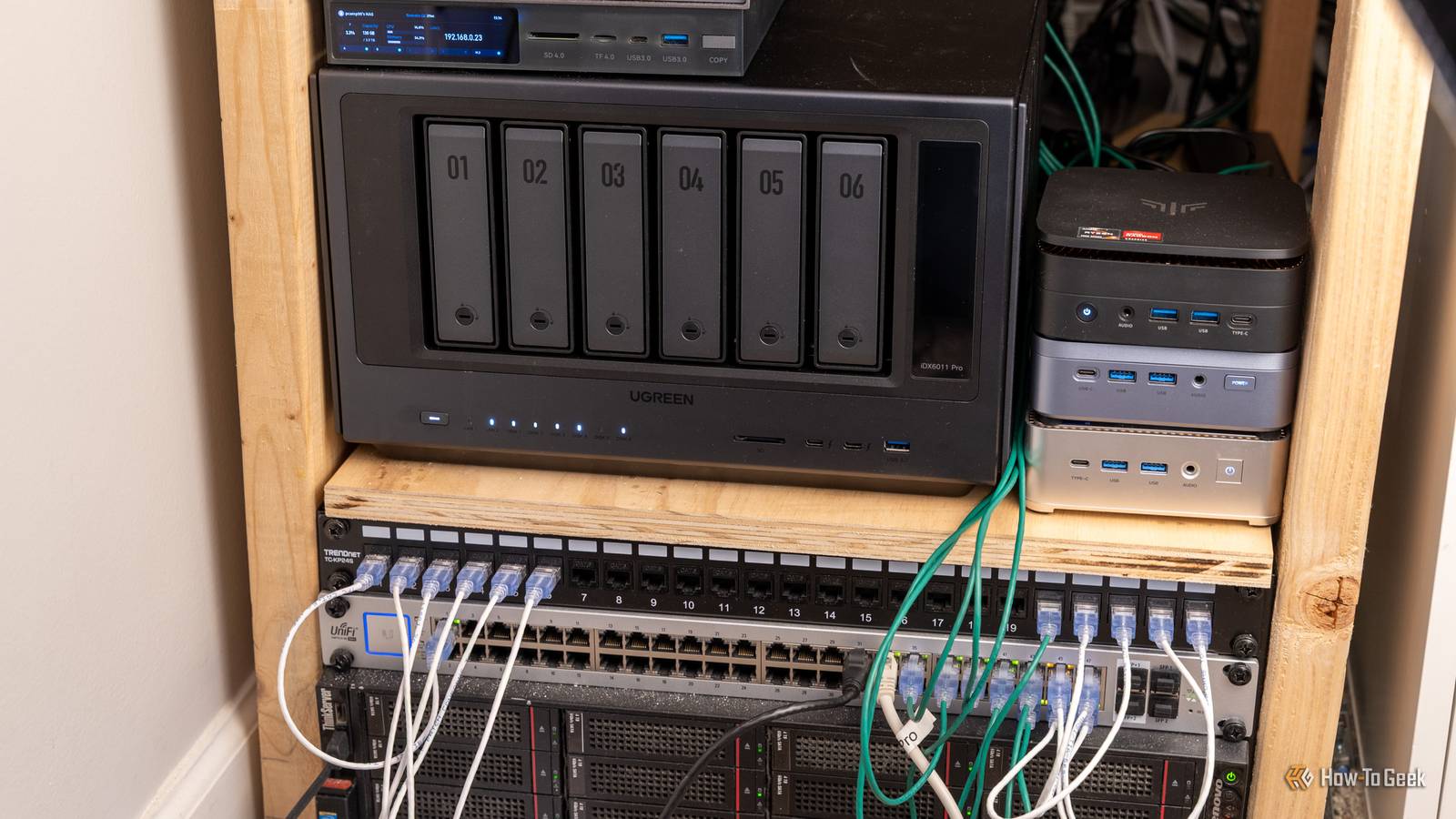
While the original multi-server setup only separated my services from storage, I now actually have proper category separation within my homelab.With three mini PCs running all of my services with high availability, I have all of my media services on one system, all of my administration services on another, and then a miscellaneous server for anything else I need to run.My fourth Proxmox system is dedicated to development, and used for nothing else.
Since I have several virtual machine servers now, I’ve actually deployed them as a cluster so I can migrate services between them with a few clicks of a mouse.Now, if I need to maintenance a server, the services that were running on it spin up on another server automatically, making downtime almost nonexistent.I also have separated my storage into very specific categories.
My Lenovo RD440, my tried and true storage server, still serves as the home for all of my Plex media.I then have my Ugreen iDX6011 Pro NAS running as a backup target for all the computers in the house as well as storing all of my photography and videography content from over the years.My Zettlab D4 NAS functions as a backup target and storage target for all of the Proxmox nodes.
I have all of my ISOs stored there for Proxmox, as well as any high availability virtual machine and any virtual machine backups.My newest NAS, the Synology DS225+, is about to be put into service to run my locally-hosted cloud storage like Immich and Synology Drive.Ugreen iDX 6011 Pro AI NAS Brand UGREEN CPU Intel Core Ultra 7 255H The Ugreen iDX 6011 Pro AI NAS is one of the most powerful NAS servers in the Ugreen lineup.
With Intel's Core Ultra 7 255H 16-core processor and 64GB of LPDDR5/x RAM onboard, there's more than enough power to handle anything you can throw at this system.Add to that dual Thunderbolt 4 ports, dual 10GbE LAN ports, an OCuLink expansion port, and more, and you have a very solid network attached storage system.$2599 at Ugreen Expand Collapse Zettlab D4 NAS Brand Zettlab CPU RK3588 The Zettlab D4 NAS features four 3.5-inch hard drive bays with a M.2 NVMe SSD slot, perfect for your home storage server needs.
The powerful RK3588 chip features built-in AI acceleration that is leveraged throughout the OS.There's also a built-in SD and microSD card slot on the front for automatic backup of your photos, videos, and more.$700 at Zettlab Expand Collapse Synology DiskStation DS224+ The Synology DiskStation DS224+ is surprisingly affordable yet packed with premium features.
This includes native support for Mac and access to the versatile DiskStation Manager Software.See at Walmart See at Newegg Expand Collapse Why do I have my entire homelab split on so many different machines? Well, it allows me to maintenance one without having to take down other services.Something like the DS225+ will need very little maintenance, which means that my cloud storage will very rarely see downtime.
Same with the Zettlab D4, I don’t foresee that needing a lot of maintenance, meaning it will be extremely reliable as a backup target for my Proxmox servers.Subscribe to the Homelab Newsletter for Real Multi-Server Tips Get the homelab newsletter for hands-on multi-server guidance and related homelab insights: setup patterns, high-availability techniques, storage segmentation strategies, and troubleshooting tips tailored to homelab environments — focused coverage you can put into practice.Get Updates By subscribing, you agree to receive newsletter and marketing emails, and accept our Terms of Use and Privacy Policy.
You can unsubscribe anytime.The Ugreen NAS is in the same boat, a reliable system to use as a backup target for all the computers in the house.The Lenovo RD440 is the only system that still requires a decent amount of tinkering at this point, and the only thing it houses is my Plex media.
So, if I need to take that down, I’m not taking down the rest of my homelab at the same time.GEEKOM A5 mini PC Brand GEEKOM CPU AMD Ryzen 5 7430U The GEEKOM A5 mini PC packs 16GB of user-replaceable RAM, a user-swappable NVMe SSD, plus two other storage slots, giving you plenty of user-upgradability in this compact system.The Ryzen 5 processor packs plenty of power for general tasks, and it's even great at lightweight gaming and CAD work too.
$439 at Amazon $439 at Best Buy $439 at GEEKOM Expand Collapse ACEMAGIC M5 mini PC Brand ACEMAGIC CPU i7-14650HX The ACEMAGIC M5 mini PC is perfect for setups that need a high-performance desktop with a small footprint.It boasts the Intel i7-14650HX 16-core 24-thread processor and 32GB DDR4 RAM (which is upgradable to 64GB).The pre-installed 1TB NVMe drive can be swapped out for a larger one though, and there's a second NVMe slot for extra storage if needed.
$900 at Amazon $900 at ACEMAGIC Expand Collapse KAMRUI Hyper H1 Mini PC Brand KAMRUI CPU AMD Ryzen 7 7735HS The KAMRUI Hyper H1 mini PC is perfect for setups that need a high-performance desktop without spending an arm and a leg.It boasts the AMD Ryzen 7 7735HS 8-core 16-thread processor and 16GB of LPDDR5 RAM (which is not user-upgradable).The pre-installed 512GB NVMe drive can be swapped out for a larger one though, and there's a second NVMe slot for extra storage if needed.
$369 at Amazon Expand Collapse A homelabber’s path is more about the journey than the destination My homelabbing setup has definitely evolved over the years, and it’s evolved over the past 12 months.But that’s the key: it’s evolving.I didn’t start out day one with four virtual machine servers and four storage servers—I started out with just one system.
Over time, my homelab has grown in more ways than I ever expected it to.When I first started out, I had no idea that I would eventually have all of the equipment I now do.I love the setup I have now, but I know that it’ll likely look very different a year from now.
I’m just glad that I finally made the move from one server running everything to having multiple systems going so that way my homelab could become more reliable now than it ever has been before.
Read More