Building a comprehensive Obsidian Knowledge Base has become a discipline for me lately.I already use several different methods to build it.Some of them are pretty standard, like using the web importer plugin.
Others are a bit more unexpected.And I do a great deal of it without touching the editor for the most part.But I wanted to go further.
So I found a few rather unconventional sources to use to continue building my "second brain".An Encyclopedia on CD-ROM A source free from LLM influence Close When I came up with this idea, the very first thing to hit my wonky brain was to use Then I remembered I sold my set for $50 back in 2022 (it's a long story).So I rummaged around in my Tub of Old CDs and found something similar: .
Imagine the full breadth of late 90s knowledge from an untarnished optical source helping to fill my knowledge base/second brain.Obviously, grabbing the entire digital Encyclopedia and putting it in my Knowledge Base wasn't going to fly.Plus, it'd take forever.
It also doesn't make much sense to pull entries in their entirety.So I took a different approach for both extracting data and formatting the content itself.I outlined some topics I wanted to learn more about and keep available for reference.
Then I grabbed from the disc.For some articles, I chose to get the entire thing.For others, I wrote down (on paper) the key points I wanted to learn, and extracted those sections.
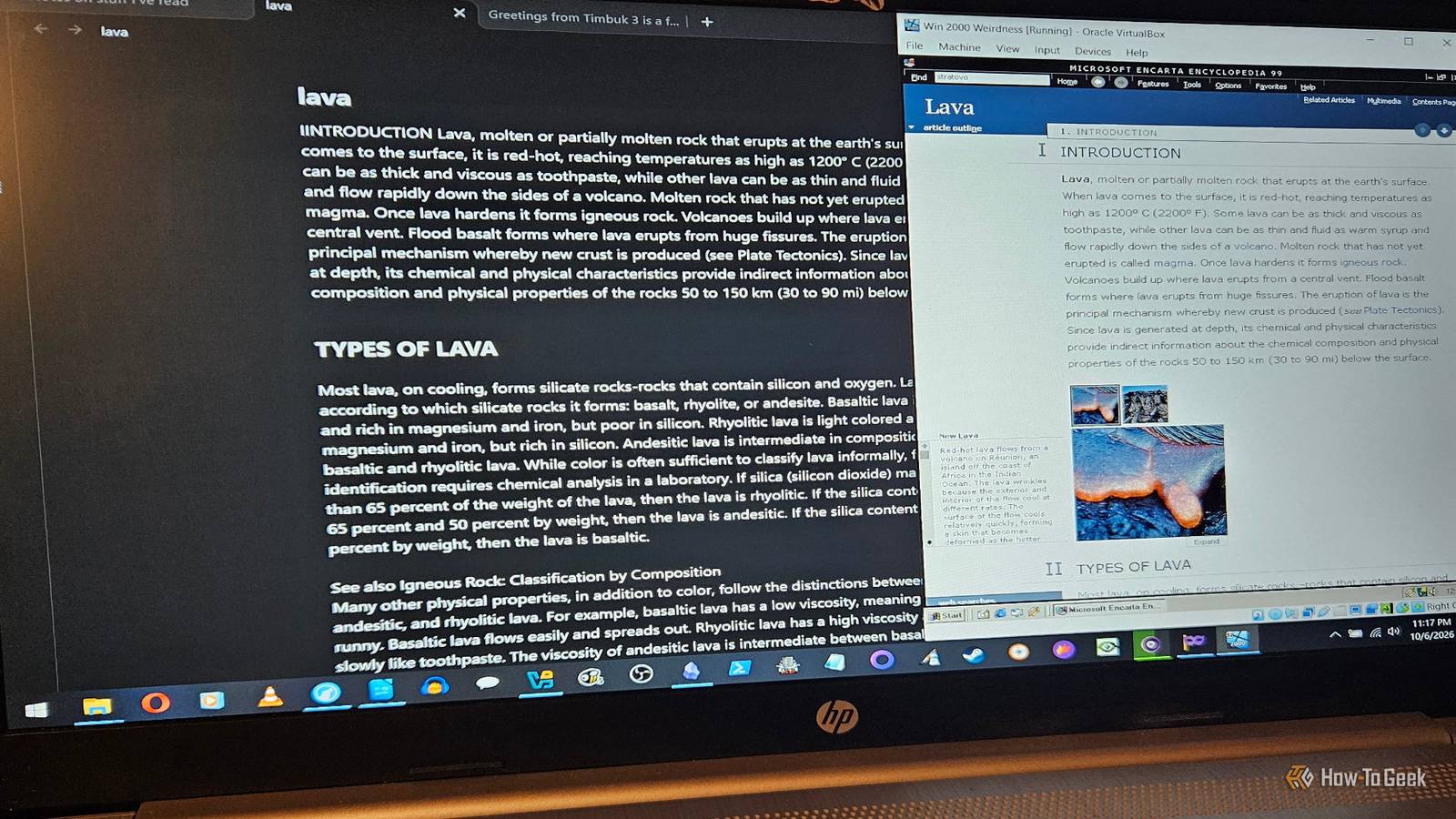
Since I was working from scratch on this project, I developed a very quick process to extract them from the disc and convert them to Markdown.Basically, I just loaded Encarta on a virtual machine running Windows 2000.Then I enabled guest to host clipboard sharing.
From there, you can just look up an article, go to options -> copy and paste it right in a brand-new Obsidian note.From there, I was able to add several articles of interest (like stratovolcanos and slide rules) to my Knowledge Base, so that I could read and take notes on them later.Taking notes from e-books and online articles A little bit of interaction When I was in college studying audience research methodology, I discovered I could export highlighted notes from my textbook into Google Docs for personal use.
If you use certain types of e-books frequently (typically nonfiction or textbooks), the odds are you've made highlights or created notes from them.I'm not talking specifically about copying selections from the book and pasting them into another file, although you could do that if you needed to.While publishers allow a certain percentage of copy/paste for note-taking, I've always found it easier to write down structured notes based on what I've read (by hand, on paper), then add to my Knowledge Base.
That way, I'm interacting with the text and learning something while also retaining the information, in my own words, inside of Obsidian.But that doesn't always work.For the few cases where I just grab tables, charts, or quotes from the text, I work within the allowable limits.
The purpose of the feature is to take notes, which is precisely what I use it for.With Kindle books, it's about 10% in my experience, although that can change based on the publisher.With Google Play Books, it can vary.
I used the function when I studied Audience Research Methodology.It saves your highlights, notes, and bookmarks to a document.I found those notes while digging through my GDocs under an old Google account.
So I did what I do with everything: I archived them.You can save them as MD files and drag them into your Obsidian Vault.But because these have my notes and highlights in them already, it made more sense to save them as PDFs and import into my Vault using Obsidian's built-in functions.
Wiki Madness Using a community plugin to fill in some gaps I can't overstate how much I love Wikipedia.I actually contribute to both it and the Internet Archive every year when I have the opportunity I use both sources frequently, but I wanted to draw from Wikipedia as a knowledge source.I'm obviously not the only person to think of this, as there's a community plugin for Wikipedia, which grabs the first paragraph from the Wikipedia entry and brings it to your vault.
I did a search for the huhu beetle and had great success getting a decent amount of the Wikipedia entry loaded into my Vault.From there, I can make notes, annotate, and add additional information.This is probably one of the best unconventional sources (next to Encarta) I've found for learning about new things.
How else would I have known the huhu beetle apparently tastes a bit like peanut butter? Who knew? More tools in your Obsidian arsenal Finding new and unique sources for building a Knowledge Base/Second Brain isn't always easy.But I'm pretty happy with the results so far from these particular sources.There's still a gold mine of information available online.
It just takes time and effort to find the right sources.And you know what? It's worth the time, effort, and trouble.Related 2 Obsidian replacements that let you self-host without any ridiculous workarounds Doing a crazy workaround for syncing your notes doesn't make sense.
Especially when there are plenty of apps that let you do it easily.Posts By David J.Buck
Read More