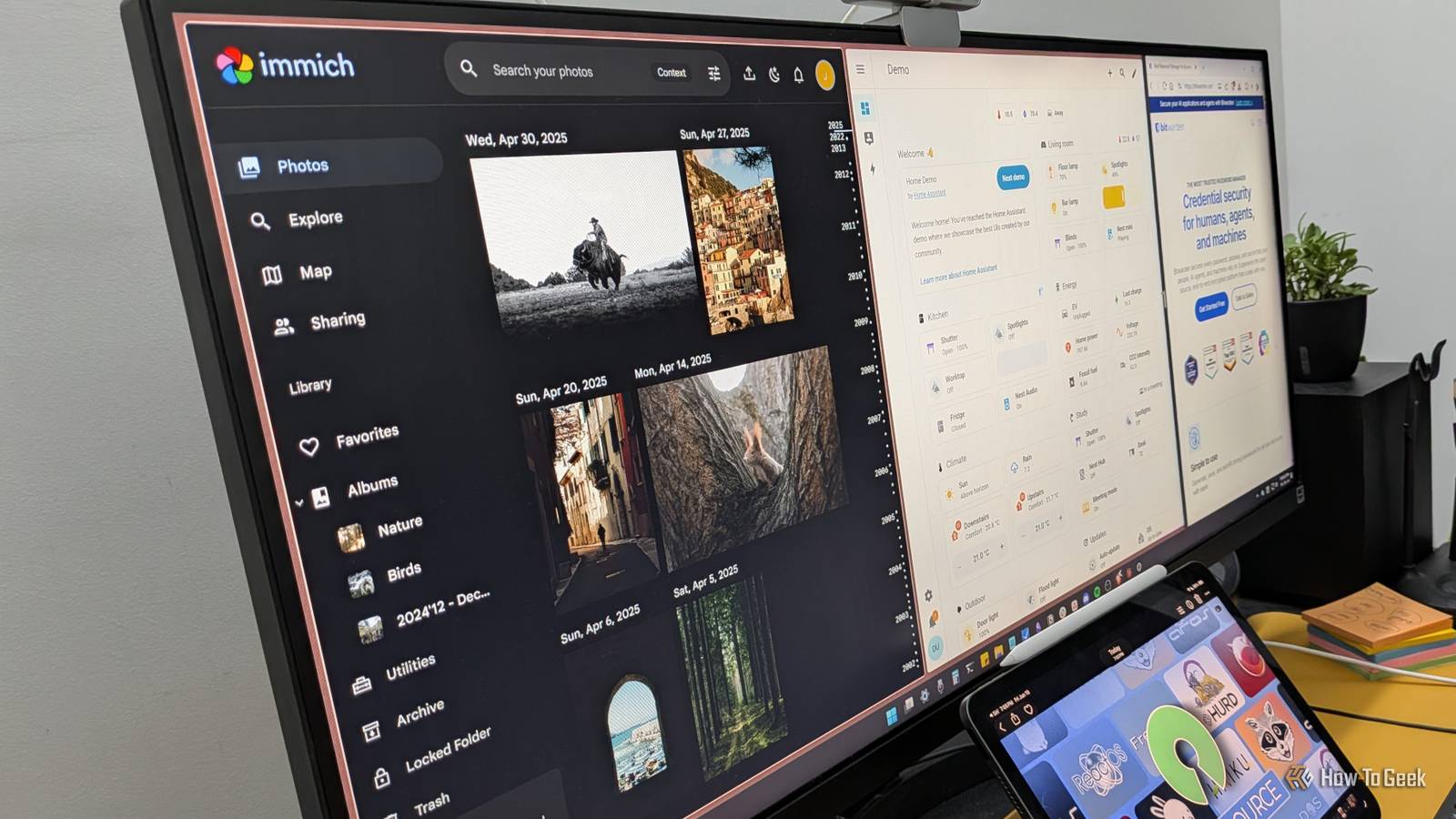
A lot of the everyday stuff on our devices quietly runs through someone else's servers.None of it feels like surveillance, but each one is a stream of pretty personal data flowing out of your hands.The good news is that for each of these, there's a free and open-source (FOSS) alternative that does the same job while keeping your data on your hardware.
Here are three such FOSS apps worth setting up this weekend.Home Assistant Don’t let your smart home be controlled from another person’s home Smart devices are genuinely useful.You can have your lights turned on when you get home and off when you leave, pull the blinds based on the time of day, kick on the AC when the humidity climbs—all without lifting a finger.
Beyond the convenience, automating this stuff can actually save you electricity, because you're not leaving things running out of plain human laziness.The problem, however, is how we use these smart devices.The default path is to plug everything into Google Home or Alexa and control it all through those apps.
And the moment you do that, you've invited big tech straight into your house.They get the raw data on everything happening inside your home.And if you've got voice assistants in the mix, these companies potentially have records of things you've said out loud in your own living room.
While there’s no strict evidence that Google or Amazon are maliciously using this data, theoretically a lot of our personal lives can be inferred by analyzing these data points—including when we’re in and out of our house.That genuinely unsettles me.Now, in my experience, the best way to cut yourself out of that loop while still enjoying your smart home is by using Home Assistant.
It lets you build a local network for your smart gadgets and run everything through that instead of a cloud service.It works with almost every gadget regardless of brand, so you're not stuck buying everything from one company just so they'll talk to each other.It’s also one of the best platforms for setting up smart home automations.
Because everything lives in one place, you can chain things together.One gadget doing something triggers the next, which triggers the next, and you end up with genuinely integrated automations instead of a bunch of isolated single-brand routines.It takes a bit of setup, but it's well worth it.
Here's a useful guide on how to set up Home Assistant.Related 5 things Home Assistant does better than Amazon Alexa and Google Home Alexa, show me a real smart home system.Posts 1 By Adam Davidson Immich You can get face recognition without showing your face to a third-party Immich is a self-hosted photo and video management solution—essentially a FOSS alternative to Google Photos.
Now, I never really considered how useful Google Photos is until I ditched Google Drive and moved all my personal stuff over to Nextcloud.While it's fine for viewing your images, you miss out on useful features like natural-language contextual searching, face recognition, object and scene tagging, and more.These features are genuinely useful if you’re someone with a library of tens of thousands of images.
That said, I’m also not comfortable having all my photos processed and analyzed by Google’s servers.And so I went with Immich.You self-host it—like Nextcloud, point it at your photo library, and it runs the machine learning locally on your own hardware.
So you get the face detection, the object recognition, the search, all of it, but it's all happening locally instead of on someone else’s server.Now, I should be clear that Immich is not a one-to-one replacement for Google Photos.With Immich, you don’t get free storage the way you get with Google.
Your photos live on your own hardware, which means you need somewhere to put them, usually a NAS.But if you ask me, that's a feature, not a bug.You have absolute ownership of your photos, and over the long run, it’s usually more cost-effective than paying Google indefinitely for storage.
Here's the official guide on how to install Immich.UGREEN NAS DH2300 $200 $220 Save $20 Brand UGREEN UGREEN's DH2300 is a small 2-bay NAS, perfect for backing up all your most important data. $200 at Amazon Expand Collapse Bitwarden Renting your password vault just doesn’t sit right with me Password managers are basically unavoidable at this point.
Reusing the same password everywhere is a terrible habit, and good passwords are long, complex, and impossible to actually remember.So you need a password manager—there's no real way around it.The question is: which password manager should you use? Most people I know just let their browser handle it, so they're saving everything to Chrome's built-in Google Password Manager or whatever ships with their browser.
Those work, but they're not as robust as a dedicated password manager.Purely from a security standpoint, I think a reputable proprietary password manager like 1Password or Dashlane is fine.They offer end-to-end encrypted vaults, and I'm not aware of any legitimate report showing passwords getting compromised out of one.
That being said, my argument is, why would you put your passwords on someone else’s servers if you have a FOSS solution that’s just as powerful and capable? It's like having the chance to own your home for free, but choosing to pay to rent it instead.Bitwarden is right up there with the best password managers, but it’s fully open source.Now, it does have a paid tier with more features, but it’s extremely affordable.
That said, the free tier is perfectly adequate for 99% of users, with support for unlimited passwords and unlimited devices.Now, when you use Bitwarden, you will be using their servers to host your passwords by default—but you don’t necessarily have to.You can run Vaultwarden, which spins up your own server instance to store your passwords locally, and then you just point the Bitwarden apps at your own server instead of theirs.
Bitwarden is cross-platform.You can install it on Windows, Linux, Android, macOS, and iOS.It also has extensions for all popular browsers.
Related I don't trust Bitwarden's cloud servers—but this free, open-source alternative fixes that The only server you should trust with your passwords is the one under your desk.Posts 2 By Dibakar Ghosh Going FOSS doesn’t mean having to compromise None of this requires you to swear off convenience.Home Assistant, Immich, and Bitwarden just move the convenience onto hardware you actually control.
The weekend's free—might as well spend it taking your data back.
Read More