There's no denying that Microsoft has been stuffing many of Windows' default apps with superfluous features, turning them into bloated pieces of software filled with (mostly) AI features no one needs, with the Copilot-infested Notepad being a prime example.Or the company is throwing optimization out the window, resulting in simple apps like the default Weather app using more than 1GB of memory.Luckily, the third-party Windows app ecosystem is thriving as ever, offering oodles of lightweight, minimalist apps that can replace every bloated Windows default, and then some.
One Photo Viewer A perfect replacement for the bloated Photos app I've been using One Photo Viewer instead of Windows Photos for years, and while using it was simply a matter of preference at first, it has become a necessity ever since Microsoft caught the AI bug and started stuffing AI features into its apps left and right.Nowadays, the Photos app can be considered more of a photo editing app than a simple photo viewer, and while some people like that, I've got other tools I use when I need to edit photos and images.When I want to view them, I use One Photo Viewer.
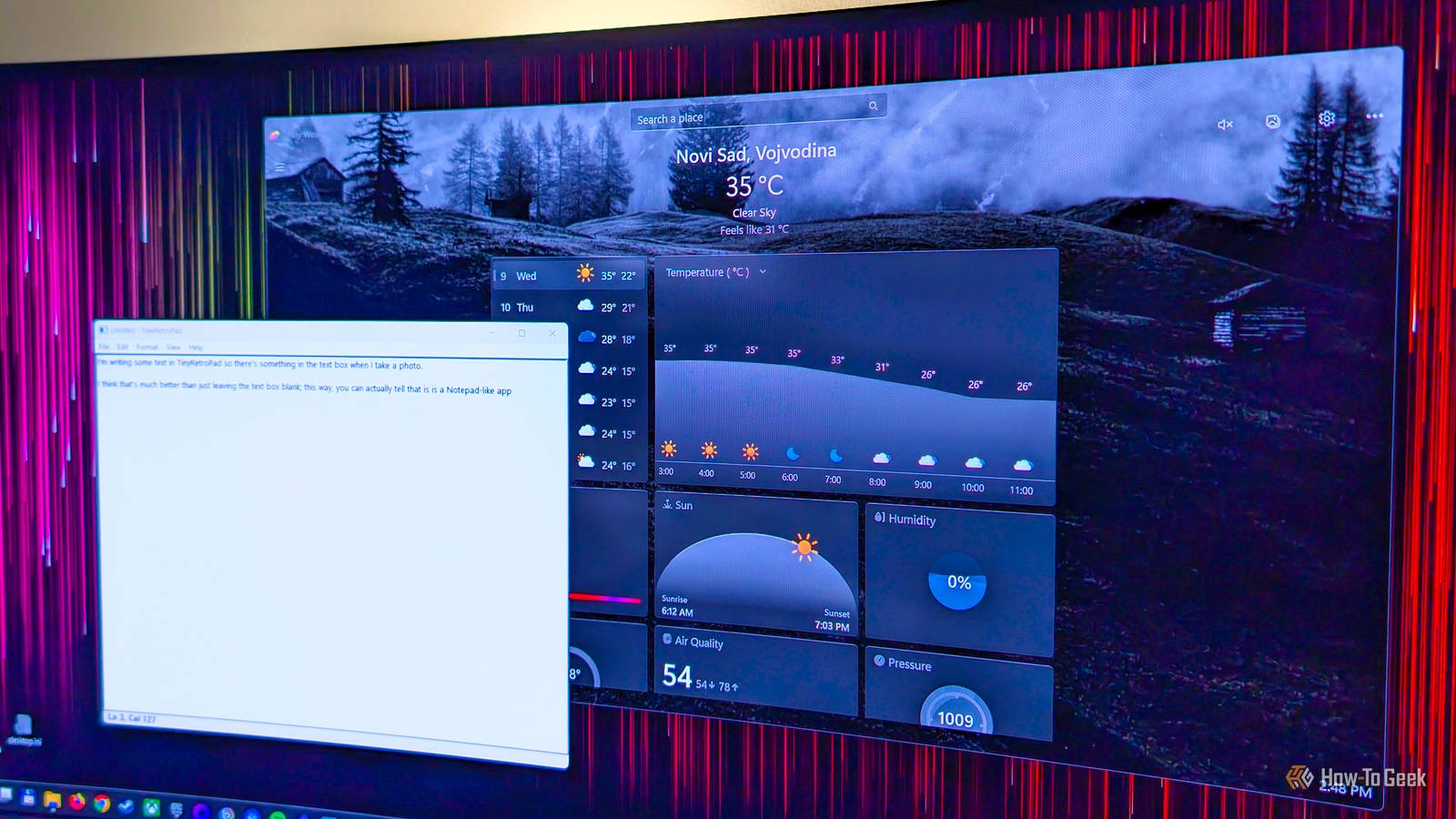
The app's about as minimalist as they get; it does one job, and it does it exceptionally well, which is why I recommend it to everyone looking for a straightforward Windows Photos replacement that doesn't get in the way and is light on resources.Lively Weather Simple and resource-efficient Close I couldn't believe that the default Weather app in Windows 11 was such a resource hog, but after doing some testing and discovering that it can devour more than 1GB of RAM, I was happy I had banished it from my PC years ago, which I promptly did again after finishing my testing.I'd used weather apps on my phone for years instead of opening one on my PC, but after finding out about Lively Weather, I tried it out and kept it because it, much like One Photo Viewer, does one job, and it's pretty good at it.
Lively Weather doesn't have a bunch of tabs listing every possible piece of weather-related information, along with stuff like radar data, historic weather, and other things you don't really need.It's got a single page that lists pertinent information about one or more locations you manually search for and add — no access to your device's location needed.The app has an attractive UI featuring a bunch of pretty backgrounds that change depending on the weather and time of day.
The backgrounds also feature a pleasant motion effect that follows your mouse pointer.Even though it packs animated effects, Lively Weather is anything but a resource hog.In my testing, it used only about 170MB of memory when active, which dropped to just a few megabytes when I minimized it because, by default, the app gets suspended the moment you click the Minimize button.
If you don't like animated effects, you can disable them and also drop the visual quality to the "Potato" level (that's an actual preset you can pick inside the app), allowing you to use Lively Weather on virtually every PC capable of running Windows 11.If you ask me, Lively Weather is one of the best and lightest Windows weather apps out there.TinyRetroPad An extremely lightweight Notepad replacement that weighs less than 3KB! Close Talking about lightweight apps, Windows really did Notepad dirty by stuffing it with multiple AI features no one would ever need and turning what was once the definition of a minimalist Windows app into a bloated, AI-riddled shell of its former self.
Fear not, because TinyRetroPad is out there, offering a super-minimalist take on a Notepad app while weighing less than 3KB! That's right: the developers have created a simple note-taking app that takes up so little storage space it has an almost invisible footprint.You could cram an ancient floppy with hundreds of copies of TinyRetroPad and still have free space left.Feature-wise, this app is about as minimalist as they get and reminds me of the good old Notepad from the Windows XP era.
You can use it to edit configuration files and write some quick notes, and the app launches instantly.Aside from the staple features you'd expect from a Notepad app, such as Find and Replace and Go To, TinyRetroPad doesn't try to reinvent the wheel and instead offers just the essentials, which is why I like it so much.You don't need to sign in, install the app, or create an account to use it.
All you need to do is visit the app's GitHub page, click on trpad.exe, hit the download button, save it wherever you want, and then launch it.Related I’m done with Windows Notepad: Why I went back to this 20-year-old open-source tool I don’t need tabs, sessions, or extra clutter in a tool I open for two seconds.Notepad++ stays fast, simple, and doesn't force features on you.
Posts 23 By Jorge A.Aguilar Pinta A slick-looking minimalist alternative to Microsoft Paint Microsoft Paint is yet another Windows default app that has gotten the AI treatment.Microsoft has added generative AI tools such as Generative Fill and Erase, Image Creator, Restyle, and Cocreator to it, turning what was once a simple graphics editor into yet another AI-infested piece of software.
One of the best and most lightweight third-party Paint replacements is Pinta, a simple raster graphics editor that looks slick and is reminiscent of classic Paint, only with a fresh coat of, well, paint.The app packs just enough features to remain simple to use while still allowing you to create some pretty impressive stuff.You can also use it to draw silly-looking doodles instead if you want, like we all did when we were kids.
If you're looking for a straightforward Paint alternative, you can't go wrong with Pinta.The app doesn't weigh much, it's open source, and you can also use it on macOS and Linux if you end up liking the Windows version.You know that Microsoft has gone too far when even Notepad has AI features While I can understand some Windows apps, such as Paint, receiving one or two generative AI features, Microsoft has gone too far the moment it stuffed Notepad with AI.
Worse still, instead of limiting the number of AI features in Paint, Microsoft has just kept stuffing it with more without much consideration, and if you want to use some of them, you need to sign in with your Microsoft account and use up AI credits, which sounds bonkers, yet here we are.Aside from Notepad, the only default app from this list I still had on my PC when I started writing this piece was Photos.But considering how Microsoft threw a OneDrive backup notification in my face the moment I opened Photos to see just how bloated it had become, I got rid of it as well.
After all, One Photo Viewer allows me to view photos on my PC, and when I want to edit them, I have a solid selection of tools I'd rather use instead.
Read More