GitHub hosts an enormous amount of genuinely great free and open-source software.But as an interface for discovering and installing apps, it's one of the worst experiences out there.There's no browsing by category, no install button, and half the time the README assumes you already know what a build toolchain is.
I got tired of it, so I used Claude to build myself a workaround—an app-store-like layer that sits on top of GitHub.GitHub desperately needs to improve its user experience Finding good software shouldn't require a computer science degree If you're somebody like me who loves free and open-source software (FOSS), advocates for it, and uses it daily, you probably have a bit of a love-hate relationship with GitHub.The reason GitHub is awesome is that it's generally where you find the actual source code behind that open-source app you just discovered.
Even if the FOSS app has its own website describing its features, GitHub lets you inspect the code, check current issues flagged by other users, and see how responsive the project developer actually is.At the same time, though, GitHub does a pretty lousy job of helping ordinary users discover any of these amazing projects.For example, you can't go into GitHub and search for "Notion alternative" and expect anything resembling an app store experience.
Granted, GitHub does have repository topics, and projects can be tagged with things like "note-taking" or "password-manager"—but that categorization depends entirely on how the maintainer chose to describe and tag their repository.GitHub search can also look through repository names, descriptions, code, and other metadata, but it's fundamentally built for developers looking for software projects, not ordinary users looking for applications.Related 5 open-source apps that completely replaced every subscription I had You can cut your subscriptions without losing much.
Posts 7 By Nick Lewis Now, to be fair, GitHub isn't supposed to be an app store.It houses everything from apps to the libraries needed to build apps, along with datasets, and even books and poems.It's a platform for hosting Git repos and providing tools for version control, collaboration, and issue tracking.
App discovery was never the point.That said, since it houses so much awesome software, there should be a more convenient way to make it more accessible.In fact, app discovery is only half the problem.
Even after you find a good app, there's no easy installation option.Some projects have excellent installation docs, while others are a wall of jargon.For a technical user, that's a minor annoyance, but for a non-technical user, it can be a complete dead end.
I've run into this firsthand when recommending FOSS applications to friends and family.I'll find some genuinely useful open-source tool on GitHub, send them the link, and they'll have absolutely no idea what to do next.So I wanted to solve that problem.
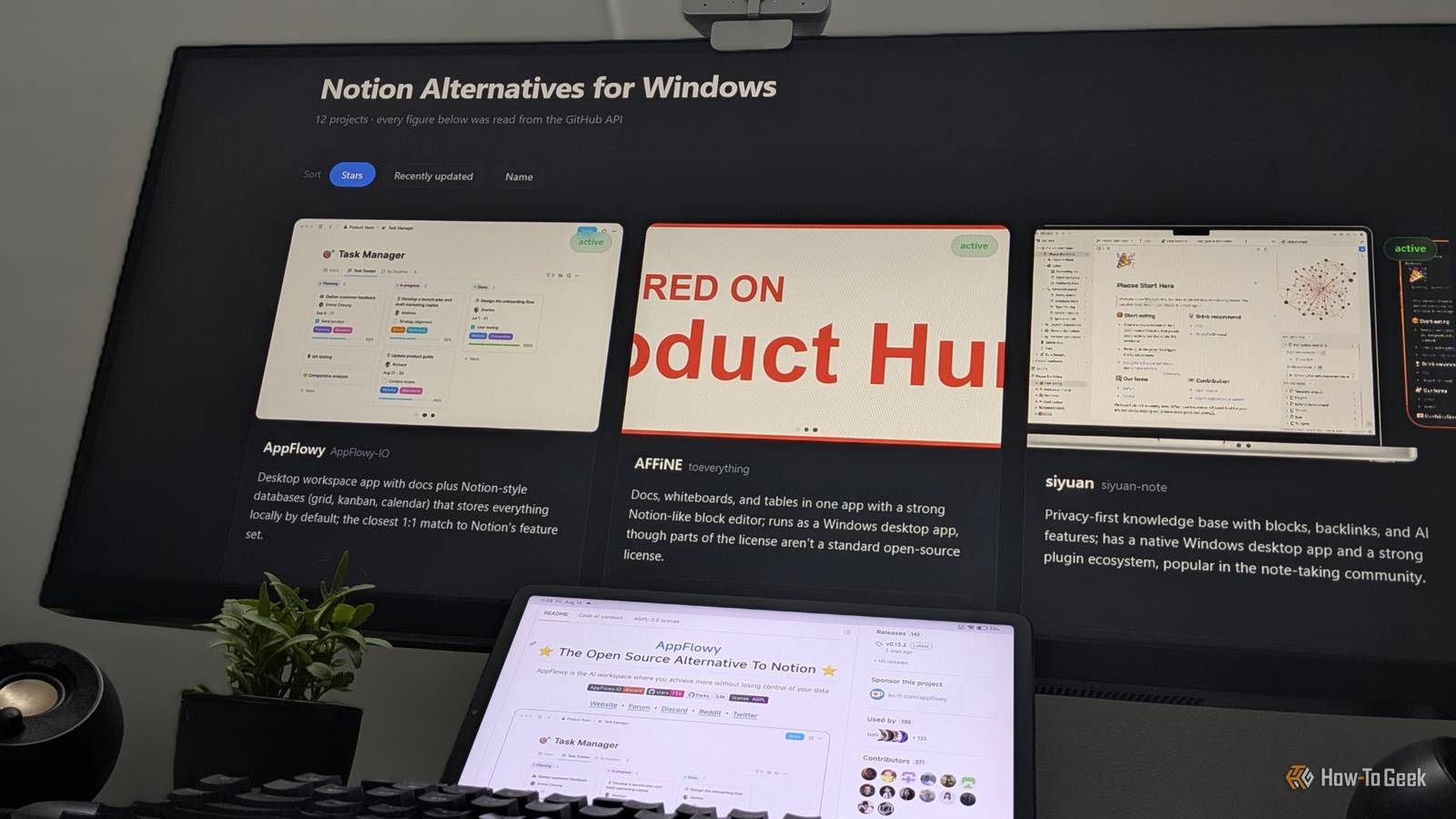
I decided to use Claude to build an interface that sits on top of GitHub and treats its enormous collection of FOSS projects more like an application store—making it easier to discover software, understand what a project actually does, figure out whether it's right for you, and, where possible, install it without needing to study how Git works.How I use Claude to solve the problem Let Claude deal with the jargon Close The idea is pretty simple—I open Claude and tell it what kind of application I'm looking for.That could be an alternative to a specific app—say, a Notion alternative or a Todoist alternative—or just a category of software I'm interested in, like a good open-source note-taking app.
Based on what I want, Claude goes out searching the internet.First, Claude checks its own knowledge for apps that best suit my requirements, then cross-references them on GitHub to make sure they're still maintained, up to date, and working.That produces the first set of apps.
Second, it searches AlternativeTo—a huge crowdsourced database of software and software alternatives—to build a second set.And third, it runs a general web search to find articles, recommendations, and other sources that might surface apps and projects the first two methods missed.Claude then uses all three sources to curate roughly 10 to 15 applications and presents them to me in a basic layout.
For each app, I can see its name, a brief description, screenshots where available, and useful signals like GitHub star and fork counts.That alone solves the interface problem I was having with GitHub.Related Stop blindly running GitHub binaries: Here is my 6-step safety protocol Running an .exe from GitHub is a leap of faith.
Here is how I keep things secure.Posts By Ali Haider From there, I can simply tell Claude, "I want to install this application." Claude then reads the source code and the project's current issues page to check for anything suspicious before I go ahead.Granted, this is no antivirus scan or proper security audit, and false negatives are absolutely possible.
But I find it a useful extra layer to have, rather than installing an app completely blind.Close If the source code looks fine, Claude then checks whether my system can actually run the app.Certain apps require certain dependencies, and they won't install without them.
Some GitHub projects aren't very explicit about this, but Claude can usually infer which dependencies are needed based on the project type.If you're using Claude Code, this whole process can be automated.It's designed to have access to your system and run terminal commands, which means it can check whether you have the necessary dependencies and install any that are missing.
If you're using the Claude web app instead, it’ll generate the terminal commands, but you’ll need to run them yourself.Once the dependency check is done, Claude moves on to installing the app itself.Related Claude Code isn't good at everything, but it's amazing at these 5 tasks Claude cannot think; it can only imitate.
You must treat it like a fancy autocomplete and not like a programmer.Posts By Graeme Peacock Here’s the Claude GitHub installer skill Everything you need to set this up yourself I personally use Claude Code for this workflow.I've created a custom skill for it called GitHub-Installer, and you can create it for yourself using the prompt below.
Once it's set up, just invoke the skill and ask for a category of app or an app alternative.Claude will help you find apps, present them in a clean graphical view, check the source code, ensure all necessary dependencies are installed, and finally install the app.Here's the prompt to set up the skill and all other associated files and scripts necessary for this workflow: Create a skill called "github-installer" that turns GitHub into a browsable, installable app store.
## When it triggers Any request for software by category or as an alternative to a known app — "find me a Notion alternative," "open-source screenshot tool," "something like Todoist but self-hosted." Also triggers on "install [app name] from GitHub." ## Step 1 — Pin down the request Before searching, establish three things (ask only if not already obvious): - Operating system and distro/version - GUI app, CLI tool, or self-hosted service - Any dealbreakers: must be actively maintained, must be offline-only, must not require Docker, etc.Do not ask more than one round of questions.Infer what you can.
## Step 2 — Discovery from three independent sources Run all three, then merge.Do not stop after one.1.
**Prior knowledge, verified.** List candidates you already know, then confirm each one still exists and is maintained via the GitHub API.Drop anything you cannot verify — do not present an app you have not confirmed.2.
**AlternativeTo.** Search alternativeto.net for the app or category, filtered to open source.Note the community vote counts.3.
**Open web search.** Look for recent roundups, Reddit and Hacker News threads, and awesome-lists.Prioritise sources from the last 18 months.Merge into a deduplicated shortlist of 10–15.
If fewer than 6 survive verification, say so plainly rather than padding the list.## Step 3 — Pull real data for every candidate For each repo, hit the GitHub API and collect: - stars, forks, open issue count - date of last commit to the default branch - license, and whether the repo is archived - topics - the README Use `gh api` if the GitHub CLI is installed and authenticated — the unauthenticated limit is 60 requests per hour, which 15 repos plus READMEs will exhaust.If `gh` is unavailable, use curl and warn about the limit.
Flag as **unmaintained** anything archived or with no commit in 12+ months.Include these in the gallery but mark them clearly; do not silently drop them.**Screenshots.** Parse each README for image URLs and grab the first two or three that look like app screenshots — skip badges (shields.io, img.shields, badgen), logos, and icons.
Convert relative paths to absolute `raw.githubusercontent.com/{owner}/{repo}/{default_branch}/{path}` URLs so they load outside GitHub.If a repo has no usable screenshot, render a placeholder card rather than a broken image.## Step 4 — Build the gallery Generate a single self-contained HTML file — all CSS inline, no external dependencies, no build step.
- Responsive card grid, one card per app - Screenshot leads each card, with the remaining screenshots in a simple click-through if more than one exists - Below the image: app name, one-sentence description in plain language (rewrite the README's jargon; do not paste it), and a metadata row showing stars, forks, last commit, and license - A coloured badge for maintenance status: active / slow / unmaintained - Buttons linking to the repo and the project homepage - Sortable by stars and by last-commit date - Dark theme, generous whitespace, no framework In Claude Code: write the file to the working directory and open it in the default browser.In the Claude web app: return it as an HTML artifact.## Step 5 — Pre-install smell test When the user picks an app, do a fast sanity check before touching the system.
This is **not** a security audit — say so to the user explicitly, every time.Look for: - obfuscated or minified code in a repo that should be readable source - install scripts that curl-pipe to shell, or request sudo without cause - network calls to domains unrelated to the project - open issues mentioning malware, supply-chain problems, or a hijacked maintainer account - a very new repo with a suspiciously high star count - a license that is missing or contradicts the README Report what you checked and what you did not.If anything looks off, stop and explain rather than proceeding.
## Step 6 — Dependency check Read the README and the project's build files (package.json, Cargo.toml, requirements.txt, PKGBUILD, etc.) to determine runtime dependencies.Check which are already present on the system.In Claude Code: run the checks directly.
In the web app: give the user a single block of commands to run and ask them to paste back the output.Prefer a distro package, Flatpak, or official binary release over building from source.Only build from source if no packaged option exists — and tell the user which route you have chosen and why.
## Step 7 — Install In Claude Code: install missing dependencies and the app itself, showing each command before running it.Never run a destructive command without confirmation.In the web app: hand over exact copy-pasteable commands for the user's specific distro, plus a GUI alternative where one exists.
Afterwards, tell the user how to launch the app and how to uninstall it cleanly.## Rules - Never invent a repository URL, a star count, or a screenshot.Every number in the gallery comes from a live API response.
- Never claim an app has been security-audited.- Prefer projects with a real license over unlicensed code dumps.- If the best tool for the job is not open source, say so rather than recommending a weak FOSS option to satisfy the brief.
Creating the skill will eat up a good chunk of your tokens.I’m on the $20 Pro plan, and it consumed 80% of my session usage.However, it’s a one-time thing and ensures every future app search is optimized for the best results and lower token usage.
Enable the Skill-Creator skill before creating this one for the best results.I also strongly recommend that you use Opus 5 or even Fable 5 to build this skill for the best, most thorough version possible.After that, you can use Sonnet to run the skill.
Make the technical more approachable It used to be that if you weren't technical—not familiar with coding, terminals, or the broader developer ecosystem—a huge number of powerful and often free tools were effectively hidden from you.You wouldn't know how to install them or get them running even if you managed to find them.Fortunately, LLMs like Claude have effectively solved this problem.
They make the technical approachable by explaining what a project is, telling you whether it fits your needs, and then walking you through actually getting it running on your system.
Read More