If you've been looking at starting a homelab, but have been waiting for the perfect time, Prime Day is it.There are so many great homelab deals out there for Prime Day to explore.From discounted NAS servers to mini PCs and even networking gear, here are the homelab deals that stood out to me on Prime Day 2026.
Every homelab should start with a NAS And there are a ton of fantastic deals going on right now The heart of any homelab is networked storage.It's utilized in every facet of the homelab, and should definitely be where you start your homelabbing journey.You definitely can just take an old desktop or laptop, hook storage up to it, and go—but I'd recommend going a different route.
Having a dedicated NAS (network attached storage) appliance is beneficial in so many ways.For starters, almost all dedicated NAS systems support something called RAID—redundant array of independent disks.This means that you can have the NAS set up with redundancy in mind.
So, if a hard drive happens to fail, you don't lose everything stored on it.RAID isn't a backup, however, so you should definitely get a backup going once your homelab is on its feet.Also, please don't buy desktop hard drives for your NAS—it's just not worth the tradeoffs.
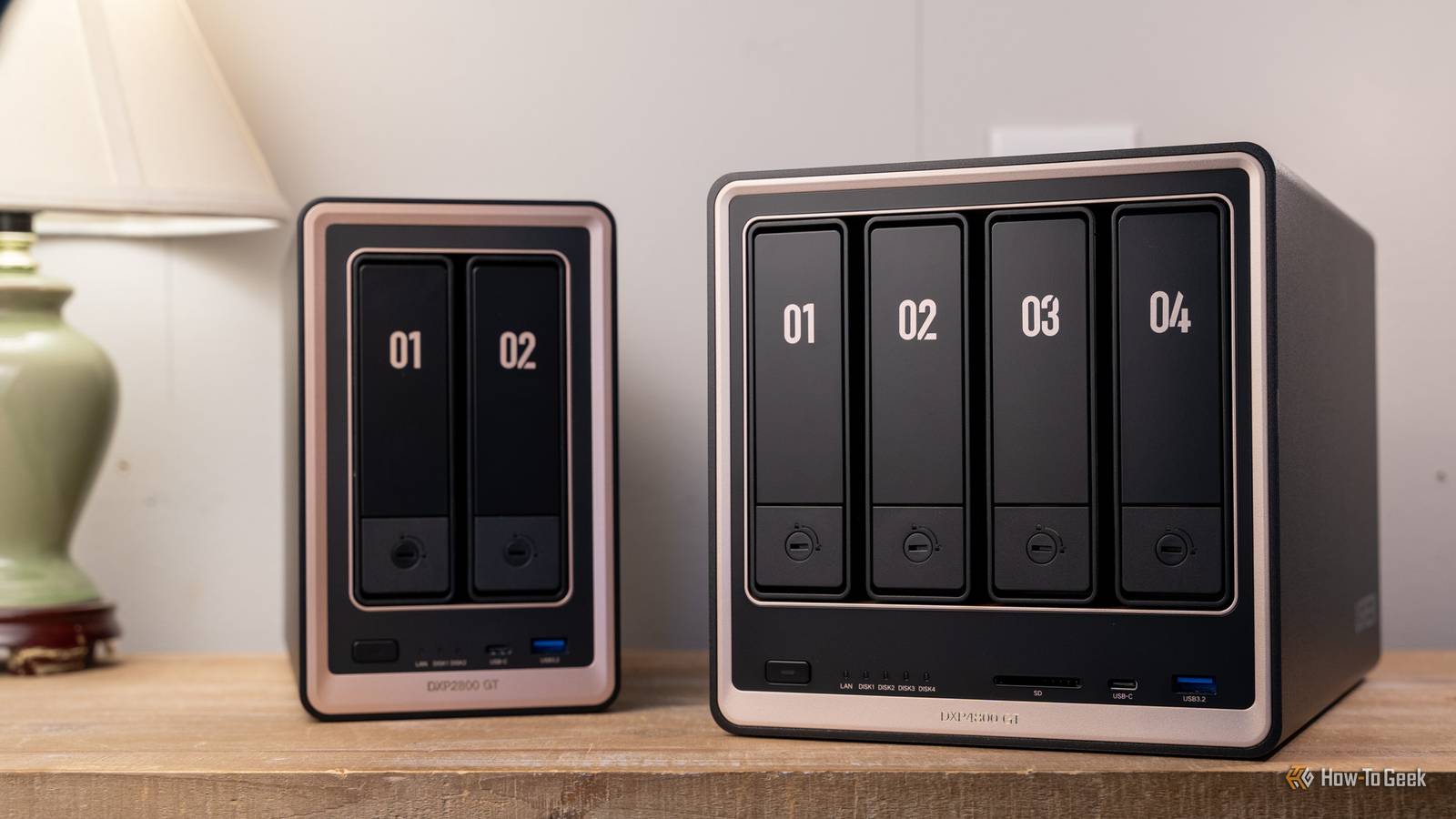
UGREEN NAS DXP2800 GT: $400 ($110 off) UGREEN NAS DXP2800: $330 ($60 off) UGREEN NAS DXP4800 GT: $528 ($132 off) UGREEN NAS DXP480T Plus All-SSD NAS: $900 ($100 off) Synology DS225+: $275 ($65 off) Synology DS223j: $151 ($44 off) So, whether you haven't started your homelab journey at all, or you've already got an old system, consider picking up a NAS this Prime Day.The deals are actually pretty solid, and having a dedicated storage appliance in your homelab is definitely worth it.UGREEN NASync DXP2800 GT $400 $510 Save $110 Brand Ugreen Memory 8GB (Upgradalble to 64GB) Drive Bays 2x 3.5-inch, 2x M.2 NVMe LAN Ports 10GbE The Ugreen DXP2800 GT NAS is the perfect starter system for anyone looking to get started in homelabbing.
With two 3.5-inch drive bays and two NVMe slots, this NAS also supports user-upgradable RAM and has 10-gigabit networking.$400 at Amazon Expand Collapse Synology DS225+ $275 $340 Save $65 Brand Synology CPU Intel Celeron J4125 Memory 2GB Drive Bays 2 Expansion None The Synology DS225+ is a great beginner storage server.It features two 3.5-inch hard drive bays and both 2.5Gb Ethernet and Gigabit Ethernet.
Designed around Synology's Disk Station Manager operating system, this NAS offers a simplified experience that anyone will feel at home using. $275 at Amazon Expand Collapse Start your homelab ahead of the curve with a mini PC A NAS is a great starter server, but a mini PC is better My homelab started with a NAS, but I wish I would have picked up a dedicated server computer way sooner.These days, I run several mini PCs in my homelab and absolutely love it.ACEMAGIC K1: $550 ($179 off) GMKtec G3S: $237 ($63 off) GEEKOM A5 Pro: $381 ($69 off) KAMRUI Essenx E1: $256 ($94 off) GEEKOM A5: $371 ($69 off) Mini PCs are fantastic for homelab use for a wide variety of reasons.
For starters, they can be pretty affordable for the power they provide.Speaking of power, mini PCs typically use a fraction of the power that full-size desktops use.Another reason I love mini PCs is because you can put whatever operating system you want on them.
I run Proxmox on mine, but you could run Windows 11 (most ship with Windows 11 Pro) or any version of Linux that you can think of, really.My first true server PC (that wasn't also a NAS) was a big rack-mount server, and I wish I would have just gone with a mini PC instead.Don't make the same mistakes I did, and just buy the mini PC.
It'll serve you better than a big beefy server for 99% of the tasks you'll throw at it.GEEKOM A5 mini PC $371 $439 Save $68 Brand GEEKOM CPU AMD Ryzen 5 7430U Graphics AMD Vega 7 Memory 16GB DDR4 SO-DIMM Storage 512GB NVMe (expandable) The GEEKOM A5 mini PC packs 16GB of user-replaceable RAM, a user-swappable NVMe SSD, plus two other storage slots, giving you plenty of user-upgradability in this compact system.The Ryzen 5 processor packs plenty of power for general tasks, and it's even great at lightweight gaming and CAD work too.
$371 at Amazon Expand Collapse Don't limit yourself to just gigabit Ethernet 2.5Gb Ethernet gives you 2.5 times the transfer speeds Up until last year, my entire homelab ran on traditional gigabit Ethernet just fine.However, I wasn't utilizing my homelab to the fullest because big files took forever to transfer on my network.In February of 2025, I finally took the multi-gig plunge and it's another homelab thing I wish I would have done from the start.
Running 2.5GbE networking in my homelab meant transfers finished 2.5 times as fast.TP-Link TL-SG108S-M2 8-port 2.5GbE: $50 ($30 off) Tenda SM108 8-port 2.5GbE: $44 ($11 off) TP-Link TL-SG105S-M2 5-port 2.5GbE: $40 ($20 off) GigaPlus S25-0802 8-port 2.5GbE, 2-port 10Gb SFP+: $51 ($19 off) UGREEN CM953 5-port 2.5GbE: $31 ($9 off) 2.5 times faster transfers might not sound like a lot, but imagine a 10-minute transfer finishing in 4 minutes.Or, a 60-minute transfer completing in 24 minutes.
It's impressive how much time can be saved with a jump to 2.5GbE.Deals Save on Storage & Networking Deals - NAS, Switches, Upgrades Find Prime Day deals and deep discounts on NAS systems, mini PCs, and 2.5GbE/10Gb networking gear.Shop storage drives, switches, network adapters, and cables to upgrade your homelab — savings on setups and accessories await.
Deals Explore Storage & Networking Deals Most Ethernet cables you have around the house can likely handle transfer speeds of 2.5GbE, and a lot of computers, including mini PCs and laptops, are starting to ship with 2.5GbE ports.Even if your computer doesn't have a 2.5GbE port, it's easy to add through a simple USB dongle—which is what I did for my MacBook.Your homelab doesn't have to cost a lot to be useful I've seen people with pieced-together homelabs getting way more use out of their hardware than people with homelabs worth thousands of dollars.
You don't have to spend a crazy amount of money to get a useful homelab.So, if you've been looking at starting your homelab journey, use Prime Day as the jumping off point!
Read More