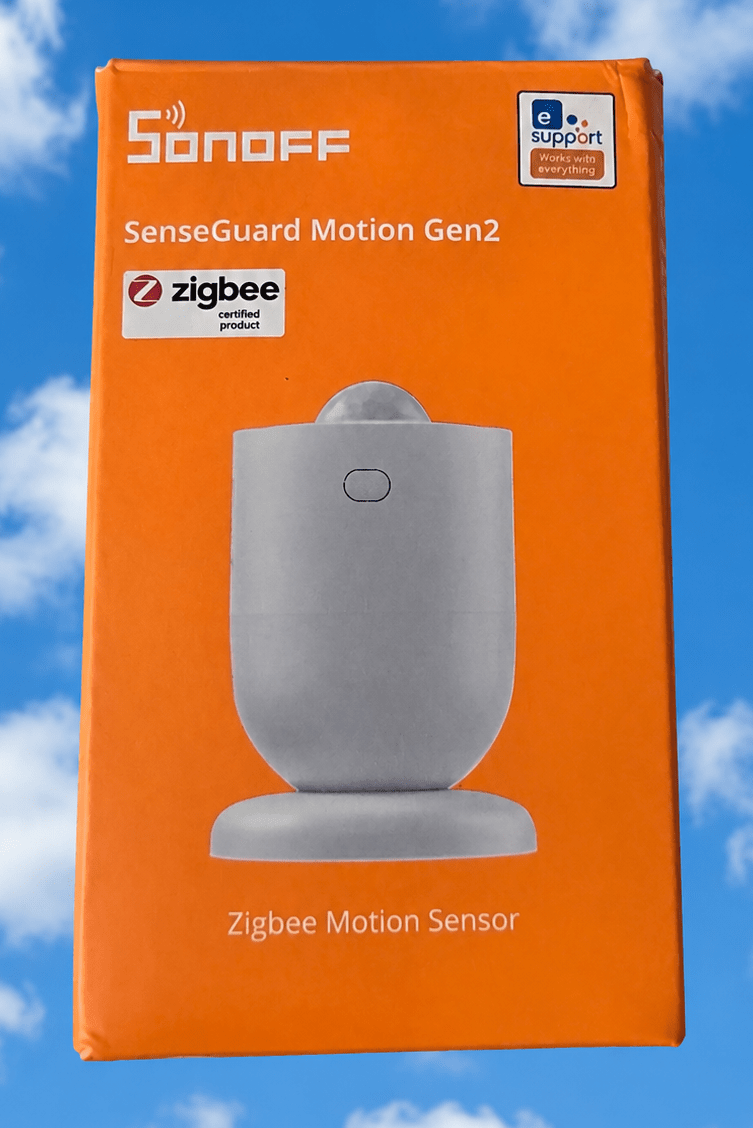
Specifically the new Airguard TH Lite and the SenseGuard Motion Gen2.These two products arrived on my desk this morning – once again Sonoff are on the march with new products and I’m sure they won’t disappoint.So firstly these are both Zigbee and regular readers will know I’m a fan of Zigbee in my Home Assistant setup and using the SMLIGHT SLZB-06 as Zigbee coordinator over ethernet, the latest in a long line – I started using Zigbee with Sonoff USB dongles as both coordinators and routers but for over a year now I’m a convert to using ethernet for the coordinator.
So that rules out using Zigbee hubs -different hubs for different manufacturer’s products – thankfully all but a few Zigbee-based products will run under Zigbee2MQTT, in my case that is running as an add-on to Home Assistant.Ok, enough of the background… lets take a look at the Airguard TH Lite first..What can I say about Airguard TH Lite… Well, it looks familiar for one thing.
Anyone seen the similar Switchbot product? Same lanyard, same size, similar look – I have a few of those – I love them, the only thing I don’t like is that thy need to be near a Switchbot hub.Both products have easy to remove backs – both use a pair of AAA batteries… the difference being I can hopefully run the Airguard TH Lite straight into my Home Assistant Zigbee2MQTT setup with no third party hubs, But first – more photos… the pics you see here are all mine despite the blue sky background for the box shots (I got ChatGPT to put that in, instead of my desk).Oooh, they ARE slightly different – the Sonoff has a tiny reset button on the top whereas the Switchbot unit has the reset button on the inside.
Other than that, there’s not much difference that I can see.The Sonoff product comes with a handy adhesive pad – and there’s a QR code on the back for pairing.But I’m going to try to bypass that… battery insulting strip removed – let’s dive straight into Zigbee2MQTT and “Permit Join”.
Erm… nothing.Looks like I have to press that reset button.Nothing – I really should read the manual… one last shot – long press of the reset button.
Right, I’m in….A quick rename to “airguard-th-lite”… making sure I told Zigbee2Mqtt to update Home Assistant… and… it’s in – complete with tiny picture of the device… so someone’s been quick to make it Zigbee2Mqtt compatible.And now, in Home Assistant… That simple – let’s take a look at the device and it’s entities – I’m not expecting any surprises..
That first entry is the “update” entry – the others are obvious… battery is a percentage reading.About the only comment that comes to mind is – why didn’t they put the reset button on the bottom instead of the top… but then, while the Switchbot unit has a VERY thin rubber band along the inside edge of the back covre, the Sonoff does not, so it’s probably not totally rainproof anyway but I’ll happily leave the Sonoff on my porch, shielded from the sun and rainfall but in direct line or the weather otherwise.The chances of seeing rain in the next few months here in Southern Spain are slim at best.
Sonoff clearly state in their promotional material INDOOR USE – so fair enough.Quick note – the TH Lite has 3 vents along the bottom left side – the Switchbot has none.Ooh err, Switchbot… internal temperature – what about heat from the chip? For the sake of it I tried adding a previously unused Switchbot unit to Home Assistant- Bluetooth scanning did nothing – so I added it to the Switchbot app manually – came up as “outdoor meter 7a” – nothing in Home Assistant… so..
button pressed on the unit – white light flashing….Bluetooth enabled on the phone… No supported devices in range… trying the Cloud version – I know my token and secret key… or heaven’s sake, Switchbot – that’s too much like hard work – meanwhile my Sonoff Zigbee sensor is happily working, no problem.The Switchbot products work and they work well – but it’s a while since I installed their temperature sensors – all that work for such a simple device….
I’m sure someone else will write all about using this with a Sonoff hub and eWeLink app – I’m quite happy it’s running well in Home Assistant.Claimed temperature accuracy – +-0.2C – does anyone really try to measure decimal point accuracy? Nearest degree will do me.If you DO use this sensor with eWeLink you get smart alerts for temperatures exceeding thresholds.
Claimed battery life – 2 years – but that is entirely down to which batteries you use.It came fitted with an unknown brand battery pair – I’ll leave them in and see what happens.Check back here in 2 years Onto the next product… The Senseguard Motion Gen2 Great looking device – adhesive pad on separate magnetic mount base..
unlike the previous device this one uses a CR2477 battery – not something I keep a lot of but it comes supplied with battery.When you separate the unit from the magnetic base – you can easily rotate the back off to reveal/replace the battery – no tools required.Well that’s not quit true you have to turn the internal battery cover a few degrees with a coin.
I’m in Spain and I find the 10c coin works well, a Euro is too thick.I tried a screwdriver and that failed and left a mark on the battery cover (not the first time I’ve done that – I did the same with an earlier similar product from Sonoff).After fitting a battery – ensure the cover is FULLY closed, again using a coin.
So once again, without delving into the eWeLink app can I connect this directly to Zigbee2Mqtt and hence Home Assistant? Long-pressing the button you see in the photo does the job.A little red light flashes – not the big hole you see in the photo – LED behind the plastic – opposite site flashes quickly.Back to my Zigbee2Mqtt JOIN command..
Renamed to senseguard-motion-gen2… done.In Zigbee2MQTT – exposes occupancy – illuminance, battery.GOOD ? But “occupancy”? The box says MOTION – there’s a big difference,,, I’d expect AlieXopress to get that wrong – but Sonoff? I sat REALLY still for a couple of minutes – still true, that’s a good start – this may well be a PRESENSE sensor after all – and the fact that it is battery powered and has a light sensor… could be a good combo..
I went off to the bathroom at the other end of the house – CLEAR.Came back to the office – occupied – sat PERFECTLY still no more than 1 metre or so next to the unit – around 4 minutes later – clear – that us NOT occupancy sensing.So, like the AliExpress sensor before it and unlike the powered Iotorero unit I just reviewed, this Sonoff unit is indeed a MOVEMENT sensor as claimed on the box, not an OCCUPANCY sensor.
A shame as the Iotorero unit needs USB power and this one runs on a battery.Oh well, I guess you can’t have it all.
Read More