I do a lot of writing on my laptop, but it's far from ideal.The problem is that my laptop is full of distractions that can steal my focus, including access to the entirety of the internet as well as highly addictive games such as Slay the Spire.I decided to turn my old Kindle into a distraction-free writing terminal, and it worked better than I was expecting.
I turned my jailbroken Kindle into a writing terminal A Bluetooth keyboard and my phone are all I need Close My fourth-generation Kindle is no longer supported by Amazon, and has lost many of the most useful features.This finally gave me a reason to jailbreak it, and I've not looked back since.I've done everything from turning my Kindle into a smart home dashboard to an offline Wikipedia.
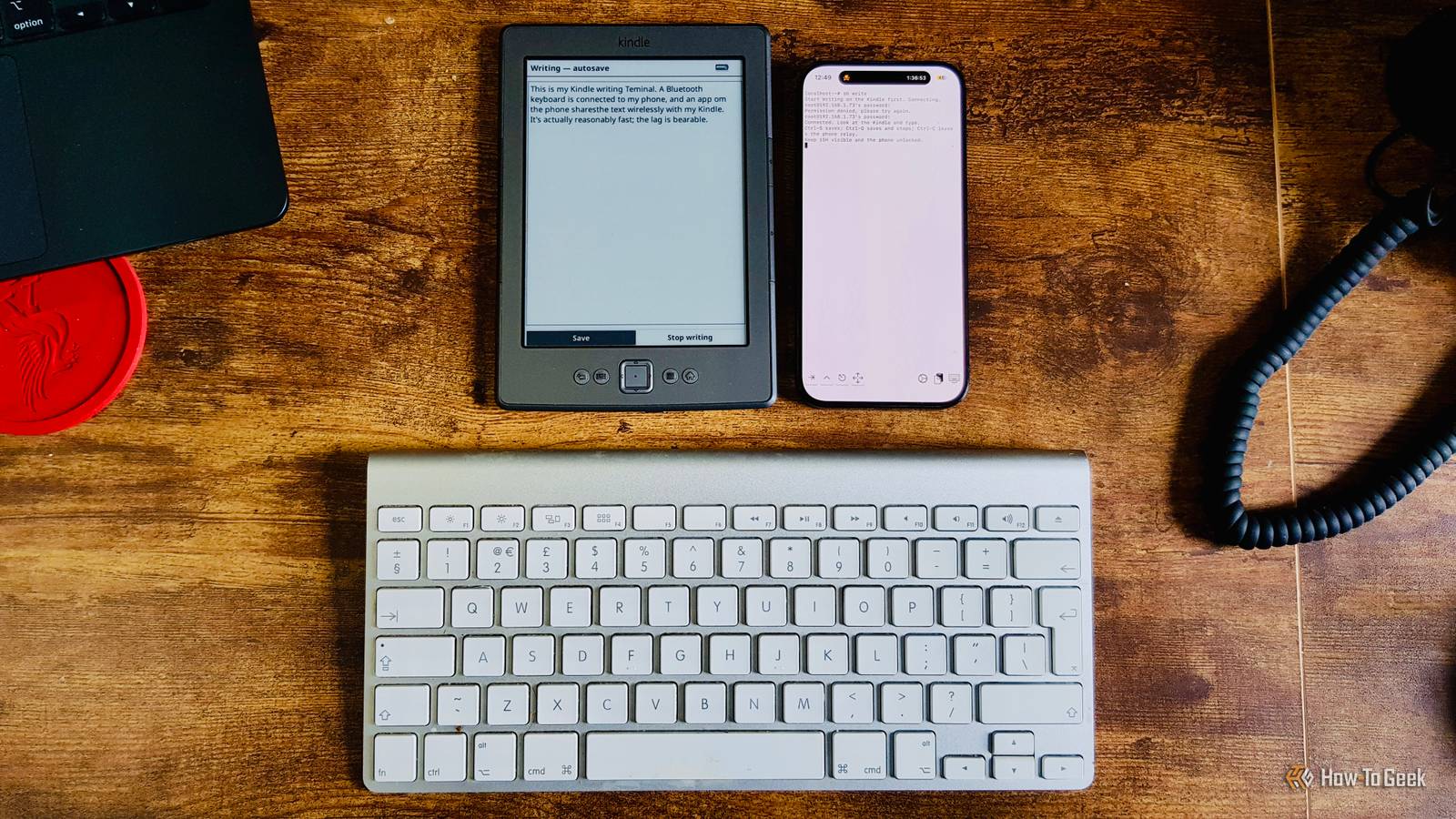
I wasn't sure if it would work that well as a writing terminal, but I decided to give it a go.I wanted the setup to be easy to use and not require much in the way of additional hardware.A Bluetooth keyboard is connected to my phone, and I use an app called iSH that runs a Linux shell on my iPhone.
A script captures the keystrokes from the keyboard and wirelessly sends them to the Kindle via SSH, which is set up in KOReader.A custom plugin in KOReader displays the captured keystrokes on the Kindle's screen as I type, with the editor running locally on the Kindle itself.I can type, delete, and edit text, and save the text to the Kindle, with an autosave running every couple of seconds.
When I'm done, another script shares the saved text file to my phone, and I can then send it to my laptop and open it in any word processing app.Related 7 things my jailbroken Kindle can do better than an Android tablet or iPad Sometimes a Kindle is all you need.Posts 5 By Adam Davidson E-Ink makes more sense for writing than you might think It's not fast, but it has other benefits Writing using an E-Ink screen as the display may not seem like it makes a lot of sense at first.
The way that E-Ink displays work means that they can't refresh particularly quickly, so they're not the obvious choice for a writing terminal where the content of the screen is constantly changing.However, even using my ancient Kindle 4, the lag isn't unbearable.The characters that I'm typing appear on the screen with only a short delay, and I can move the cursor around through the text to make edits without the whole thing feeling too painful to use.
The E-Ink screen also has some significant benefits over my laptop.The screen reflects ambient light rather than emitting its own, making it more comfortable to use for extended periods than my laptop.It's also far easier to see in bright sunlight, unlike my laptop, which becomes mostly unusable.
If I want to work outdoors, using my Kindle writing terminal is so much better than my laptop.Removing distractions is the whole point If I keep my phone out of sight, there's nothing to steal my focus The biggest benefit of this setup is that it (almost) completely removes distractions.In the past, I've set up the Kindle to work as a second monitor for my laptop.
It worked fine, but it meant that all the distractions of the laptop were still right there.With this setup, all I have is the Kindle, a keyboard, and my phone.My phone is arguably even more distracting than my laptop, but I don't need to have it out for my writing terminal to work.
The iSH app needs to keep running in the foreground for the whole thing to work, but I turn the brightness right down and stick my phone in my pocket, so I'm not tempted to pick it up and look at it.That means the only things in front of me are the keyboard and the Kindle, so there's really nothing else to do other than focus on the writing or read an eBook.Removing distractions has made me far more productive.
It won't replace my laptop, but that isn't the point It's great for just getting stuff down That's not to say that I do all of my work on my Kindle now.The setup is great for getting text down, but it's not really suited to editing and rewriting.Without a mouse or trackpad, selecting chunks of text or copying and pasting just isn't viable.
The thing is, I'm not trying to replace my laptop.I'm just trying to stop myself from getting distracted when I'm writing, and my Kindle writing terminal really helps.It's perfect for getting down the first draft of an article without anything else getting in the way.
Once it's written, I can export it, send it to my laptop, and start editing it in my word processing app of choice.Since I'm using a full-size keyboard, I type just as fast as I do on my laptop, and without the distractions, I get the first draft finished more quickly.I can then carry on the editing process on my laptop or desktop.
Sometimes fewer features are the best feature My Kindle writing terminal is incredibly basic, but that's the entire point.When I'm writing a draft, I don't need bells and whistles; I just need something that allows me to get the text down without stealing my focus.With an old Kindle, a keyboard, and my phone, I get exactly that.
Read More