Claude and ChatGPT are where most of us started with AI, and once you discover what they can do, it’s only natural to put them to work beyond the chat window.That means plugging them into other tools and harnesses through their APIs.But once you do, Claude and ChatGPT stop being a simple $20 subscription and start behaving like metered utilities that can quietly run you hundreds of dollars a month, depending on what your automations are doing.
Fortunately, you’re not limited to using these premium models with their premium pricing.There are dozens of free and open-source AI models out there that are just as capable for most workloads.And if you source them right, they can cost you exactly — nothing.
The best deals in AI aren't advertised — they're researched A bit of upfront research can save you a lot of money down the line Close Most people’s mental map of AI revolves around four major models — the GPT models from OpenAI, Claude from Anthropic, Gemini from Google, and Grok from Elon Musk’s xAI.That’s understandable, given that these are the models backed by massive marketing budgets.But the open-source space has quietly produced some genuine heavy hitters.
Currently, Kimi K3 from Moonshot AI, GLM-5.3 from Z.ai, and MiniMaxAI’s M3 are some of the big names in the FOSS AI space, offering frontier-level performance.However, I'm not here to simply tell you that there are good open-source models — I'm here to tell you that you can access them at heavily discounted prices, sometimes even for free.All you have to do is use third-party providers instead of accessing these models from their creators’ websites.
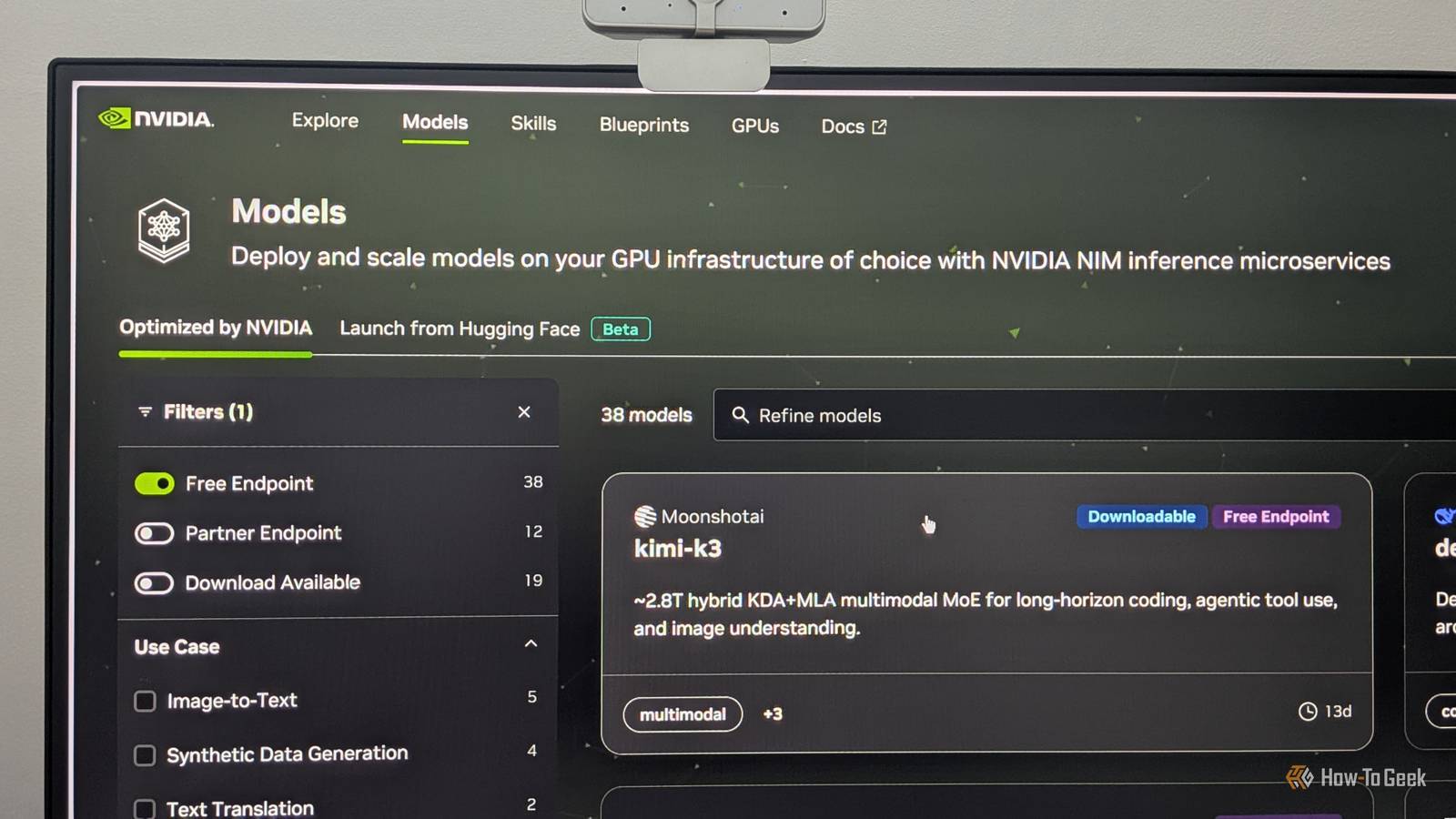
Popular options include OpenRouter, Together AI, and Groq (not to be confused with Elon’s Grok).LM Studio has also recently started offering US-hosted access to these models with zero data retention at very attractive prices.However, the best deal, at the time of writing, comes from NVIDIA.
They host a huge catalog of open models on their own infrastructure at build.nvidia.com, and they routinely make some genuinely powerful models available completely free.These free endpoints rotate — a model might be free for a limited window and then get delisted — but there’s always something worth using in the pile.For instance, right now, NVIDIA is offering a free endpoint for Kimi K3.
Before this, they were offering a free endpoint for MiniMax M3.Related Gemma 4 and Qwen 3.6 aren't competing—they're solving completely different problems Your choice between Gemma 4 and Qwen 3.6 depends entirely on where your code runs.Posts 4 By Jorge A.
Aguilar Are these free models really as good as Claude and ChatGPT? A drop in quality for a drop in price isn’t always a good deal Close Many of these open models claim to go toe-to-toe with Claude Opus 4.8 or GPT 5.6 Sol.Some of them are even trading blows with Claude Fable 5 — Anthropic's top-tier model.Now, I haven't personally tested them against Fable — running that comparison would cost more than I'm willing to spend.
However, I do run a bunch of n8n automations using Claude Opus 5.I just replaced my Anthropic API with one of these free models and actually found the performance pretty good — good enough that I’ve permanently switched.That said, I realize this is an anecdotal claim, and your mileage may vary depending on your use case.
As such, it’s best to test these models yourself to see how they perform for your particular needs.Just swap your Claude or GPT API endpoint for NVIDIA's, run your tools exactly as you normally would, and judge the results.And since the models are free to use, the testing costs you nothing but a bit of time.
Still, if you’re looking for a basic idea of where to start, you can always visit Hugging Face for model benchmarks.Alternatively, YouTubers like Matthew Berman and 1littlecoder are always testing out these newly released models.You can watch their videos to get a sense of what these models are capable of.
Related 4 open-source tools that can replace your Claude subscription (and sometimes outperform it) I ditched my Claude subscription for these 4 open-source tools—and they're actually better.Posts By Jorge A.Aguilar How to use these free and open-source models It’ll barely take you two minutes to set up As free and open-source models, they’re all readily available online, and you can download and run them on your own hardware.
However, while that’s technically possible, it’s not the most practical option.We’re talking about models with trillions of parameters.You’ll need a GPU with at least 1,000 GB of VRAM to run them at full precision.
If you have that, great (and can we be friends?) — but I’m assuming that you don’t.As such, we’re dependent on companies that actually have that kind of hardware to host these models.Now, as I mentioned earlier, there are actually a bunch of companies in this space, with NVIDIA being one of them — and it also makes these models available for free.
That said, none of the inference platforms offer a polished chat interface for you to interact with these models.They’re delivered the way Claude’s and ChatGPT’s APIs are — as endpoints you plug into other AI software, commonly called harnesses.And while all of that can sound a bit too technical, I swear, it mostly takes a couple of minutes to set up.
First, to get the API, visit build.nvidia.com/models.Next, click your profile icon, select API Keys, and click Generate API Key.Give the key a name (so you can remember where and how you’ll be using it) and set an expiration date.
You’ll get a new dialog box showing your API key, which starts with “nvapi.” Copy it immediately and store it somewhere safe — NVIDIA won’t show you this key again.If you lose the API key or think it’s been compromised, delete the key from the same dashboard.If someone has access to the key, they can use your inference quota.
The API gives you access to all the models NVIDIA has made available — no need to buy any tokens or enter your credit card information.With the key in hand, you can simply paste it into whatever app you want to use.For example, if you want a basic chatbot powered by these free models, you can use Open WebUI.
Just select the model you want to use and start chatting, or give it a coding task to get a sense of what the model is capable of.But the real value shows up when you use them with proper harnesses — that’s where the free API access genuinely pays off.Some popular options include: Open Cowork: A free and open-source alternative to Claude Cowork or ChatGPT Work.
Cursor: An AI-powered coding agent.Hermes Agent: A self-improving agentic AI.OpenClaw: An open-source AI agent.
n8n: An automation platform.These free endpoints are meant for personal use, testing, and development.They are not intended for production applications where you're hosting something for other users.
That’s it for the pros — what about the cons? There are always some caveats There are two main points of friction with the NVIDIA APIs, though neither is a deal-breaker — at least not for me.The first is the rate limit.While it doesn’t limit you to a set number of messages every five hours — like Claude or ChatGPT’s free tiers — it does limit you to roughly 40 requests per minute.
For most personal use cases, this is a non-issue — I can't think of a scenario where I'd personally fire off 40 requests in a minute.However, if you’re running some heavily automated workflows that shoot tons of requests in parallel, this can become a bottleneck.The second is more important — speed.
The models are actually hosted on NVIDIA's own GPUs, and there's only so much compute to go around.If you're using a popular model (and the powerful models are always the popular ones) or you're hitting the API during peak hours, responses tend to get noticeably slower.There’s also the fact that bigger models eat more compute per request, which compounds the slowdowns.
However, in my book, this is still a fine trade-off.The slow responses are only annoying if you're using it as a chatbot.If you’re using it to power your background automations — which is what I do — the raw intelligence of the output matters far more than how many seconds it took to finish.
Related 3 things I automate with local AI that I'd never trust ChatGPT with Because your private information deserves a private LLM to process it.Posts 1 By Dibakar Ghosh
Read More