Smart features on a TV can be very useful.You can stream content using apps such as Netflix or control your TV remotely with your smart home.You need to connect your TV to the internet to use some of these features, and doing so can expose a lot of your data.
Why I decided to make my smart TV dumb The smart features aren't worth the cost I have Pi-hole set up on my local network, and DNS requests from my connected devices usually get passed through it.Looking at the DNS requests from my TV was something of an eye-opener.DNS requests don't show you the content of network traffic, so there's no smoking gun here.
When I'm using streaming apps on my TV, there will be DNS requests to reach the services that deliver the video stream.However, there were also lookups for app boot domains, API domains, logging domains, event domains, push domains, image CDN domains, TV-partner domains, and even voice-related Netflix/LG domains.Most concerning, but not totally unexpected, were lookups for a domain associated with a company that uses Automatic Content Recognition (ACR) to track the programming and advertising that people watch.
This was an indication that my TV may be sending information about content that I was watching to third parties.The annoying thing about ACR is that it doesn't just monitor content you watch through your TV's apps; if you stream content through a streaming stick or watch a DVD and the content appears on your screen, ACR can still try to recognize it.The webOS software on my TV also isn't that great.
Using clunky software that shares a lot of data about me just didn't feel worth it.LG C5 OLED Display Size 42, 48, 55, 65, 77, or 83 inches Operating System webOS The LG C5 is a premium 4K OLED TV that sits between LG's more budget-friendly B-series and flagship G-series models.It finds a happy sweet spot of good picture quality and gaming features without a crazy price tag.
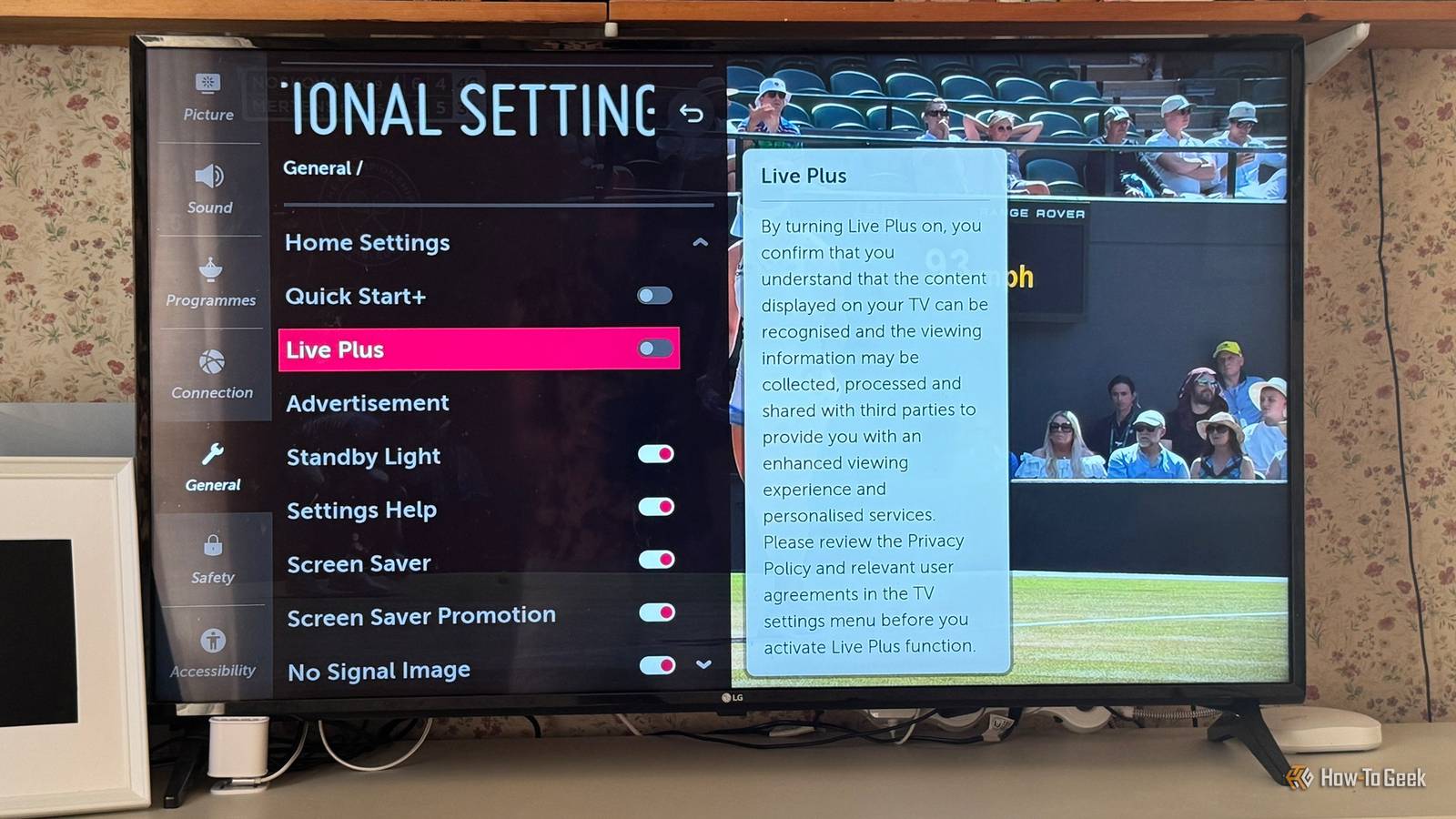
Display Type OLED Display Resolution 4K (2160p) Connectivity Wi-Fi 6E, Bluetooth 5.3 Weight 36.6 pounds Response Time 120Hz VESA 300mm x 200mm $1000 at Best Buy $999 at Amazon Expand Collapse Disabling the worst settings I could turn things off, but I still had concerns Close To be fair to LG, you can disable a lot of the smart features in the settings.The problem is that, as with many companies, features that you might want to disable are often hidden behind innocuous-sounding names.For example, LG's ACR feature, which can determine what you're watching based on the images displayed on your TV screen, is called Live Plus.
This makes it sound like a great extra feature, and while LG describes it as an enhanced viewing experience, the setting description on the TV makes clear that "content displayed on your TV can be recognized and the viewing information may be collected, processed, and shared with third parties." This was the first thing I disabled by going to Settings > All Settings > General > Additional Settings and toggling Live Plus off.In the same Additional Settings section, I went to Advertisement and toggled on Limit Ad Tracking and toggled off Screen Saver Promotion.I then went to Settings > All Settings > General > Additional Settings > Home Settings and turned off Home Auto Launch and Home Promotion.
In General > Account Management, I only accepted Terms of Use and withdrew my consent for things such as Interest-Based Advertisement Management.Finally, I navigated to General > AI Service and toggled off both recommendation options.Related The 4 apps I uninstall on every Google TV Save space and clean up bloatware.
Posts 6 By Cory Gunther The safest option is to disconnect from the internet No Wi-Fi, no Ethernet, no tracking Turning off all of these settings was a chore, and I was still a little paranoid that I might have missed some of the key settings.I decided that the only way to be sure that my TV wasn't sharing my data was to disconnect it from the internet altogether.If the TV couldn't communicate with the outside world, it wouldn't be able to share data about what I watch with anyone.
I use a wired connection from a mesh node for the TV, as I wanted the most stable connection I could get for streaming.Disconnecting the Ethernet cable was the obvious first step.I'd also set up a Wi-Fi connection at some point, so I needed to disable it, too.
I went to Settings > Connection > Wi-Fi Connection and turned the toggle off.My TV was now completely disconnected from the internet.An old Apple TV replaced webOS I still get smart home control with IR My smart TV was now a dumb TV, and there were a couple of significant issues.
Firstly, I could no longer use the streaming apps on the TV to watch Netflix or other streaming services.I solved this easily by hooking up an old Apple TV, which had all the streaming apps I needed, including Swiftfin for Jellyfin.The second problem was that I was using the LG webOS TV integration in Home Assistant to control my smart TV, allowing me to open streaming apps, select the input source, change the volume, and more.
The simple solution was to replace this functionality with infrared.Using an IR blaster, I can do everything I can do with the standard TV remote, and the Apple TV integration in Home Assistant lets me open specific streaming apps just like I could on my TV.I let my TV share my data for too long I've owned this TV for some time, and I really should have done this sooner.
I aim for local control for my smart home wherever possible, and while my TV is now dumb, I can still control it locally using infrared.I can finally watch endless repeats of without embarrassment now that my TV can't tell LG what I'm watching.
Read More