You probably assume only employers, marketers, and big corporations can track when you open their emails.But the truth is, anyone can do it — me, your friends, your family, or even a complete stranger on the internet.Luckily, Gmail and most other email providers have a simple setting that can shut this down — at least most of it.
But first, let me quickly show you how email tracking works in the first place.Add How-To Geek on Google Add as Preferred Source Follow on Google Discover This open-source app tells me exactly when you open my emails And it’s ridiculously easy to use Close Email tracking is generally a feature of expensive marketing software, but I found an open-source app that does it for free: Mailspring.It’s basically a desktop email client like Thunderbird.
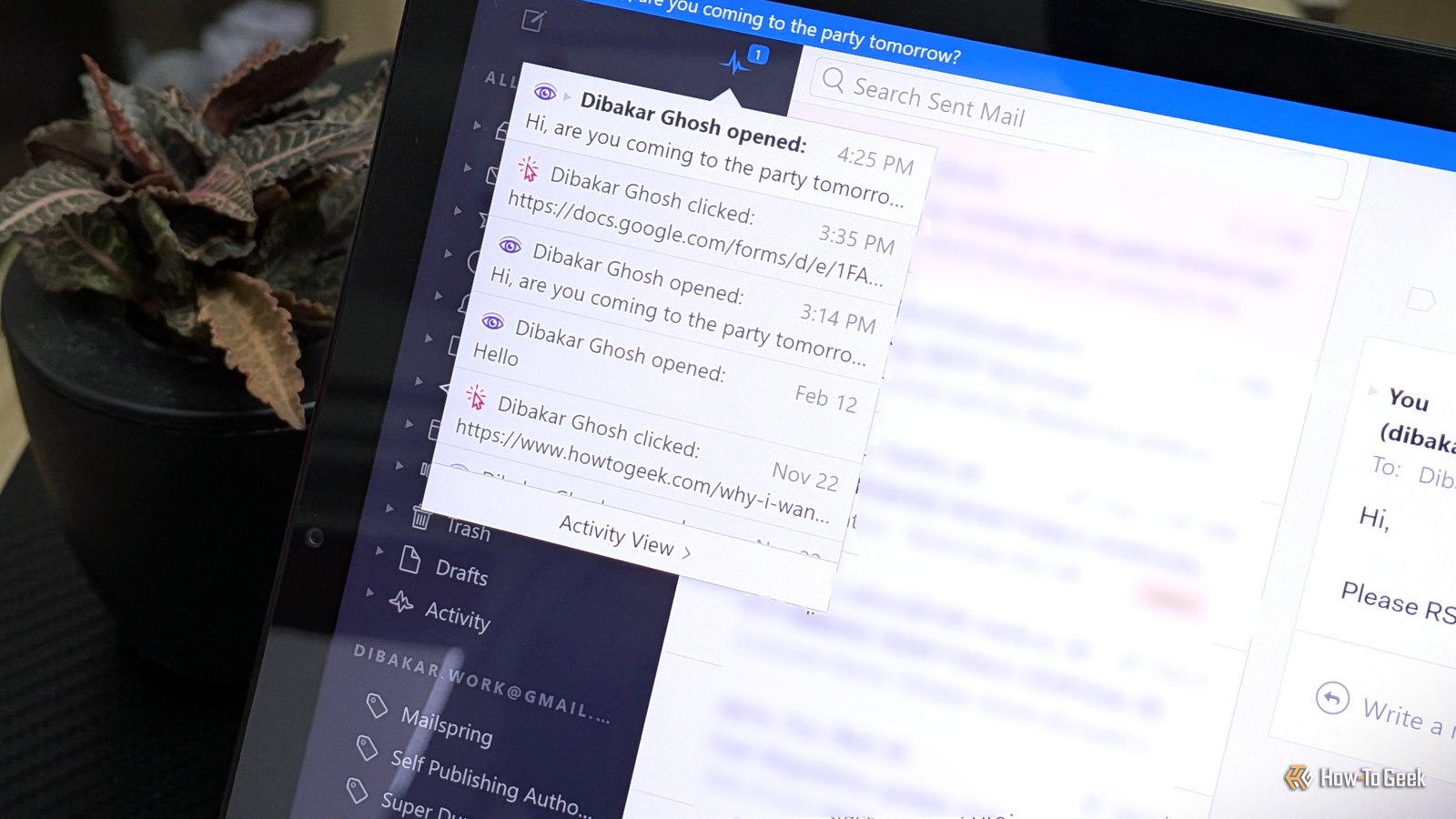
You install it on your computer, connect your Gmail account (or any other email account), and then use it to send and read emails from that account right on your desktop.However, Mailspring also adds a bunch of advanced features, including the ability to add trackers to your emails.When you use Mailspring to compose an email, you’ll find two small icons at the bottom of the toolbar that let you enable “open tracking” and “link tracking.” If you send an email through Mailspring with these options enabled, you’ll be able to see if and when someone opens your email or clicks a link in it.
The notifications show up right in the Mailspring app, and there’s also a dashboard showing your open-rate statistics.You’ll need to create a Mailspring ID to use either tracking feature, as both require access to Mailspring’s servers.These are also freemium features.
You get five free tracked emails per week and need to upgrade to the $8 Pro plan for unlimited tracking.Related I ditched Outlook for this open source email client (and it’s not Thunderbird) My outlook for the future of Outlook was so poor that I switched apps.Posts 25 By Dibakar Ghosh The trackers are basically invisible images, believe it or not Knowing is half the battle You might think that me knowing when you open my emails is similar to me knowing when you read my WhatsApp messages, but the two work very differently.
Read receipts on WhatsApp are a built-in feature that you get in most instant messaging apps.Email, on the other hand, was modeled after regular snail mail, with no built-in way to know when a message gets opened.Email tracking was largely introduced later through additional software, and the most popular method today is called pixel tracking.
It’s what most email marketing tools use, and it’s also what you get with Mailspring.It works by adding a tiny 1×1 image (hence the name ) to the email.However, the image isn’t attached to the email — it sits on the sender’s server, and the email just contains a link to it.
When you open the email, your email app tries to load everything inside it, including that image, so it sends a request to the server.The server logs that request, and that’s how the sender finds out you opened their email.So pixel tracking isn’t technically recording when you open an email.
It can only tell when the image is loaded, which works as a decent proxy but isn’t entirely reliable.For example, if your email app loads all images as soon as an email arrives in your inbox, pixel tracking will report the email as opened right away, even if you never looked at it.Likewise, if your email app doesn’t load images at all, pixel tracking will report that the email was never opened, even if you read it several times.
Related 5 Gmail Features on Android That Will Help You Stay Organized and Save Time Because Gmail has more to offer than just sending and receiving emails.Posts By Kabir Jain This one Gmail setting will leave the trackers blind Stop the images, stop the tracking Close Now that you know how pixel tracking works, the solution should be pretty clear.Simply stop images from loading in your emails, and the tracking pixel won’t be able to do its job.
That said, there isn’t a universal switch that turns off automatic image loading across all your email accounts.The setting generally works on a per-app basis.For example, if you turn off automatic image loading in the Gmail app on your phone, that setting won’t carry over when you use the same account in another email app, such as Outlook or Thunderbird.
The exact steps to disable this feature vary from app to app.For reference, I’ll cover how to do it in Gmail, since that’s what most people use.On the Gmail web app, follow these steps: Click the gear icon in the top-right corner and select “See all settings.” In the General tab, scroll down to the Images section.
Select “Ask before displaying external images.” Click “Save Changes.” That’s it.On the Gmail Android app, follow these steps: Open the menu.Go to Settings.
Select your account.Scroll down to the Data usage section.Tap Images.
Select “Ask before displaying external images.” That’s it.If you have multiple accounts in the Gmail app, you’ll need to repeat these steps for each one.This extra privacy comes at a cost Most emails today are full of images.
In fact, sometimes the main content of an email is contained in images, such as an infographic or a chart.As such, blocking images in your emails means many of them will show up looking empty or broken.Even so, if you’re concerned about your privacy, it makes sense to turn off automatic image loading as the default setting.
You can always allow images to load for a specific email if you want to view them, or even whitelist a sender you trust and don’t mind them knowing when you’ve opened their emails.Related Want real privacy? Ditch big-tech OSes and go Linux Are you tired of big tech watching your every move? There's a solution...Posts 3 By Sydney Butler The links you click still give you away, though I can still tell if you’re engaging with my emails I promised to show you how to stop people from knowing when you open their emails, and I did.
However, if you recall, open tracking isn’t the only kind of email tracking.There’s also link tracking, which tells the sender if and when you click any links in their emails.Now, this one isn’t so easy to turn off.
You see, Mailspring — and most email marketing tools — wraps the original link in a tracking URL that points to its own server.When you click the link, the server logs your request and then redirects you to the page you meant to visit.It happens so fast that you’d never notice, but if you compare the link in your email with the URL of the website you land on, you’ll see they’re different.
Thankfully, there’s a way to bypass this kind of tracking.For instance, you can right-click the link and select “Copy link address.” Then, paste it into a free tool like URL Decoder to extract the original destination URL.This way, you can open that URL directly in your browser without going through the tracking server.
However, this doesn’t always work.Unlike Mailspring, which encodes the destination URL directly in the tracking link, some link trackers store the actual destination on their own servers.In that case, the only way to find the destination URL is to trigger it, which’ll log your interaction with the link.
Email tracking is not malicious (at least not always) While the idea that someone knows exactly when you open their emails feels kind of creepy, there’s rarely anything sinister going on.Marketers mostly use it to figure out the best time to send their emails to maximize open rates and see which subject lines get the most clicks.That said, things can get messier when someone, like a friend or family member, uses a tool like Mailspring to see when you open their emails and hold you accountable.
However, that’s more of an awkward social problem than a real threat.Also, now that you’ve read this, you know how to bypass some of these tracking methods.Related Why I Want Email Read Receipts (and You Might Too) Fight fire with fire, and trackers with trackers.
Posts 4 By Dibakar Ghosh
Read More