As web developers, we deal with text all the time.Whether it's JSON, HTML, URLs, Markdown, or something else.Nobody talks about the utilities that boost your productivity when managing these, so I will.
I have three tools that'll help you make faster remote API calls, build and learn jq more quickly, and transform strings from one format to many others.Resterm A Postman-like TUI to semi-automate remote API calls Resterm is a Postman-like replacement that supports HTTP (REST), GraphQL, gRPC, WebSocket, and SSE.It even handles automatic port forwarding for Kubernetes clusters and some forms of authentication, including OAuth.
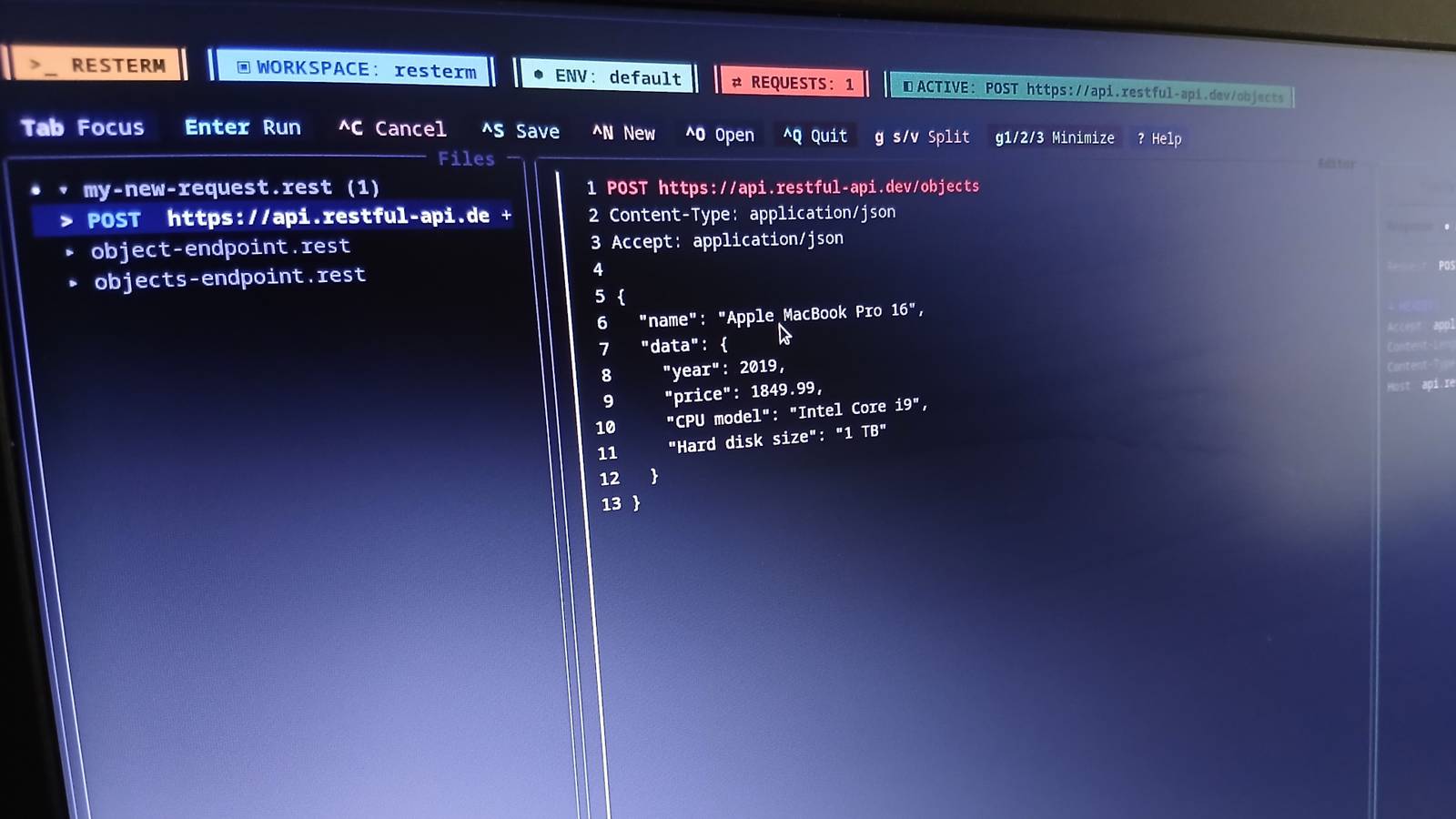
The goal, it seems, is to remove many of the frustrating barriers of API-endpoint testing, right in your terminal.The core idea is simple: you create query sequences inside familiar .http (or .rest) files.The left panel is the file manager, the middle is the editor, and the right is the result pane.
Because query sequences can become long and complex—like chained requests that require a shared token or authentication—Resterm includes a custom scripting engine called RestermScript (RTS) to handle them.It's reasonably straightforward, and you declare the syntax inside comments.You can also store simple routines in helper files and even project-specific values in resterm.env.json or plain-old .env files too.
Resterm runs the saved requests through a template engine, so you can access your data via curly braces, like {{ foo.bar }}.Microsoft Surface Pro 8 The best pen experience on a Windows system, and also a solid computer overall.Technically a tablet, but Microsoft's keyboard and pen make for a well-rounded experience.
$1000 at amazon Expand Collapse If you're a Vim user, you'll be happy to hear that resterm supports basic Vim motions, modes, and commonly used text objects.However, you need to get used to :w doing absolutely nothing.In fact, the file management interface resembles Nano more than Vim, with Ctrl+N, Ctrl+S, and Ctrl+O to create, save, and open files.
That's not to knock it, because moving around feels 95% natural to Vimmers.Resterm has both manual and headless capabilities via the CLI, TUI, or Go API, so it's not just a niche tool but one you can adopt across your entire project.There are installation instructions on its GitHub page (curl and brew), but I prefer UBI, which I cover extensively in another article: ubi -p unkn0wn-root/resterm JNV A fuzzy JSON query builder JSON is unavoidable for web developers, and processing large objects is frustrating without specialized tools like jq.
If you're unaware, jq is a simple query language to extract JSON values.Like most query languages, getting it exactly right the first time is unlikely, and often is the case that an interactive tool is an enormous help.Cue jnv.
Jnv feels much like fzf for JSON.It allows you to construct queries and watch the results in real time.To do that, pass the binary a JSON file path, and an interactive UI appears.
As you type the query, you see a filtered view in the window below.Related 5 Great Linux Utilities to Monitor Your System Resources in the Terminal Because the core utilities don't do it all.Posts 3 By Graeme Peacock Jnv is a simple tool that does one thing well.
It may not seem like much, but that instant feedback is a fantastic help when learning jq and probably the best way to explore unfamiliar JSON files.JSON seems to be the universal configuration format, and I use it to manage my setups.Love it or hate it, it's here to stay, but a tool like jnv makes JSON files and schema a lot easier to grok.
You can install it with Homebrew, Cargo, Nix, MacPorts, Docker, or my preferred method: ubi: ubi -p ynqa/jnv See its GitHub page for the other installation options.Sttr Transform any string into any other format As web developers, we're constantly dealing with different formats of text.Whether it's HTML, URLs, JSON, Markdown, or something else.
I often need to craft a command pipeline just to massage the data into something usable, which is error-prone.Sttr is a simple string transformer that takes an input path plus a command and then outputs a reformatted result.Some examples are: Escaping/unescaping HTML Encoding/decoding URLs Base64 encoding/decoding strings Converting color formats, like hex to RGB Escaping JSON Turning Markdown to HTML Changing case, e.g., camel to Pascal case, or kebab to snake case Converting YAML to JSON Sttr can do these and much more.
It's one of those tools you skip over but go, "Oh, yeah!" when you suddenly need it.The good thing is the hardest part is remembering the name, because it's so incredibly simple to use.echo ‘camelCase' | sttr kebab It takes only one command: the desired output format.
There are a variety of ways to install it, including curl, brew, snap, Docker, WinGet, scoop, Go, and other ways I've never heard of—see its GitHub page for installation instructions using these methods.However, as usual, UBI makes it easy: ubi -p abhimanyu003/sttr Sttr has a CLI, but it also has a TUI.If you pipe text into it without providing a command, it will ask you to select a conversion target.
You can filter results by pressing the "/" key.Related Just Starting Web Development? Here’s Exactly Where to Begin Resist the complexity and make it easy on yourself.Posts 2 By Graeme Peacock REST, JSON, and string manipulation are all frequent challenges web developers face.
These tools make life easier in those regards, particularly jnv.While people may not appreciate it, jnv makes learning jq 10 times quicker.It also forces you to understand complex schemas by making you write logical expressions that reflect their shapes, and with instant feedback, you'll comprehend large JSON structures much faster.
Read More