Smart furniture is stupidly expensive.On my hunt for full-length mirrors with smart RGB lighting, it hit me.I don't want to pay $150 or more for something that does not even connect to my smart home ecosystem.
That's why I decided to make it myself, all on a tight budget.Going the DIY route let me create something perfect for my needs, instead of sifting through the boring, overpriced options on the market.The total cost of making my own smart RGB mirror was astonishingly cheap.
Here's how I did it.Add How-To Geek on Google Add as Preferred Source Follow on Google Discover Pick the right shape and specs Not all mirrors and lights are created equal Close Full-length mirrors with smart RGB lights built-in cost a ton of money for a very simple product.I won't even touch name brands, because the off-brand options already sit at steep price ranges.
Most of them come with remotes, and only a few of them pair with Android and iOS apps, but the extent of features offered in their companion apps is lackluster at best.So if you have $150 to burn on a bad product, just make a better one yourself, as I did.Start by picking out the size and shape of your mirror.
Speaking of myself, I knew I wanted a full-length mirror with an arched top, a storage rack or shelf on the back, and a rotating design.I bought mine on sale for about $30, but the full price is around $100 on Amazon.I highly recommend checking Facebook Marketplace, thrift stores, and flea markets instead of buying it at the undiscounted price.
You might even find someone selling it for cheaper, or giving it away for free on Marketplace.This design is much more complicated than a simple mirror that comes with a kickstand.Related 7 smart home upgrades you need in the bedroom Sleep better, wake up gently.
Posts 2 By Tim Brookes If you don't need all these bells and whistles, you can go for a simpler design instead.It'll be lighter on your wallet.Simple full-length mirrors are much more affordable, starting at $35 per piece.
That alone saves a big chunk of money, but there's more good news.Depending on the brand of your smart light strip, you can get away with spending only another $25 more.A conservative estimate puts this total at about $60 for the entire project — a third of what the pre-made version would have cost you.
Choose a smart light strip with a dependable app Check compatibility with your smart assistant too Most entry-level RGB light strips and smart mirrors have terrible software support.In the past, I faced an issue with a smart RGB lamp from Amazon that was really cheap.A few years in, the app stopped working, and the seller had left Amazon by then, so I couldn't even reach out to them to get help.
Luckily, name-brand LED strips adhere to stricter standards and are incredibly budget-friendly these days.Govee offers a 16.4ft RGB light strip that supports Alexa and Google Assistant for hands-free controls.It also has a reliable companion app, produces 16 million colors, offers music sync mode, and includes a wide range of light presets.
This includes extensive customizability options.The entire 16.4ft strip costs only $24.99, and you can get iteven cheaper during seasonal sales like Black Friday or Christmas.All smart light strips come with 3M adhesive on the back.
Installing it on a full-length mirror is as easy as pie.Make sure you plan your path, because you don't want to unstick and re-stick the strip on the mirror's sides.Think about which side you'd want the power adapter to be on.
First, do a mock-up round without removing the sticker peel, then proceed with the real thing.The sticky bottom of the light strip should be glued onto the flat sides or edges of the entire mirror.If you have some extra bits left at the end, look for the cuttable part on the strip and trim off the excess.
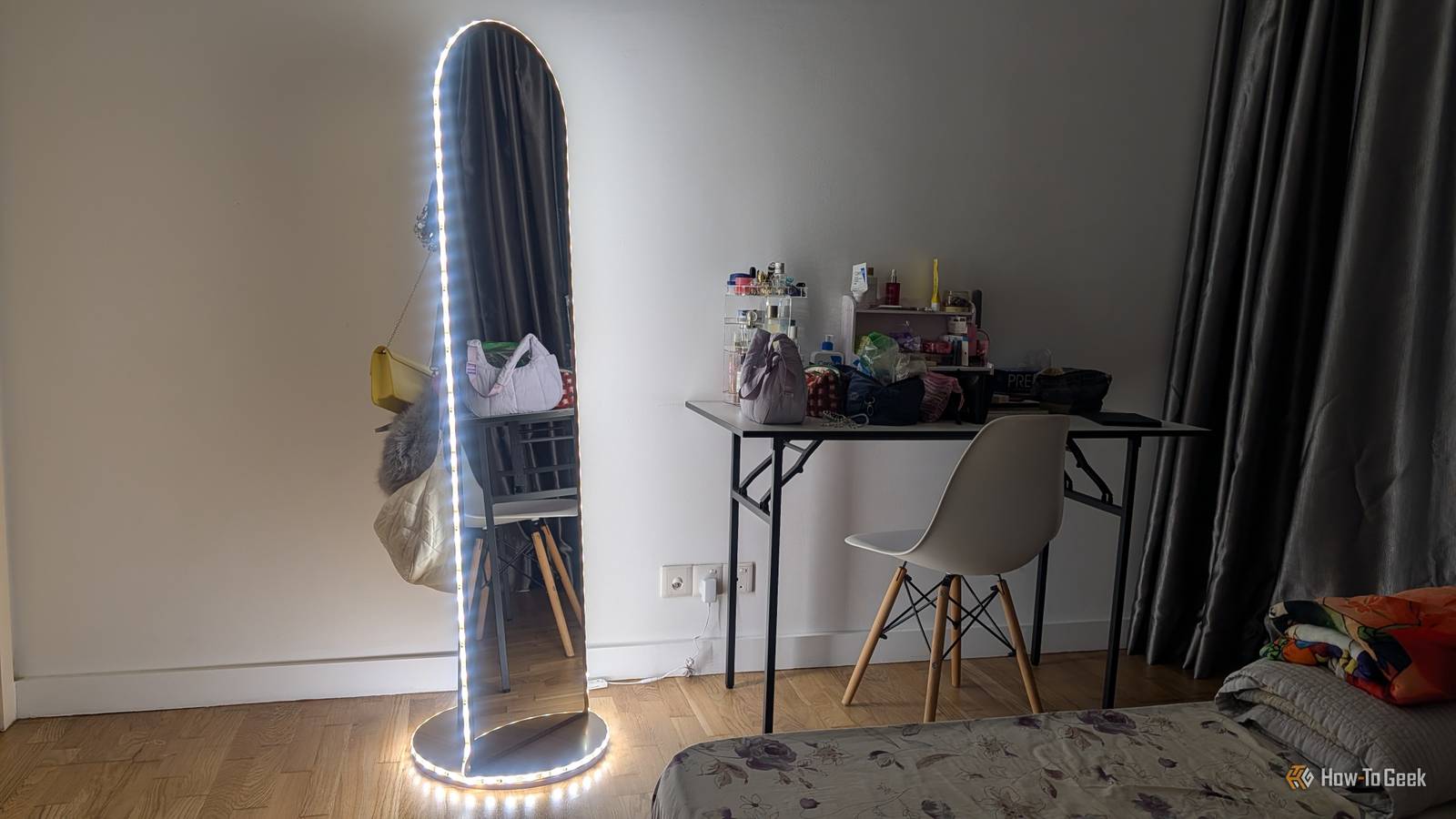
My mirror was really large, so I didn't have to chop off anything.I am so pleased with the final result.It came out super neat and clean, and I keep getting compliments from friends and family.
Zhuzh it up further if you want If you saved money on the mirror base itself, why not splurge a little on the LED lights? That's what I did, and I don't regret my decision one bit.People keep asking me where I bought the smart mirror because I can talk to my Alexa robot or my Google phone to change its brightness, turn it on or off, or give it various other commands.I've even set a custom routine for the brightness to dim to 2% by the time I fall asleep, and then power off completely at sunrise, as I'm afraid of the dark.
For my project, I chose the 16.4ft SwitchBot LED Strip Light 3 for $44.99 because it comes with Matter support in addition to all the features of the Govee strip.I use both Alexa and Google Assistant at home, depending on which room I'm in or which device I'm using, so Matter compatibility is essential for me.The heart of my smart home setup is a Matter-compatible hub from SwitchBot too, so it only made sense to stick with the same brand.
Staying with SwitchBot lets me sync automations and routines for my mirror lights with other smart things in my house.Your choice will depend on what smart home assistant you prefer, and whether you need Matter support.But if you've got the cash to spare, why not treat yourself to an upgraded experience? SwitchBot LED Strip Light 3 Hands-free controls? Check.
Extensive light modes and customizations? Check.Versatile smart assistant support? Check.The 16.4ft SwitchBot LED Strip Light 3 knocks it out of the park in every aspect.
If you need to spruce up your place, this is the right light fixture to buy.See at Amazon Expand Collapse
Read More