I have an annoying habit in Excel.Whenever I want to switch to another worksheet, I instinctively press Alt+Tab.I know that's not what the shortcut does, but years of using it to jump between apps have made the habit almost impossible to break.
So I found a way to make it work.My Alt+Tab habit gets in my way My muscle memory always wins Close I'm a big fan of keyboard shortcuts that speed up my Excel workflow, especially ones that help me navigate the app.When it comes to switching worksheets, Ctrl+Page Up jumps one sheet to the left, and Ctrl+Page Down jumps one sheet to the right.
But the problem is that they're not the shortcuts my hands naturally reach for.Even if I did train myself to use them, there's another problem when I'm working with a workbook that has lots of worksheets.If the two sheets I want to switch between are several tabs apart, I have to either rearrange them or keep pressing the shortcut until I reach the one I want.
This is where my Alt+Tab muscle memory gets in the way.I use the shortcut all day, every day, pretty much whenever I'm working on my computer.I press it if I'm writing something in Word and need to check Excel.
Likewise, I press it if I'm in Excel and need to look something up in my browser.After years of doing this, the shortcut has become almost automatic.In my head, Alt+Tab essentially means "take me to the other thing I'm working on." But this habit is a recurring source of frustration when I'm working exclusively in Excel.
I might be building a report on one sheet while referring to the source data on another sheet.Or I might be working through calculations on one sheet and constantly checking another for information.Once I'm settled into that workflow, I'm not thinking about keyboard shortcuts anymore.
I'm concentrating on the spreadsheet, so my hand instinctively reaches for Alt+Tab.Except Windows doesn't see those two worksheets as two separate things.As far as Windows is concerned, I'm still in the same Excel app.
So instead of taking me to the other worksheet, Alt+Tab takes me to the last app I was using.Then I have to switch back to Excel and click the sheet I wanted in the first place.That doesn't take very long, but when I'm doing it repeatedly throughout the day, it's an irritating little interruption.
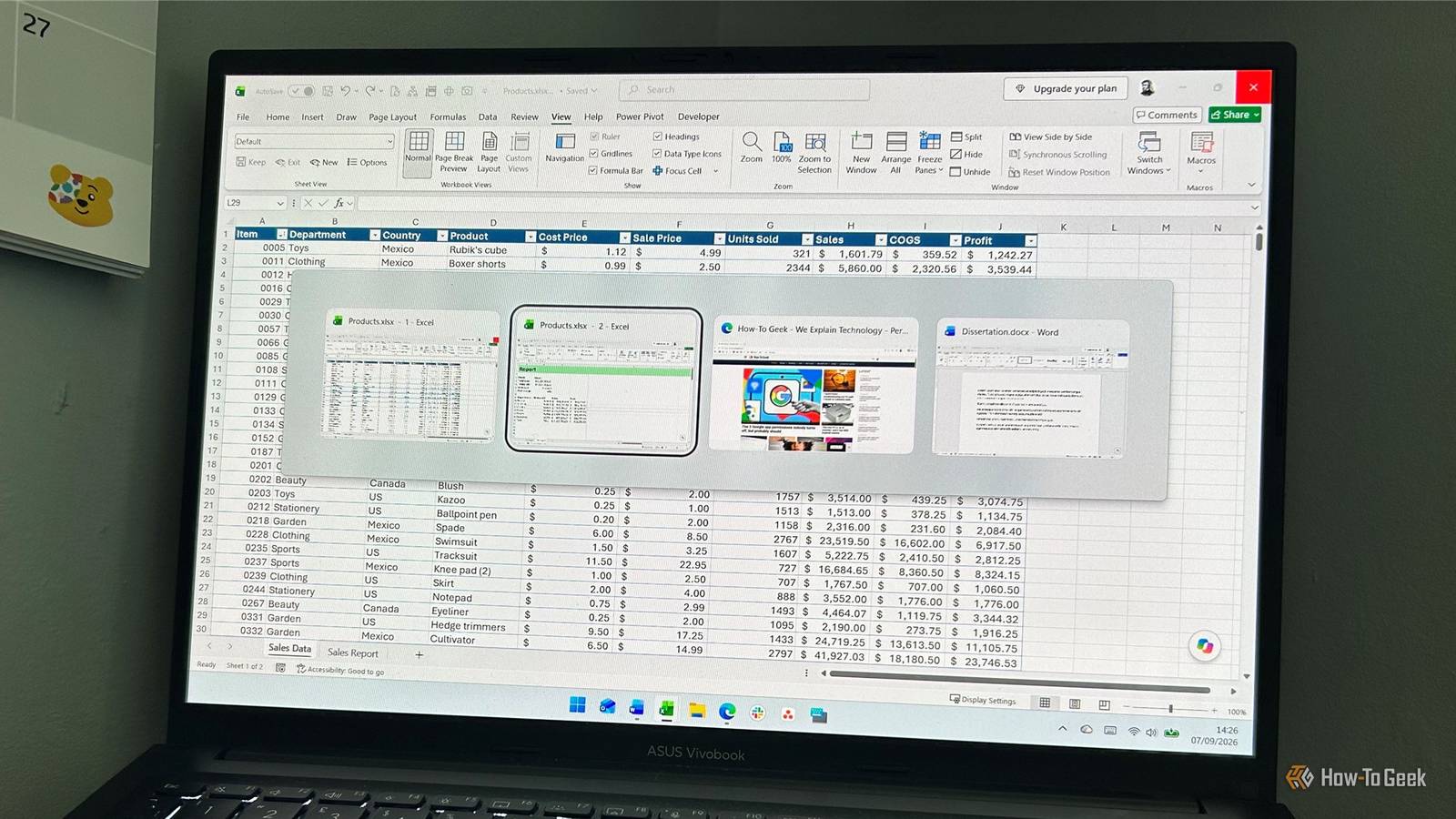
And every time it happens, I think the same thing: Why did I just press Alt+Tab again? Eventually, I stopped trying to train myself out of the habit and found a way to make Excel work with it instead.I opened the second worksheet in a new window Now Alt+Tab actually works Close The workaround is so simple I'm slightly embarrassed I didn't think of it earlier.When I click View > New Window, Excel opens another window showing the same workbook.
The important thing here is that Excel isn't making a copy of the file, and I don't have two separate workbooks to keep synchronized.The New Window tool simply gives me another window into the workbook I'm already using.For example, I might have my main report open in one window and the data sheet open in the other.
I can then leave them on top of each other and use Alt+Tab to jump between them.This is particularly handy when the two worksheets are far apart in the tab list, because I don't have to keep pressing Ctrl+Page Up or Ctrl+Page Down to move between them.Because both windows belong to the same workbook, changes I make in either one are saved to that workbook.
I haven't created duplicate versions or introduced another file into my workflow.Once I've finished cross-referencing the worksheets, I can simply close one window and carry on working in the other, with all my changes intact.This feels much more natural because I'm finally using Alt+Tab the way my brain expects it to work.
If you only need to keep an eye on a few cells in another worksheet, Excel's Watch Window lets you monitor selected cells while you work elsewhere in the workbook, so you don't have to keep switching back and forth.It's particularly handy when you need to reference a handful of figures rather than work directly on the second sheet.I didn't need another Excel shortcut Ctrl+Page Up and Ctrl+Page Down are still useful shortcuts for navigating between worksheets, and I'll carry on using them when I'm simply moving through a workbook.
But when I'm deep into a task that has me repeatedly bouncing between two sheets, Alt+Tab is the shortcut I instinctively want to use.Rather than constantly catching myself reaching for a different shortcut, I give each sheet its own window and let Windows handle the switching.Instead of learning a new habit, I found a way to make the habit I already have work for me.
Read More