I share my Amazon account with my wife, as it doesn't make sense for us to both pay for a Prime subscription.Mostly it's fine, but around birthdays and Christmas, things get tricky.Orders for my wife often arrive with my name on them, so she regularly opens packages addressed to me assuming that they're hers.
I was about to order her birthday presents, so I wanted a way to track the Amazon package so I could grab it and hide it as soon as it was delivered.I gave my old Kindle one simple job The E-Ink display makes a perfect dashboard I wanted to set up a nice, clear, visual indication of the current status of the package, so I could see the current status at a glance.I could display the status on a tablet, but I wanted it to be an always-on display, so a tablet wasn't an ideal choice.
What I really needed was a nice E-Ink display that could show the current status using minimal power and then update the displayed image when the status changed.An E-Ink screen should be able to do this while using very little power.I could have bought an E-Ink display for this specific purpose, but that seemed like overkill for something that I was only going to use occasionally.
Then I realized that I already had an ideal E-Ink display to hand.I've jailbroken my ancient Kindle 4 because Amazon no longer supports it.I've used it for a whole range of things, from displaying a weather dashboard to showing who is at the door, so I knew that it would be perfect for this project.
Raspberry Pi 5 Brand Raspberry Pi Storage 8GB It's only recommended for tech-savvy users, but the Raspberry Pi 5 is a tinkerer's dream.Cheap, highly customizable, and with great onboard specs, it's a solid base for your next mini PC.8GB 1GB Expand Collapse Amazon already provides me with the tracking information I need My inbox is full of Amazon delivery status updates Unfortunately, Amazon doesn't offer a simple public API that I could use to track the status of deliveries from my personal Amazon account.
There was no way for me to query some endpoint to find out whether the package status was "dispatched" or "out for delivery." Amazon does provide me with all of this information, however, in the form of emails.I get emails from Amazon for key changes to my orders, such as order confirmations, dispatches, and deliveries, and my inbox is full of them.It meant I should be able to pull the information directly from these emails.
I set up a filter in my Gmail account that automatically tags any Amazon emails relating to orders with a custom Amazon Packages label.I used the past emails to form the filter so that it included order confirmations as well as dispatch and delivery emails.All the information I needed could now be found in my Amazon Packages emails, which I could see as a virtual folder in Gmail.
Related 7 things my jailbroken Kindle can do better than an Android tablet or iPad Sometimes a Kindle is all you need.Posts 5 By Adam Davidson My Raspberry Pi turns my emails into dashboards The delivery status is converted to an image I set this project up on a Raspberry Pi, just to see if I could, but you could set up something similar on a mini PC or other computer if you preferred.A Python service on the Raspberry Pi connects to my Gmail using a Google app password and searches only those emails with the Amazon Packages label, so that my other emails remain untouched.
It looks at these emails every five minutes to see if any new emails have arrived.The most recent email is examined to find key phrases in the subject line or body relating to the status of the order, based on the format of previous Amazon emails.The status of the order is determined from these key phrases.
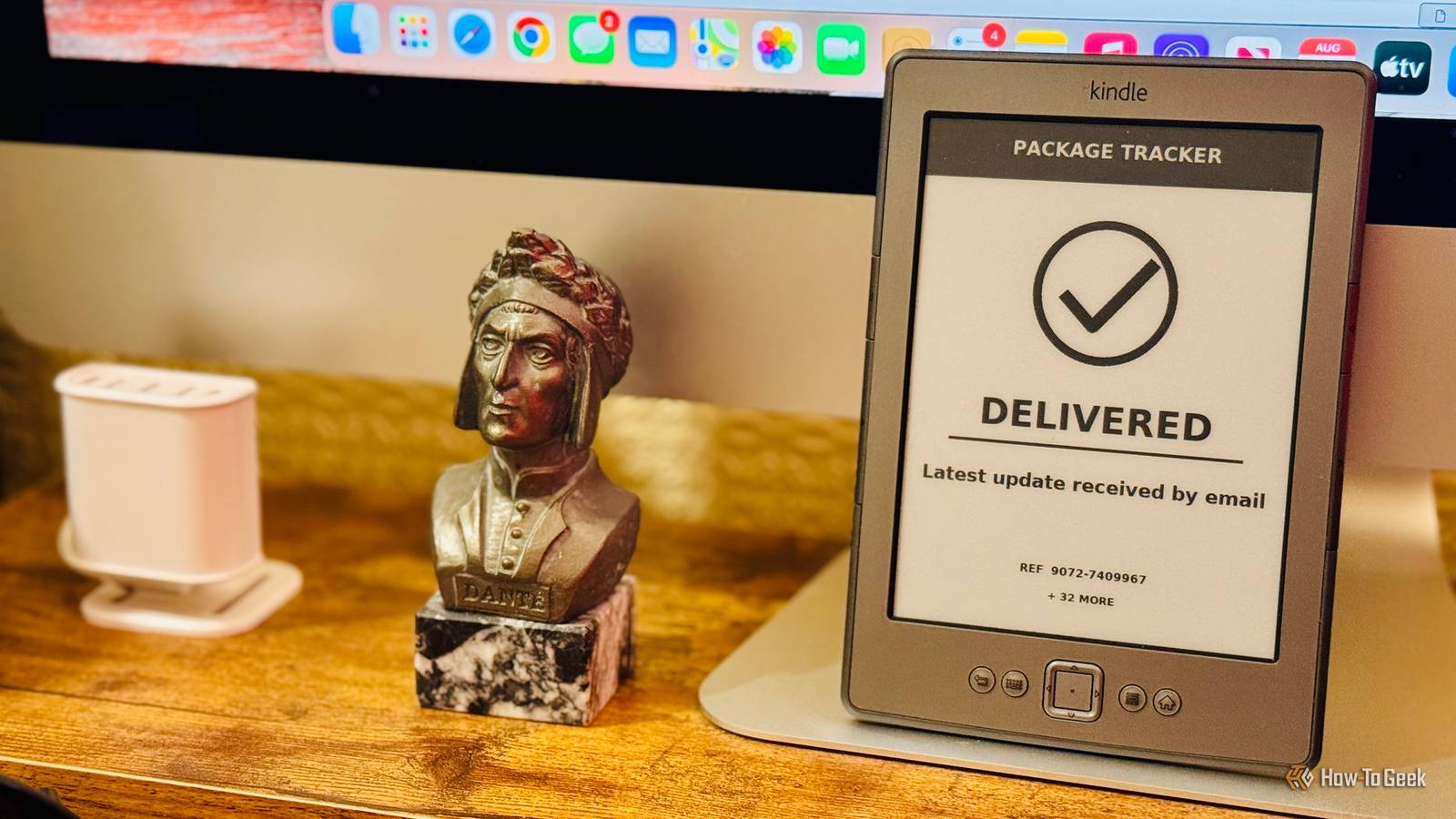
The Raspberry Pi then creates a 600×800 8-bit grayscale PNG image that's ideal for displaying on my Kindle 4.The image contains the current order status along with a matching icon.It also includes key information such as the order reference number.
A second, smaller file is also created that contains an SHA-256 hash calculated from the PNG.If a new status email arrives, a new status image is created, and this hash file will change.A small HTTP server then makes both files available across the home network.
The Kindle only updates when the status changes Images are only downloaded when they update Close The final stage is to get the Kindle to display the generated images.When I run a custom KUAL extension on my jailbroken Kindle, it downloads and displays the current PNG image, which appears on the Kindle screen.The extension then checks the tiny hash file every five minutes.
If the file is unchanged, nothing happens, but if the hash file updates, this means that a new image is available.The extension then downloads and displays the new image.This method helps to stop the entire thing from chewing through the Kindle battery.
Rather than downloading the image every five minutes, regardless of whether it's changed, the image is only downloaded when a new version is available.I leave the Kindle propped on my desk, and I can watch the status change throughout the day.It means that within a few minutes of receiving a status update email, my Kindle will show the updated status, and it often happens before the Amazon email has appeared on my phone.
It works really well and helped me catch my wife's birthday present delivery before she had a chance to open it.I built my Amazon package tracker for free This entire project was set up using an old Raspberry Pi and an outdated Kindle, which meant that it cost me nothing.I love being able to put old tech to use like this; you don't always need to spend a fortune building something genuinely useful.
Read More