With memory prices flying through the roof, becoming a growing concern for smartphone manufacturers, I wouldn't be surprised if virtual RAM becomes the next big marketing gimmick.Different OEMs call this feature by different names; Samsung calls it RAM Plus, while others refer to it as virtual RAM, extended RAM, and more.Add How-To Geek on Google Add as Preferred Source Follow on Google Discover We've already seen several Chinese brands advertise their entry-level smartphones as having 12GB or 16GB of RAM, with up to 12GB of additional virtual memory allocated from internal storage.
I found this feature on my Galaxy phone, too, which made me wonder: Does allocating a portion of your storage to virtual memory genuinely improve multitasking, or does it introduce performance trade-offs that aren't immediately obvious? Since many Galaxy phones have this feature enabled by default, I wanted to look beyond Samsung's claims and see whether RAM Plus is worth keeping on or if turning it off makes more sense.How RAM Plus works on your Galaxy phone More memory on paper doesn't mean faster performance When I first heard about this RAM Plus feature being enabled by default on my Galaxy S26 Ultra, I was curious to know how much internal storage it took.So I headed to Settings, then the Device Care menu, to find the Memory setting.
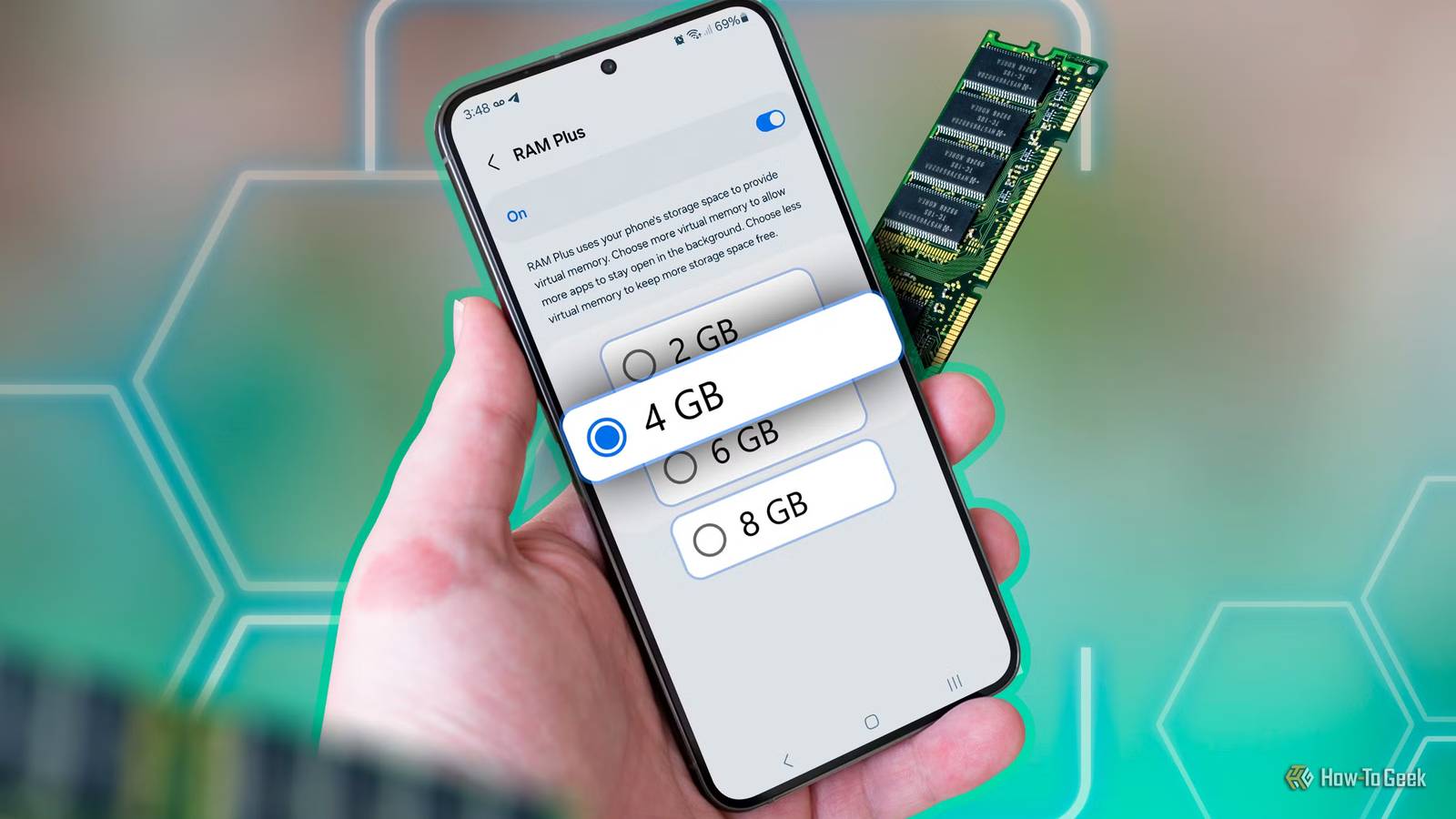
I was shocked when I entered the RAM Plus menu under Memory to find that 8GB of my internal storage was allocated to this feature, on top of the 12GB of physical RAM already available.Modern Galaxy phones use high-speed LPDDR5 or LPDDR5X physical RAM to handle active apps and system processes.Your internal storage, even if it's based on fast UFS 3.1 or UFS 4.0 flash memory, has considerably higher latency and lower bandwidth than the physical memory pre-installed on your smartphone.
Given the fact that Android already uses a memory-management feature called zRAM, which compresses data within physical RAM to make better use of available memory, RAM Plus feels like overkill.So RAM Plus ideally doesn't give your phone additional high-speed memory for demanding games or editing.It's actually being used as an overflow parking space for inactive data, not an actual upgrade to your phone's RAM.
Why RAM Plus isn't always a performance upgrade More virtual memory doesn't guarantee smoother multitasking After discovering that my Galaxy S26 Ultra had 8GB of internal storage allocated to RAM Plus, I started questioning whether I actually needed that much virtual memory, especially on top of the existing 12GB of physical RAM, which is enough for most demanding tasks on an Android phone.Samsung's RAM Plus settings page suggests that allocating more virtual memory allows more apps to stay open in the background.However, its support documentation adds an important caveat: more virtual memory doesn't necessarily improve performance or guarantee that more apps will remain available.
Samsung also acknowledges that virtual memory is slower than physical RAM because it relies on internal storage.So, those 8GB allocated to virtual memory, which I hardly use on top of my 12GB of physical RAM, could instead be used for my photos, videos, downloads, and apps.How to disable RAM Plus in One UI Reclaim your storage with a few taps Close After discovering that the default RAM Plus feature on my S26 Ultra wasn't making any significant difference or improvement, I decided to turn it off.
Thankfully, Samsung makes it fairly easy to do so.To do so, head to Settings, scroll down, and tap Device care, then select Memory, scroll down, and tap the RAM Plus menu.There, you'll see the virtual memory allocation and a toggle right next to the On text.
Toggle it off, and the system will ask you to restart your phone to apply the change.Once your phone restarts, you can use it normally and see whether disabling RAM Plus makes any noticeable difference to your everyday experience.Samsung introduced the option to completely disable RAM Plus with One UI 5.0.
If you're using an older version, you might only be able to reduce the allocation to 2GB.Who should actually leave RAM Plus turned on? Budget Galaxy phones with 4GB of physical RAM could still use the safety net When disabling RAM Plus makes sense in my case, and for many modern Samsung devices, it isn't completely useless across every device tier.If you're using a Galaxy S-series flagship, a Z Fold or Flip, or an upper mid-range Galaxy A-series phone with 8GB or more of physical RAM, you probably don't need to rely heavily on virtual memory for everyday multitasking.
However, if your Galaxy phone has just 3GB or 4GB of physical RAM, I'd think twice before disabling it.Modern Android apps and background services can put these devices under memory pressure, and RAM Plus may help keep more apps available when switching between them.That said, allocating more virtual memory doesn't guarantee better performance.
I'd stick with the default setting rather than automatically maxing it out.Related 4 things my Galaxy S26 can do that your Pixel 11 can't Anything you can do, I can do better Posts 1 By Cory Gunther Sometimes, less is more If your Galaxy phone already has 8GB or more of physical RAM, RAM Plus could do more harm than good by leaving you with less available storage, which can affect how much space you have for apps and downloads.I'd rather save my precious internal storage for my memories and apps than allocate it to a feature that offers me hardly any benefit.
Read More