I use a lot of ESP32 boards around my home, but they don't always have to be stuck indoors.By putting an ESP32 in my car, I'm able to access live engine data from my car that tells me much more than my dashboard does.Your car's OBD-II port can tell you a lot Mechanics aren't the only ones who can access live engine data The On-Board Diagnostics II (OBD-II) port is a 16-pin diagnostic port that mechanics can use to communicate with a car's computer.
They can pull information from the computer to try to determine the cause when your car has a problem.Normally, a lot of the data they can access isn't available through your car's dashboard.One common reason for using this port is to extract error codes that can help narrow down car issues, but the port can also expose a lot of useful measurements, such as coolant temperature, engine speed, throttle position, intake temperature, engine load, and more.
The port itself carries the data but also provides power to the connected scanner.The scanner can then pull data from the car's computer when the relevant systems are active.Mechanics aren't the only people who can access this data.
You can do the same yourself, and it's surprisingly cheap to do.Related The $50 tool every used car buyer should bring to test drives Gain access to information that could save you thousands of dollars in unexpected repairs.Posts 1 By Joe Kucinski A cheap adapter can pull the information from the port You can buy one for just a few dollars OBD-II adapters plug into the OBD-II port of your car, which is usually found under the dashboard on the driver's side.
These cheap adapters can pull the information from your car's computer and share it over Bluetooth.You can buy one for as little as $7.I bought one of these cheap adapters for my car, which is an aging Volkswagen.
It was simple to connect once I'd found where the OBD-II port was.I tested it out using a free car scanner app.All I had to do was connect to the adapter over Bluetooth, and then select the adapter in the app.
I could then see data from the car in the app.The problem was the app wasn't particularly easy to read and was ad-supported.What I really wanted was a simple dashboard that would let me view the live data from the car.
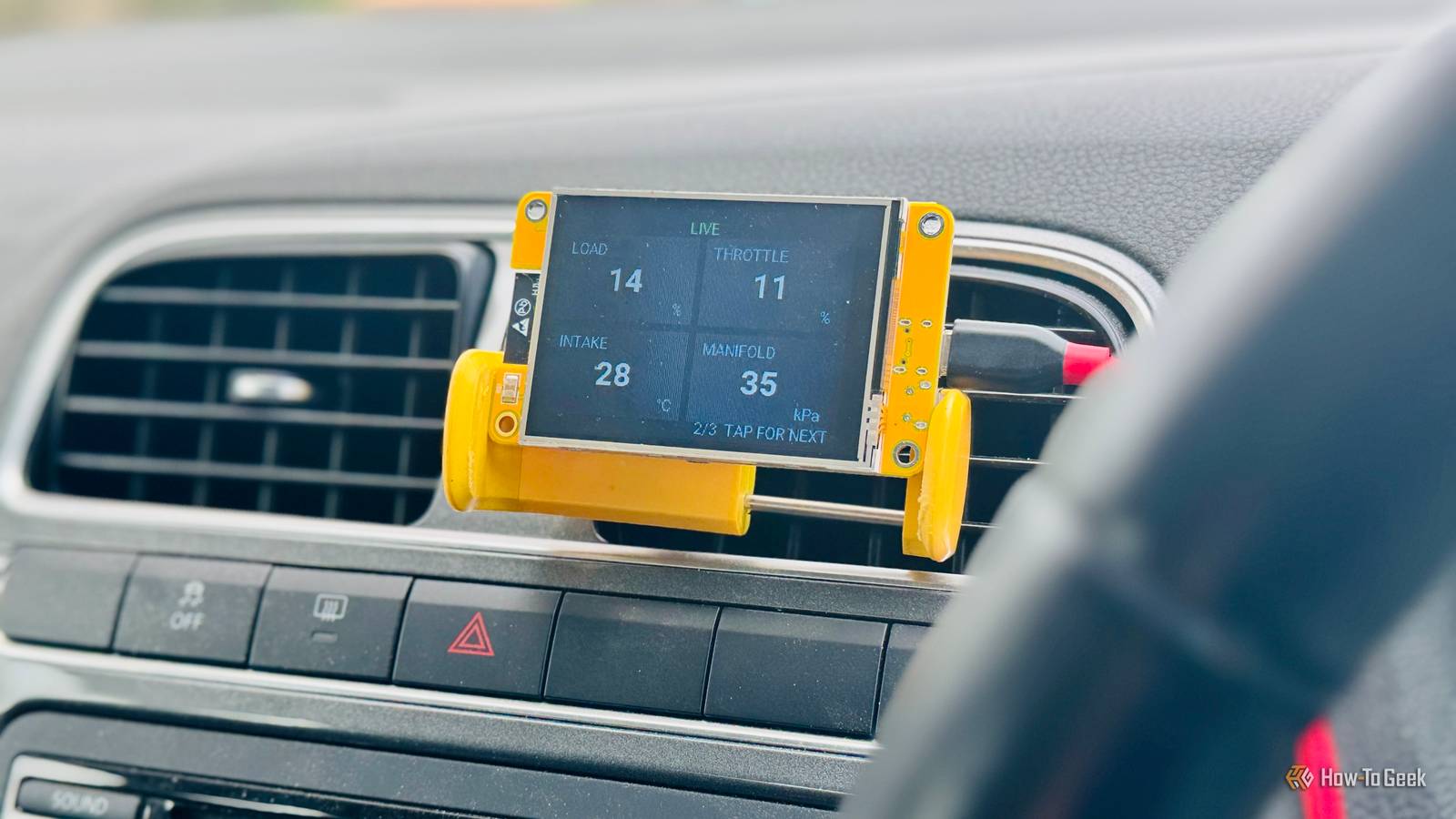
A Cheap Yellow Display lets me see the live data An ESP32, Bluetooth, and a display all on one board Close As is often the case, my first thought was whether I could use an ESP32.These cheap development boards are often my first port of call for tech projects, and I already had a board that was perfectly suited to the task.The Cheap Yellow Display (CYD) is a board that includes an ESP32 and a color touchscreen display, along with onboard Wi-Fi and Bluetooth.
I was pretty sure I could get the CYD to connect to the OBD-II adapter over Bluetooth and display the live data from the car on the screen.I used ESPHome to create the firmware.I cheated a little and used Codex to help write the custom C++ code that handles the Bluetooth Classic connection and talks to the car's computer through the OBD-II port.
My first try was meant to find the adapter over Bluetooth and connect automatically, but this failed to work.Using my phone, I found the MAC address of the adapter and hardcoded that into the firmware.This worked perfectly; when I turned on the ignition and plugged the CYD into power via my car's cigarette lighter, the CYD connected to the adapter via Bluetooth, and the live data appeared on the screen.
There's no Wi-Fi involved, so the whole thing works without worrying about a network connection.When I'm not driving, I remove the adapter from the port.Some cheap adapters can drain the battery if left connected.
The CYD shows me more than my car's dashboard does The data you can access will depend on your car Using my ESP32-based dashboard, I'm able to see far more information than my car's dashboard displays.I get information such as the engine speed, calculated engine load, throttle position, intake air temperature, intake manifold pressure, and more.The exact data exposed will depend on your model of car.
Some of this information is far more useful than what my car shows me.If my car overheats, I'll see a warning light, but I can't see the coolant temperature anywhere on my dash.The CYD makes this information visible so I can monitor it in real time.
My car is fairly old and basic, but newer cars can potentially expose a lot more, such as fuel levels, ambient air temperature, turbocharger pressure, emissions data, and more.The data you can access will depend on both the car you're driving and the OBD-II adapter you use.The whole thing cost me less than $25 I already had the CYD, but you can buy one for around $15, so with a cheap OBD-II adapter, you can still get everything you need for under $25.
It's a pretty reasonable price to pay for access to such useful information about your car, especially since it could help you spot an issue before it turns into an even more expensive repair.
Read More