Are you wanting to start building out your homelab, but aren't sure where to start? The best approach that I've found is separating your services from the beginning with a two-system setup.Thin clients are cheap and readily available basically everywhere, and it's not hard to find a NAS, either.So, if you're wanting to kickstart your homelab setup, try the two-tier approach I lay out below.
Thin clients are notoriously tiny And that means they barely have any onboard storage Close You've probably seen a thin client even if you don't realize you've seen a thin client.Thin clients are the very that sit behind a monitor or on a desk at an office, car dealership, dentist, or anywhere else like that.The original design of a thin client is to provide a low-power desktop that connects to a more powerful on-premise server, instead of having to have a big beefy computer at every desk.
The size of thin clients makes them ideal for homelab tasks.Most are Intel- or AMD-powered, come with at 2GB to 4GB of RAM, and typically they even have a Windows license if you want to run Windows on them.Of course, you could also install Linux if that's the route you want to go.
Some thin clients are even upgradable if you want to put more RAM in them.Thin clients are also typically fairly cheap.Depending on the model you get, they're often under $100, with many being available in the $50 to $75 range.
This makes them far cheaper than mini PCs, and you can get a lot more power out of a thin client than, say, a Raspberry Pi.However, where thin clients fall short is storage.Many ship with eMMC storage or very small SSDs or hard drives.
I can't think of any true thin clients that support 3.5-inch hard drives at all, either.So, if you want to use a lot of storage in your homelab, then a DAS or external hard drive is the only option when it comes to using a thin client with extra local storage.Though, you always could pair it with networked storage using a NAS.
A NAS is a great storage system Though the operating system doesn't always make homelab management simple Close I love NAS (network attached storage) systems.I have quite a few myself, and use two on a daily basis.You see, a NAS is a great way to take storage (like a handful of 3.5-inch hard drives or some NVMe drives) and make them visible to your entire network—thin clients included.
A NAS is a purpose-built storage appliance.While a thin client could utilize a DAS (direct attached storage) connected over USB, the speed you get through that storage would be dependent on what type of USB the thin client had.However, most thin clients have at least gigabit Ethernet, which is the lowest speed you'll see on a NAS for networking.
With a NAS, you can keep all of your storage on a system designed for it.A NAS will give you easy RAID setup, the ability to set up either read or write cache, and also ways to back up the data off-site.Not all NAS systems ship with Intel processors, though.
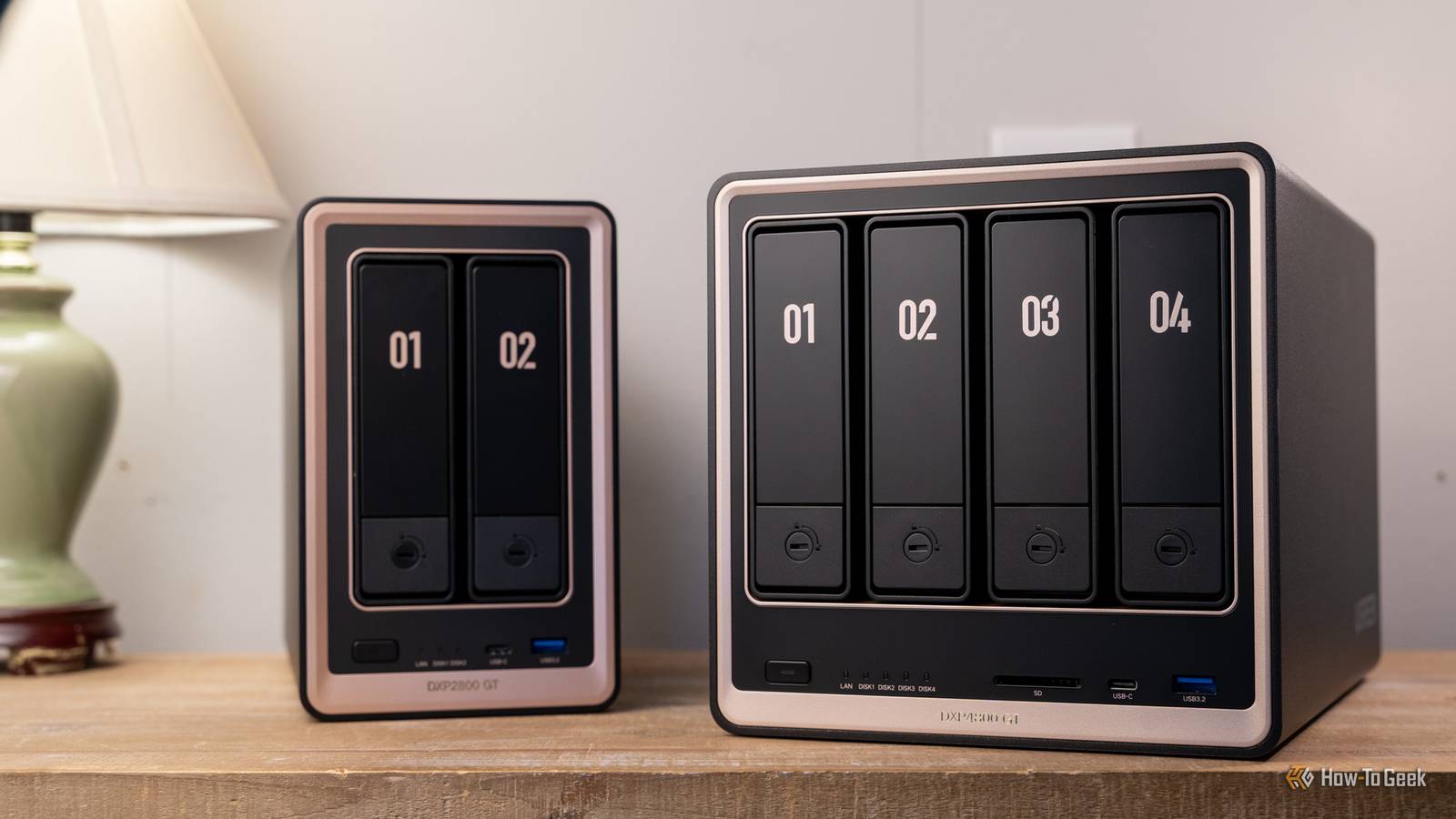
One of my favorite NAS systems to use right now—the Ugreen DXP4800 GT—doesn't have an Intel processor.Though it does handle Plex transcoding decently, a thin client with a more modern Intel CPU would be a much better Plex or Jellyfin server.UGREEN NASync DXP4800 GT 9 Brand Ugreen CPU AMD Ryzen Embedded R2514 Memory 8GB DDR4, expandable to 64GB Drive Bays 4 3.5/2.5-inch, 2 NVMe The Ugreen DXP4800 GT is the latest NAS from Ugreen, featuring dual 10Gb Ethernet, two NVMe slots, and a whole lot more.
Shipping with 8GB of DDR4 RAM, you actually can replace it yourself and upgrade it to have up to 64GB of RAM should the need arise.Plus, UGOS continues to mature and is becoming a very solid NAS operating system.See at Amazon $660 at Ugreen Expand Collapse Use a NAS for your storage, and a thin PC for your apps One doesn't have to depend on the other A NAS and thin client pair super well together in a homelab.
Having different systems for different purposes is how you build a resilient homelab.One of the benefits of separating the systems in your homelab is that your apps don't have to rely on each other.Imagine you're running a few Docker containers in your homelab—Pi-hole, Plex or Jellyfin, Immich, and a Minecraft server.
If all you have is a NAS, then everything has to shut down to do storage upgrades when you need to pull a drive out or service the system.If everything is on a thin client, then you're not left with much storage space after it's all said and done.However, if you separate the services into two separate systems—a NAS and a thin client—that's no longer a problem.
You run the apps on the thin client and use the NAS for storage.Sure, Immich and Plex might shut down when you service the NAS, but Pi-hole and Minecraft would still work.Likewise, if you had to service the thin client, you could still access your network attached storage.
I have one NAS just for my media (Plex and Audiobookshelf) libraries.That NAS also happens to run my Docker containers, but those are backed up nightly off-site so I could spin them up at a moment's notice.Likewise, I have a second NAS that's just for my mass storage needs.
That's where I put all of my photography backups, my video projects, and my Time Machine backups from my Macs.That's all it does.I also have a separate desktop that runs all of my development environments and virtual machines I need for my homelab.
While my setup is a bit complicated (and expensive at this point), you can replicate the same thing with a few thin clients and a NAS.Instead of just one thin client, you could pick up three and turn them into a high-availability Proxmox setup.Proxmox needs at least three nodes for a proper HA setup, and it also needs centralized storage.
So, you couldn't do a high-availability setup without some form of network-attached storage or a Ceph cluster (which is more complicated than most people need to start with anyway).So, pairing a few cheap thin clients together in a cluster with a NAS is a great way to get started with homelabbing.Or, just starting out with one thin client and a NAS is another fantastic and more affordable option, letting you grow from there whenever you're ready.
Not every homelab has to look like a data center My homelab has gone through many stages, but, if I could do it all over again, I'd start with a few smaller PCs and a more modest NAS instead of the 12-core 24-thread 64GB RAM 12-bay behemoth that I started with.A NAS and thin client is the best two-tier homelab approach I can think of for someone starting out.So, if you've been looking at other YouTubers' homelabs thinking "There's no way I can afford that!" just start with what you can.
Buy the thin client, add a NAS as soon as possible, and watch it grow from there.
Read More