Swapping out a default Android keyboard for an open-source alternative usually comes with a long list of compromises, but thanks to FUTO Keyboard, that has changed.Here is a private, trustworthy option with features like gesture swiping and voice-to-text that actually work.However, there is one unexpected feature that still leads me to switch back to Gboard.
Gboard has the best handwriting recognition in the business I can write by hand anywhere I need to enter text Close I swear by my digital pen—so much so that I base my phone-buying decisions on their compatibility with a stylus.I switched away from the Galaxy Z Fold series after Samsung removed S Pen support from the Galaxy Z Fold 7, a feature that remains nowhere to be seen on the Galaxy Z Fold 8.I am now writing these words on a Motorola Razr Fold instead, and I am writing them out by hand on Gboard’s handwriting layout.
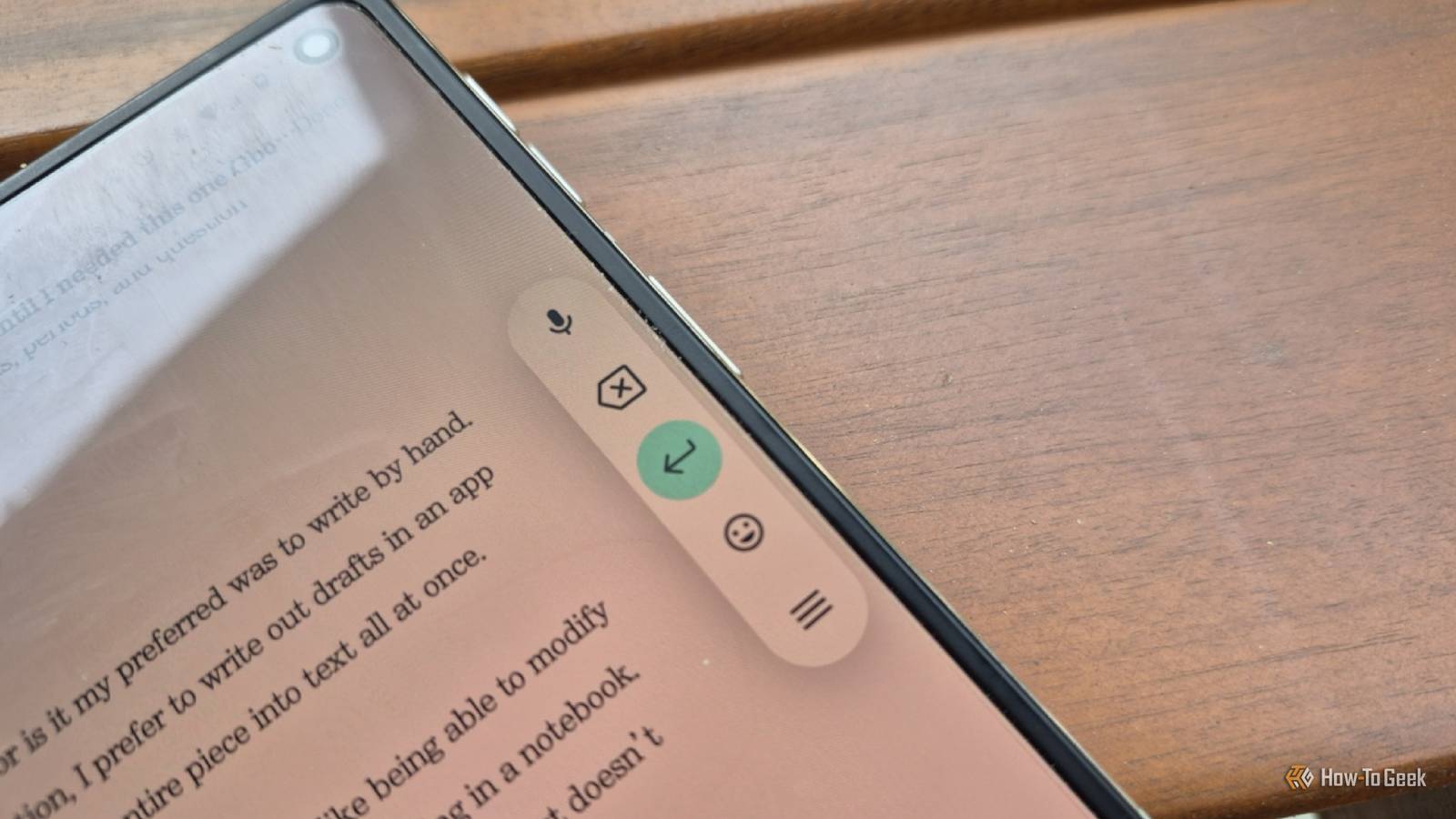
Here’s how it works.When Gboard detects that you are using a stylus, be that a Wacom-based pen like the Samsung S Pen or an active pen like my Moto Pen Ultra, it swaps out your virtual keyboard for writing controls.This places a toolbar off to the side of the screen that contains a bare minimum set of buttons—a microphone, the delete button, the enter button, an emoji key, and a menu button.
The idea is that you interact with it as little as necessary and instead write directly on your document or message.To begin writing, I place my stylus down by the blinking cursor.Then I simply start writing by hand.
Google transcribes my handwriting on the fly, regardless of whether I write in print or cursive.I can begin writing this way wherever I am able to input text, which means I can write long-form in my preferred writing app (Pencake), write out responses to text messages, and write by hand into search fields.I can even write out URLs, though that isn’t ideal due to the keyboard’s default tendency to automatically insert spaces.
I can manipulate text using only a stylus There are things we do with keyboards that we don’t typically do with pens When I’m working in handwriting apps like Saber, Notewise, and Samsung Notes, I don’t need to press the spacebar.Likewise, if I need words to be farther apart, I use a lasso tool.But Gboard is for interacting with text, not handwriting, so it needs different controls.
To insert a space, I draw a vertical line between two characters.To highlight text, I draw a single line striking through each word, or I draw a circle around an entire selection.To delete a word, I scratch through it.
Drawing a backward capital L, kind of like an end bracket, starts a new line just like pressing "Enter." Some characters can't be written out this way.I need to tap the emoji key on the toolbar if I wish to bring up all the various emojis, since drawing a smiley face doesn't yield any results.Likewise, various types of punctuation require pulling up a pop-up displaying special characters—though I don't see the ever-important em dash—so I must open the regular keyboard layout for that often-used key.
Still, most of the essentials are adequately recognized, such as commas, periods, and question marks.There are times when a keyboard is genuinely more useful No, I don’t write by hand faster than I type This Gboard feature is not my preferred way to type, nor is it my preferred way to write by hand.When I’m not writing my initial draft using voice dictation, I prefer to write out drafts in an app like Notewise on my BOOX Go tablet and transcribe the entire piece into text all at once.
Handwriting in Gboard comes in handy when it’s time to make edits.I like being able to modify what I’ve written in a way that feels natural with a pen, like I’m still writing in a notebook.There is something satisfying about striking through text that the backspace key just doesn’t provide.
Plus, as someone who works directly from my phone, this alternative layout allows me to see the entire screen without causing things to jump around the way they do when using a conventional virtual keyboard that occupies the entire bottom half.This is all the more reason I find the layout more helpful for editing than writing my initial drafts.This is not a faster way to type I won’t tell anyone that writing this way is faster than using a virtual keyboard—I personally can type much faster by gesture swiping with my pen.
But there is more to consider than speed and efficiency.I enjoy writing by hand, which helps me focus and write from a more settled, less manic state of mind.
Read More