I never planned to explore the open-source Android world.It started with a simple thought: what would my phone look like if I stopped reaching for Google’s apps for everything? That question sent me down an unexpected rabbit hole.I started trying open-source apps, expecting the usual trade-off: great privacy, maybe, but clunky designs and interfaces that looked like they belonged to my grandparents.
Instead, I found apps that were polished, modern, and fun to use.After a while, I stopped comparing them to Google altogether.I found a few new favorites.
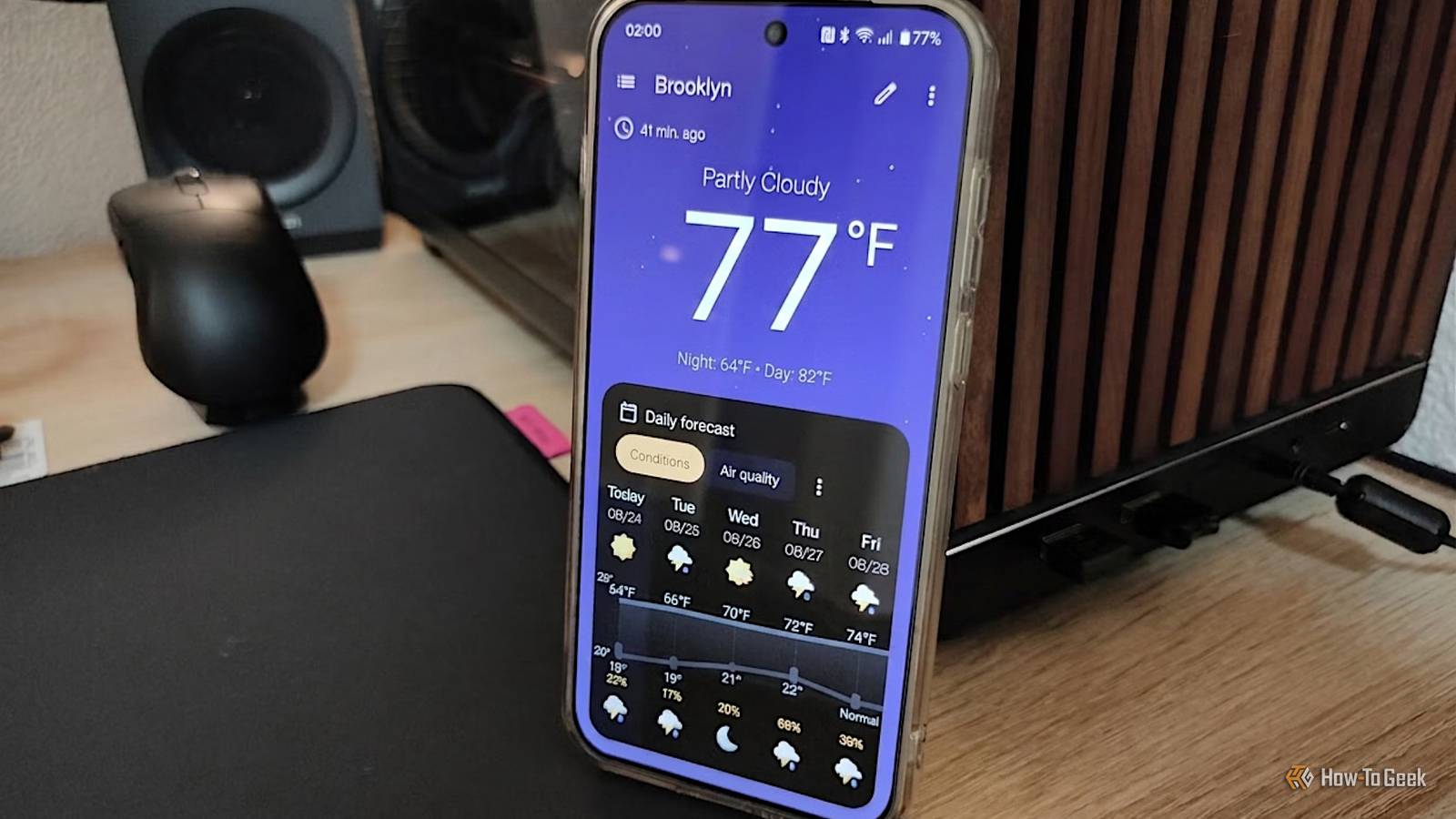
These four surprised me the most — and they made my Google-free experiment feel far less like a compromise.Breezy Weather The customization is what sold me When I showed Breezy Weather to my friend, his first reaction was, “Wait, is this open source?” I understood why.I'd used my phone’s built-in weather app for years, but Breezy Weather feels like a completely different experience.
I honestly can’t get over how polished this app is.What I like most is how much information it gives me without cluttering the interface.Along with the current temperature and forecast, I can check things like humidity, air quality, precipitation, wind, UV levels, and other details in one place.
I can also choose different weather sources and customize what appears on the screen, which gives me much more control than my phone’s stock weather app.Plus, no ads or unnecessary news sections are competing for my attention.LocalSend This is how file sharing should work Quick Share is great when I’m sharing files between compatible devices, but things get less straightforward when I’m jumping between different platforms.
That’s where LocalSend caught my attention.It lets me send photos, videos, documents, and other files between Android, iPhone, Windows, Mac, and Linux without worrying about which ecosystem the other device belongs to.I just open LocalSend on both devices, select what I want to send, and transfer it over the local network.
Easy, right? There’s no account to create, no cloud storage involved, and no complicated setup.The only requirement is that the connected devices have to be on the same network.It feels almost too simple, which is probably why it's my favorite app.
And here’s another fun part: there’s no built-in file-size limit.So yes, I can send that vacation video without wondering if the app is going to reject it.Grocy My pantry has entered the digital age Close Apparently, my pantry needed management software.
Grocy is much more than a place to dump my grocery list.Honestly, I practically run my home with it.I can keep an inventory of everything at home, scan barcodes when I add products, track quantities, set expiration dates, and see what needs to be used before it goes bad.
Grocy creates my shopping lists, manages recipes, tracks chores, and monitors my household supplies.Too much for one app? There’s a lot more, trust me.The app is fast, and its Material You design makes it feel much more modern than I expected.
The more I use it, the more I realize how many little household tasks I was keeping track of in my head.It sounds excessive to have software managing my groceries, but after using Grocy, I’m not going back to “I think we have some.” Related 4 open source Android file managers that don't spy on you or show ads Keep your files safe and private.Posts 1 By Faisal Rasool Joplin My notes finally have a home Close I’ve tried plenty of note-taking apps, but I kept running into the same problem: I’d save something and then forget where I put it.
A recipe would be in one app, a travel idea somewhere else, and a random article idea would end up in a note I’d never find again.I wanted one place where I could dump all those thoughts and actually find them later.That’s what pushed me to try Joplin.
Joplin feels like a free upgrade, not an expensive replacement.To start with, Joplin supports end-to-end encryption for synced data.I can organize notes into notebooks, use tags, write in Markdown, attach files and images, and create to-do lists.
I can also use Joplin’s Web Clipper to save useful content from my browser and sync my notes across devices.It gives me enough flexibility to use it for both quick thoughts and more detailed notes.Bye-bye, basic notes Related I’ve used Google Keep for years, and these 5 features still surprise me Keep keeps my life together.
Posts 4 By Sanya Shah Google, we need to talk I went into the open-source world with very low expectations and came back with my standards raised.More importantly, I stopped thinking about what I was missing and started appreciating how much choice I actually had.Of course, I’m not planning to delete every Google app from my phone tomorrow, but I’m also not reaching for Google by default anymore.
This is definitely not the end.There are plenty more open-source Android apps out there waiting to be discovered, and I’m already curious about what else I can replace — or simply add to my phone.Turns out, I’ve only scratched the surface.
Read More