I love Jellyfin; it allows me to stream my entire movie and TV show collection across multiple devices.There's really only one thing that Jellyfin can't do, and that's deciding what I'm going to watch.I wanted to find a more entertaining way to choose a show or movie, and what I found was even better than I expected.
I had an idea to make Jellyfin more fun Like most good ideas, someone had thought of it first Vibe coding has really changed my entire thought process when it comes to tech projects.I'm not a fan of installing vibe-coded apps people have built because I don't completely trust them, and if someone vibe coded it, there's nothing to stop me from doing the same.Vibe coding my own personal projects that stay local to my network is totally fine in my eyes.
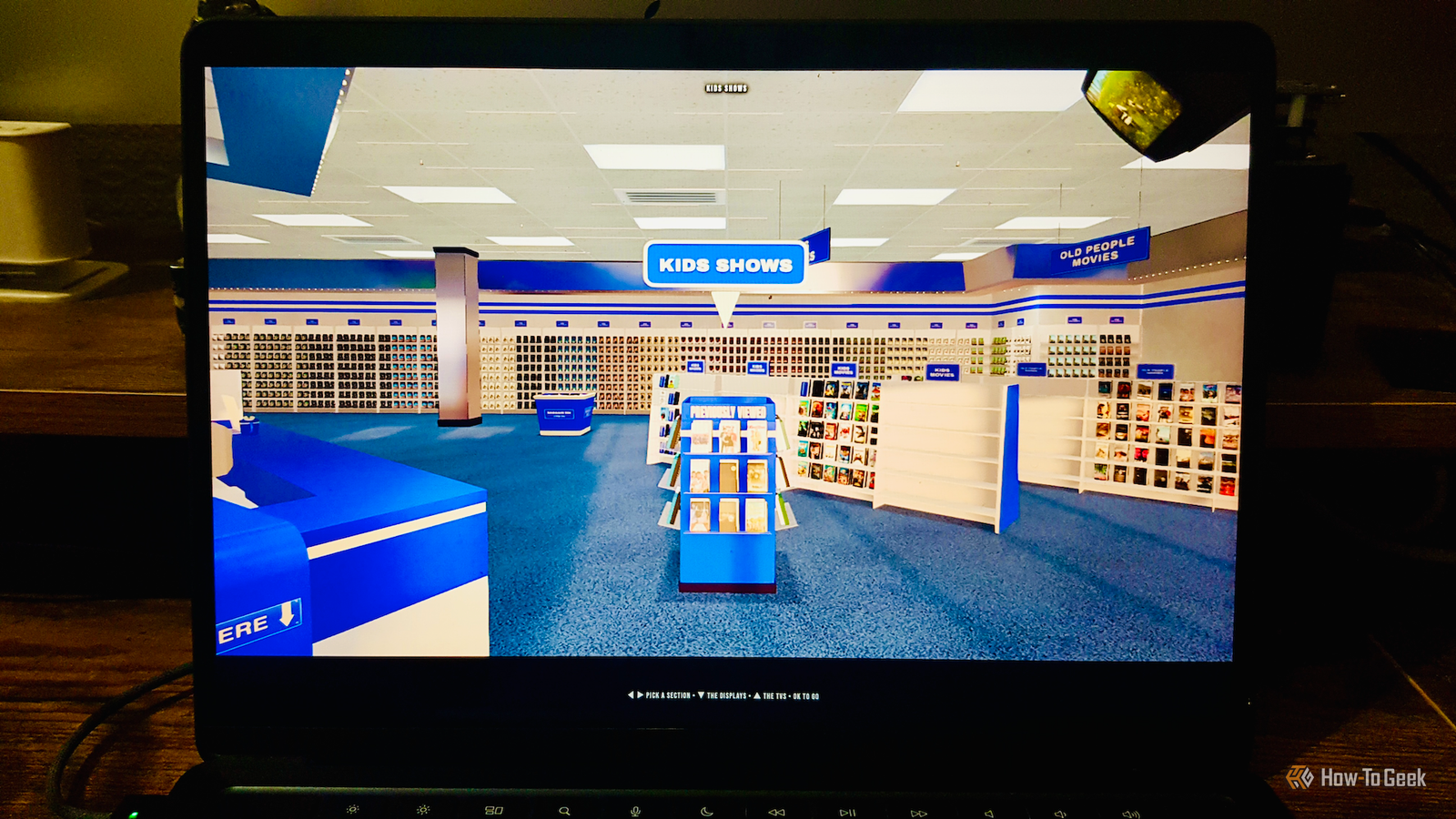
I was thinking of ways to make choosing movies to watch more fun, and I thought it would be quite cool to create a front end where my Jellyfin library was displayed like the shelves of an old-fashioned video store, with VHS tapes showing the cover art.I spent an embarrassingly long time creating a prototype before deciding to check whether someone else had already built the same thing.Of course, someone had, except that instead of just a static shelf of VHS tapes, they'd designed an entire 3D virtual video store where you can walk around and browse the shelves.
I quickly gave up on trying to build my own and looked into how to set up my own virtual Blockbuster.Related I watch my entire Jellyfin collection on a movie theater screen for under $30 The best AV upgrade I've ever made.Posts 8 By Adam Davidson Setting up the virtual video store was surprisingly easy I'm running it in a container on my mini PC Close The project is called Halcyon Video and is free and open source.
The license says that you can fork it, mod it, and even ship your own store as long as you keep it open.It supports both Jellyfin and Plex libraries.Installing it was incredibly simple to do.
I run Jellyfin on a mini PC, so I wanted to run Halcyon in another container on the same device.There's a pre-built Docker image that you can start with the following command: docker run -d --name halcyon --network host --restart unless-stopped \ ghcr.io/halcyon-video/halcyon-video This will download and start Halcyon using the host's network settings and ensure that Docker will bring it back up in the event of a restart unless you deliberately stop it.In next to no time, Halcyon was up and running, and I could access it by pointing my browser at the IP address of the host on port 1420.
The format is: http://[halcyon-host-ip-address]:1420 In my case, I can access Halcyon at: http://192.168.1.148:1420 I can now explore my Jellyfin library like it's the 1990s You can even rename your store Close When you first open Halcyon in your browser, there is a setup screen.I selected Jellyfin as the distributor, entered the IP address of my Jellyfin server, and signed in with my Jellyfin credentials.I was then able to choose which folders from my Jellyfin collection I wanted to include.
You can also select from popular streaming services to add movies from these services to the video store shelves.Once completed, the virtual video store is built, which takes a short while.Once the video store has loaded, you can explore using the arrow keys to browse around the different aisles and shelves or even walk around in a first-person view using WASD controls.
Your different libraries appear in different sections, and you can browse all the videos on the shelves and select one to watch.There's a display of previously watched movies, and even a bargain bin with movies that have poor ratings.If you've opted to include them, there are sections for streaming services such as Netflix, Disney+, and Apple TV, showing movies currently available on those services.
Selecting a movie from these sections will open the movie in the appropriate service in another browser window.There are TVs around the store showing one of your movies.If you're really stuck for what to choose, you can take a glance at the TVs for inspiration.
You can edit the name of the store and the design of the display cases, or choose from presets from different eras, and there's a tip jar on the counter if you want to reward the developer for all their hard work.The pointless rental process is what makes it fun Browsing old-school style is way more joyful Once you've selected a movie, you take it up to the checkout counter to rent it.It will then start to play in your browser, directly from your Jellyfin or Plex server.
When you've finished watching, there's even an animation of the VHS tape or DVD being posted into the returns box in the video store.The whole thing is utterly pointless, but that's all part of the joy.Instead of just scrolling through your Jellyfin or Plex library trying to pick something to watch, you can browse the shelves to find what you want or even speak to the checkout clerk to ask for a recommendation.
It's a small taste of the good old analog world before everything became available with a tap on a screen.Choose movies like the good old days My original idea was for a simple display of VHS covers, and there's even an option to do this in Halcyon rather than use the full 3D virtual store.It's less resource-hungry, so it's a good option for older hardware.
Whichever option you choose, watching Jellyfin has never been so much fun.
Read More