Most people carry their phones everywhere they go.That's why location privacy can feel a little unsettling.Modern smartphones know where we work, where we shop, how we commute, and which places we visit regularly.
Even if you trust your device, it's natural to wonder how much of your routine it actually remembers.Add How-To Geek on Google Add as Preferred Source Follow on Google Discover I recently went digging through my iPhone's settings and discovered a feature called Significant Locations & Routes.It had accumulated 66 records on my device, yet the feature offered surprisingly little insight into what those records represented.
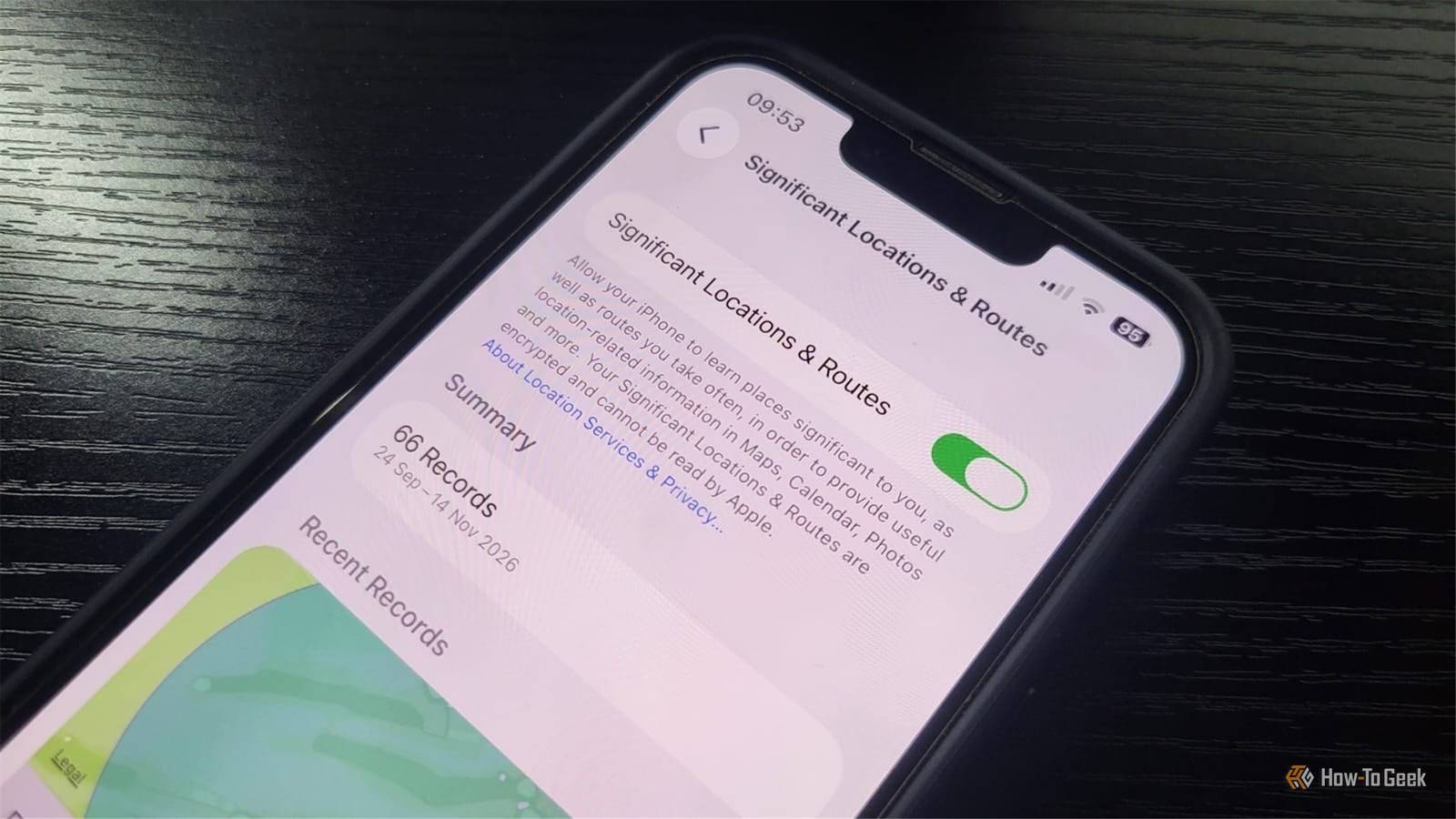
The more I investigated, the more questions I had about what my iPhone was recording, how it was using that information, and why I could only see a tiny fraction of it.My iPhone had 66 location records Here's where I found them Close You can find Significant Locations & Routes by heading to Settings > Privacy & Security > Location Services > System Services > Significant Locations & Routes.When I opened the page, my iPhone asked for Face ID before showing me the stored information.
Once inside, I found a summary showing 66 records alongside a date range running from September 24 to November 14.Below the summary was a single recent record displayed on a map.The location corresponded to somewhere I've visited multiple times, which immediately made me curious about how the feature decides which places are significant enough to surface.
The screen raised more questions than it answered.I could see that my iPhone had stored 66 records, but I had no obvious way to browse them.What your iPhone records Apple's explanation is surprisingly detailed Close Apple's own Location Services & Privacy documentation describes Significant Locations & Routes in far more detail than I expected.
It says: "Your iPhone and other devices where you sign in to iCloud with your Apple Account will keep track of places you have recently been, how often and when you visited them, and the routes you take to get there, in order to learn places and routes that are significant to you." Apple says the feature identifies places and routes that are "significant to you" based on where you go, how often you visit, when you visit, and how you get there.The company also says the information is used to provide personalized services, including "building better Memories in Photos." Apple says it can also support features such as predictive route suggestions.Apple's reasoning makes sense.
If your iPhone knows where you spend a lot of time and which routes you frequently travel, it can make more relevant suggestions.Whether those benefits justify the data collection is ultimately a personal decision.The 66-record mystery I could only see one location This was the part that caught my attention.
My iPhone reported 66 records, yet the screen only displayed a single recent location.I zoomed in.I zoomed out.
I looked for a way to browse older entries.I checked for a list view or additional pages.None of those options appeared to exist.
One detail that stood out during my testing was how broad the visible location appeared.The map didn't pinpoint a specific spot.Instead, it displayed a fairly large circular area.
That left me wondering how precisely the underlying location data identifies a place, and whether the map was showing the full extent of the information my iPhone had stored.Apple also offers a separate Visited Places feature in Maps, but enabling it on my device didn't reveal any additional information about the 66 records shown in Significant Locations & Routes.Related Why I switched from Google Maps to Apple Maps You should give Apple Maps another try.
Posts By Tim Brookes Apple explains what Significant Locations & Routes does, but neither its documentation nor my iPhone's interface clarifies what constitutes a record.Does each one represent a visit, a significant location, or something else entirely? What I do know is that my device reported 66 records while surfacing only a single recent location.That gap between what had apparently been stored and what I could actually inspect ended up being the most interesting part of the feature.
Should you leave Significant Locations & Routes enabled? It depends on your priorities Close Apple's privacy explanation is an important part of the discussion.It says, "Your Significant Locations & Routes are synced between your devices using end-to-end encryption and cannot be read by Apple." Apple's encryption claim specifically concerns Significant Locations & Routes.Other location-based services may process information differently depending on the feature being used.
Personally, I didn't find anything during my research that made me want to disable the feature immediately.Apple provides a clear explanation of what it does and how the company says it's protected.Other users may reach a different conclusion.
You might consider turning the feature off if: You don't want your iPhone learning patterns about places you visit regularly.You don't use the personalized features it supports.You prefer to minimize the amount of location-related information your devices retain.
You'd rather avoid storing this type of information, even with Apple's stated privacy protections.Related 6 Ways Your iPhone Could Be Tracking You (and How to Stop It) Limit what your iPhone knows and shares about you.Posts By Yash Wate Apple also allows users to share information from Visited Places and Preferred Routes & Predicted Destinations with compatible apps, provided they enable the relevant sharing options.
If you'd rather stop future collection, return to Settings > Privacy & Security > Location Services > System Services > Significant Locations & Routes, and turn the feature off.If you'd also like to remove existing data, tap Clear History.Turning the feature off stops future collection, while clearing history removes stored information.
Apple says clearing Significant Locations data removes it across devices signed in to the same Apple Account and can reset personalized features such as predictive traffic routing.It's worth checking your own iPhone Finding 66 records on my iPhone was eye-opening.Apple's documentation revealed the feature tracks more information than many people might expect.
I came away with a better understanding of why the feature exists and how Apple says it's protected.I also came away wishing Apple provided a clearer explanation of what those 66 records actually represent.If nothing else, it's worth opening the setting yourself.
You may discover your iPhone has been learning more about your routine than you realized.
Read More