While it's easy to think of YouTube as just a place to watch videos, it's actually one of the biggest search engines in the world.Whether you're looking for a review, some entertainment, or trying to figure out how to fix something, YouTube is often the go-to platform when you need hands-on advice.Unfortunately, as the platform has expanded to encompass other types of content, including Shorts, live streams, playlists, podcasts, movies, and more, its search system has become increasingly constrained, especially when you're looking for a specific video.
That's where a few browser extensions come in—they can transform the YouTube search experience and make it as precise as Google.SearchLens gives you the search filters YouTube should have out of the box Put control over your searches in your own hands Close If you've ever used YouTube's built-in search filters and found them to be underwhelming, you're not alone.The filters let you pick what type of item you're searching for (video, Short, channel, etc.), a few options for duration, broad upload dates, and a few other things, but if you're doing a deep dive to find a specific video, you're out of luck.
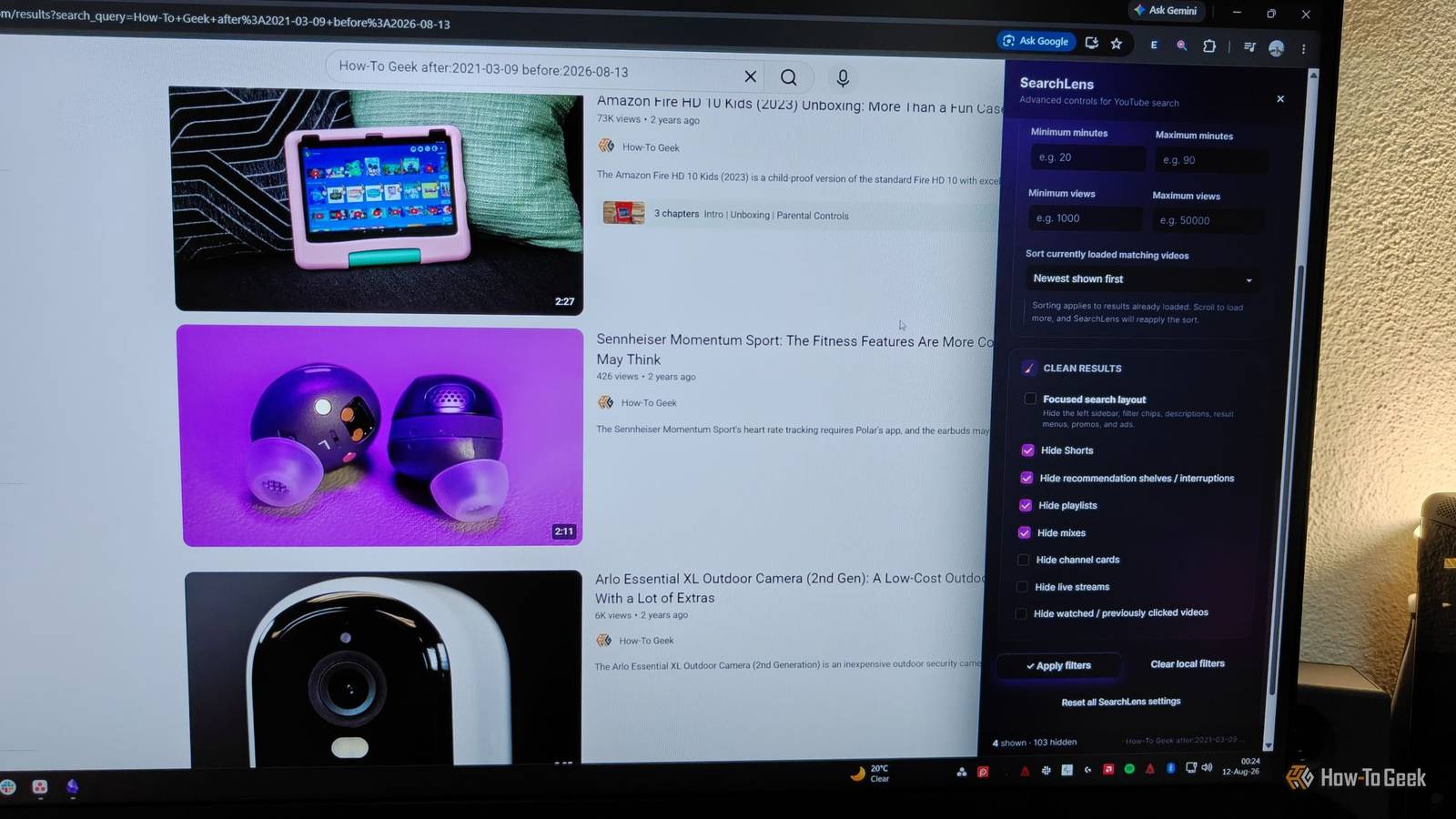
Thankfully, someone noticed YouTube's constrained filters and decided to build a whole toolbar for filtering search results in the form of SearchLens (Chrome, Firefox).When you click on the extension in the search bar or start a search on YouTube, the extension pops up on the right, giving you extensive filtering options.One of the most impressive filters is the precise date range, where you can specify the exact date using the built-in calendar.
Aside from that, you can force the search to ensure the results contain specific words or phrases, as well as exclude words—I can't overstate how many times I've wished I had this when searching for something.It also lets you filter for channels, although I noticed that it doesn't always filter out channel names correctly.For instance, I tried searching only for channels that contained the term "How-To Geek," yet a few other channels kept popping up that aren't ours.
There's also a section for filtering by minimum and maximum duration and views, and you can change the sort order from YouTube's default to most viewed, most recent, and a few other options.Beyond basic filters, the extension lets you clean up the search results page as well.You can check the boxes in the Clean Results section to hide Shorts, recommendations, playlists, mixes, channel cards, live streams, and previously watched videos.
All in all, the extension has everything you could possibly wish for in a search engine, all located in a collapsible sidebar.It's the go-to extension if you're a power user.Search Fixer clears the junk out of your results Strip YouTube search back to basics If you tried SearchLens and liked the Clean Results features but found the rest of the toolbar to be overkill, Search Fixer (Chrome, Firefox) might be what you're looking for.
This free and open-source extension contains several filtering, search and display, and appearance options that let you reshape your YouTube search experience without overwhelming you with choices.It's a set-it-and-forget-it solution.After installing Search Fixer, you'll find all of its options by opening the extension in a separate tab.
The extension lets you hide various sections YouTube displays by default, such as People Also Watched, auto-generated music mixes, Shorts, playlists, courses, live content, and more.If you want to customize things even further, you can hide verified creators to find independent YouTubers, hide official music videos and artists (perfect for finding guitar tabs), and hide watched or timestamped videos.However, it's the appearance section that truly makes this extension stand out from the rest.
You can remove capital letters from titles, hide descriptions, force the legacy player for Shorts, display results in grid view, and more.It's worth noting that, in addition to transforming your search experience, Search Fixer can also help reduce the amount of content YouTube has to load by removing various elements from the page.The extension itself is super barebones and should run comfortably even on an older PC.
Related Sick of Bad YouTube Recommendations? Here's How to Get Better Video Suggestions See more of what you like, and less of what you don't.Posts By Tim Brookes YT Tweaks is the Swiss Army knife of YouTube customization Make YouTube search feel uniquely yours If you like the idea of an extension that works in the background like Search Fixer but find it too barebones in its options, allow me to introduce you to YT Tweaks (Chrome, Firefox).This extension packs over 100 individual options that let you configure much more than just the search results.
You can configure the video grid, homepage, subscriptions page, channel page, video player, watch page, search page, and more.But since this article is about YouTube search, that's what I'll focus on.Under the search page configuration, YT Tweaks lets you view results in a grid just like Search Fixer.
It lets you hide the right sidebar, Shorts, mixes, live streams, upcoming videos, and irrelevant search results (like the People Also Watched section).You can even hide or dim watched videos based on how much of them you've already watched.However, you shouldn't download YT Tweaks just for these few options, as it's really at its best when you combine them with all the other tweaks available.
For instance, this is one of the few extensions that lets you hide specific types of content only within certain parts of YouTube instead of applying a blanket setting.If you wish to hide Shorts from your search results but still don't want to miss whenever a channel you're subscribed to uploads a new Short, YT Tweaks can help you achieve exactly that.A single browser extension can completely change your desktop YouTube experience YouTube's search engine is a major part of the platform, but unfortunately, the search results page has become cluttered and bogged down by various little additions, tweaks, and the constant repetition of popular videos you've already seen.
Thanks to these extensions, you can completely overhaul not just what appears in your search results, but also how it appears.Pick the extension from this list that best suits your needs, install it, and you'll instantly notice the difference.Related How to Disable YouTube Shorts Kind of.
Posts 8 By Mahesh Makvana
Read More