The terminal isn't just for running commands and editing config files.There's a whole category of TUI (terminal user interface) apps out there that can replace the graphical tools you reach for every day—and a lot of them end up being faster and lighter in the process.If you've got some free time this weekend, here are three I'd start with.
None of them take long to set up, and will probably replace a few unnecessarily bulky graphical apps you’ve got installed.Yazi The best file manager was hiding inside the terminal Yazi is a file manager that lives in your terminal.If you're tired of constantly typing cd and ls to move around your directories, but you also find graphical file managers a bit bulky and unnecessary, Yazi is the perfect middle ground.
Now, there are actually a ton of terminal-based file managers out there, each with its own features and gimmicks.You can check out how I rank the five most popular TUI file managers here.But if you want to skip that and just want to know which TUI file manager I think is the best, then that’s Yazi.
It's kind of like an evolved Ranger, so if you've used that before, you’ll know exactly what to expect.The interface follows the Miller column layout, which means that instead of showing you a single directory at a time, it displays three columns at once.The current directory sits in the middle, the parent directory is on the left, and a preview of whatever file or folder you've selected shows up on the right.
So as you navigate, you always have context for where you came from and what you're looking at.It's written in Rust with async I/O, which promises blazing fast navigation even in directories with thousands of files.File previews render quickly too—including images, as long as your terminal supports it.
The installation information for Yazi is provided on their GitHub page.Related 5 popular Linux terminal-based file managers—ranked Five tools that do the same thing but with completely different workflows.Posts 9 By Dibakar Ghosh tdf Because reading PDFs should be simpler tdf is a terminal-based PDF viewer.
If you're someone like me who doesn't need to annotate or sign PDFs and just wants something functional and lightweight to view them from time to time, this is what you need.It's built with ratatui—a Rust-based tool for creating TUI apps—and designed to be performant, responsive, and work well even with very large PDFs.The layout dynamically adjusts based on how you resize the terminal.
There’s a robust search feature that lets you find specific words in the PDF and highlights them.Other than this, you’ve got asynchronous rendering where pages render in the background so you never experience the app freezing as you scroll through the PDF.It also supports hot reloading, which means it’ll auto-update the PDF you’re viewing if it was changed or tweaked while you’re viewing it—no need to close and restart the app to view the changes.
All that said, one thing I should mention is that this app lives and dies by the terminal you use.If your terminal can't render images—which most default terminals can't—then tdf won't work properly.That's why you'll need to run something like Kitty or Ghostty for it to work.
The installation information for tdf is provided on their GitHub page.Related Linux terminals all run the same commands—so why do users fight so hard for their favorite? There are dozens of terminals.All of them can run the same commands.
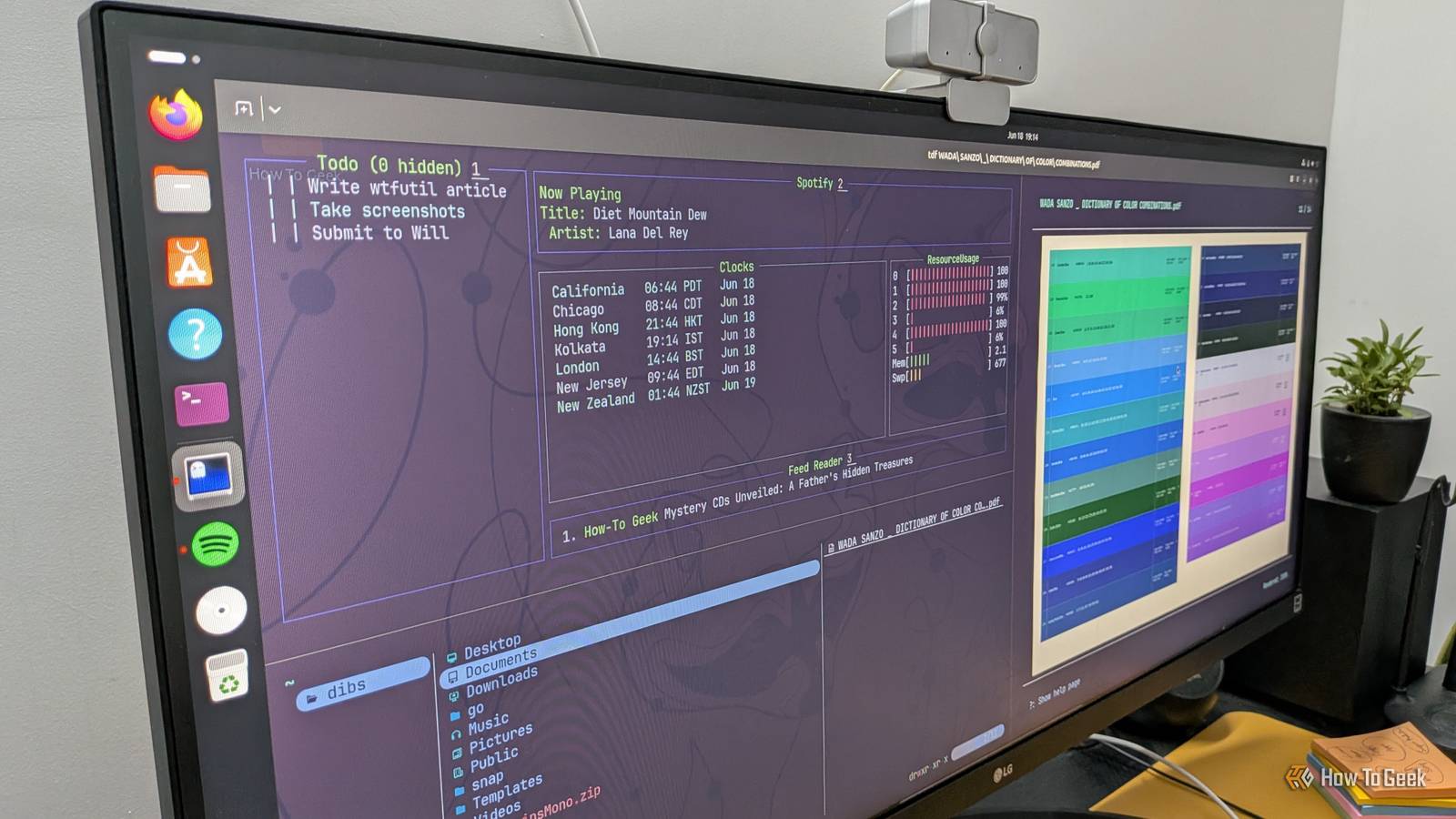
But Linux users will still go to war for their favorite ones.Why? Posts 4 By Dibakar Ghosh wtf I don’t know why it’s called this—but it’s really cool Pardoning the absurd name, wtf is basically a TUI-based personal dashboard.It gives you a modular space that you can fill with widgets (called modules) to get quick insights into all kinds of different things.
This includes RSS feeds, weather, to-do lists, a Docker monitor, and a lot more—there are over 60 modules in total.You can head over to the wtfutil.com/modules page to get an idea of everything that's available.I find it more powerful than most of the popular dashboards out there, and it's the perfect tool if you're looking for a cool widget experience on Linux.
You can just keep one terminal running on a virtual desktop with all the widgets you want open through wtf, and jump to it whenever you need that extra information.Personally, I find it a much more elegant solution than using Conky—which can be a bit janky.That said, setting up wtf can feel a bit complicated, because you'll basically need to code the layout in YAML rather than using a graphical interface.
Now, I'm no programmer myself, but I've been able to use Claude (or any capable LLM, for that matter) to build multiple working layouts.Just roughly draw and feed it an image of the layout you want along with the module syntax from the official page, and it'll write the code for you.While almost anyone can use this as a personal dashboard, it becomes more useful if you use a NAS or have a lot of Docker containers and want a centralized location to monitor everything.
For more details, you can check out this full overview of wtf and how to get it working.UGREEN NASync DXP4800 Plus Type Network-attached storage Dimensions 10.14"D x 7.01"W x 7.01"H UGREEN's NASync DXP4800 Plus offers exceptional power for the price.It features four drive bays, a pair of M.2 NVMe slots, 10GbE and 2.5GbE Ethernet jacks, an SD card reader, and upgradable DDR5 RAM.
$660 at Amazon Expand Collapse The world of Linux TUIs is more interesting than you think These three are just the entry point.The TUI ecosystem on Linux runs deep—there are terminal apps for music, email, system monitoring, even browsing the web.Once you start pulling that thread, it's hard to stop.
Next week, I’ll be bringing some more cool and useful TUI apps your way.
Read More