Have you ever wanted to test out hardware authentication for passwordless logins? I know I have, but I'm too cheap to spend $30 on a Yubikey.Instead, I decided to take a $6 ESP32 I already had in a drawer and see if I could replicate the YubiKey experience, and I'm surprised by how easy it was.What is an ESP32, and how does it replace a YubiKey? The little microcontroller that could Close If you've never heard of the ESP32, it's a small microcontroller designed by Espressif.
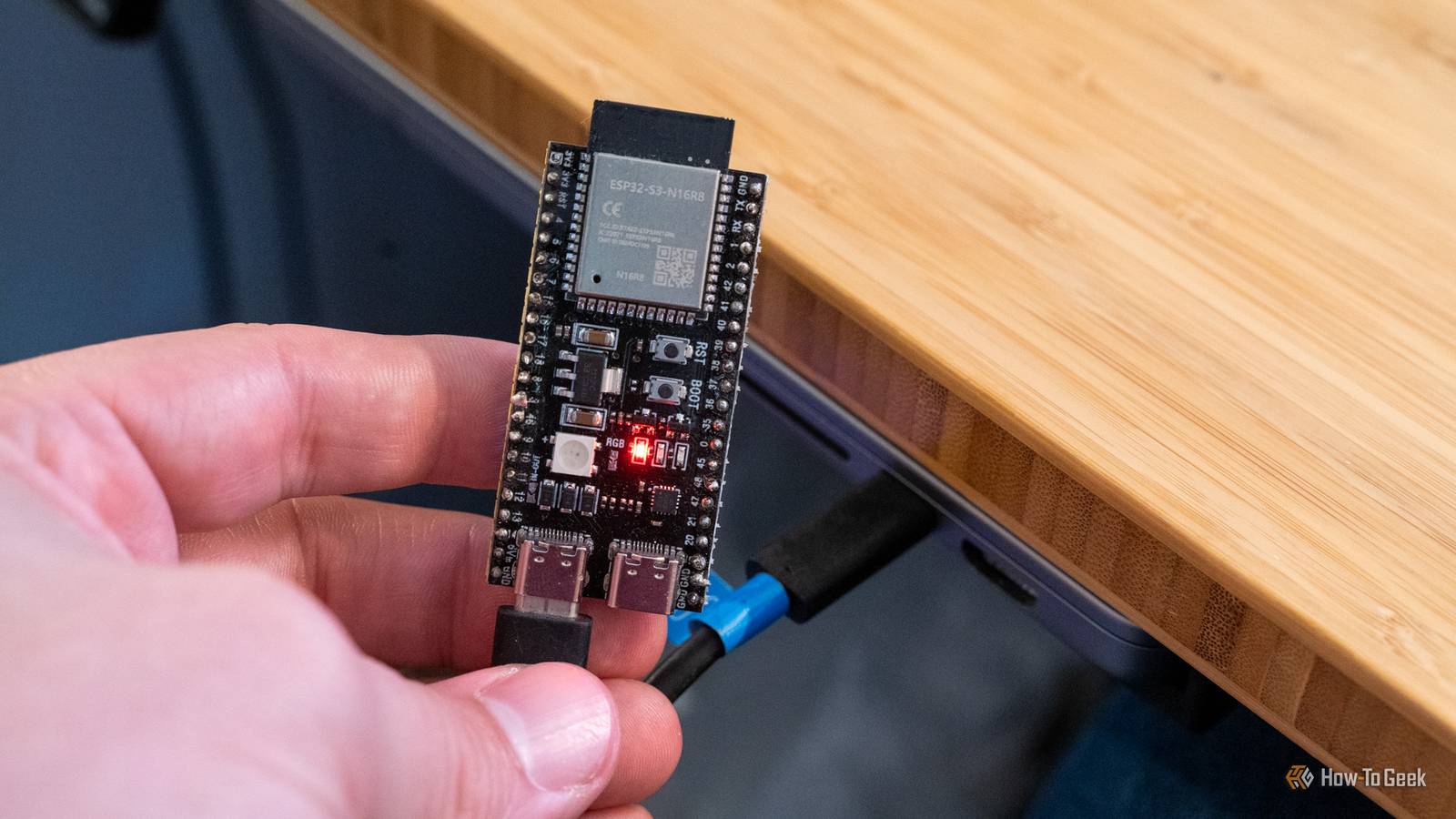
Many companies make them, and they're all relatively cheap.The ESP32 that I'm personally using to replicate a YubiKey is the ESP32-S3N16R8.Essentially, it's the ESP32-S3 board with 16MB of flash and 8MB of PSRAM.
How can it do that? The ESP32 can act as a USB device, meaning it can emulate a device on any connected computer.For instance, an ESP32 could emulate a keyboard on your computer — or a mouse.Really, an ESP32 can do almost anything you program it to.
Today, I programmed mine to be a security key for passwordless login.What is a YubiKey? The passwordless authentication device Several years ago, passkeys were introduced as a way to log into a service without typing in a password.Passkeys are inherently more secure than a password, as it's almost impossible for them to be compromised in the same way traditional passwords are vulnerable.
The main way most people use passkeys is through a password manager, which means that the passkey could potentially be leaked if that password manager is compromised.Yet that's how most people use passkeys because it's the most convenient option.You just log into your password manager account, and the passkeys are all right there.
YubiKey, or other hardware keys, are slightly different.These hardware keys physically store the passkeys in onboard storage, which means that the keys live in that specific device's vault.Lose the device, you lose the passkey.
Often, there are other recovery options available, but it's still something that should be closely guarded.On the other hand, since the passkey is stored on-device, it is extremely secure — nearly phish-proof.But YubiKey can cost $30 to buy, and I didn't want to spend that.
So, I decided to see if the $6 ESP32 I already owned could replicate a YubiKey without having to spend any more money.How did I set up my ESP32-S3 to replicate a YubiKey? It took less than two minutes I started my journey off by visiting Pico Keys.Pico Keys is a unique platform that allows you to deploy your own hardware secure module (HSM).
Pico Keys also has an ESP32-S2/S3 flasher tool built right into the website, which is what I used.From the flasher page, I chose Pico FIDO, as that is what enables the ESP32 to register and be used as a passkey inside of a browser.It delivers WebAuthn support, PIN, and physical button confirmation to the authentication stack.
The actual act of flashing the ESP32 with Pico Keys took about 60 to 90 seconds — it was quite fast.Once it was flashed, I had to unplug the ESP32 from my MacBook and wait a few seconds, then plug it back in.From there, I visited WebAuthn.io, which is a website to test your security keys.
The way WebAuthn.io works is by registering a temporary user account and passkey in your browser to store on the security key—in my case, the ESP32.It took a few tries to get it working, but once I figured it out, it worked every time.Now, I can just leave the ESP32 plugged in and store passkeys on it for logging into services without typing in a password.
3-pack ESP32-S3 N16R8 This 3-pack of ESP32-S3 N16R8 microcontrollers are perfect for your DIY projects.Being the N16R8 models, there's enough memory and storage to run projects using platforms like MicroPython instead of having to rely on just straight C coding.Also, the breadboard pins are included in the package, though you will have to solder them on.
$18 at Amazon Expand Collapse Would I trust this instead of a YubiKey? Why yes, yes I would, for the most part From a hardware perspective, I definitely would trust the ESP32 instead of a YubiKey.At the end of the day, both are microcontrollers that plug in over USB to a device to handle authentication.My only hesitation is the form factor.
The YubiKey is designed to be fairly rugged, and it's quite small.The ESP32 that I'm using is fairly large and also on the more delicate side.Sure, I could 3D-print an enclosure to make it more robust, but it's already fairly chonky.
Since I do most of my work at my desk, I would have no problem leaving it plugged in at the desk for authentication to services there, but I wouldn't toss it in my bag or pocket to authenticate when I'm not at home—which defeats the purpose.So, from a reliability perspective, I would definitely trust it to replace a YubiKey.I just don't know that I trust its ruggedness to survive life with me.
Going the DIY route is a great way to test before buying a more expensive device I've never used a hardware security key before trying this project out, and I have to say, it's quite nice.I love that I was able to use a device I already owned with some DIY tinkering to trial it.I've always wanted to use a YubiKey or other hardware security key; I'm just too cheap to buy one.
However, testing the DIY route out first is a great place to start.Now, I can trial it to see if I would actually like using a hardware key to log into my services.If I love it, I can spring for the YubiKey knowing that I would actually use it instead of just wondering if it would sit in a drawer or not.
Read More