I finally got tired of using Gigabit networking with my NAS, so I upgraded to 2.5GbE.The upgrade was actually cheaper than I expected, and the results were better than I expected.Moving to 2.5GbE completely changed how my NAS works in my homelab, and I think it will for you, too.
Gigabit is just too slow for large file transfers in 2026 It’s 1998 tech, after all When Gigabit networking was introduced in 1998, the average hard drive size was between 3.2GB and 5GB.Yes, the hard drive was 5GB or less.Today, most computers come with at least 256GB of storage, if not 512GB or 1,024GB (1TB).
Similarly, hard drives could only move data at 10MB/s to 15MB/s back in 1998, while today the average drive speed is 5,000MB/s to 7,000MB/s for NVMe.Many NAS systems have slots for NVMe cache drives, meaning you transfer files to that fast NVMe then the system handles moving the data off of it to the array at a later point.Quiz 8 Questions · Test Your KnowledgeInteresting and unique NAS use casesTrivia challengeBeyond basic backups — how well do you know the surprising things a NAS can do?MediaHome LabBackupNetworkingAutomationBegin 01 / 8MediaWhich popular open-source media server software is commonly self-hosted on a NAS to stream personal video libraries to any device?AVLC Media PlayerBKodiCPlexDInfuseCorrect! Plex is one of the most popular apps for turning a NAS into a personal Netflix-style streaming server.
It organizes your media with artwork and metadata and can transcode video on the fly for different devices and connections.Not quite — the answer is Plex.While Kodi and VLC are great media players, Plex is specifically designed as a client-server platform that lets you stream your NAS library to phones, smart TVs, and browsers from anywhere in the world.Continue 02 / 8BackupWhat is the name of the widely recommended data protection strategy that involves keeping three copies of data, on two different media types, with one copy offsite?ARAID redundancy ruleB3-2-1 backup ruleCDouble-parity protocolDMirror-and-sync methodCorrect! The 3-2-1 backup rule is a cornerstone of data protection strategy.A NAS plays a central role by acting as the second on-site copy, while cloud sync or an offsite drive satisfies the third copy requirement.Not quite — the answer is the 3-2-1 backup rule.
RAID is often mistaken for a backup, but it only protects against drive failure, not accidental deletion or ransomware.The 3-2-1 rule is the gold standard precisely because it covers multiple failure scenarios.Continue 03 / 8Home LabA NAS running a hypervisor or container platform like Docker can host a Pi-hole instance.What does Pi-hole primarily do?AMonitors hard drive temperatures across the networkBBlocks advertisements network-wide at the DNS levelCEncrypts all outgoing internet trafficDManages IP address assignments via DHCPCorrect! Pi-hole acts as a DNS sinkhole, blocking known ad-serving and tracking domains before they ever reach your devices.
Hosting it on a NAS via Docker means it runs 24/7 without needing a dedicated Raspberry Pi.Not quite — the answer is that Pi-hole blocks ads at the DNS level.Rather than installing an ad blocker on every single device, Pi-hole protects your entire network, including smart TVs and phones, by intercepting ad domain requests before any data is loaded.Continue 04 / 8SurveillanceMany NAS manufacturers offer dedicated surveillance software packages.What is the primary function of these applications?AMonitoring CPU and RAM usage across the local networkBManaging and recording footage from IP security camerasCScanning network traffic for intrusion attemptsDAutomating firmware updates on connected IoT devicesCorrect! Synology Surveillance Station and QNAP's QVR Pro are examples of NAS-based NVR (Network Video Recorder) solutions.
They let you manage multiple IP cameras, set motion-triggered recording, and review footage without paying for a cloud subscription.Not quite — the answer is managing and recording IP camera footage.A NAS can replace a dedicated NVR appliance entirely, storing days or weeks of footage locally.This is a compelling use case since it avoids ongoing cloud storage fees while keeping footage on hardware you control.Continue 05 / 8AutomationWhich self-hosted application, commonly run on a NAS, automatically downloads TV show episodes and movies by integrating with torrent or Usenet indexers?ARadarr and SonarrBBazarr and LidarrCOverseerr and RequestrrDProwlarr and ReadarrCorrect! Radarr handles movies and Sonarr handles TV shows — together they form the backbone of a self-hosted media automation stack.
They monitor release groups, grab new episodes automatically, and pass files directly to your Plex or Jellyfin library.Not quite — the answer is Radarr and Sonarr.While Bazarr handles subtitles and Prowlarr manages indexers, Radarr and Sonarr are the core apps for automating movie and TV downloads respectively.They integrate with your NAS download client and media server for a seamless pipeline.Continue 06 / 8NetworkingA NAS can be configured as a VPN server so that remote users can securely access the local network.
Which VPN protocol, known for being modern and extremely fast, is supported by newer NAS operating systems like Synology DSM?APPTPBL2TP/IPSecCWireGuardDOpenVPNCorrect! WireGuard is a modern VPN protocol praised for its lean codebase, high speeds, and strong encryption.Synology added WireGuard support to DSM, making it easier than ever to securely tunnel into your home network from anywhere without exposing your NAS directly to the internet.Not quite — the answer is WireGuard.PPTP is outdated and considered insecure, while OpenVPN and L2TP/IPSec are reliable but more resource-intensive.
WireGuard achieves better throughput with less overhead, which matters on the modest CPUs found in many NAS devices.Continue 07 / 8Cloud ReplaceNextcloud is a self-hosted platform frequently deployed on a NAS.Which major commercial cloud service does it most directly aim to replace?AAmazon AWS S3BGoogle Drive and Google WorkspaceCMicrosoft Azure Active DirectoryDDropbox BusinessCorrect! Nextcloud provides file sync, document editing, calendar, contacts, and video calls — a direct alternative to Google Drive and Google Workspace.Running it on a NAS means your data never leaves your own hardware, which is a major privacy and cost advantage.Not quite — the answer is Google Drive and Google Workspace.
Nextcloud replicates the full productivity suite experience: shared folders, collaborative document editing, and mobile sync.When paired with a NAS, it becomes a powerful private cloud that rivals Google's offering without any subscription fees.Continue 08 / 8Creative UseSome photographers and videographers use a NAS as the central hub for a collaborative editing workflow.Which protocol, natively supported on macOS and optimized for high-bandwidth file access, makes a NAS behave like a fast local drive for video editing?AFTPBWebDAVCSMBDAFP or SMB with MultichannelCorrect! For video editing workflows, SMB Multichannel (or historically AFP on older Macs) allows a NAS to deliver the kind of sustained throughput needed to scrub through high-bitrate footage without copying files locally first.
Pair this with a 2.5GbE or 10GbE network and a NAS can rival a dedicated SAN for small creative teams.Not quite — the answer is SMB with Multichannel (or AFP on legacy Macs).FTP and WebDAV are too slow and latency-prone for real-time editing.SMB Multichannel bonds multiple network connections to boost throughput, which is why NAS vendors like Synology specifically market this feature to creative professionals editing 4K and 6K footage.See My Score Challenge CompleteYour Score/ 8Thanks for playing!Try Again I did some calculations, and for networking to have stayed ahead of storage tech by as much as it was in 1998, we would need to be on 200GbE by now.
I’d love to be on 200GbE, but it’s just not feasible (though it technically does exist).While Gigabit networking did come out in 1998, it wasn’t until about 2008 when it became mainstream.Fast forwarding the numbers to then, and we should reasonably be at 25GbE in modern desktops.
Sadly, even that’s not the case today.However, 2.5GbE is becoming more mainstream—10x less than what we should be at if technology kept up its pace.Either way, Gigabit just isn’t fast enough in 2026.
Being limited to 100MB/s data transfer rates when spinning platter drives can hit several hundred MB/s in RAID is pretty crazy.I found that when my NAS was limited to Gigabit, I simply didn’t do a ton of transfers to or from it.If I had to move several hundred gigabyte or a few terabytes of files to my NAS, I would try to set the transfer up to run over the weekend, because otherwise my network would slow to a crawl with all of the bandwidth being taken up for far too long.
Something had to change.Most NAS systems ship with at least 2.5GbE built-in No NAS upgrades required Most modern NAS servers actually have at least 2.5GbE built-in now, with many shipping with either 5GbE or 10GbE ports.A lot of NAS units are also including 10Gb/s USB ports, which can take faster Ethernet adapters if you want.
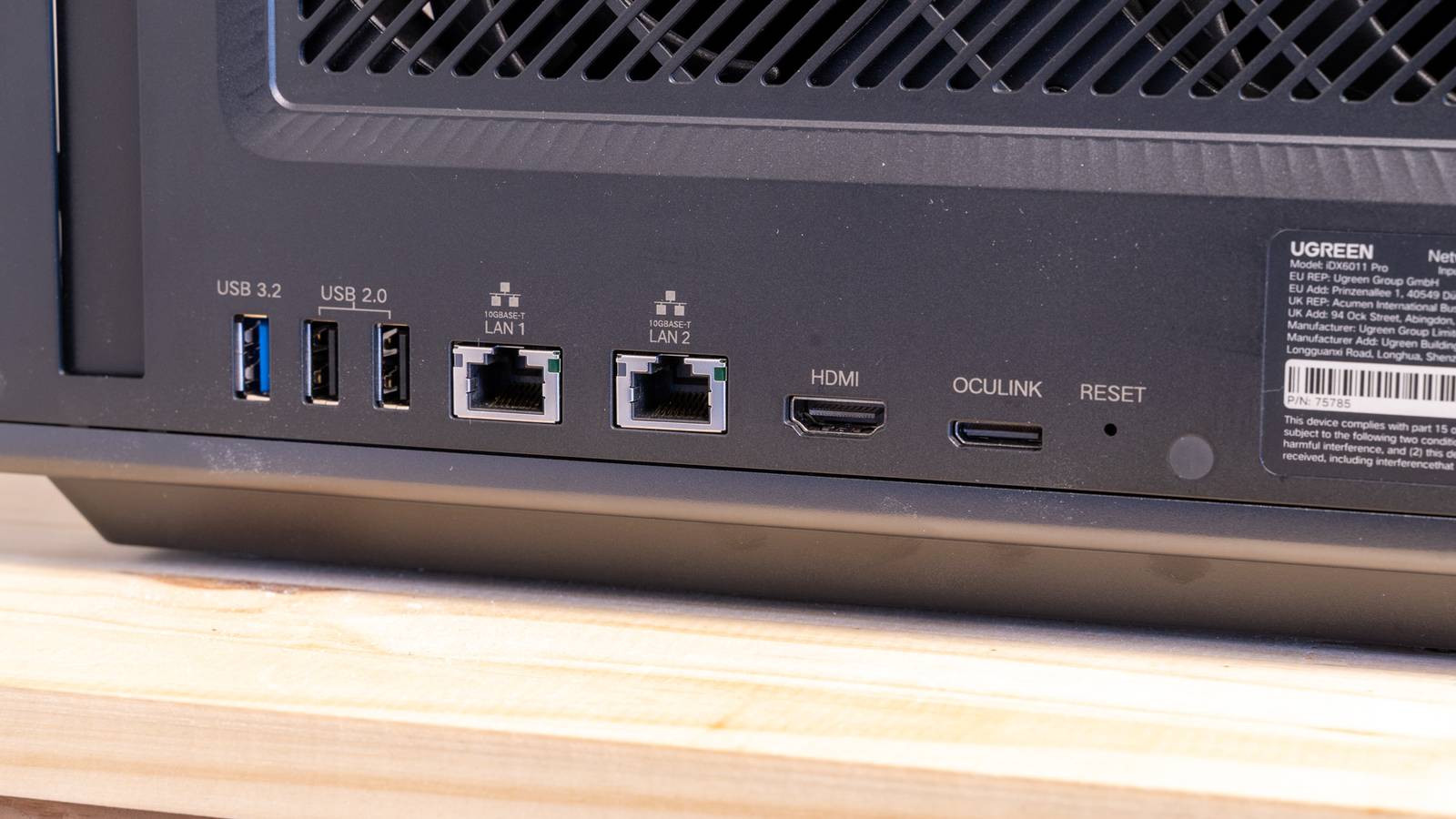
My most recent NAS, the Ugreen iDX6011 Pro, has dual 10GbE, but also a full-size PCIe slot that I could put a faster networking card in—say, 25GbE.Since most NAS units ship with this faster networking standard there’s not really much else that needs upgrading except maybe your computer.In my case, my gaming desktop already had 2.5GbE built-in, but my MacBook didn’t, so I had to add it there.
I also did have to upgrade some of my older NAS units that didn’t have built-in 2.5GbE.The NAS that I built from an old retired enterprise server only had Gigabit Ethernet built-in, so I picked up a cheap 2.5GbE PCIe card to slot into it to get better transfer speeds on it.The last piece of the puzzle for me was a 2.5GbE switch.
While I looked at some Amazon switches, like the TP-Link TL-SG105S-M2 or the TRENDnet TEG-S562, I ended up trying out this no-name 10-port 2.5GbE switch for $70.It didn’t work well in my setup, and I couldn’t get devices to uplink at 2.5GbE with it for some reason, so I decided to save some cash and buy the Unifi Flex Mini 2.5G, which is just $49—less than the TP-Link or TRENDnet with more features.Really, if you already have a NAS with 2.5GbE, and a computer with 2.5GbE, then all you’ll need is a switch capable of 2.5GbE to take advantage of the faster transfer speeds.
TP-Link 2.5G PCIe Network Card (TX201) The TP-Link TX201 is a 2.5Gb/s network card that installs in a PCIe slot on your computer.Designed to deliver multi-gig networking, this add-in NIC is perfect for upgrading your desktop, server, or NAS for faster networking.The slim profile suits even 1U servers, and you'll get both a normal and low-profile mounting bracket in the box.
It supports networking speeds of 2500/1000/100, meaning it's backward compatible with standard Gigabit and Fast Ethernet connections too.$30 at Amazon $30 at B&H Photo Video $30 at Newegg Expand Collapse Unifi Flex Mini 2.5G Switch The Unifi Flex Mini 2.5G Ethernet Switch is a fully-managed network switch delivering multi-gig speeds.It works both standalone or with a Unifi Network Controller, making it a versatile option for your network setup.
You get an included USB-C power adapter, though the switch can be powered over PoE+ from the upstream switch.$49 at B&H Photo Video $49 at Unifi Expand Collapse 2.5GbE finally lets me use my NAS how I always wanted to Moving data 2.5x as fast makes data transfers far less of a pain Once my entire networking stack was ready to go on 2.5GbE, I could feel the speed increase immediately.For instance, moving 50GB of files over 2.5GbE takes under three minutes now, where it used to take seven minutes (or more) on Gigabit.
I was able to move 70GB of data in just about five minutes, which was much faster than I would have seen over Gigabit networking.With this newfound speed, I started to actually store more files on my NAS.In the past, I used my NAS as purely a cold storage pool or for media storage.
Basically, archived files or photos would go to the NAS, but never anything that I would want to access with any regularity.Now, with 2.5GbE, I’m able to edit RAW photos directly off my NAS with no issues.I even do video editing from my NAS on my MacBook Pro sometimes with relative ease.
Bumping the transfer rate from 100MB/s to 250MB/s has fundamentally changed how I use my NAS, and I couldn’t imagine going back to a slower internal networking speed.At this point, I treat my NAS as an extension of my computer—so long as the data on it only needs to be accessed when I’m at home.I still keep a local copy of the current year’s photo library on my MacBook, but I store almost everything else on the NAS now.
It has way more storage than any of my computers ever could, it backs up to the cloud, and it has hard drive redundancy built-in.What more could I ask for? UGREEN NASync DXP2800 Brand UGREEN CPU Intel 12th Gen N-Series This cutting-edge network-attached storage device transforms how you store and access data via smartphones, laptops, tablets, and TVs anywhere with network access.See at Amazon Expand Collapse Faster than 2.5GbE would be nice, but it’s not necessary When I first went to upgrade my network in early 2025, I was dead set on going 10GbE.
It felt like the “gold standard” of networking speeds, but I quickly realized it was an unnecessary standard for most setups.Sure, moving data at 1GB/s would be much nicer than 250MB/s, but 250MB/s is already such an upgrade over 100MB/s that the extra cash required for 10GbE wasn’t necessary at the end of the day.If you’re still using Gigabit networking for your NAS, make 2026 the year you finally upgrade—you won’t regret it.
Read More