Some time ago, I was given one of these devices by a friend of mine, and unfortunately, it had a problem.I think he’d had it lying around for a while.Anyway, I could not get it to connect to Ethernet, despite having had experience with the predecessor, the SLZB-06.
After struggling for some time with the device I eventually gave up and contacted SM Light who promptly offered to replace the device under warranty.The SLZB-06MU arrived a couple of days ago, and I’m just testing it now for the first time.In case you’re not familiar with SM Light, the device is described as the SLZB-06MU Zigbee Ethernet USB PoE LAN adapter.
Whether you’re using Zigbee2MQTT or ZHA, this device could prove to be a reliable partner.I have two houses connected by a Home Assistant, and in each house I have one SLZB06 Zigbee coordinator.These devices can be connected to your system by USB, Wi-Fi, or Ethernet.
I prefer Ethernet.The device acts as a central coordinator for all Zigbee devices, many of which may be bulbs or smart plugs, which themselves are wireless Zigbee routers and you can also use various dedicated Zigbee routers.As I already have an SLZB-06 here in Spain as my Zigbee coordinator, the first thing I need to do on switching on this device is set it to be a Zigbee ROUTER because you should only have one Zigbee coordinator in the network.
With some such devices, switching between coordinator and router can be a little painful, but with the SM Lite devices, it’s simply a case of switching from one to the other in the webUI, and it takes seconds.To start the ball rolling, I plugged the SLZB-06MU into USB power and plugged its Ethernet connector into my router.I could have used power over Ethernet (POE), but in this case, USB is as easy as anything.
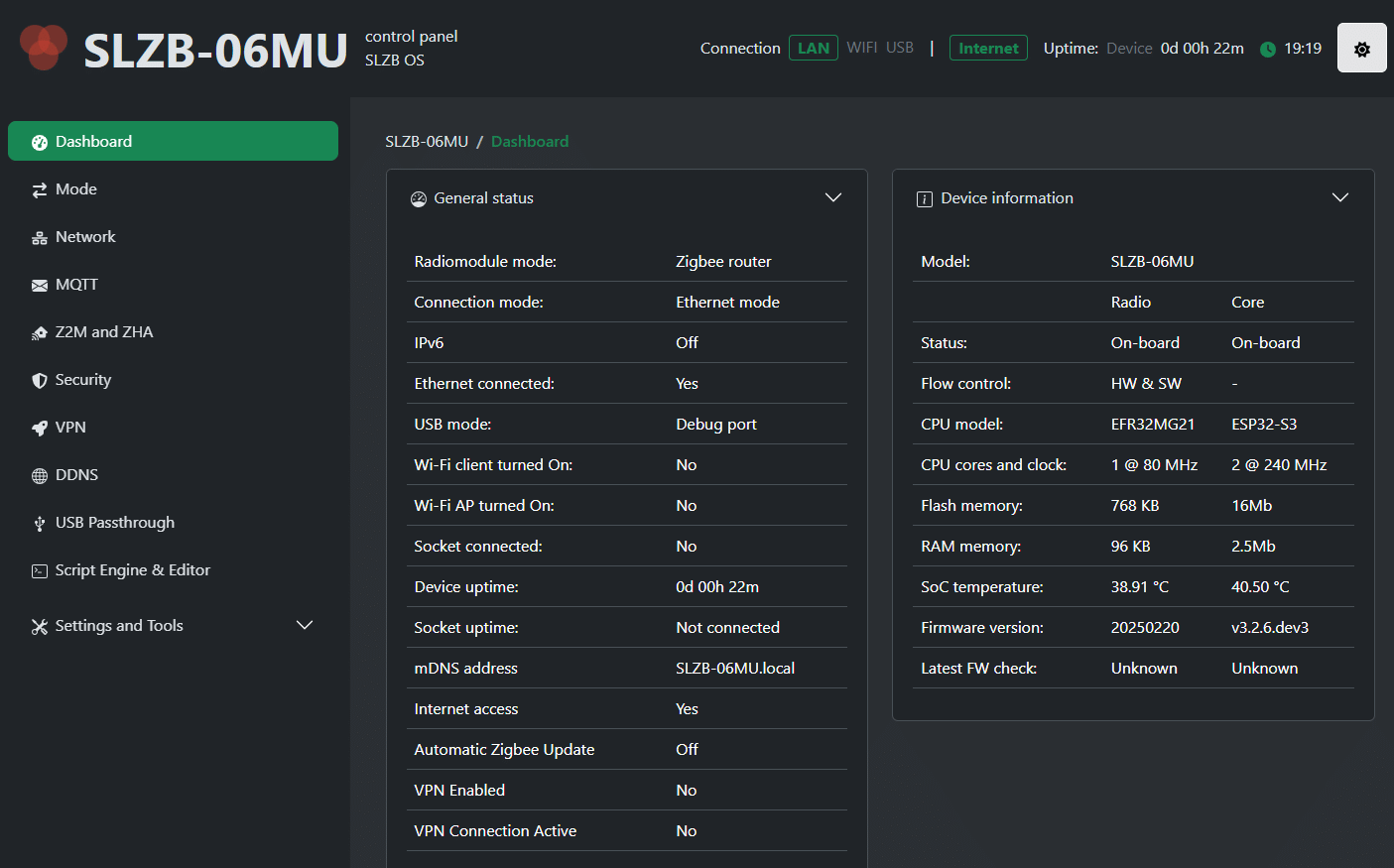
I checked with my router to see what new devices had been added into the system, and sure enough it immediately spotted a “SLZB-06MU” on address 92.168.1.36 I went to that address in my Chrome browser on the PC and found its webUI.The screen I’m showing here is almost out of the box The only thing that is different in the image above compared to the absolute out-of-the-box experience is the mode – Zigbee router mode – which I achieved immediately after connection simply by going to the left “Mode” page which as you see above has Zigbee Coordinator as the first radio mode (selected by default) and I selected Zigbee router mode before returning to the main screen.I did absolutely nothing else than this after opening the box for the first time.
As you can see above, there are Thread options as well.The next thing I have to do is fix the address – by default it is dynamic.There’s a page for that too, in the side menu.
If running as a Zigbee coordinator (I’m going to run as a router while I run the device in) there are also explicit instructions for setting up and replacing an existing Zigbee coordinator.Note: This is not a new device – the last firmware update was February 2025.Setup for Home Assistant is the same as the SLZB-06..
Obviously that IP address will be different depending on your setup.In my case I’ll use the address it picked dynamically but fix it internally when I replace my SLZB-06 – after giving the SLZB-06MU a good trial as a Zigbee router.
Read More