One of the best things about Waze is also one of the worst.The app lets users report hazards, which are then shared with every other Waze user on the same stretch of road.These alerts can be really useful, but they can quickly get incredibly annoying.
Waze's constant warnings were driving me mad I didn't want to know about every car on the shoulder Some of the community-submitted Waze alerts are genuinely helpful.Where I live, there are a lot of old roads, many of which have horrific potholes.Some are so deep they could damage my car if I'm not careful to avoid them.
Waze giving me an audible warning about a pothole ahead is genuinely useful.Since the locations are user-submitted, almost all the worst potholes in my area generate alerts, making them far easier to avoid and saving me from expensive repairs.Unfortunately, Waze doesn't stop at pothole alerts.
It also alerts you to many other road features, from speed bumps and sharp curves to complex intersections and multi-lane merges.Beyond road features, Waze alerts you to crashes, traffic, vehicles on the shoulder, bad weather, blocked lanes, and even animals in the road.The constant barrage of alerts can soon get annoying.
This is especially true when you're listening to your perfectly curated road trip playlist or trying to follow the complex plot of an audiobook, and it keeps getting interrupted by yet another alert telling you that there's a car on the shoulder.Related I've used Waze for 10 years—here's why I refuse to switch to Google Maps Google owns both, but Waze is better.Posts 31 By Cory Gunther Waze says it limits alerts, but there are often still too many The intent is to reduce distractions Waze gives a lot of alerts, but it could actually be even worse.
In some situations, Waze may actively reduce the number of alerts you get.According to the Waze support pages, the alerts that you receive will depend on your current driving location.You may get more alerts "where you need to pay more attention to the road, such as when you are approaching an accident-prone segment, where there is a hazard on the road, a significant speed decrease and more." The support page goes on to state that "in order to minimize drivers' distraction, we limit the amount of alerts a driver may see on a single route." It also explains that alerts are prioritized based on different factors such as how familiar you are with the road and how many alerts affect your route.
The upshot is that you may not get alerted about everything.Despite these features, the default Waze settings are still far too annoying for my liking.I get so many alerts about cars parked on the shoulder, which I'm not particularly worried about.
Thankfully, there's a simple fix that means I don't need to switch back to Google Maps.You can take control of how Waze alerts are delivered Replace audible alerts with visual ones Close The good news is that Waze gives you some level of control over how you receive these types of alerts.You can opt to disable the hazard alerts completely, receive audible and map alerts, or have them appear only on the map.
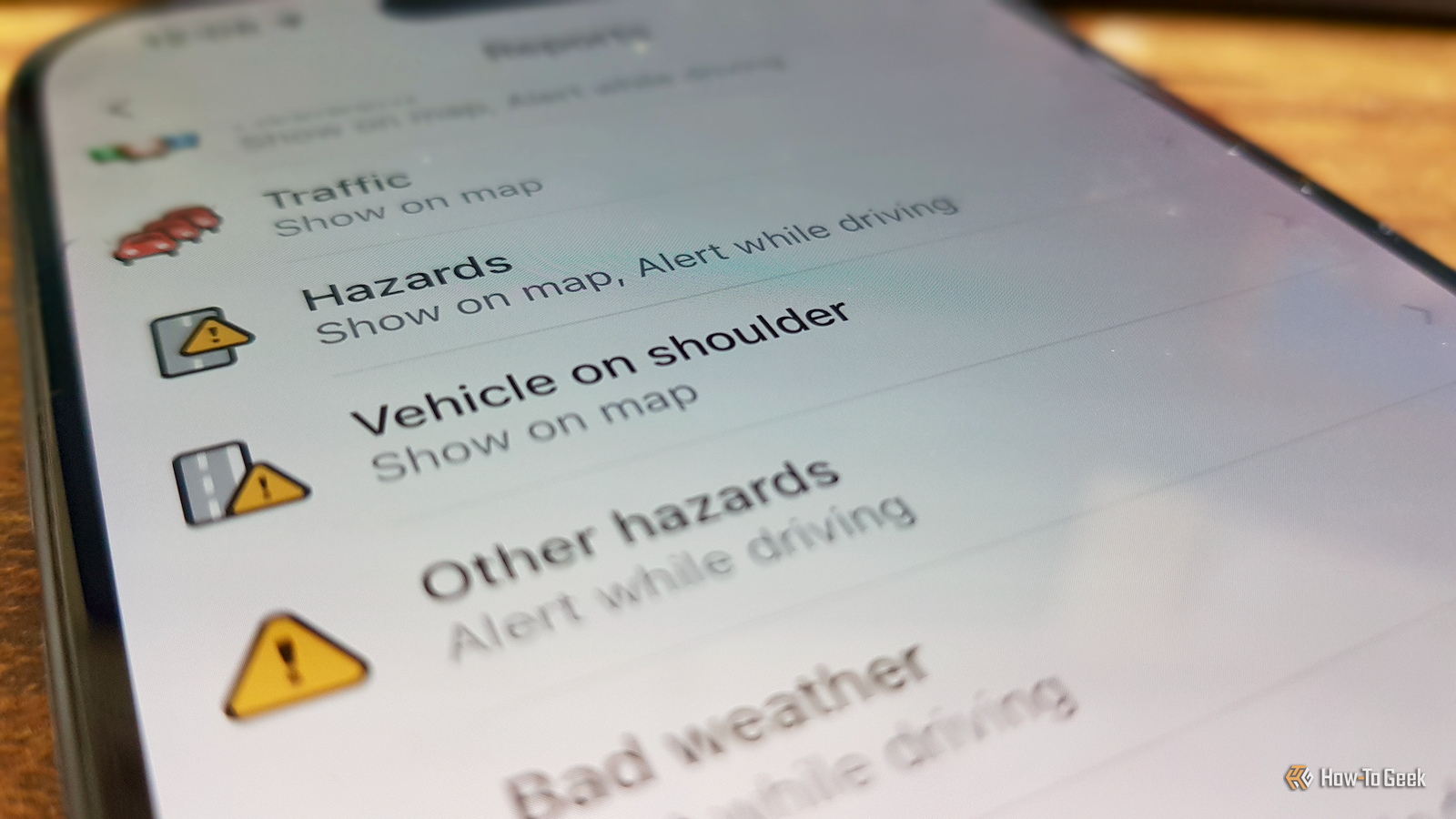
Choosing the latter option can make driving using Waze far less annoying while still letting you see the important information.To change these settings, open Waze, tap the menu icon, and select Settings.Under Driving preferences, tap Alerts and reports.
Select Reports to see a full list of all the available types of reports.To change whether an alert is spoken or shown on the map, tap a report type, such as Vehicle on shoulder.Toggle Show on Map and Alert while Driving on or off to suit your needs.
Some sections, such as Road features, contain multiple types of alerts, and you can configure each of these individually.Your settings apply globally; if you change how a report is delivered, it will apply to all subsequent journeys, not merely the one you're currently making.If you want to bring audible alerts back, you'll need to go back into the settings and re-enable them.
Waze is now far less annoying to use I get the alerts I want without those that I don't The control Waze gives you is reasonably granular, but not completely.You can adjust a large number of report types, but some alerts fall under a wider category, so you can't disable them individually.For example, pothole alerts fall under Other hazards, so I have to leave this category enabled in order to get them.
I was able to disable the Vehicle on shoulder alerts, however, and these were the ones that annoyed me the most.I still see them on the map, but my music doesn't get interrupted by audio ducking every time I pass a car that's pulled over safely on the side of the road.With so many reports available, it can take a little time to get the settings exactly how you want them.
It's worth the effort; driving with Waze is now a far less annoying experience.Make Waze your own Not every journey is the same, and some of the Waze alerts may not be ideal for the routes you drive most often.Adjusting the report settings ensures you only get the alerts you want, without distractions from information you don't need.
if you're still not sure whether to use Waze or Google Maps, it's worth taking a look at the key differences.
Read More