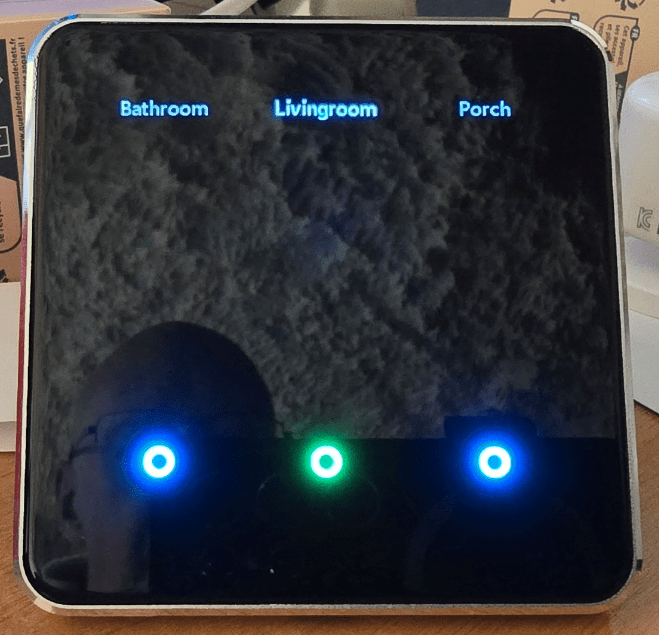
Just had my first play with a new Semismart Zigbee Smart Screen Switch ZMS-206EU-3 and I’m quite excited… See the main photo – this standard EU fitting wall switch – which requires neutral – switches up to 3 devices on and off – the blurb that comes with it says you need to pair it with the Tuya app – no you don’t – if you’re a Home Assistant user and have Zigbee2MQTT set up as I do, it’s a quick matter of hitting PERMIT JOIN in the Zigbee2MQTT add-on and seconds later – one new switch – and it’s BEAUTIFUL.There is a white version and a black version – this is about the black one – black screen with silver frame – nothing to see initially except for 3 white rings on the screen (not backlit).But as you move near the switch THAT ALL changes.
Initially the screen put up 3 words at the top, switch1, switch2, switch3.Simple setup in Home Assistant follows – you put in what you want and the colours for the 3 switch circles – any combination for both on and off.I made the text Livingroom, Bathroom and Porch and circle colours green for on, blue for off (though the blue looks more like cyan to me).
You have more controls than you can imagine in HA, brightness, backlight on/off, radar sensitivity – you name it.So at a distance there is no power consumption for the LEDS, radar brings the lights on as you get close up.The whole effect is excellent and the switches work perfectly both in HA and locally.
And here are the controls in Home Assistant under the device settings..Right one the one finishing touch that is missing – and I have contacted the company to see if they can change it – you can’t READ the status of the backlight in HA – i.e.the radar.
If you could just detect in HA the status – assuming you put one of these switches next to your front door and next to your back door, you would have a ready-made intruder alert system.Maybe I’m being greedy but it seems to me that would make a great addition.I’ll update the blog if and when I get a response.
Right now I’m having great fun with this new switch and my wife loves the display.I should say I received a couple of these switches back in January but it has taken this long due to house moving to actually write something.OOOH, I like the child lock – set that and you can only control the outputs from your phone or PC, the real buttons get disabled.
Here I’m playing with the second of the two switches I received – this one has a white front (I’ve not yet set the output names) but it is otherwise the same as the first unit.And finally don’t forget there is a US version of this – and there are 1-2 and 3-gang versions.I don’t have switch boxes with neutral so as usual I guess I’ll be mounting these elsewhere and controlling lights or light groups which are already in Home Assistant.
I like to have multiple means of controlling light groups like the living room – Google home voice (which of course doesn’t work when the WiFi is dead externally so I fall back to using the phone – using these wall switches even better as being Zigbee they don’t need external Internet connections… and of course that way at any time I can change their use by simply updating the names that appear at the top of the switches – and updating my automations.
Read More