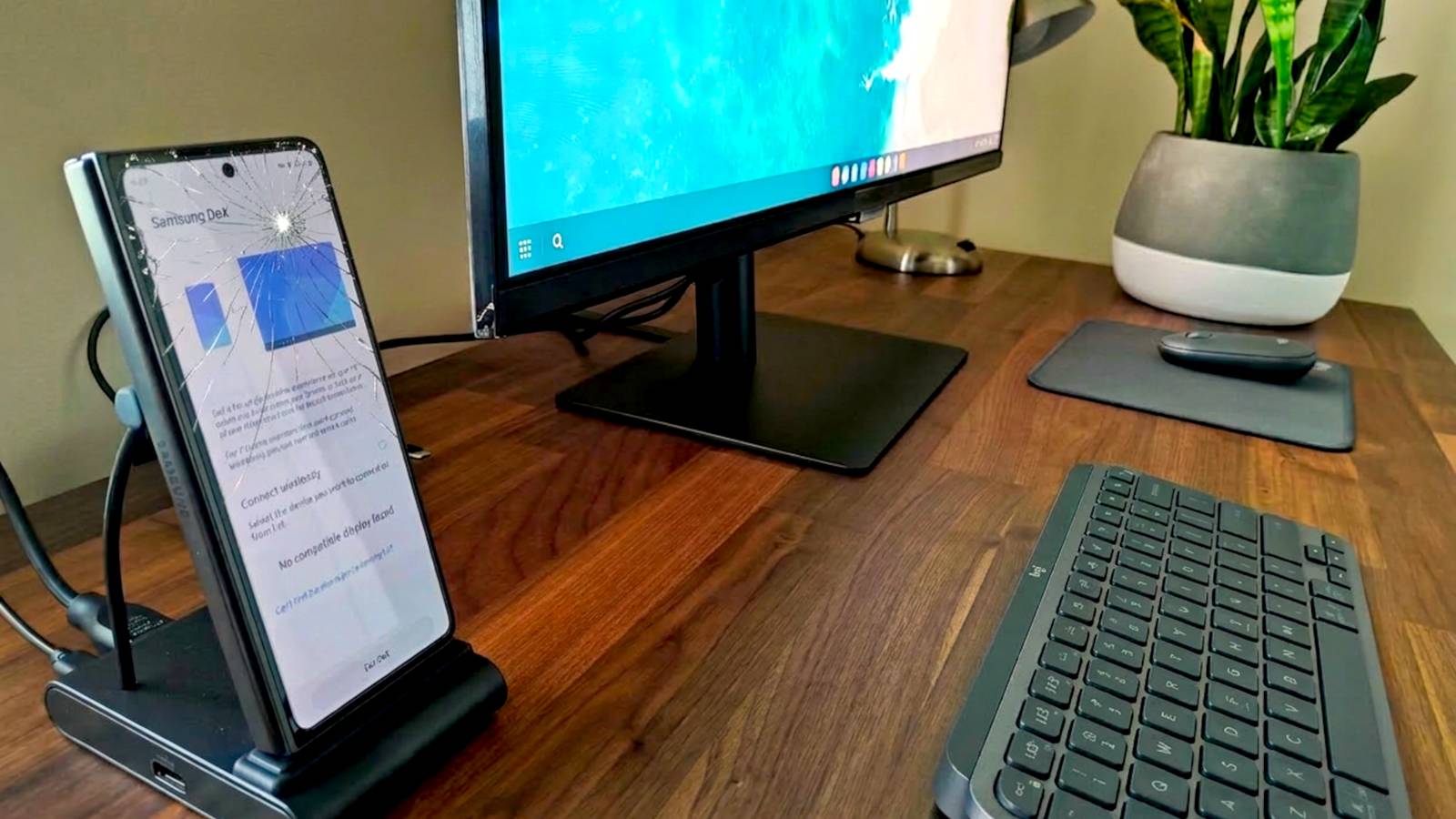
Techie people love to say things like, “You know phones are just computers, right?” This has never been truer than it is today.Your broken Samsung Galaxy phone doesn't need to be discarded—it can quite literally be the brains powering a mini PC setup with a monitor, keyboard, and mouse.Samsung Galaxy phones are super powerful now And you don't need the latest model There’s a decent chance that your Galaxy phone is the most expensive piece of technology you own, and there’s good reason for that.
Under that fragile AMOLED display lies a processor that can keep up with some mid-range laptops.You most likely use all that power to scroll through apps, take photos, and send text messages, but your phone is capable of much more.Modern chips like the Snapdragon 8 Elite Gen 5 inside the latest Galaxy S26 series are ridiculously powerful.
This isn’t even exclusively a Samsung thing, either.Apple’s MacBook Neo has the same chip that was in the iPhone 16 Pro.However, you don't need the latest Galaxy phone to have a powerful processor.
The last several generations of Snapdragon’s high-end chips are all great.Related 8 ways to repurpose an old Samsung Galaxy phone Let that Galaxy phone live on.Posts 8 By Goran Damnjanovic We need to thank Samsung for desktop mode on Android Once again, Samsung is the leader So, how do we put that desktop-caliber power to good use? By simply connecting your broken Galaxy phone to an external monitor, the software transforms into a desktop interface called “DeX.” Android as a whole just recently got a native desktop mode, but Samsung has been doing it for a long time already.
“DeX” is shorthand for “Desktop Experience”, and it was a cool idea that launched alongside the Galaxy S8 in 2017.Back then, you needed a plastic puck called the “DeX Station,” but that’s not the case anymore.The software has matured into something that feels surprisingly similar to Windows or macOS.
You get a proper taskbar, resizable windows, desktop widgets, and support for a mouse and keyboard (along with shortcuts you already know).The best part is that everything on your phone is right there and ready for you.Samsung has included DeX in every Galaxy S series since the Galaxy S8 and Note 10.
It’s a bit more of a recent development for the Z series, though—you’ll need a Fold 2 or later or a Flip 7 or later.Galaxy A series and other Galaxy devices do not officially support DeX.DeX is much more polished than standard Android’s desktop mode, but Samsung is working with Google on the project.
Eventually, both versions should be fully up to par.For now, though, Samsung Galaxy owners have a superior experience.Let’s get it up and running.
How to use DeX on a Samsung Galaxy phone It's easier than you think First, we need to assess the level of "broken" you're working with.A Galaxy phone with a damaged yet functional screen is the best candidate.However, you have options if the screen is unresponsive or completely blank.
If you previously enabled USB debugging—which is a good idea—you can control it with scrcpy and get a mouse and keyboard connected to use in DeX.The most reliable way to get started with DeX is with an HDMI to USB-C/DisplayPort to USB-C adapter or a cheap USB-C hub.Once you plug your phone into a monitor or TV, a prompt will appear on your screen asking if you want to start DeX.
If it does not pop up automatically, you can always find the DeX toggle in your Quick Settings panel by swiping down from the top of your screen.Anker USB C to HDMI Adapter Brand Anker Input USB-C $20 at Amazon $17 at Anker Expand Collapse For those who hate cables, you can even go wireless.As long as you have a smart TV or monitor that supports Miracast, you can beam the entire desktop interface across the room with a few taps.
Now that you’re in the DeX environment, you can tweak things to your liking.If you don’t have a mouse handy, and the screen still works, your phone can actually act as a touchpad.Just tap the “Use your phone as a touchpad” notification that appears on your phone when DeX is active.
Of course, a cracked screen might not be great as a touchpad, which is where pairing a Bluetooth keyboard and mouse comes in handy.Most of the desktop-specific options can be found by going to Settings > Connected Devices > Samsung DeX.Look for “Connected display” to adjust monitor settings.
This is also where you’ll find the mouse and keyboard options.DeX allows you to change the mouse scrolling direction, and it offers a couple of multi-touch gestures as well.From here, you’re well on your way.
The beauty of DeX is that there’s really not that much to configure.This is literally your phone being displayed in a different form factor.All your apps are signed in and ready to go, you’ve already adjusted settings on your phone, and your photos and videos are backed up.
It just works.Samsung Galaxy S22 Samsung's entry-level flagship phone for 2022 is an excellent purchase, especially at this price.See at amazon Expand Collapse Samsung Galaxy S23 The regular Galaxy S23 and S23 Plus don't have all the advanced camera features or S Pen of the Ultra, but they're still solid smartphones with the latest hardware and Android software.
See at Amazon Expand Collapse Samsung Galaxy S24 The Samsung Galaxy S24 may be the smallest in the line, but it has big-time processing power and a fantastic camera, perfect for selfies, group shots, and more.Buy on Amazon Expand Collapse
Read More