I wanted to build a second brain, so I installed the one app synonymous with the idea — Notion.The plan was to set up a few databases and start capturing all my notes into them, so everything would stay neatly organized and easy to find when I needed it.However, if you’ve used Notion before, you probably already know what’s coming.
Add How-To Geek on Google Add as Preferred Source Follow on Google Discover Soon, the system that was meant to save me time by minimizing research work started eating up more time with maintenance work.I put up with it for a while, eventually quit, and have since been sifting through different note-taking apps to find the perfect home for my second brain.Recently, I stumbled across Capacities, and it seems like it could be that new home.
Your second brain shouldn’t be your second job Notion eats up way more time than it saves The problem with Notion, at least for me, is that it gives you a blank slate and a bunch of tools, and expects you to build everything yourself.No doubt the tools are powerful, and you can create really cool stuff with them — I have clients managing million-dollar businesses using Notion.However, having the power to build anything means that most of the time, you’re going to end up building the wrong thing — especially if you’re not an expert in the topic.
As such, I’d much rather have a pre-built system optimized for building a second brain.Now, to be fair, there are community-built Notion templates that can help solve this problem.But there are hundreds of templates to choose from, so you end up wasting time testing different templates until you find the perfect one.
Not to mention, most of the good templates are locked behind a paywall.That said, even if you build the perfect scaffolding for your notes, there’s still the friction of capturing something new.Before even writing a new note, you have to think about which database to open and which properties to fill out.
Sure, this might seem trivial, but it was only after I tried the Daily Notes feature in Obsidian, and now in Capacities, that I realized the importance of having a seamless note-capturing system.And so, without further ado, I’m going to stop my rant about Notion and focus on the app we’re here to talk about: Capacities, and why I think it’s a better app for building a second brain.Capacities Capacities is a modern note-taking app that treats each note as a typed object, such as a book, a person, a meeting or a custom type you define yourself.
Objects link to each other and can collect backlinks automatically.It runs on the web, Windows, macOS, Linux, iOS and Android with sync and offline access.See at Official Website Expand Collapse Capacities offers the simplest note-capturing experience Less deciding, more writing Close The entire note-capturing experience in Capacities revolves around the daily note.
Of course, you can open Capacities and jump straight into creating a different object type (more on that later), but by default, you’re expected to write everything down in a daily note.This system lets you completely bypass the initial friction of deciding where to place your notes, since every idea goes into the daily note for that day.It basically works like journaling.
Whenever you have an idea or thought, you just open the app, see the daily note, and write down what’s on your mind.If you feel you want to write more about a specific topic, you can use @ or double brackets [[ ]] to create a link to another object dedicated to that topic.You can either write about the topic then and there, or save it for later when you go through all your daily notes.
But how are you supposed to find these notes if you don’t name them, and you can’t remember the dates when you took them? Well, this is where tags come in.You can add multiple tags to each daily note, which makes finding them much easier.Capacities also has robust search functionality that matches your query against both the note title and the body.
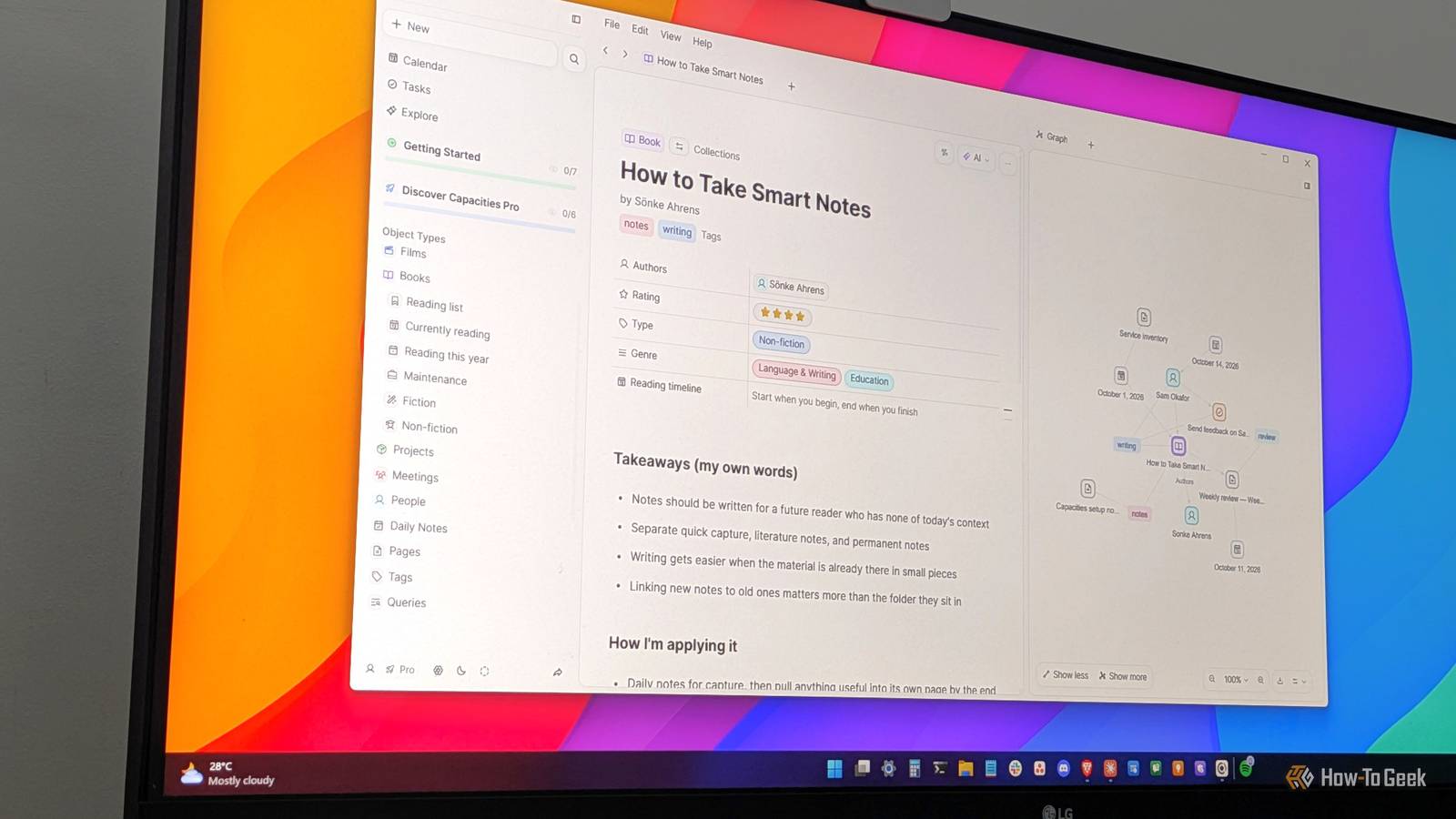
But what if you don’t actively remember the note you want to find? What about serendipitously finding your old notes? Well, similar to Obsidian, Capacities also has a graph view that shows you how all your notes are linked to each other.While creating a new note, you can link back to other notes, open the graph view on the side, see how everything connects, and get new ideas and inspiration to write about.Related I tracked my life in Excel for 3 months—I’m never using a journaling app again Three months of rows later, I learned more about myself than I ever did in therapy.
Posts 5 By Dibakar Ghosh What are these “objects” inside of Capacities? Capacities is an object-oriented note-taking system Close Everything you create inside Capacities is treated as an object.You can think of an object as the most basic unit of everything you make in the app.First, you’ve got the built-in types.
These are fundamental to how Capacities works, so you can’t delete them: Daily notes: One note for each day, which is where you capture everything, like we talked about above.Pages: Plain notes for anything that doesn’t fit a specific type, like drafts, cheat sheets, or longer write-ups.Tags: Labels that you can add to any object to group related notes across types.
Queries: Saved searches built on set rules, e.g., all meetings you haven’t marked as reviewed.Tasks: To-dos with a status, priority, and due date that you can link to any note.Queries and tasks are only available with their premium plan: Capacities Pro.
Next, you’ve got the custom object types.Think of each one as a page with its own set of properties that every object of that type shares.By default, you get four pre-built custom object types: Book, Person, Meeting, and Project.
Each custom type has its own properties.For example, the Book object has fields for the author, rating, and genre, while a Meeting object has a date and attendees.You can edit them, delete them, or create your own custom object types based on the kinds of notes or content you generally capture.
This is actually where Capacities starts to feel a lot like Notion databases.The main difference is that you don’t have to build the database first.You can start by writing plain pages, and once you notice that a bunch of pages follow the same structure, you can change their type to a custom object type.
For example, I used to have a lot of pages for movies I watched, but once I noticed I had a bunch of them, I created a new Film object type and moved them into it.Finally, there are media types.When you add images, PDFs, web links, or audio files to Capacities, each of them becomes an object of its own.
This allows you to tag and link them just like any other object.I should also mention that each object type gets its own page where you can see all the objects under it in different view styles: gallery, table, list, or board.The best part is that none of this requires upfront planning, as is the case with Notion.
You can start by focusing on collecting notes and then turn them into object types later.Go premium and get a task manager built-in Your notes app and to-do app combine into one Close A lot of people use Notion for managing tasks and projects alongside their notes, and if you want something similar, you can get it with Capacities’ Tasks feature.Granted, Tasks is a paid feature that’s only available with the Pro plan, but it’s a much better-integrated task management system than what you can build with Notion.
Firstly, you can create a task while writing any note by typing a pair of parentheses () followed by a space, or by using the /task command.A task created inside a project or a meeting note automatically gets that note set as its context, so it shows up in that project’s Tasks tab.In practice, this means you can write your daily note, and whenever something actionable comes up, you can add it as a task without leaving the note, let alone the app.
Each task has a status, a priority, a scheduled date for when you plan to do it, and a separate deadline for when it’s actually due.Tasks that are past their deadline are flagged in red, while tasks scheduled for today show up under your daily note.Related I transformed Obsidian into a project management system — and it’s better than Notion The app everyone calls a note-taking tool can do a lot more than that.
Posts 2 By Dibakar Ghosh The note taker for people who have a life outside of note-taking When using Capacities, I felt like the developers had somehow gone into my head, seen what I wanted, and built it for me.There are two things I absolutely love about Obsidian: Daily Notes and Graph View, and Capacities offers a better implementation of both features.Then, coming to Notion, I love its databases and task management capabilities, and I’ve got better implementations of those features here as well.
The app has completely streamlined how I take notes and, at least for the moment, it’s where I’m housing my second brain.Capacities lets you import your notes from popular platforms, including Notion, Obsidian, and Evernote.You can also export all your notes as Markdown files, with all properties converted into front-matter at the top of each file.
Read More