The application of AI in the productivity space, especially note-taking, has been growing rapidly.We've seen newer tools like Granola and Fathom gain popularity, while established platforms like Notion have also integrated AI, helping users generate transcripts and notes from hours-long meetings.It looks like Google is also experimenting in the space but with a twist—a tool called Google AI Edge Foresight that runs locally on your Mac leveraging Apple Silicon.
The company is experimenting with Foresight through Google AI Edge wing, a collection of technologies and tools designed to run AI models locally on devices.What is Google AI Edge Foresight? Local AI meeting app powered by on-device Gemma models It is an AI meeting companion app that processes your meeting data locally on your Mac and doesn't require the internet for its function.Unlike many AI meeting companion apps that rely heavily on cloud models, Foresight uses Google's EmbeddingGemma 2 and Gemma 4 models for on-device AI.
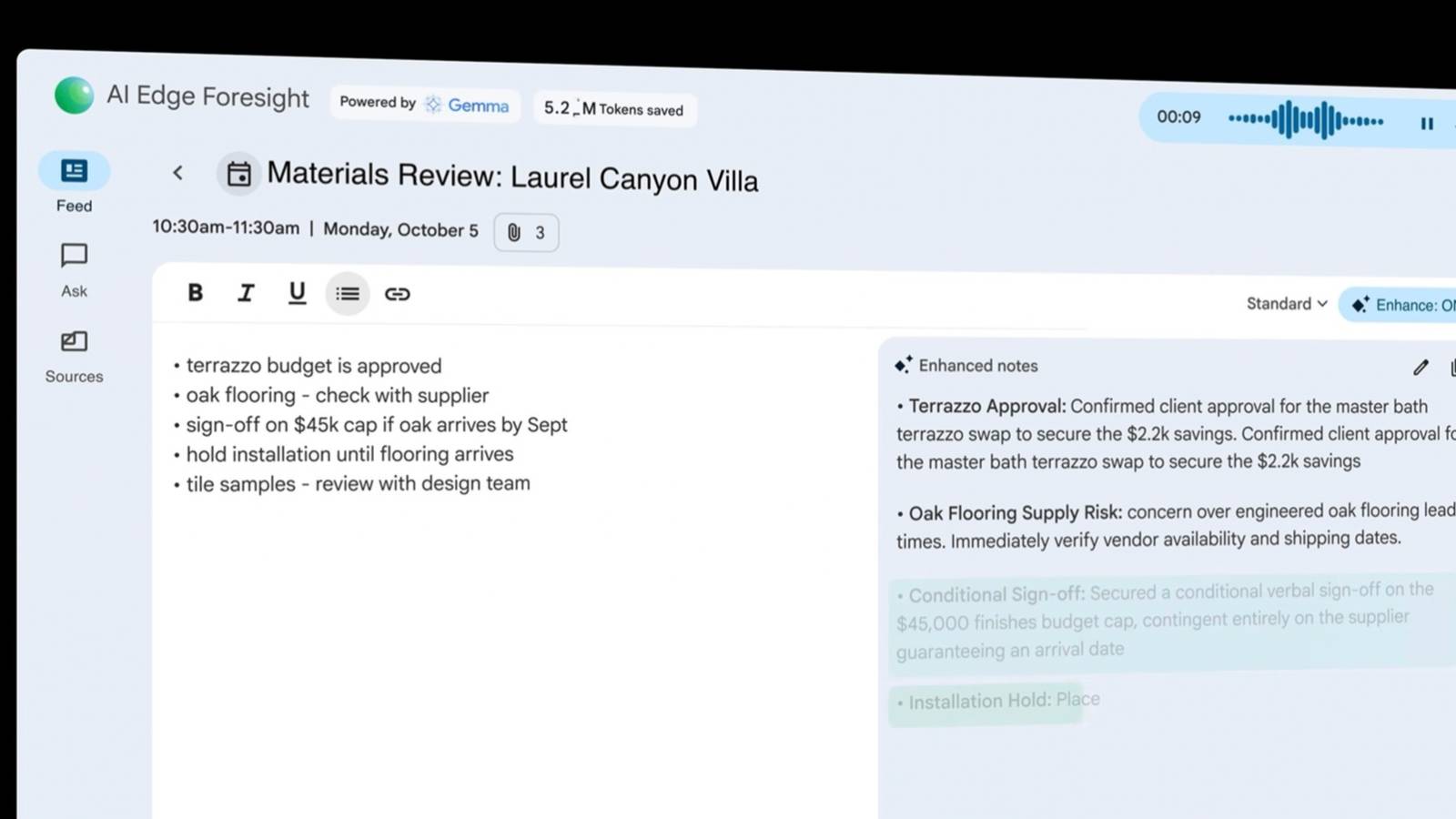
EmbeddingGemma 2 is a 740M-parameter multimodal embedding model capable of processing text, image, video, and audio.Thanks to this on-device processing, you can interpret and analyze your meetings even in areas with poor internet connectivity or on flights when you want to work on your meeting notes.Record and store meetings completely offline Keep your transcripts private and generate shorthand notes even when you don't have internet access Foresight offers you a two-sided window—the left side is for taking rough shorthand notes, while the right side displays a real-time transcript captured through your Mac's microphone and system audio.
The software works with meetings across platforms such as Google Meet and Zoom, as well as offline conversations.In addition to real-time transcription, it also remembers context and important details of the meeting, so you can come back later.It builds a knowledge graph around your meetings, personal shorthand notes, and other files you add to the knowledge source.
Lets you build knowledge sources relevant to your meetings Upload relevant PDFs, documents, and web bookmarks before meetings By utilizing the Knowledge Source feature, you can upload PDFs, Google Docs, Microsoft Office formats, plain text, Markdown, and web bookmarks that are relevant to your work and point the AI in the right direction before you begin a meeting.Once your knowledge sources are built, you can leverage them quickly during meetings.There's a dedicated Ask window where you can chat and get quick responses.
Another interesting feature is Live Assistance, which can listen to the meeting and automatically answer questions as they come up.Google's product page didn't elaborate on this feature much, but it's a nifty feature, and one I'd personally be interested in trying.Related Amazon's new Alexa Tablets finally have the Google Play Store Say goodbye to Fire Tablets.
Posts By Jon Fingas Availability Google AI Edge Foresight for macOS is available to download for Macs with Apple Silicon.Google hasn't provided specific storage or memory requirements on its product page, although it describes Foresight as having a light footprint and low battery drain.Currently, the rollout of Foresight seems to be an experiment by Google, and if it succeeds, we can expect a Windows version soon.
Read More