Your Kindle can do so much more than just preview e-books and show Amazon ads.There's an online community dedicated to unlocking that potential, and they've done some amazing work.Here are some plugins the community has developed for a jailbroken Kindle that I regularly use.
They're all free, but I'd probably pay for some of these because they're just that good.KOReader I never went back to the regular Kindle reader after installing this KOReader is a free and open-source replacement for the default Kindle interface and reader.It feels faster, and it offers basically endless customization.
It also has a lot more features than the standard Kindle reader app.It can open any file format, including EPUB, DOX, and comic book formats.Its PDF viewer has a "text reflow" feature to automatically fit the text on the screen.
You can set the book cover to be the lock screen.That way, whichever book you're currently reading will show up on the lock screen.You can even set custom wallpapers.
KOReader lets you customize every single aspect of the interface and the reader's appearance.Plus, it has all the features of the regular Kindle interface and then some.You can see detailed book stats and reading stats.
It can connect with Calibre directly and even automatically download RSS feeds right on your Kindle.There's a read timer and profiles to quickly switch the layout and look of the pages.KOReader has a devoted community who develops and maintains plugins for this app to add even more functionality to this reader.
For example, I've installed a plugin for KOReader which automatically launches KOReader on boot.That way, I never even have to see the Kindle interface unless I exit KOReader.It's a handy way to "de-Amazon" your Kindle experience.
KPomo A Pomodoro timer for your Kindle Since they draw so little power, e-ink displays make excellent dashboards.I use my Kindle as a Spotify remote, but most often, it's my work timer.KPomo is a neat little app that lets you decide a Pomodoro session, break time, and shows a big running timer when the session is active.
It's pretty basic, but that's a good thing in this case.Gamebatte-K2 Turns your Kindle into a Game Boy This is a Game Boy emulator for Kindle.The e-ink screen doesn't lend itself well to games with a high refresh rate, but for some Game Boy titles it's surprisingly perfect.
, , and play nicely on this emulator., , and are somewhat playable but not fun on the e-ink screen.At any rate, you can play some old school Game Boy titles on your Kindle.
Related This is how I play Wordle and other games on my Kindle (without using the browser) You can also play Super Mario, Tetris, Tamagotchi, and more.Posts By Faisal Rasool KWordle Play Worlde offline KWorlde is a Wordle clone optimized for Kindle devices.It gives you an on-screen keyboard to play the game, and the available keys change as you play, just like they do on the smartphone app.
I used to give up too easily when playing on my phone or computer because I would be distracted by something or another.However, I've noticed I complete most games I start on my Kindle because it's so distraction-free.The best part is that it works offline, so you can play it anywhere.
Amazon Kindle Paperwhite (2024) Brand Amazon Screen 7-inch, 300 ppi, 16-level gray scale With a 7-inch display, high contrast, and sharp image quality, the Amazon Kindle Paperwhite will help you fall in love with eReaders.It even supports Bluetooth devices for setting aside the eReader and enjoying audiobooks through headphones or earbuds.$160 at Amazon $160 at Best Buy Expand Collapse KUAL (Kindle Unified App Launcher) Launch your Kindle apps from here When you sideload apps on a Kindle, they'll appear in your Kindle library as booklets.
These booklets serve as shortcuts for launching those apps.Technically, you can just tap these booklet shortcuts to launch your apps.However, it's annoying for two reasons.
The Kindle library shuffles these around depending on your recent reads.So the shortcuts never stay in one place.On top of this, some apps just don't create those handy booklet shortcuts.
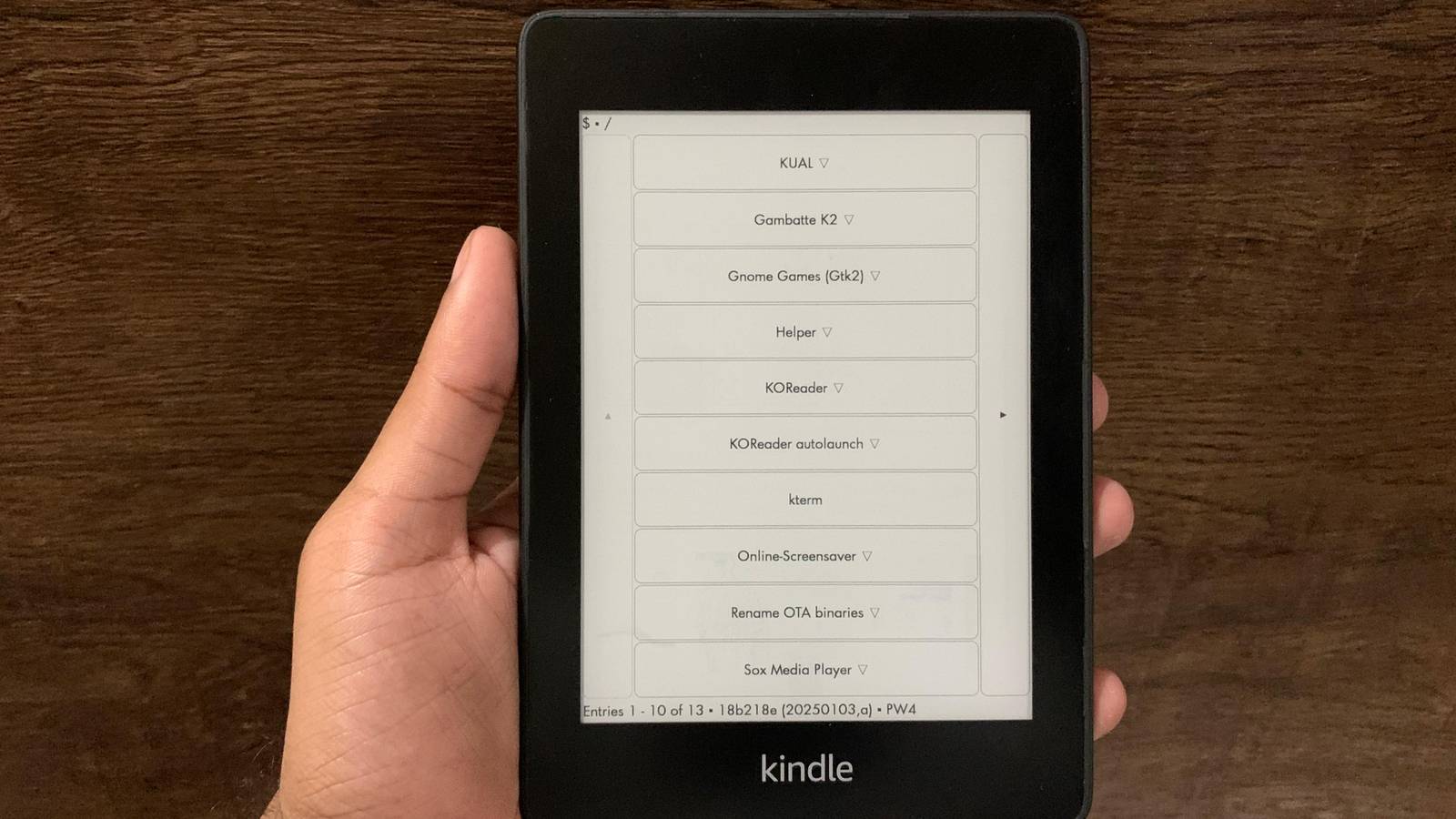
KUAL solves both those problems.KUAL, or the Kindle Unified App Launcher, is an app drawer (like the kind your smartphone has) for Kindle.It automatically detects all your installed apps and plugins, and lists them in one place.
That way, instead of hunting for a booklet shortcut that may or may not even be available, you can just open KUAL, tap the app shortcut in the KUAL list, and it'll instantly launch it.KindleForge Download Kindle apps with one tap Normally, you need a computer and USB cable in order to sideload new apps and extensions on a jailbroken Kindle.It works, but it is pretty inconvenient.
KindleForge makes that process simple and easy.Think of KindleForge as an app store for jailbroken Kindles.It doesn't have a huge list of apps that you'd expect from a typical software store, but you can install them with a single tap—no computer required.
It has some productivity apps like text editors, flash card apps, a note-taking app, a pomodoro timer, and even a drawing app.It has a few games like the Gambatte-K2 emulator, GNOME games suite, Wordle, and KindleCraft (which turns your Kindle into a Minecraft server).You can use it to install custom music and audiobook players.
There's a JarLauncher which can install Java on your Kindle.You can access a terminal emulator with Kterm.You can also download KUAL here, as well as KOReader.
There's even an app on KindleForge that can block over-the-air updates from Amazon and even ads.There are quite a few more open-source Kindle plugins that make this device so much more than just an e-reader.Whether it's games, productivity apps, or even entire replacements for the default Amazon interface, you'll find something you like.
Read More