Summer is never particularly kind to technology, and my home server is no exception.Like most homelabbers, I run mine 24/7, and while Ubuntu Server was perfectly happy to keep chugging along, the hardware was starting to give up in the extreme heat.Thankfully, I found a solution, and it was way simpler than you'd think.
My home server is just an old convertible laptop It's already at a massive thermal disadvantage Close Many homelabbers start small—an old office desktop or gaming PC, mini PC, Raspberry Pi, or, in my case, an old laptop with a broken screen.It had been sitting unused for years, so I figured I might as well put it to work as a server.Granted, a laptop is a far cry from “proper” server-grade hardware designed to run uninterrupted for years.
Still, any computer should be able to handle a small, continuous workload, which is exactly how I use mine.I use it to store files and host a few apps; I don't run game servers off it.But as I added more services over the past few months, the workload steadily increased, generating more heat in the process.
Normally, this isn't a problem, even for laptops.Their cooling systems should be able to handle sustained loads from the hardware they're equipped with.However, context matters.
My laptop only has a dual-core i5-7200U with a 15W TDP, but it's also a 2-in-1 with a detachable keyboard.All of its internals are crammed into the screen portion, and that design constraint means it has limited room for cooling.I've taken this laptop apart many times.
It has a tiny blower fan and thin, flat heatsinks that look about as good as they work.I've upgraded the thermal pads and replaced the thermal paste with Arctic MX-7, which performs incredibly well at keeping my overclocked desktop cool.But despite the fresh paste, the laptop is still overheating like crazy.
There simply isn't enough heatsink to absorb the continuous heat buildup from keeping all my self-hosted services running.My little server couldn't handle the summer heat anymore Everything worked until things got really hot I turned this old laptop into a home server during the colder months this year.As I learned more about self-hosting and discovered new apps, I gradually added more to my Docker stack, steadily increasing the workload my server had to handle.
At the same time, summer arrived, and the temperatures started climbing.Unfortunately, I don't have AC in my apartment, and the kitchen where the laptop resides gets particularly hot because of the appliances and its sunny location.Even though the workload itself wasn't particularly demanding, the combination of running the laptop 24/7 and dealing with an ambient temperature that constantly sits above 85°F meant the poor little laptop started running insanely hot.
I could hear the blower fan struggling to pump all that heat out, and the outer shell got so hot that I couldn't keep my hand on it for more than a few seconds.I wouldn't have even noticed this, except my self-hosted apps started becoming unresponsive, intermittently failing, and I couldn't SSH into the server or access my files from my PC.That made me realize just how much I'd grown to rely on my home server, something I didn't even realize 10 months ago.
I couldn't access Jellyfin to watch shows while doing chores or sit down to watch something, and my images were no longer accessible in Immich—and this was just the beginning.Since I run AdGuard Home to offload DNS from my router and filter unwanted traffic, browsing on all my devices also became much more sluggish because the router had to handle DNS requests through the secondary server.But the worst part was losing control of my smart home devices.
I run Home Assistant on my laptop, and all my smart bulbs are offline-only thanks to a custom integration.Once the laptop went offline, scanning an NFC tag to toggle the lights did nothing.I was basically left with the choice of sitting in the dark or leaving the lights on all night.
I knew something had to be done.I couldn't just stop relying on my home server after putting so much work into it.A random USB fan solved the whole problem The cheapest, most straightforward fix imaginable People who repurpose desktop PCs for their home servers have an easy solution to overheating issues—just add more case fans.
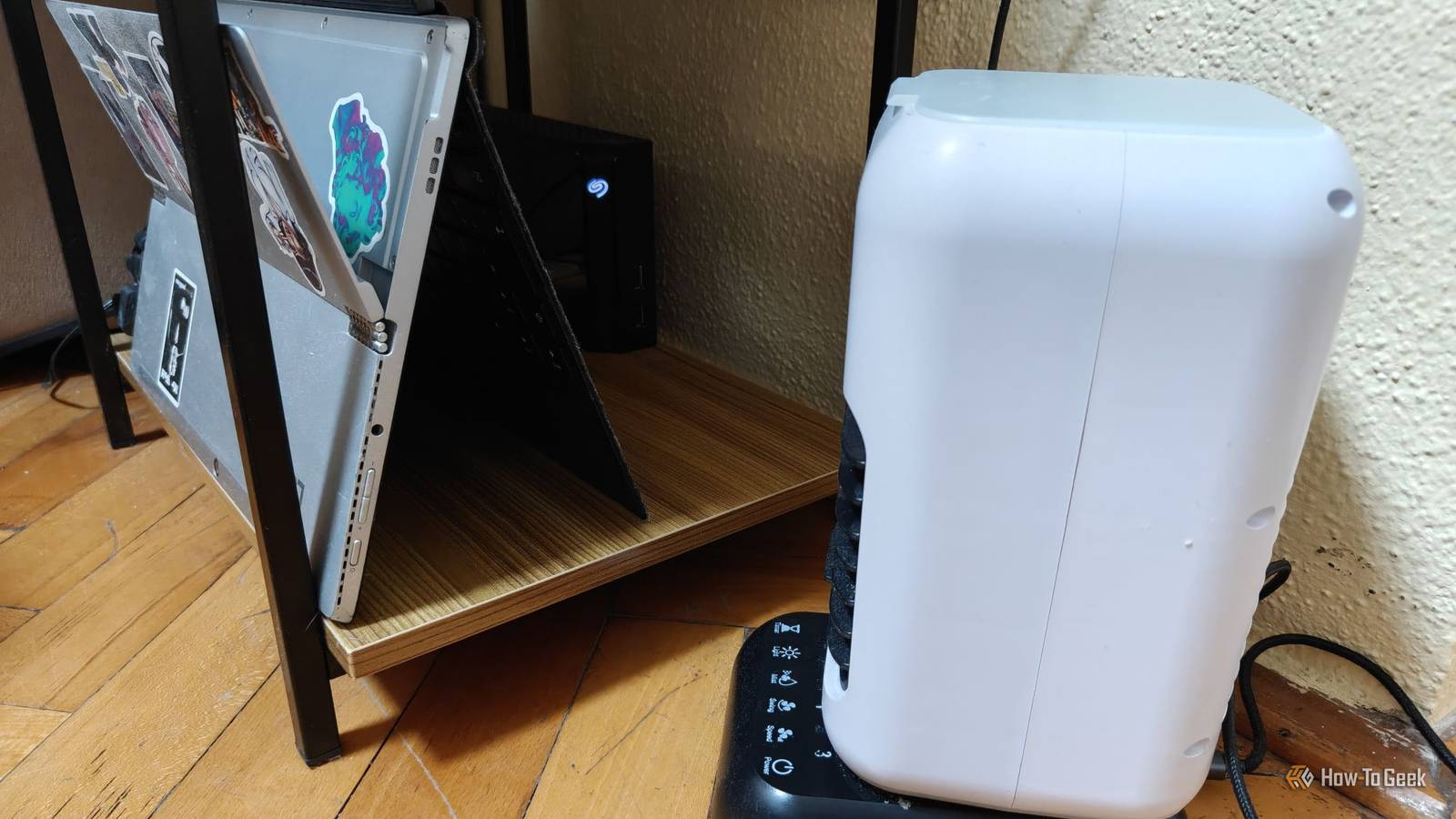
I'll admit it: it took me an embarrassing amount of time to realize I could do the same with my laptop by simply plugging in a USB fan and placing it in front of it.Granted, it would look a little wacky, but the goal was to have fresh air constantly displace the hot air surrounding the laptop.Funnily enough, the solution was literally sitting right next to my server.
I had bought a few USB evaporative coolers ahead of summer, so I simply plugged one into the laptop's USB port and set it to the lowest fan setting (without any water in it) to minimize noise and power draw—and it worked wonders.Of course, a regular USB fan would work just as well, but this is what I had at hand.My home server is never hot to the touch anymore and, more importantly, all of my services work perfectly 24/7, just like they did during the cooler months.
It's a temporary solution for a temporary problem, and it couldn't work better.I haven't done any before-and-after thermal tests or anything like that, but the CPU temperature hovers around a comfortable 50°C with all services running and actively streaming a show on Jellyfin.I didn't need better hardware; I just needed better cooling A USB fan sitting in front of a laptop-turned-server isn't the cleanest solution to an overheating problem, but it's exactly the kind of creativity the homelab community loves.
I turned a laptop that was never meant to run more than a few browser tabs into a server I now rely on heavily, and all it took to keep it cool was pointing a cheap USB fan at it.Sometimes, the solution really is that simple.
Read More