Google is in the midst of transitioning Android to what it calls an “intelligence system.” It’s made a big deal about enabling phones to do more without your input.The idea is solid, but in real-world use, I’ve found that Samsung’s less flashy features are much smarter.In particular, I’m talking about the “Now Bar.” This is Samsung’s live notification panel that can be shown on the lock screen, always-on display, and notification bar.
The concept is a lot simpler than what Google is trying to do, but the most important thing is that it’s actually useful in my day-to-day life.How Samsung’s Now Bar works on Galaxy phones A simple concept, well executed Close For those who haven’t used a Galaxy phone with One UI 7 or later, I’ll explain how the Now Bar works.Think of it as a combination of the old “Google Now” cards and the iPhone’s “Dynamic Island.” It’s a place for Samsung to show information that it thinks is relevant to you at that specific moment.
There are a bunch of different things that can be displayed in the Now Bar, and you get to toggle them on or off.There are basic things like the current mode, if the flashlight is on, running timers, and media playing.However, it also works with a number of apps and web services.
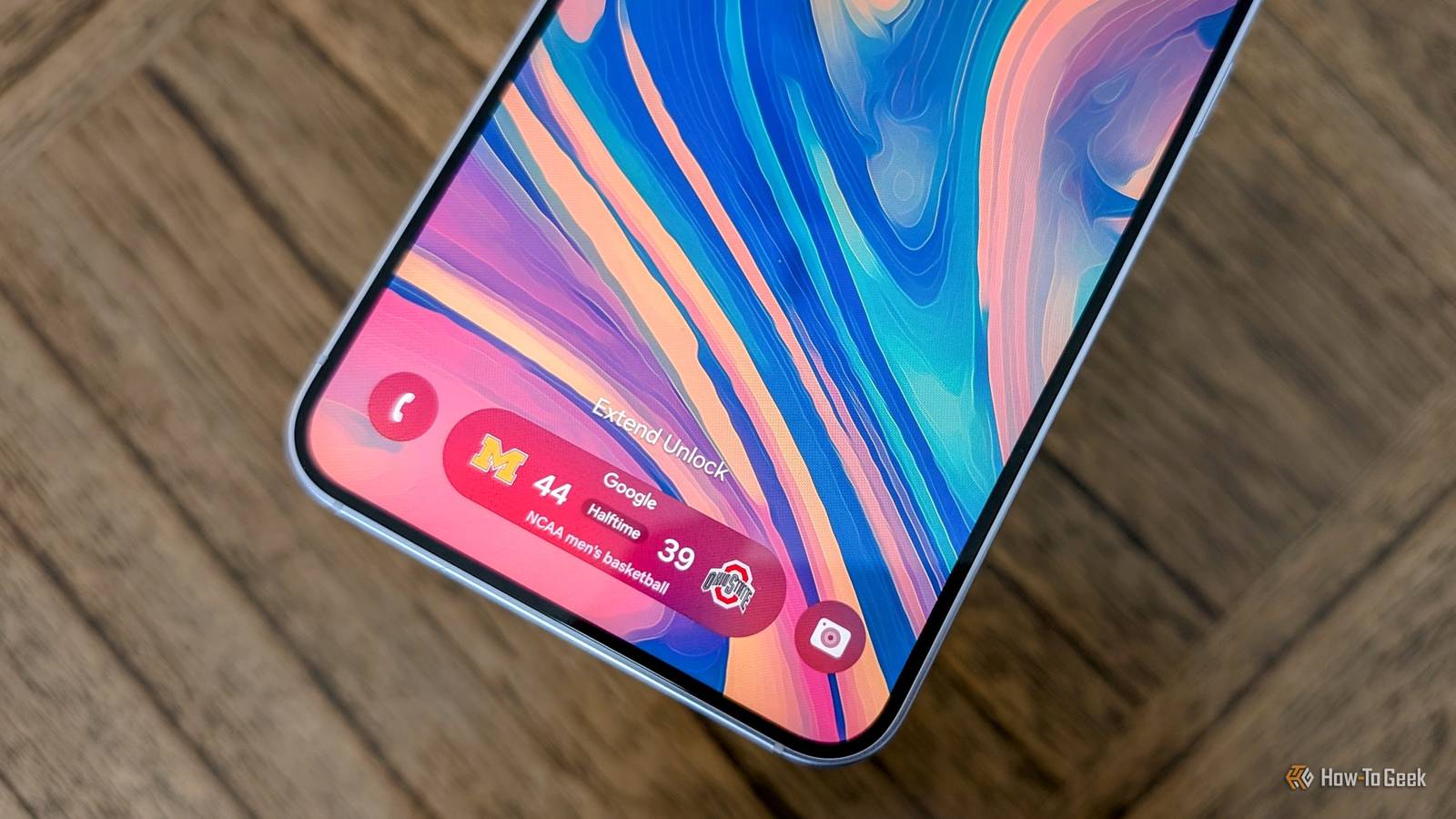
That includes Google Wallet, Maps, Samsung Health, SmartThings, and sports.When something is happening with one of the connected services, it appears on the Now Bar.When multiple things are occurring, you can simply swipe between them.
It’s simply an extra place for live notifications and pertinent information.Information when you need it I’m not usually a fan of Samsung software Here’s the thing — I’m not really a big fan of Samsung software.I must admit the tide is turning a bit, though.
I’ve been using the stock One UI Home launcher on my Galaxy Z Fold 8, and now I’m singing the virtues of the Now Bar.The great thing about the Now Bar is that it stays out of the way.It’s there when I need it, completely gone when I don’t.
And when it is present, it’s easily noticeable without getting in the way.Typically, that’s the lock screen.Close Sports scores are a perfect example.
I’m not as dialed into social media as I used to be, which means I sometimes miss when my favorite team’s games have started.The Now Bar puts that information directly on my lock screen and notification bar when the game is getting close.If I’m not able to sit down and watch the game, I can keep track of the score without having to do anything extra.
Sports scores are just a small part of what makes the Now Bar great.Its real superpower is making Android notifications feel smarter.Related Samsung’s Now Bar Is the Sports and Lock Screen Feature I’ve Been Waiting For It's like Dynamic Island, but better.
Posts By Cory Gunther Samsung made notifications smarter Using Google’s own tools For all intents and purposes, that’s what most of the things that appear in the Now Bar are — notifications.A timer counting down, media controls, a Google Wallet event ticket, flashlight toggle, Google Maps directions, etc.Without the Now Bar, all of these things appear in the notification shade along with everything else.
Much of this is possible thanks to a feature that Google added to Android last year called “Live Notifications.” However, the way that Samsung utilizes these notifications seems to work a lot better than Google’s own implementation.Last weekend, I was paying close attention to the Now Bar for this very article.Samsung put my team’s football game in the Now Bar shortly before kickoff.
The Google app didn’t tell me anything until there was a score in the game.On my Pixel phone, the game is supposed to appear on my lock screen, but this has never worked for me.I’ve always had to manually pin a game to follow it live.
Close For whatever reason, Samsung is able to use the same information much more effectively.It also presents the information in a way that’s easier to use.The Now Bar doesn’t just look like a special notification.
It’s a stack of mini widgets, and tapping one of them opens its own custom window for you to interact right then and there.You don’t have to open the app.I should mention that, for the last few months, sports scores haven’t been working for everyone.
I’ve personally not had this problem, and according to others, it may be resolving itself.It just works In short, I like the Now Bar because it simply does what it’s supposed to do.It displays relevant information when I need it, provides quick controls for current tasks, and goes away when nothing is happening.
It’s in my face just enough to be useful, but not annoying — and I never said “AI” to describe it.Related Google calls Pixel an "intelligence system," but its basic automation is surprisingly dumb Google Pixel's automation system is split in three.Posts By Joe Fedewa
Read More