Homelabbing is a weird hobby.You start with some old PC you already have, and before you know it, your house is full of gadgets plugged into the wall, each with one weirdly specific job.But a single mini PC can handle all those jobs and more, while keeping your setup remarkably simple and more cost-effective to run.
A mini PC makes a great NAS, especially once you add some storage Streaming and storage in one box Close Buying a dedicated NAS enclosure has genuine benefits, but it's essentially a low-power computer with some neat hard drive bays and a polished (usually Linux-based) operating system.The software is a big plus if you want convenience.Synology DiskStation Manager and QNAP QTS make it easy to configure RAID, manage network permissions, create snapshots, and monitor drive health without building the setup yourself.
However, you can get basically the same experience with a NAS-style OS on a mini PC.TrueNAS SCALE, OpenMediaVault, and Unraid offer similar convenience.I personally run Ubuntu Server on my mini PC.
The main caveat is storage expandability.Mini PCs tend to have very limited internal connectivity; maybe there's an extra M.2 slot if you're lucky.But external drives easily solve that, especially when you have several high-speed USB ports.
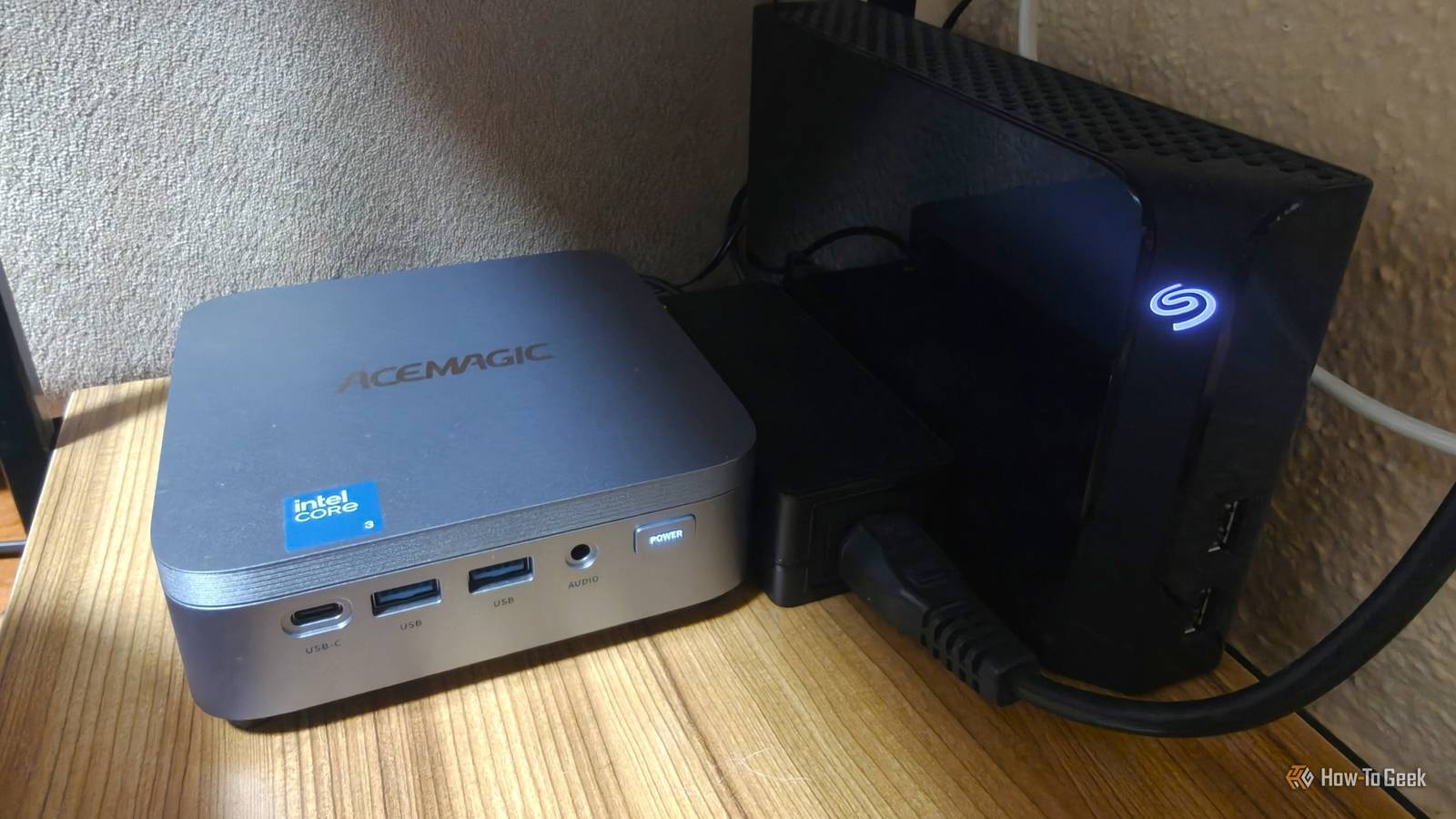
My storage needs are minimal, so I use my mini PC with a single 6TB external hard drive for backups, photos, and, most importantly, media.I also have plenty of USB 3.0 ports if I ever need more storage.People often buy a NAS with the intent to replace their streaming subscriptions with a self-hosted solution like Plex or Jellyfin, which is exactly how I use my mini PC.
The big benefit of a modern mini PC is that it's typically much more powerful than a similarly priced NAS.A NAS can absolutely handle 4K transcoding (especially if it supports Intel Quick Sync), but you generally get much more raw processing power from a similarly priced mini PC, along with more headroom for running other services at the same time.It makes a noticeable difference when transcoding, skipping through high-bitrate video, or doing other things on the server.
Case in point, the Synology DS225+ costs $365 at the time of writing and gives you a low-power quad-core Intel Celeron with just 2GB of DDR4 RAM, while the Acemagic K5 costs around $380 and packs a modern Intel Core 3 304 with 12GB of DDR5 RAM.The mini PC is drastically more powerful, so if you don't need specialized NAS software and dedicated drive bays, it's not a bad trade-off.Acemagic K5 Brand Acemagic CPU Intel Core 3 304 The Intel Core 3 304-powered Acemagic K5 packs surprisingly capable everyday performance, rich I/O, and a dedicated AI NPU into a tiny, affordable desktop.
Graphics Integrated Intel Graphics Memory 12GB LPDDR5-5600 MT/s Storage 256GB/512GB M.2 2280 NVMe SSD Ports 2× USB-A 3.2 Gen 2 (10Gbps), 4× USB-A 3.2 Gen 1 (5Gbps), 1× USB-C 3.2 Gen 2x2 (20Gbps) with DisplayPort 1.4 and up to 100W USB-PD, 1× HDMI 2.0, 1× DisplayPort 1.4, 1× 2.5GbE, 1× 3.5mm audio Display Up to three 4K 60Hz external displays Operating System Windows 11 Pro Dimension 5.05 × 5.05 × 1.61 inches Weight 1.98 pounds USB Ports 7 total: 6× USB-A, 1× USB-C Networking Wi-Fi 6, Bluetooth 5.2, 2.5GbE Price $550 CPU Cooling Heatsink and fan PSU External power adapter Fans 1× CPU fan Cables HDMI cable, power cable/adapter See at Amazon Expand Collapse Docker lets one mini PC replace a whole pile of Raspberry Pi services Small services don't need their own computer Docker makes setting up and managing self-hosted apps incredibly easy, which is how many people use their Raspberry Pis for homelabbing.A Raspberry Pi isn't all that powerful, but it draws very little power and can still run a surprising number of lightweight services with its limited resources.A single Pi could run AdGuard Home, Home Assistant, Uptime Kuma, Syncthing, and a number of other smaller utilities without breaking a sweat.
Unfortunately, RAM prices have driven the cost of higher-end Raspberry Pis up significantly.The Raspberry Pi 5 8GB now retails for around $175, which is simply too much for what's ultimately a single-board computer that can struggle when you try transcoding a Jellyfin stream on it.Since I've already got my mini PC set up for streaming and general-purpose storage, I simply choose to run all my self-hosted services on it instead.
The processor is more than powerful enough to handle anything I'd throw onto a Raspberry Pi while barely affecting its typical CPU usage.Buying a separate Raspberry Pi just to run AdGuard Home 24/7 to block unwanted network traffic seems wasteful when the mini PC can already handle it with ease.While it consumes a bit more power than a Pi running 24/7, it's not a significant difference, as the mini PC is still quite efficient compared to a traditional desktop tower.
Home Assistant turned the mini PC into a powerful smart home hub It's easier to set up than you think Home Assistant is the ultimate platform for smart home enthusiasts.It offers next-level automation and integrations that allow you to connect and control a wide range of smart home devices.Say you had a couple of Wi-Fi-controlled smart switches but otherwise relied on a Zigbee ecosystem for everything else — you could finally integrate everything with Home Assistant.
You don't even need that many smart home devices to take advantage of it.I was able to take my smart bulbs offline and use NFC tags as physical switches to control the lighting in my house, and that's pretty much all I use it for.Related The hidden costs of running a Home Assistant smart home (and why they're worse than you'd expect) Free software, expensive rabbit hole.
Posts 2 By Adam Davidson The best part is that this open-source app can run on almost any hardware, so a modern mini PC can run it in the background without taking up much space or drawing much power.The best part is that a mini PC has everything it needs to be a full-featured smart home hub: many mini PCs already have Wi-Fi and Bluetooth, but if you also need Zigbee, you can plug a Home Assistant-compatible SONOFF Zigbee USB adapter into it.It can also be used with Thread, giving you a surprisingly easy way to unify your smart home gadgets under a single piece of hardware.
This little PC is the center of my home Modern mini PCs are shockingly flexible and powerful devices that can run a couple dozen self-hosted services without issue.If you want a single device to handle your NAS storage, act as a media server, run your smart home, and host a bunch of smaller services while barely drawing any power or taking up space, it's hard to beat a mini PC.
Read More