Have you ever opened Blender hoping to create something, only to get overwhelmed by the interface and close the app a few minutes later? If so, you’re in good company.A lot of people, myself included, have wanted to use this powerful software to create something beautiful, especially after hearing about — the animated film that won the 2025 Oscar for Best Animated Feature and was entirely created using Blender.However, as soon as you open the app, all the panels, modes, menus, submenus, and hundreds of settings make it seem like an insurmountable learning curve, leading many of us to give up on the idea.
However, that wall is starting to come down.Earlier this year, Blender released an official MCP (Model Context Protocol) server.It lets you connect AI models like Claude and ChatGPT to Blender so they can work inside the app.
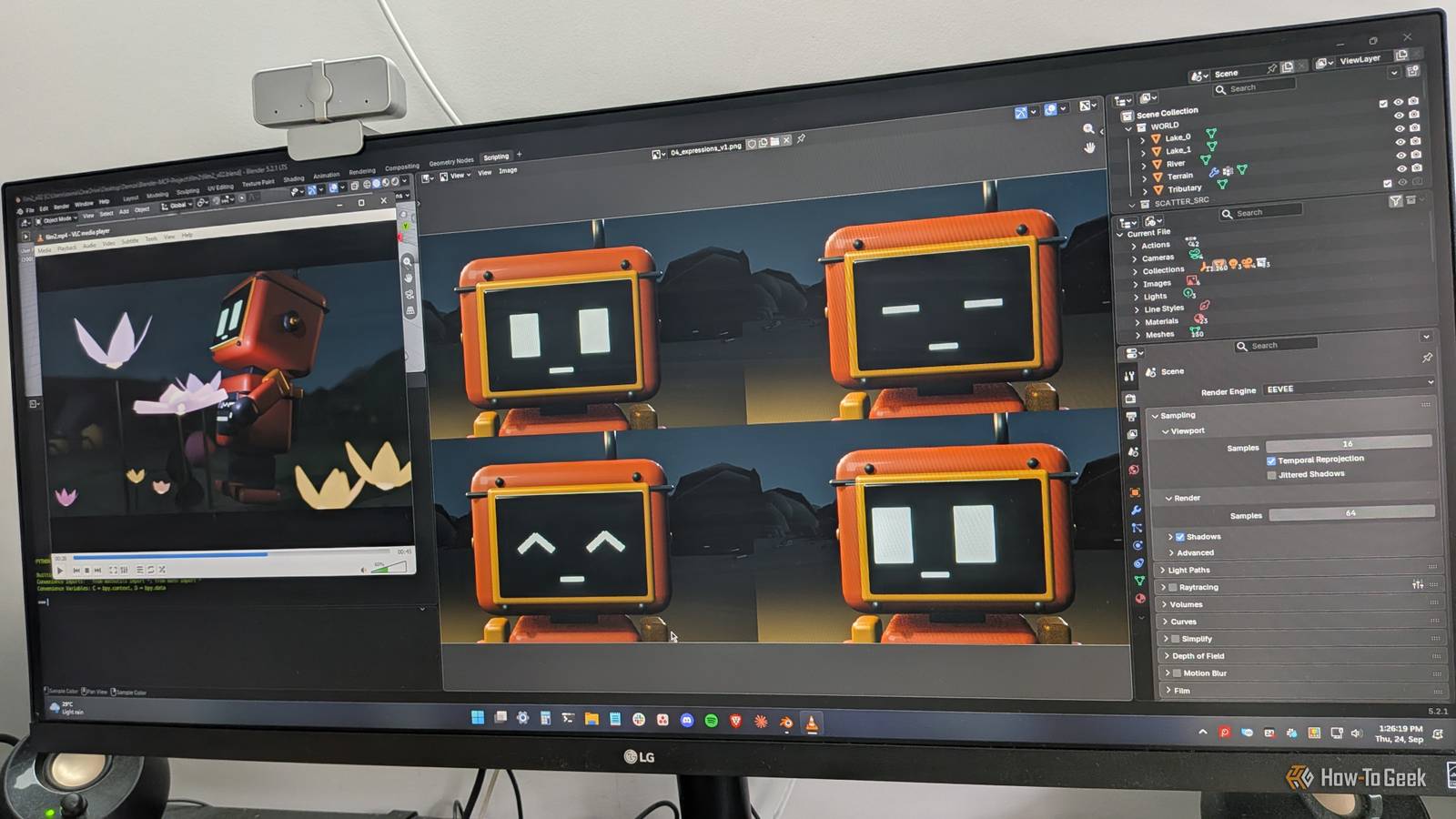
This means you can now simply tell the chatbot what scene you want, and it can build it for you — or at least get you most of the way there.This is how I was able to create a 45-second animated video using Blender in around 3–4 hours, without knowing anything about Blender or having used it before.Here's the video I, or rather Claude, made A 45-second video in less than 4 hours The video you see above is the result of a four-hour session between me, Claude, and Blender.
I used Claude Opus 5.5 in low effort mode.The entire thing used around 26% of my current session usage, and I’m on the $20 Pro plan.I simply brought an idea of what I wanted to build, told Claude about it, and it did everything else.
In fact, of the four hours it took to create this, I was probably hands-on for less than one, mostly reviewing the work and telling (and re-telling) Claude what I wanted.For most of the process, Claude was working autonomously for hours at a stretch.I could literally see new scenes and models popping into Blender every few seconds.
The version I’m sharing here is the third iteration.Claude didn’t nail it on the first try — so if you’re trying it yourself, don’t expect it to either.There were problems with the camera movement, the character models, and the depth of the scenery.
So it took a few rounds of back-and-forth, with me trying my best to articulate my vision and Claude trying to bring it to life.One thing I found particularly interesting about the experience was the approach to building the video.Initially, I told Claude how I wanted the video to look — start by focusing on a small area and then zoom out to reveal everything.
But I noticed that each time it zoomed out, the level of detail became increasingly sparse.Claude also wasn’t building the world from the ground up, and it seemed to struggle with creating the entire world at once.So I told Claude to first build the entire world with as much detail as possible, then focus on a particular location and zoom out from there.
It’s similar to how you sometimes approach storytelling by first creating the world map and its lore, and only then starting work on the character arcs.Related How ChatGPT Is Helping Me Write a Book ChatGPT can help with many things, including book writing.Here's how it's helping me plan and execute a book-writing plan.
Posts By Jason Dookeran How to create something similar yourself It barely takes 10 minutes to set up Close If you already have the Claude desktop app and Blender installed on your computer, you can simply tell Claude to take control of Blender and build you a scene.But in that situation, Claude would be using its “Computer Use” feature, where it takes control of your computer and interacts with the apps on your screen.This means you’re basically giving up access to your system for the time being, because if you start working or using other apps, that will disrupt Claude’s workflow.
Computer Use can also cost a lot more tokens because Claude is constantly taking screenshots to understand what’s on the screen and making decisions based on them.A much better approach is to use the Blender MCP server.This lets you leave Claude and Blender alone, ideally on a separate virtual desktop, and let it work while you do something else.
Here’s a step-by-step guide on how to set it up: Ensure you have the Claude desktop app and Blender (v5.1 or newer) installed on your system.Go to Blender’s MCP page and download the add-on.Simply drag and drop the blue zone into Blender twice, following the instructions on the website, and it should install automatically.
Go to Edit -> Preferences -> Get Extension, and you should now see MCP listed among the installed extensions.Next, go to Edit -> Preferences -> System and enable Allow Online Access under the Network section.Finally, go to Edit -> Preferences -> Add-ons, expand the MCP listing, and start the server.
And that’s everything you have to do inside Blender.Next, we need to install the Blender MCP server in Claude, which, thankfully, is a much more straightforward process.Simply head over to the Blender MCP releases page and download the latest version of the .mcpb file.
Once downloaded, double-click to open it.Confirm with “Yes” when Claude asks if you want to install this extension.Now, open Blender and ask Claude to check whether it can connect to Blender.
You can also share the official setup guide with Claude to help it set up the MCP server if you’re having difficulties.From my experience, you should keep Blender open and not minimized.When I minimized it, the workflow failed for some reason.
Related I tested over 100 Claude Code plugins—here are the 5 that actually matter I installed over 100 Claude Code plugins so you don't have to.Here's the signal from the noise.Posts By Dibakar Ghosh Is this not AI slop? I would argue no Close I know a lot of folks who are going to see me using Blender with Claude and scream “blasphemy.” And sure, everyone is entitled to their own opinions, but I really don’t see anything wrong with using Claude or any LLM, for that matter, to help you explore new tools and workflows that you previously felt locked out of.
To me, AI slop is a matter of quality control during distribution.If you’re building something low-quality because AI makes it cheap and easy, and then sending it to consumers, then yes, people have a right to be angry.However, if you’re using AI to learn something new and explore new tools, whether it’s coding, music, or even using a tool like Blender, I find that to be an overall enriching experience.
You’re now exploring a tool or skill you previously avoided because of the high barrier to entry.And just like when learning anything new, initially you’re going to create bad, amateurish-looking products.I’m not claiming the video I created above is perfect or amazing.
If you look closely, the robot is actually floating above the ground for no apparent reason.When it touches the flower, its head goes into it.The coloring of the rivers also feels a bit like vomit.
It has a lot of flaws.But the fact that I, a person who has always dreaded using Blender, just sat with the tool for four hours, explored its interface, and now feel more comfortable using it — that can’t be discounted.LLMs have introduced a lot of folks to coding, graphics, and music, and helped them develop new ideas about these disciplines, including how to think about a topic and how to approach it in ways they might never have learned before.
To me, that sounds more like empowerment.Related How AI Got Me Back Into Creative Hobbies Let it be your cyber-muse.Posts By Dibakar Ghosh Blender is now more accessible than ever Blender is one of the most powerful open-source tools out there and, historically, one of the more inaccessible ones simply because of its steep learning curve.
Not only does it feel overwhelming, but many of us who wanted to learn it just weren’t able to set aside the time, given how busy life gets.But now, with Claude and ChatGPT in the picture, it’s more accessible than it’s ever been.It’s like having a friend who’s already well-versed in Blender by your side to help you use it and, in the process, also help you learn how it works.
Related I transformed Claude into the ultimate coding tutor that tracks my progress (Prompt included) I built a coding tutor that won't let me cheat my way through it.Here's the prompt.Posts By Dibakar Ghosh
Read More