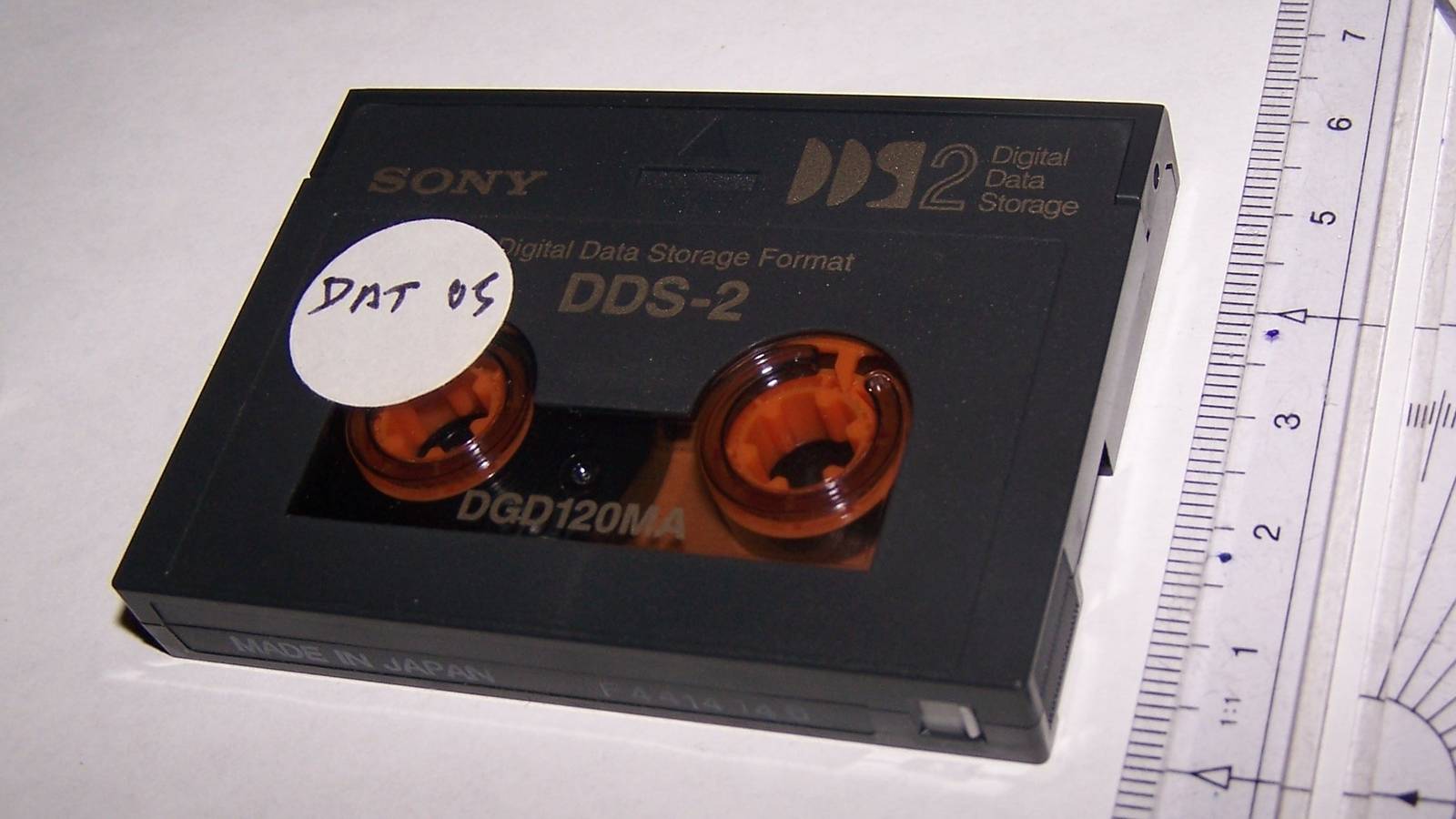
Backing up your data on what looks like a weird VHS sounds wild in 2026, but it was the reality for years.In a lot of offices and studios, doing backups literally meant swapping a little cartridge and hoping for the best.Some of you may remember these, and others won't, but I'm talking about DAT (DDS).
Let's talk about what it stored, why it wasn't commonly used by home users, and what made it special.Tape backups were real, and they were everywhere Although now, they're nowhere to be found.Yup, it's true.
Not that long ago—well, in the '90s to '00s, so pretty long ago really—you used to be able to back up your data on tape.DAT (Digital Audio Tape) and DDS (Digital Data Storage) tapes were found in many offices, studios, schools, and server rooms.Not so much at homes, but more on that later.
The naming is a bit confusing, especially for DAT, because how can you back up proper PC data on something referred to as an audio tape? DATs were a 4mm cassette format originally made for recording audio.Meanwhile, DDS tapes used the same cassette style and tape tech, but wrote computer backup data, not music.The names get mixed up, but DDS was the right term used in the context of PCs.
In practice, a DDS setup was a tape drive connected to a PC or server, often over SCSI in that era.Backup software ran on a schedule, wrote data to the tape, and logged whether the job completed or not.This was often done overnight, and in the morning, someone's job would be to eject the cartridge, label it, and put the next one in.
Those tape backups sound like an oddity in the current PC climate, but back then, they made sense.They were cheap to keep, easy to store, and easy to take off-site (a real problem in the days of no cloud storage).A tape cartridge was small, light, and far from demanding.
It also created an offline copy by default once ejected, which protected those backups from common backup problems, these days remedied by the 3-2-1 backup rule.What DAT (DDS) actually stored Those backups were different from what we deal with today.It's not like these backups were an entire PC's worth of data cloned onto a cartridge.
In most cases, people would create a backup set using dedicated software.That software determined what to copy, when to copy it, and how to keep tabs on it for potential restores.The tape was just the destination.
Most companies used these tapes for full backups plus incrementals.A full backup would be, well, full—everything you'd selected at that point in time.Nightly incrementals only saved what changed since the last backup so as to avoid doubling up.
Otherwise, companies would be burning through tapes at an alarming rate if they were writing a full backup every night (not to mention that it'd take ages, too).Tape backups were also software-driven and cataloged, because tape is sequential.The backup program maintained an index of what was on which tape and where it lived on the tape, so it could restore specific files without you manually hunting.
Another odd thing about these DDS tapes was that the advertised capacities were often framed around compression assumptions.Backup software compressed data as it wrote to tape, so you'd see native and compressed numbers, and often a large discrepancy between the two.Why DAT backups weren't a thing for home users It wasn't impossible, it just wasn't popular.
You might notice that I've mostly talked about DAT/DDS backups in the context of companies.It's not because those backups couldn't work at home; it's more that they weren't the obvious choice.The drives were expensive compared to what most people were willing to spend on protecting their data, not to mention that back then, many people weren't as backup-conscious as they are now.
Outside of costs, installing DDS gear wasn't exactly plug-and-play.A lot of it leaned on SCSI, which, in turn, required extra hardware and drivers.It was a hassle for the average home user.
Beyond that, the fact that tape is sequential didn't help.It's not like you could easily go through your backups, zone in on the exact file you wanted, and restore it.It's more like rewinding a VHS tape; there was no quicker way to do it, you just had to sit through it.
The restore process depended heavily on the backup software doing its job properly, too.Without that catalog, restores could become painful, because the drive may need to shuffle through large parts of the tape to reach the right segment.That's tolerable nuisance if you're getting paid for it, but not so much when you're just trying to back up some files in your home setup.
The modern version of the tape idea Were all DAT/DDS tapes lost to time? So, have you ever backed anything up on tape? And if you have, was it within the last 20 years? I'm guessing probably not, but please feel free to surprise me.DDS tapes are no longer a thing, be it in the consumer or enterprise market, but tape backups still exist.Subscribe to the newsletter for smart backup explainers Curious about tape backups, legacy DAT/DDS, or how old ideas map to today's archiving? Subscribing to the newsletter gives clear, practical deep dives on legacy tech and modern backup strategies so you can learn what matters for preserving data.
Subscribe By subscribing, you agree to receive newsletter and marketing emails, and accept our Terms of Use and Privacy Policy.You can unsubscribe anytime.The format you'll hear about today is called LTO.
These backups still have their place where they're relevant, as they offer high capacity per cartridge, low cost per stored terabyte over time, and easy off-site storage.Tape remains a simple, straightforward, and familiar way to keep a big cold archive.For most of us, the idea of tape (plus a dash of nostalgia) survived even though the hardware's fully obsolete.
The closest equivalent to having a fully offline copy that you'd physically remove from the system are immutable backups, offline backups, and versioned backups.That can be achieved with things like an external drive, including an SSD in an enclosure, a NAS that takes snapshots you can't easily rewrite, or a cloud backup service with long retention and rollback.And those old DDS tapes? I'd say they're lost to time, and for one boring reason.
You might still have the tapes, but the drives that read them and connect them to your PC are hard to come by.You need more than just the hardware; you also need the right interface to connect it, and that's just not a thing on modern PCs.But, thinking back, it's fun to remember that there was once a time when tape backups were actually pretty common.
Read More