Every time you uninstall a program on Windows, you're probably leaving more behind than you realize.It's not dramatic, but it adds up.Luckily, there are plenty of third-party apps that will find what a regular uninstaller misses and get rid of it by themselves.
Windows leaves behind a lot of extra files Standard uninstallers miss so much When Windows uninstalls a program, it works from a fixed list of files that were laid down during the original installation, but there's more to programs than what it knew about originally.Anything the program created while it was actually running, like user caches, config files, or temporary data, simply isn't on that list.So when the uninstaller finishes, those files just stay where they are, scattered across folders like AppData, Temp, and Program Files, with no one coming back to clean them up.
On top of that, Windows is deliberately cautious about deleting things.Developers can mark certain files as permanent, which tells the system it is never allowed to remove them.Shared files used by multiple programs are handled through a reference-counting system, and if Windows thinks even one other program might still need a file, it leaves it on the drive instead of risking breaking something.
The file might be completely useless at that point, but it stays anyway.This creates problems of its own.When registry keys are deleted, the registry file doesn't actually get smaller; it just has empty gaps sitting inside it where the old data used to be.
Over time, those gaps pile up, and the registry gets messy and bogged down.In bad enough cases, this can eat into system memory and start causing Windows Update failures.The same thing happens on the file system side.
NTFS keeps a record for every file that ever existed in something called the Master File Table.When files are deleted, those records get marked as empty slots.The table itself never shrinks.
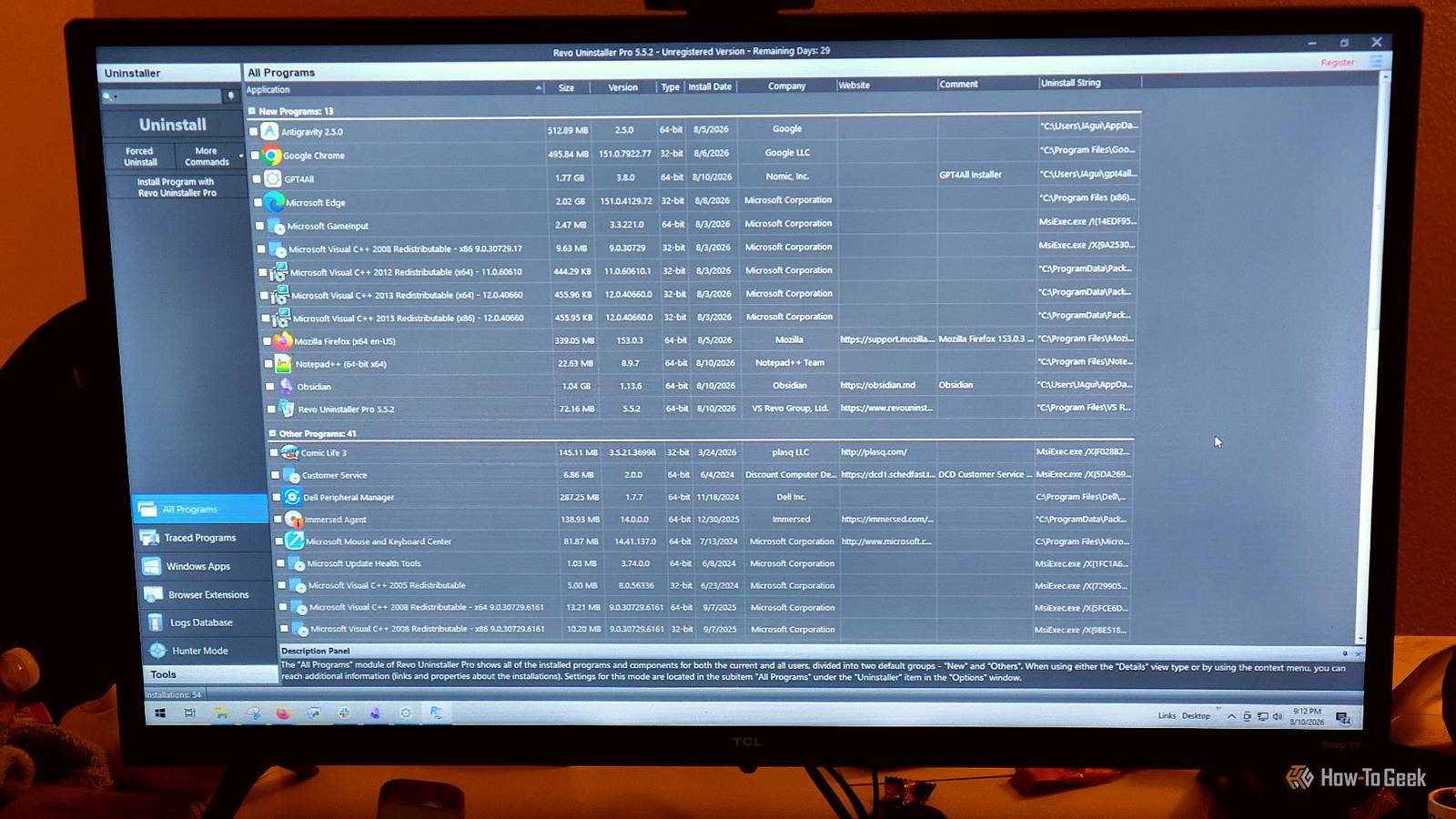
Once Windows runs out of its reserved space for expanding that table, it starts cramming new entries wherever it can find room across the disk, which slows down every file lookup.Third-party uninstallers can clean up the mess How these tools find what got left behind Close When Windows fails to fully uninstall a program, third-party tools like Revo Uninstaller and IObit Uninstaller pick up the slack.Dedicated uninstallers are built specifically to go find the files that get left behind and get rid of them themselves.
They do this in two main ways.Some, like IObit, work in real time by sitting quietly in the background while a program installs and records every change it makes to the system.So basically, every file it creates and every registry key it touches gets logged.
When you later uninstall, IObit already has a complete record and can undo all of it precisely.Revo is different because it scans after the fact and uses a database to know where software typically hides its leftovers.So it knows which folders and registry paths to check, and what file patterns to look for.
I have experienced bad tools that delete too much, but that's not the case here.Before doing any of this, both tools take a safety precaution that I wish was more common.They create a System Restore Point and back up the registry.
That way, if something important gets accidentally deleted, you can roll it back.Once that safety net is in place, the tool runs the program's own built-in uninstaller first to handle the standard removal, then kicks off its own deep scan to catch everything that gets left behind.In Revo, you can choose how aggressive that scan is depending on how thoroughly you want it to dig through your system folders, user profile directories, and registry hives.
For programs that don't show up in the normal uninstall list at all, Revo includes a signature feature called Hunter Mode, while IObit offers a similar tool called Easy Uninstall.It shrinks the app down to a floating crosshair that you drag and drop directly onto any open window, taskbar icon, or desktop shortcut.Once you let go, it identifies the program and gives you options to kill its background processes, open its install folder, check its registry keys, or uninstall it entirely.
It's a straightforward way to deal with stubborn software that tries to hide.Once the scan finishes and shows you what's left over, you can wipe everything in one click.Deleting these files comes with some risks Modern apps are much safer than older ones Storage is cheap now, so a stray gigabyte or orphaned registry entry after a dozen downloads isn't worth the risk of something going wrong.
Since Windows doesn't keep a live, centralized record of which program owns which registry entry, a heuristic scanner is essentially making its best guess.Get it wrong, and it might delete a shared DLL or wipe out its reference count, causing other programs that depend on it to crash without warning.In worse cases, these tools run with administrator privileges and can reach deep into the system, deleting critical entries inside the Component Based Servicing or COMPONENTS hives, or touching files that Windows Resource Protection is specifically designed to guard.
That kind of damage can permanently break Windows Update, leaving the machine failing updates over and over with no fix short of a full reinstall.Still, third-party uninstallers usually don't use a blunt, scan-and-delete approach anymore.Instead of guessing what belongs to an uninstalled app, better tools cross-reference specific identifiers against known product metadata like developer names, so they're only targeting things they can confirm are tied to that specific application.
You can pick your favorite, but I prefer Revo Uninstaller because I don't really need it around when I install, and I feel it is better for privacy.Third-party uninstallers can be safer There's a real argument against third-party uninstallers because a scanner making educated guesses about leftover files can occasionally delete something it shouldn't.However, tools like Revo aren't operating blindly the way older cleaners did, and the restore point they create before touching anything gives you a way back if something goes wrong.
If you've been uninstalling programs for years and never thought about what stays behind, it's probably worth at least one look at what's sitting on your drive.Revo Uninstaller Developer Revo Uninstaller A Third Party Uninstaller that gets rid of all the remnants regular installers miss.$25 at Google Expand Collapse
Read More