I've had my Kindle 4 for more than a decade, and for most of that time I used the stock Kindle software.When Amazon announced it was dropping support for this model, I decided to jailbreak it.I wish I'd done it sooner, as the Kindle has become far more useful; I've found several ways that I can use it with Home Assistant, and you can find old Kindles on secondhand marketplaces for as little as $25.
An E-Ink smart home dashboard The Kindle is a stylish way to display information One of the first things I tried once I'd jailbroken my Kindle was setting it up as a Home Assistant dashboard.I'm not a fan of wall-mounted dashboards that are crammed full of controls and charts; I just don't see the point in them.You can only use a wall-mounted dashboard when you're standing right in front of it, which doesn't feel very convenient to me.
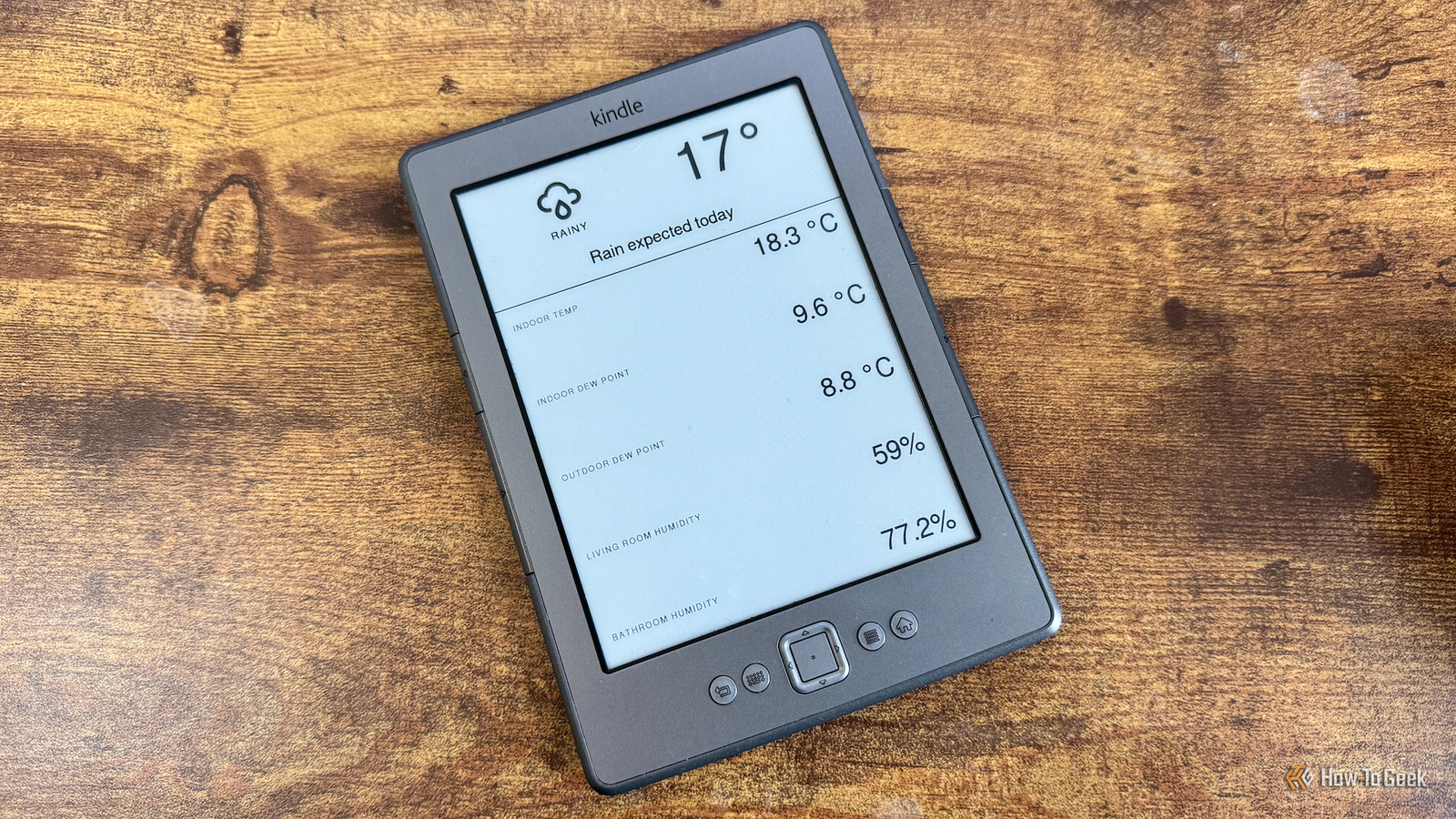
I did, however, like the idea of a simple E-Ink dashboard that could display information rather than being a control center.There's a clever tool called Home Assistant Lovelace Kindle Screensaver which takes regular screenshots of your Home Assistant dashboard and saves them as grayscale PNG files that the Kindle can display.The jailbroken Kindle can then pull these files from Home Assistant and display them on the screen.
I set up the Kindle to display a simple weather dashboard.It was clean and simple, and looked really nice on the E-Ink screen.Amazon Kindle (2024) Storage 16GB Screen Size 6-inches Even in the budget department, the Amazon Kindle is a stellar value, from its light and compact design, to its adjustable front light and 6-inch display.
$130 at Amazon Expand Collapse A replacement for some phone notifications Visual information saves my phone from getting bombarded Close I stopped using the Kindle as a dashboard after I set up a Cheap Yellow Display as a weather dashboard instead.I wondered if I could put the Kindle to use for something else.I had a brainwave.
Home Assistant sends me a lot of notifications about my smart home, to the point where I start to tune them out.I wondered if the Kindle could help reduce the number of notifications I needed to send to my phone.I set up a simple dashboard that displays a rotating list of information that would otherwise get sent to my phone, such as current electricity prices, information about low batteries, soil moisture levels for my plants, and more.
I then removed the phone notifications that had previously been sent with this information.The result is that I've slashed the number of notifications that get sent to my phone.A lot of the information now appears on the Kindle's screen instead.
Related 7 things my jailbroken Kindle can do better than an Android tablet or iPad Sometimes a Kindle is all you need.Posts 5 By Adam Davidson An awesome way to turn out the lights When I finish reading, the lights go out by themselves This might be my favorite thing that I've set up on my Kindle.I have a tiny XTEINK X3 eReader that's my daily driver.
I keep it with me wherever I go so I can read whenever I have a spare moment.At night, when I get into bed, I use my Kindle 4 as it's nice to read on the larger screen when I'm getting tired.I read every night before I go to sleep, and in the past, I would turn off the Kindle and then have to scrabble down the back of the bed to turn off the light switch or grab my phone and use Home Assistant to turn it off.
Now, life is far easier.All I have to do is exit the book I'm reading in KOReader, and the bedside lamp turns off by itself.A KOReader profile is triggered when I exit my current book, which runs a small script saved on the Kindle.
This script turns on the Kindle's Wi-Fi, waits a few seconds for it to connect, then sends a web request to Home Assistant to turn off the bedside lamp, before turning Wi-Fi back off again.It really does feel like magic.I close my current book, and the light turns off, ready for me to go to sleep.
A quick way to check who's at the door when I'm reading I can view a very slow video feed on my Kindle On weekends, I also use the Kindle 4 to read before I get out of bed.Sometimes, my morning relaxation is ruined by the doorbell ringing.I get up, put on some clothes, and go downstairs, only to find that the delivery driver has already left and there's just a parcel at the door.
I added a simple solution.I can select an option in the KUAL menu on my jailbroken Kindle, and it launches an almost-live feed from the video doorbell.The video is low-quality and only refreshes at about one frame per second, but it's good enough to see whether I need to bother getting out of bed or not.
Yet another reminder to put out the trash You can never be reminded too many times This last one is part of my ever-growing arsenal of tricks to make sure that I don't forget to put the trash out.I'm getting far better at it, but it's always good to cover all bases.On the night before the trash is due to be collected, an automation fires every 15 minutes that sends a notification to the Kindle.
When the Kindle receives it via the Notification Listener, a small text box pops up on the screen reminding me to put out the trash.It's simple but effective, as it arrives when I'm already in bed, so if I haven't yet put the trash out, I really need to.A jailbroken Kindle can do more than you think Honestly, I really wish I'd jailbroken my Kindle far sooner.
Not only is KOReader a far superior document viewer than the stock Kindle software, but it allows you to do so much.I even managed to get an AI chatbot running on a Kindle that's more than a decade old.
Read More