Reading a technical report or a dense academic paper sometimes feels like a chore.You tend to need a quiet desk and hours of uninterrupted time.I used to let important documents pile up in my downloads folder because the mental effort required to go through complex charts and over sophisticated wording felt like a battle of attrition.
Google Illuminate ended up being better than NotebookLM, and I pay for the latter monthly.Google Illuminate is the podcast system I've been waiting for Audio makes dense documents feel lighter If you've ever opened a research paper or technical document and immediately felt your brain shut down, you're not alone.I've always thought dense academic writing was exhausting to read, and I love learning.
My biggest issue has always been the jargon.It is thick, the paragraphs are long, and the formatting is not made for reading.You've got multi-column layouts, charts, and equations.
This makes it hard to find your footing even before you get to the actual content.I usually need a quiet room and a lot of willpower just to get through the first few pages.Without all of that lined up at once, the paper goes back into the downloads folder.
Instead of making you read the document, it turns it into a podcast.Two AI-generated hosts work through the material together in a back-and-forth conversation, which is very similar to NotebookLM, but they're much better at giving an overall idea instead of digging into the weeds.One of them explains a concept, the other asks a follow-up question or connects it to something more familiar, and the whole thing moves in a much more fluid way than I am used to.
I'm very used to hearing filler wording and sentences that lead nowhere.However, that didn't happen with Illuminate.I stopped trying to use NotebookLM for podcast listening, even though it has a lot of memory.
However, I am definitely going to stick to Google Illuminate.If I wanted, I could probably go through the material of a fifty-page white paper in about two hours, without feeling burned out.I even tested it on Pride and Prejudice, one of my favorite books, and never once heard something inaccurate about the story.
It isn't going to go in depth You're not going to become an expert this way There is a downside that only affects those who really want to know every little thing about their research papers.When an AI rewrites a dense research paper into a casual back-and-forth conversation, things get lost.Nuances get smoothed over, specific data points get dropped, and complex methodologies get simplified down to something that keeps the conversation moving.
I noticed that this doesn't feel technical, and that comes from not being as precise as it could be.Charts, equations, and raw data plots are big issues here, too.Unless they've been converted to text beforehand, the AI largely can't process them, so you just don't hear about them.
That's why it matters to understand what this tool is actually for.It's not a replacement for reading.It's a filter.
The point is to give you a fast, low-effort way to figure out whether a paper is worth your time before you read the whole thing or put it into NotebookLM for its other uses.This tool is about saving time at the front end of a research process, not at the end.However, if you're just trying to get an overview, then it's perfect and will cover the main points, so you'll know where to dig deeper.
I recommend using NotebookLM after Illuminate if you want to know more.It gives you mind maps, flashcards, quizzes, and study guides alongside the audio feature.That's great if you want an in-depth look over the material, but it's a lot of overhead if all you want is a quick audio summary.
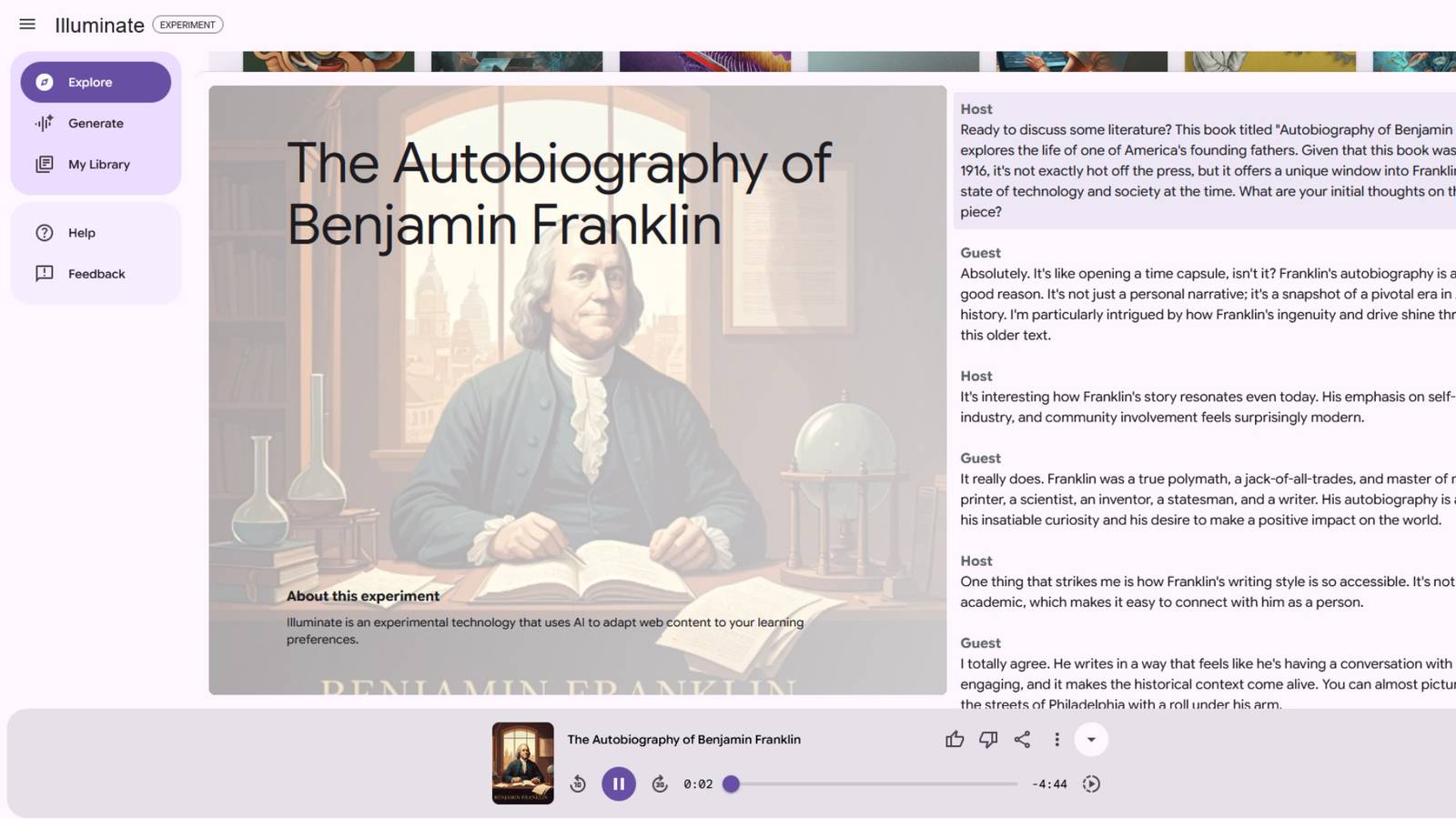
You still have to set up a notebook, upload your sources, and navigate the whole interface just to hit play.I'm going to use Illuminate much more, because it focuses on taking the URL you paste and turning it into a roughly five-minute summary.The interface looks more like a podcast app than an AI tool, with standard playback controls and an interactive transcript that lets you follow along as the hosts speak.
Click any line in the transcript, and the audio jumps to that moment.Make sure to set the podcast to your level It's a lot more in-depth than other alternatives A lot of AI audio tools feel impressive until you actually try to customize them.NotebookLM is a great example of this.
Its Audio Overview feature is useful, but you don't have much say in how the final podcast turns out.You can add a short prompt and pick from a few length options, but the structure, tone, and overall format are mostly decided for you.That's fine if the defaults happen to work for what you need, but if the hosts are speaking to the wrong audience or the tone doesn't match how you're trying to learn, your only option is to regenerate the whole thing and hope it comes out better the second time.
Google Illuminate lets you set everything before you hit generate.Instead of burying the options somewhere in a settings menu, it puts them right in front of you as you make your new podcast.Before the audio is made, you're given an editable sentence that acts as a brief for the whole discussion.
You fill in who it's for, what tone it should have, and how long it should run, all through dropdown menus.The audience setting is the most useful of these.You can choose between beginner, general, or expert, and that single choice changes how the hosts speak throughout the entire episode.
Set it to beginner, and they'll take time to explain the foundations of everything you're learning about.Set it to expert, and they'll skip the basics and get straight into the details.It sounds like a small thing, but it makes a big difference when you're actually listening.
You can also adjust the tone from casual to formal, and the duration from a short overview to a much longer deep dive.If the dropdowns still aren't specific enough, there's a Free Form option that lets you write your own prompt from scratch and describe exactly what you want covered.This mode also unlocks the ability to choose specific host and guest voices, which none of the other settings give you access to.
These are great, but not a master class These audio overviews aren't a replacement for reading the source material.The AI will gloss over minor details or have trouble with the visual data, so you may miss the technical precision you'll need for serious work.However, if you treat the tool as a skimmer or a way to screen through material, it is a good way to filter through a mountain of papers.
Google Gemini Google Gemini is a multimodal AI models and an integrated assistant developed by Google.It understands and combines text, images, audio, video, and code.As an AI assistant, it helps with writing, planning, learning, and productivity, integrated into Google Workspace apps (Docs, Gmail) and on mobile devices. Subscriptions Expand Collapse
Read More