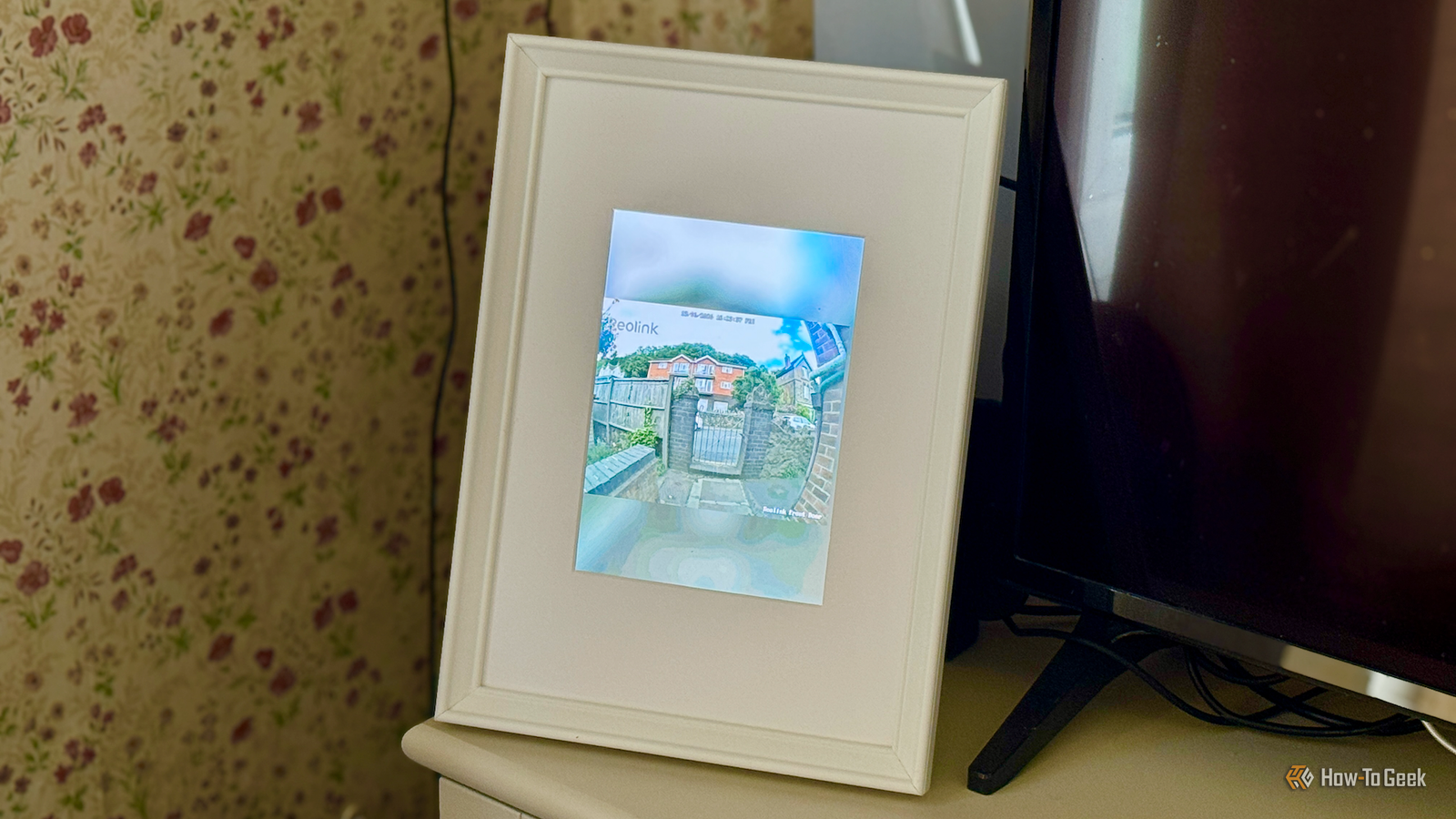
The iPad has been around for a long time, and while a lot of the hardware is now too old to be useful, some of the components can still be put to good use.I ripped apart an old iPad and turned it into an always-on display for my smart home cameras.Turning an old iPad into a display panel The screen was cracked, the display was fine I'd always struggled to find genuinely useful ways to repurpose my old iPads.
I have a few iPad 2 tablets that are so old that they barely run anything.I wasn't able to install the Home Assistant app or even open Home Assistant in Safari, and while I could use them as dashboards using VNC, there was a reasonably heavy server-side burden, and the response was always a little laggy.One of my iPads also had a cracked screen, so I couldn't really use it as a dashboard.
I decided to see if I could rip out the display, which remained undamaged, and use that in my smart home somehow.Apple iPad Air (M3) Storage 128GB CPU Apple M3 2025's iPad Air upgrade features an M3 chip, is compatible with a new keyboard folio case, and has support for Apple Intelligence.It's almost identical to the previous model in terms of look and feel.
$599 at Amazon $599 at Apple Expand Collapse A Raspberry Pi talks directly to the panel No desktop or browser needed With a bit of research, I found that it was possible to do so using a reasonably cheap display controller designed for the iPad's display panel.It was possible to remove the panel from the iPad, connect it to the display controller, and hook the controller up to a Raspberry Pi over HDMI.The process was remarkably simple; getting the display out wasn't too hard, although the cracked screen made it a bit more challenging to remove.
Hooking the panel to the controller was straightforward, and before I knew it, I had Raspberry Pi OS up on the iPad's screen.Since I was going to mount the display in a photo frame in portrait orientation, I needed to add a kernel-level rotation parameter, as by default, the display was showing in landscape.I tested a few ways to get images to appear on the display and found that writing directly to the Linux framebuffer worked perfectly and allowed me to display static images on the iPad display with the correct orientation.
Related 7 Ways to Repurpose an Old Amazon Fire Tablet Unleash the power of your dusty Fire Tablet.Posts By Joe Fedewa Streaming my video doorbell straight to the screen Using ffmpeg to display the stream Displaying static images was great, but what I really wanted was a way to display a video stream.The idea was that I could stream the live feed from my video doorbell to the iPad display.
I could then place the photo frame by the TV and be able to keep an eye on what was going on around the exterior of my home, even while I was watching TV.I use Home Assistant to control my smart home, and the live feed from my Reolink video doorbell is exposed to the smart home software.I knew that I should be able to send that video feed to the Raspberry Pi; the only challenge was figuring out how to get it to display.
As is so often the case, the answer was ffmpeg.Using the lightweight open-source multimedia software, I could pull the doorbell feed from Home Assistant and write it directly to the framebuffer of the iPad display.The problem was that the 4:3 video from the doorbell wasn't a good fit for an iPad display in portrait orientation.
Using ffmpeg, I was able to crop the image to fit the width of the display, so that the central portion of the video was visible in the frame.I can keep an eye on the front door when watching TV Automation makes the display even more useful The final result was very good.The video from the doorbell plays on the iPad display so I can see who it is if someone comes to the door, or whether the neighbor's cat is sneaking into our garden again.
The output has a small delay, but it's only a second or two, so it's not a major issue.I can now see the (almost) live feed from the video doorbell while I'm watching TV in the living room, and the display looks great in a photo frame.I soon realized that having the feed show 24/7 was a little pointless, as I didn't need to see it unless something was happening.
Using the motion detection of the doorbell, I set up an automation that only shows the live feed when motion is detected by the video doorbell.It means that I can use the display for other things the rest of the time.I now have it showing movie posters for whatever we're currently watching in Jellyfin, and it displays a reminder to take the trash out the night before collection is due.
My old and useless iPad is now a truly useful part of my smart home again.Even broken gadgets can be useful I often wondered why people were willing to pay good money for broken iPads online.Now that I know how useful even broken iPads can be, I'm going to be putting my other old iPads to similar use.
Read More