Most people who use Excel on Android tried it once, decided it wasn't worth the hassle, and went back to their laptop.That's a reasonable conclusion if you haven't used it lately, but the mobile version has gotten a lot better.The features that used to make spreadsheet work on a phone feel like a punishment have gotten fixed.
In fact, I don’t even mind using Microsoft Excel on my phone anymore.You get a real number pad on your phone Typing numbers on a phone doesn't have to be frustrating Entering data on a phone has always been a nightmare for anyone working in spreadsheets.Standard mobile keyboards are built for texting and typing, not for crunching numbers, which means every time you try to build or edit a financial model, you're constantly jumping between keyboard layouts just to find a plus sign or a forward slash.
This is one way the excel mobile app is worth trying.I hate Google Sheets' version of this.It is hard to get to the keyboard needed, and I usually can't even see most of the screen.
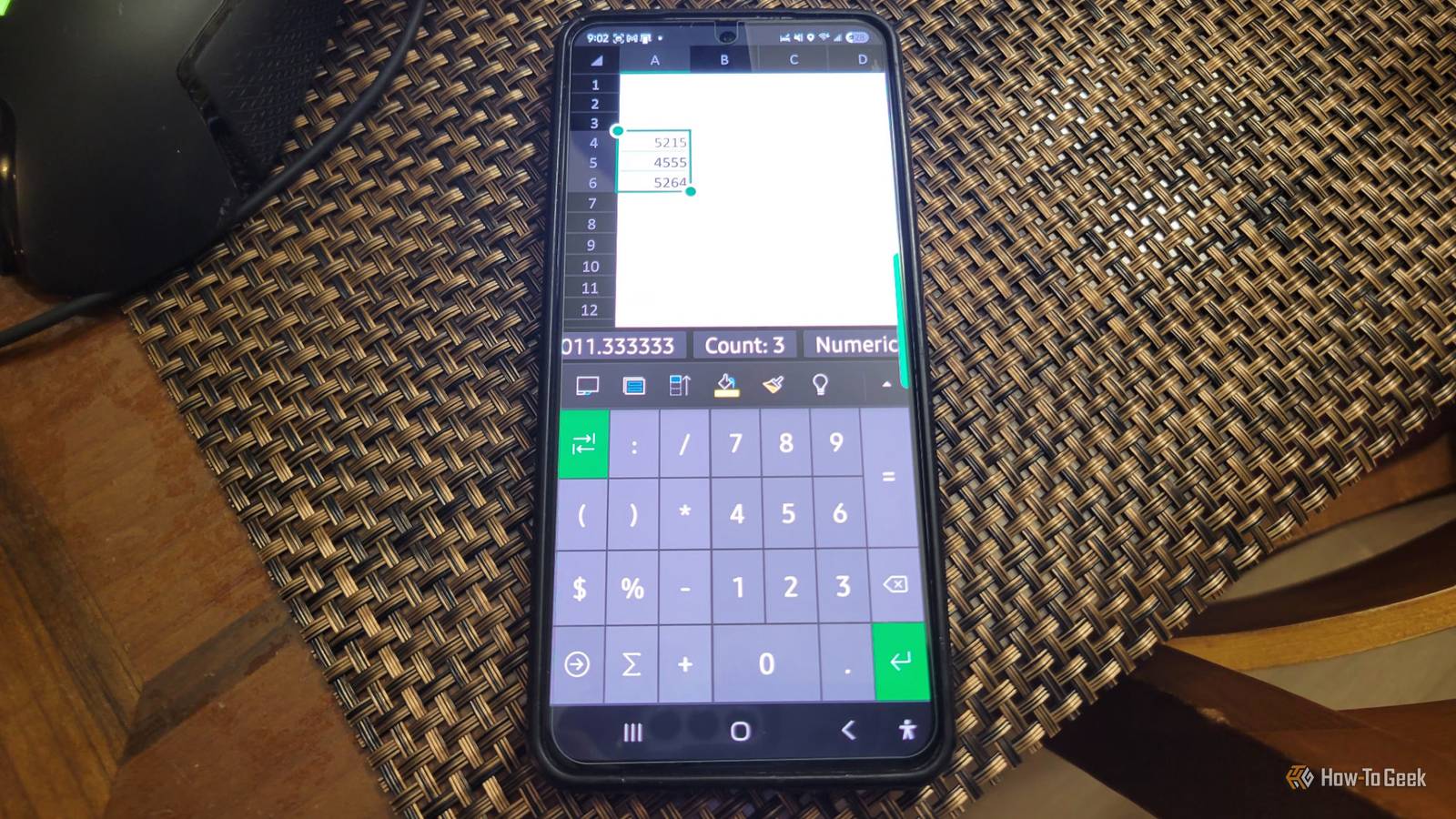
Excel for Android fixes this with a dedicated numeric keypad built right into the app.Tap the "123" toggle on the keyboard, and you get a clean, stable grid of numbers, currency symbols, and math operators all on one screen.The keys are large, the layout doesn't shift around on you, and everything connects directly to the formula interpreter in the cell you're editing.
Some would say the app version is better than the desktop one.The bigger touch targets also do a lot of work on the accuracy side.The operators feed cleanly into the formula engine, so you're not left hunting down syntax errors after the fact.
For anyone who needs to log calculations or update a model away from their desk, this is what makes a tool actually work on mobile instead of just technically running on it.It's easy to write off Excel on Android until you use that keypad, and then it's hard to go back.You get quick math summaries without typing formulas The app shows basic totals as soon as you select cells Close Excel on Android has a feature that makes working with spreadsheets on your phone far less painful than you'd expect.
The status bar's AutoCalculate feature is really cool.When you tap and drag to select a range of cells, the status bar at the bottom of the screen immediately shows you five calculations: Sum, Average, Count, Minimum, and Maximum.On a desktop that's not a big deal, but it is on a phone.
On a mobile device, typing out even a simple formula feels like a chore, so having those numbers just appear automatically is useful.Google Sheets on Android doesn't really do this; instead, you'd have to run a formula or dig through menus to get the same information.This comes in handy most when you're away from your desk and need a quick answer.
You can just tap a few cells and immediately know the total, the average, or the highest value in a list.It saves the mental effort of doing the math in your head or waiting until you're back at a computer.Your changes save fast even with bad service Background syncing keeps you from losing work Cloud sync is honestly one of those things that makes you like Excel on Android the moment you start using it.
When you open or save a workbook, Excel is reading from and writing to a local sync cache on your device, which means the app feels fast even when your connection is patchy.Any changes you make get written to that cache first, and then pushed up to OneDrive or SharePoint in the background.The protocol doing the heavy lifting here is Cobalt, and it avoids sending the entire file over the network every time you hit save.
Instead, it breaks the file into chunks and only uploads the parts that actually changed.If your connection drops mid-session, Excel just keeps saving locally and syncs everything up the moment you're back online.Google Sheets takes a pretty different approach.
It leans on a live server connection, routing edits through a central system in real time.That works fine when your internet is solid, but offline or on a flaky cellular connection it starts to show cracks.When two people edit the same cell at the same time, Sheets can silently overwrite one person's work with the other's.
On top of that, users regularly run into annoying issues like files randomly flipping to read-only or sync timeouts on enterprise networks.Excel isn't perfect either, but when conflicts do come up, it at least tells you about them.If something does get overwritten, OneDrive's version history makes it easy to roll back to any earlier point in time.
You can scan paper tables directly into a sheet Taking a photo keeps you from retyping data by handy One of the most useful things Microsoft Excel can do on mobile is let you take a picture of a printed table and pull the data straight into a spreadsheet.You don't have to manually recreate one anymore.You just point your phone's camera at a physical table, whether it's a printed annual report or something scribbled by hand in a field log, snap a photo, and the app converts it into a live, editable spreadsheet.
You get there through the Insert menu by tapping "Data from Picture," and from that point the app handles everything.Once the cloud finishes its analysis, it sends back a structured breakdown of the table.So it has what goes in each cell, where everything sits on the page, and how confident the system is about each character it reads.
Excel then maps all of that directly into your spreadsheet.But before anything gets written in, you get a preview screen that shows your original photo above the extracted data, with any uncertain characters flagged in red.Tapping a red cell zooms into that part of the photo so you can check what it actually says and fix it if needed.
Once you're satisfied, you hit Insert and the data drops straight into your sheet.It's not better than the desktop None of this makes Excel on Android a replacement for a proper desktop setup, and anyone doing serious financial modeling is still going to want a keyboard and a big screen.The app also ties you firmly to Microsoft, so if your organization runs on Google Workspace, the sync advantages don't really apply.
That said, for people who already live on OneDrive and occasionally need to do real work from their phone, the gap between mobile and desktop is smaller than it used to be.Microsoft 365 Personal OS Windows, macOS, iPhone, iPad, Android Brand Microsoft Microsoft 365 includes access to Office apps like Word, Excel, and PowerPoint on up to five devices, 1 TB of OneDrive storage, and more.Price $100/year Developer(s) Microsoft Free trial 1 month $100 at Microsoft Expand Collapse
Read More