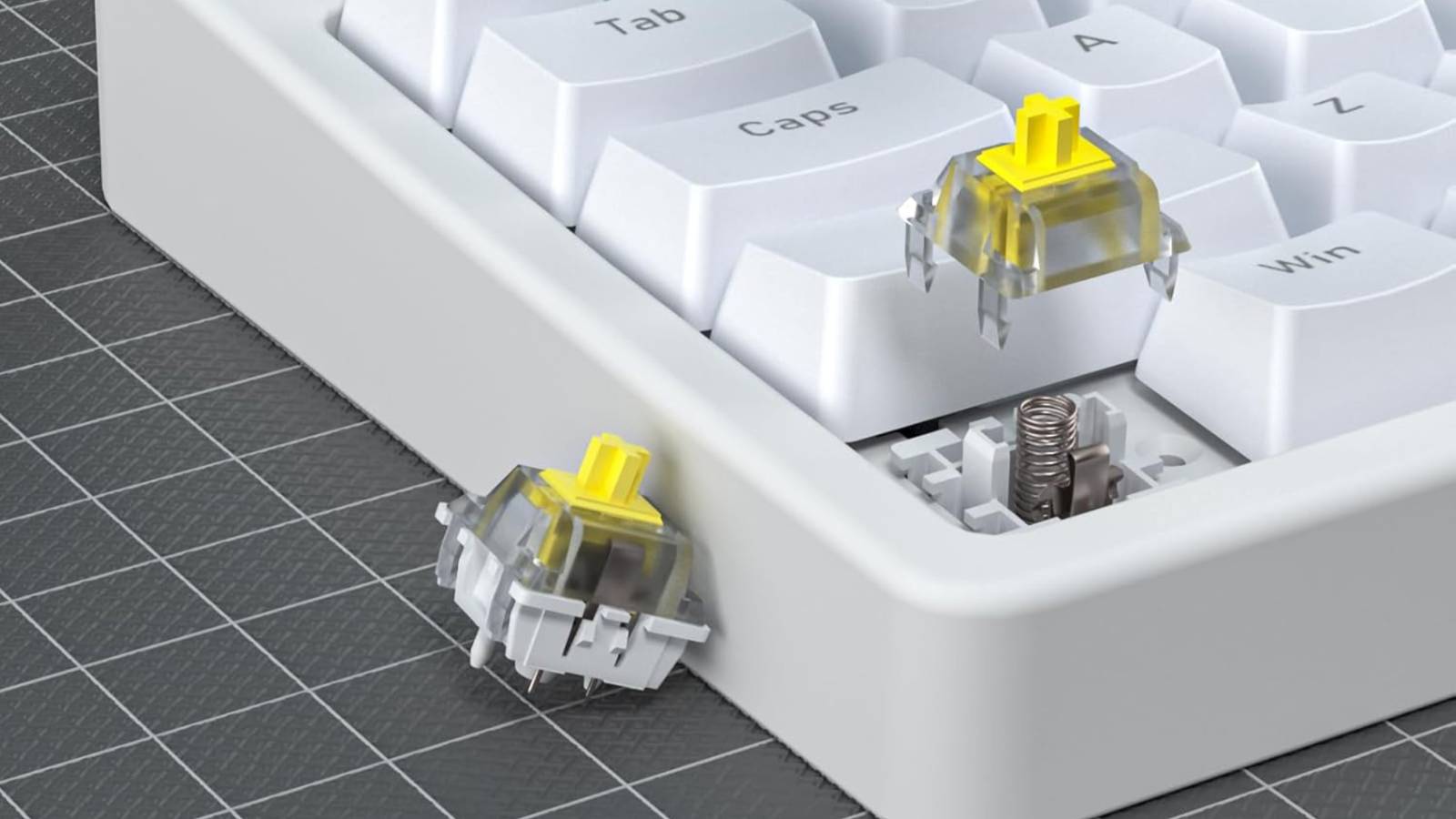
The Matter smart home dream has been slow out of the gate, but as the months roll by, more and more cross-platform smart home devices are becoming available.One you might not have had on your bingo card is a Matter keyboard that also doubles as a smart home remote.Introducing the ThirdReality MK1 Magic Keyboard ThirdReality’s $80 MK1 Magic Keyboard is an 87-key mechanical keyboard that uses linear yellow switches for a smooth and reliable typing experience.
Like many other keyboards of this type, it features RGB backlighting and swappable keycaps.Chunky and white, the MK1 very much embraces the “gamer” aesthetic with its dancing colorful LEDs in full bloom, while blending in with any functional office space in its more understated solid color modes.It works with both Windows and Mac layouts, though there’s only a “Win” button included in the box.
You could use a key puller to move keys around and reconfigure them with an app like Karabiner-Elements on a Mac, if you want.For typing and power, the keyboard connects using a wired USB connection.The USB cable at the back of the keyboard is fixed in place, and though it would be nice to have other connection options, it does at least mean minimal latency.
For smart home functions, the keyboard should connect to any Matter-capable platform, including Home Assistant, Apple Home, Google Home, Amazon Alexa, and Samsung SmartThings.It does this over Wi-Fi, so it does not require a Thread border router to work.12 buttons for smart home control Matter is a cross-platform protocol that’s been designed with ecosystem cross-compatibility in mind.
You can pair your keyboard by putting it in pairing mode (which involves either unplugging it and plugging it in or holding a key combination).Finally, scan the QR code on the back of the keyboard to add it as a Matter device to your platform of choice.Once connected, you get 12 buttons that you can use to trigger various events.
To access these, hold the Matter button that appears to the right of the spacebar, and press one of the corresponding Function keys (F1 through F12) at the top of the keyboard.The key will light up green to indicate that a smart home request was sent.Each key shows up as a Matter “Generic Switch” device, functionality that was introduced in version 1.0 of the Matter protocol.
This means it should work just fine with any platform that supports Matter, though some reviewers noted issues with platforms other than Home Assistant and Apple Home at launch.Having dedicated controls on a keyboard like this could have some real utility to the right person.If you work from home, you could use these buttons to trigger scenes, lights, fans, and other devices without breaking your concentration during the workday.
For gamers burning the midnight oil, being able to quickly dim lights or control HVAC during a session might be appealing.Since each button is a function key, you’ll have to remember what each does independently (or break out the label printer).The fact that they’re grouped in banks of four might help, since you could have lighting controls on one bank (including on-off toggles, brightness, and color controls), heating and cooling modes on another, and scenes elsewhere.
A good idea that’s not without its drawbacks Though cheap Matter remotes are finally here, with the arrival of IKEA’s Bilresa, having 12 buttons on a single device is relatively unheard of.If you crave smart home control at your desk and you don’t want to reach for your phone, open a browser, or talk to a voice assistant, then this might be the keyboard for you.Some reviewers note that the keyboard offers a slightly less refined typing experience than similarly priced mechanical keyboards.
If “thock” is what you’re after, you might be better off with something from Keychron for the money.You don’t get to choose your switches either, so typists and gamers who prefer clicky and tactile to linear and smooth will feel left out.How-To Geek Report: Subscribe and never miss what matters Unlock your tech-savvy potential and master the digital world with How-To Geek.
Subscribe By subscribing, you agree to receive newsletter and marketing emails, and accept our Terms of Use and Privacy Policy.You can unsubscribe anytime.Customization, including macros, is possible using ThirdReality’s keyboard management platform, but the lack of 2.4GHz wireless or Bluetooth connectivity will irk those who crave a clean desk setup.
Despite these drawbacks, the MK1 is a one-of-a-kind.Where else are you going to find 12 Matter switches so close to your fingertips? ThirdReality MK1 Magic Keyboard The MK1 has been certified by the Matter protocol and uses Wi-Fi to seamlessly connect with your local Matter Controller for smart home control.Works with Apple Home, Home Assistant, Google Home, Amazon Alexa, and Samsung SmartThings.
The keyboard’s F1-F12 keys are smart home controllers, allowing actions like turning on lights or activating scenes.The keyboard also includes dynamic RGB lighting, smooth and responsive Yellow switches, and a reliable wired connection.$80 at ThirdReality Expand Collapse Looking to easily control your smart home from your desk, but already have a keyboard you love? Consider something like a Stream Deck or a cheap tablet that lives on your desk, paired with Home Assistant and the right integrations.
Alternatively, stick to good old-fashioned voice commands.
Read More