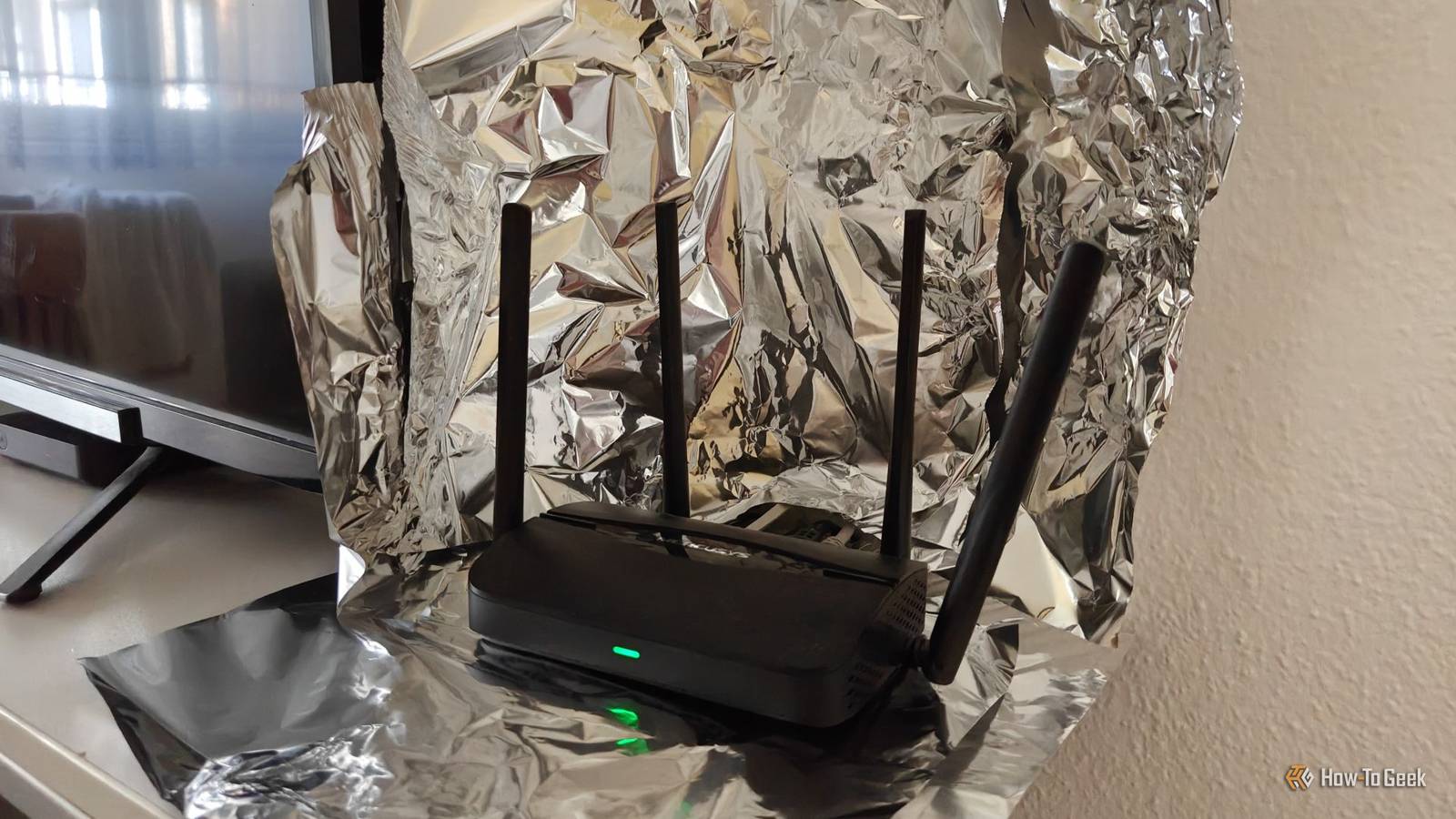
A Wi-Fi router works best when it’s placed in a high, central spot in your home.Unfortunately, reality and pre-existing cabling often dictate where it ends up, leaving it stuck in corners or behind obstacles where coverage suffers.You've probably seen those online tricks where people put aluminum foil around or behind the router in order to "shape" the signal by pushing it toward the areas that matter most.
I tested a few of these tricks myself, and the results were quite interesting.How I wanted to improve my router setup, my testing methodology, and initial control tests Setting the baseline My current home Wi-Fi setup is fairly straightforward.I have a cheap Wi-Fi 7 router set up in my kitchen because that’s where my ISP-provided modem and NAS are located, with an Ethernet cable running underneath the carpet, through the wall, and into my desktop PC.
My kitchen is on the opposite end of my living room and bedroom, and although the distance isn’t that great, thick concrete walls and furniture make it hard for the 5 GHz signal to penetrate.As a result, my phone sometimes switches to 2.4 GHz, which leads to significantly lower bandwidth and worse latency.To understand the experiments later, it helps to know how Wi-Fi antennas work.
They are omnidirectional, meaning the signal spreads out in a roughly donut-shaped pattern in all directions.In theory, placing a metallic barrier behind an antenna could reflect or block part of that signal, effectively turning it into a more directional output with stronger coverage in the opposite direction.Quiz8 Questions · Test Your KnowledgeWeird and wild DIY Wi-Fi hacksTrivia challengeAluminum foil, metal bowls, and antenna extenders — find out which router hacks are real and which are just noise.Wi-FiDIY HacksHardwareSignalsNetworkingBegin01 / 8DIY HacksWhich DIY Wi-Fi hack has been shown in studies to actually provide a measurable improvement in signal strength and direction?AWrapping the router in copper wireBPlacing a metal bowl upside down over the routerCUsing an aluminum foil reflector behind the router's antennaDTaping a USB fan to the router to keep it coolCorrect! Researchers at Dartmouth College found that a curved aluminum foil reflector placed behind a router's antenna could meaningfully shape and boost signal in a desired direction.
The foil acts like a parabolic dish, bouncing radio waves forward instead of letting them scatter.Not quite.The aluminum foil reflector is the hack with real science behind it.A Dartmouth College study showed that shaping foil into a curved reflector behind the antenna can redirect Wi-Fi signals toward the areas of your home that need coverage most.Continue02 / 8SignalsWhat does a parabolic reflector made from aluminum foil actually do to a Wi-Fi router's signal?AIt amplifies the total power output of the signalBIt redirects and focuses the signal in a specific directionCIt filters out interference from neighboring networksDIt converts the 2.4 GHz band into a stronger 5 GHz signalCorrect! A parabolic reflector doesn't create new signal power — it redirects existing signal.
By bouncing radio waves in one direction, you can concentrate coverage toward a specific room or area, which can feel like a boost even though the router's wattage hasn't changed.Not quite.Aluminum foil can't amplify power or change frequency bands.What it does is redirect signal — focusing it toward one area rather than broadcasting equally in all directions.
It's a passive shaping trick, not an active amplifier.Continue03 / 8DIY HacksWhat typically happens when you place a large metal bowl over or directly around a Wi-Fi router?AThe bowl acts as an antenna and doubles the signal rangeBThe metal reflects heat away, improving router performanceCThe signal is blocked or degraded because metal interferes with radio wavesDThe bowl channels the signal upward for better whole-home coverageCorrect! Metal is a notorious enemy of Wi-Fi signals.Placing a metal bowl around or over your router will reflect and absorb radio waves rather than help them travel, resulting in weaker coverage.This is one of those hacks that sounds clever but actually makes things worse.Not quite.
Metal blocks and reflects radio waves rather than helping them propagate.Surrounding your router with a metal bowl essentially traps the signal, degrading performance significantly.It's a popular myth that metal containers can boost Wi-Fi.Continue04 / 8HardwareAftermarket antenna extenders for routers claim to boost Wi-Fi range.
What is the most common reason they fail to deliver significant improvements?AThey are only compatible with 5 GHz networksBLow-quality extenders often have poor internal construction that negates any gainCAntennas are not responsible for Wi-Fi range at allDThey require a firmware update to activate the range boostCorrect! Many cheap antenna extenders sold online look impressive with their long form factors, but their internal components are poorly built.A good antenna requires proper tuning and quality materials — without those, a bigger plastic stick just adds aesthetic bulk without real signal gain.Not quite.The biggest issue with budget antenna extenders is build quality.
Antenna performance depends on precise engineering and materials, and many low-cost aftermarket options simply don't meet those standards, making them ineffective despite their intimidating appearance.Continue05 / 8NetworkingWhy do walls and floors in a home degrade Wi-Fi signal strength?AThey generate static electricity that disrupts the signalBThey reflect all Wi-Fi signals back toward the routerCMaterials like concrete, brick, and metal absorb or scatter radio wavesDWi-Fi signals require line-of-sight to travel and cannot pass through solid objects at allCorrect! Wi-Fi signals are radio waves, and dense materials like concrete, brick, and anything containing metal absorb and scatter those waves as they pass through.Each wall a signal travels through reduces its strength, which is why router placement in your home matters so much.Not quite.Wi-Fi signals can pass through walls, but materials like concrete, brick, and metal absorb and scatter the radio waves in the process, reducing signal strength.
The denser the material, the more signal is lost — which is why a router tucked in a corner behind thick walls gives poor whole-home coverage.Continue06 / 8Wi-FiWhich router placement tip is backed by science and consistently improves whole-home Wi-Fi coverage?APlace the router as low as possible, near the floor, to keep signals stableBPlace the router centrally and at an elevated position in the homeCPosition the router near a window so signals can bounce off outdoor surfacesDKeep the router close to the modem regardless of where that is in the homeCorrect! Wi-Fi signals radiate outward and slightly downward from a router, so placing it in a central, elevated location gives the best chance of reaching all areas of your home equally.A router hidden in a closet at floor level is one of the most common self-inflicted Wi-Fi problems.Not quite.Central, elevated placement is the gold standard for router positioning.
Since Wi-Fi signals spread outward and downward from the source, a high, central location maximizes even coverage throughout a home.Floors, corners, and enclosed spaces all work against signal distribution.Continue07 / 8SignalsThe 2.4 GHz Wi-Fi band versus the 5 GHz band — which statement about their range and penetration is correct?A5 GHz travels farther and penetrates walls better than 2.4 GHzB2.4 GHz travels farther and penetrates walls better, but offers slower speedsCBoth bands travel the same distance but differ only in speedD2.4 GHz is faster but has worse range than 5 GHzCorrect! The 2.4 GHz band uses longer radio waves, which are better at traveling long distances and passing through obstacles like walls.The trade-off is that it offers lower maximum speeds and is more crowded with interference from other devices.
The 5 GHz band is faster but shorter-ranged.Not quite.The 2.4 GHz band has the advantage when it comes to range and wall penetration because its longer wavelengths travel farther and scatter less through obstacles.However, it tops out at lower speeds compared to 5 GHz, and its frequency is shared with many other household devices.Continue08 / 8DIY HacksA popular DIY hack involves cutting open an empty aluminum beer or soda can and shaping it around a router antenna.
What is the intended effect of this modification?AThe aluminum in the can boosts the antenna's electrical conductivityBThe shaped can acts as a directional reflector to focus signal in one directionCThe can shields the antenna from interference caused by nearby electronicsDThe hollow interior of the can resonates at Wi-Fi frequencies to amplify the signalCorrect! The soda can hack is a DIY version of a directional antenna reflector.By cutting and shaping the can around the antenna, the metal curves act like a parabolic dish, reflecting signal energy in one preferred direction.It's in the same family as the foil reflector trick and can have a modest real-world effect.Not quite.
The soda can hack works on the same principle as an aluminum foil reflector — the curved metal surface redirects radio waves in a focused direction rather than letting them spread evenly in all directions.It doesn't amplify or filter the signal electrically; it just reshapes where the signal goes.See My ScoreChallenge CompleteYour Score/ 8Thanks for playing!Try Again With that in mind, it was time to test a few common DIY hacks, which involved a lot of aluminum foil and a stainless steel bowl (more on that in a second).I tried to keep my testing methodology as scientific as possible.
I kept my router and smartphone placement exactly the same throughout each test.I tested the signal at my bedroom desk, where I usually use my phone, as well as the living room corner that’s furthest away from the router.I even kept my body in the same position relative to the phone to ensure the signal had to pass through me before reaching it, just to make the test a bit more demanding.
To measure the results, I used the WiFiman app on my OnePlus 15, which can take full advantage of my Wi-Fi 7 router’s bandwidth.TP-Link Dual-Band BE3600 Wi-Fi 7 Archer BE230 Brand TP-Link Wi-Fi Bands 2.4GHz, 5GHz The TP-Link BE3600 gives you next-gen Wi-Fi 7 performance at a budget price, delivering fast, reliable coverage with multi-gig ports and a powerful quad-core CPU.With strong antennas, EasyMesh support, and modern features like MLO and HomeShield, it’s an easy future-proof upgrade for any home.
$120 at Amazon Expand Collapse Here are the initial control test results I got in my bedroom: Close And here are the control results in the living room: Close Extending the antennas with aluminum foil is a horrible idea A "hack" that makes everything worse The first trick involved placing aluminum foil around my router’s antennas.The idea behind this was that increasing the size or effective surface area of the antennas might amplify the signal.However, the results were the exact opposite.
Instead of boosting anything, the aluminum foil effectively blocked a large portion of the signal to the point where I couldn’t even maintain a 5GHz connection once I left the kitchen.The end result was a weak, choppy connection with severely limited bandwidth on the 2.4GHz band.Close Here are the test results I got in my bedroom: Close And these are the results in the living room: Close As you can see, this trick doesn't really work at all.
It's significantly worse than doing nothing to your router, so it's safe to say to skip this one.Adding a bowl behind the router improved the signal, but it's large and inconvenient Small gains from a common kitchen item In theory, placing a thick metal bowl behind the router should help direct the signal toward the rooms where I need it most.The stainless steel could help shield against interference from nearby devices (in this case, the TV) by blocking signals from leaking backward, while the curved shape might reflect and redirect the signal toward the open side.
The signal would get significantly worse on the other side of the bowl, but that's not what I was testing for today.Here are the results I got with my Ikea steel bowl in the bedroom: Close And these are the results in the living room: Close My initial instinct was to dismiss the results as a margin of error, especially when I noticed that the physical connection to the router got downgraded in the bedroom.However, after running multiple tests, I realized that I consistently got closer to the 200Mbps peak speed that my ISP provides when using the bowl, and both latency and jitter improved noticeably, especially in the bedroom (likely due to the specific physics of how the waves were reflected toward the room).
The only downside of using a bowl is that it’s a bit clunky to set up.And you also lose a perfectly good bowl for popcorn.A simple piece of aluminum foil did more than I could've expected Surprisingly good results Stainless steel bowls are on the pricier side, and if that’s a concern, I’m happy to report that a simple sheet of aluminum foil can do a similar job of directing your Wi-Fi signal while also taking up far less space.
I honestly didn’t have very high hopes for this, given that it was nothing more than a single sheet of foil placed behind the router, but the results surprised me.These are the results in the bedroom: Close And here are the results in the living room: Close Once again, the signal strength didn’t change drastically compared to the control tests (they’re within the margin of error).However, download speed, latency, and jitter improved noticeably in the living room, with a mild improvement in latency and jitter in the bedroom and no difference in speed.
This is likely a direct result of the aluminum foil setup and router being pointed slightly more toward the corner of the living room than the bedroom.Subscribe to the newsletter for tested Wi‑Fi fixes Join the newsletter to access hands-on Wi‑Fi experiments, test-backed tips, and practical DIY fixes you can try at home.Learn which foil setups, bowls, or partial Faraday cages actually help and when proper networking gear is worth it.
Get Updates By subscribing, you agree to receive newsletter and marketing emails, and accept our Terms of Use and Privacy Policy.You can unsubscribe anytime.In any case, this small piece of aluminum foil provided solid results that could offer a minor advantage in things like online games and video calls, thanks to the lower latency and jitter.
Related Stop pointing your router antennas straight up—the secret to positioning them for perfect Wi-Fi coverage You might not like it, but this is what peak performance looks like.Posts 29 By Timothy Jacob Hudson A partial Faraday cage is the best way to boost your signal The ultimate winner If a single piece of aluminum foil could make such a noticeable improvement, you can only imagine what adding multiple layers and placing them around the router could do.In fact, this setup closely resembles a partial Faraday cage, which is an enclosure designed to partially block electromagnetic fields from entering or leaving.
The router is somewhat shielded from interference, while the open side may help more of the signal be directed outward instead of leaking in all directions.This is often described online as a DIY way to improve Wi-Fi coverage, although results vary quite a bit in practice.Without further ado, here are the test results in the bedroom: Close And here’s what I got in the living room: Close As you can see, this setup delivered the best results by far, particularly in the living room.
It was the first time I saw a physical link speed of 1441 Mbps, with signal strength below -60 dBm.It also produced the best download speeds of all the tests, along with small improvements in latency and jitter.A wired extender is still the best solution for improving coverage Real networking gear always beats the DIY approach If you want a quick and dirty way to boost your Wi-Fi signal in a specific direction for free, adding a few pieces of aluminum foil around the router while keeping one side open is an easy way to try it.
Depending on your router and home layout, you might see a noticeable improvement.That being said, these DIY solutions aren’t perfect.You’re essentially blocking part of the signal on the opposite side of the foil.
If you want a real, significant improvement in Wi-Fi coverage without sacrificing performance on the main router, extending your network with a second access point and a wired backhaul is still the best option.Related Don't trash your old router: Turn it into a wired workhorse instead Wi-Fi standards moved on, but your old router can still do something useful Posts By Monica J.White
Read More